Solved windows7 home premium

jimjo16

Banned
Local time
8:34 PM
Messages
24
hi im new too this forum last week i installed windows 7 home premium 32 bit on my desktop pc it keeps asking me too install updates please restart pc ive got it set too install updates automatically is this normally what happen with new OS thank you
 

My Computer

OS
windows xp professional
Yes, it is.

Some updates can only be configured by restarting your computer and it's best to do so when prompted.

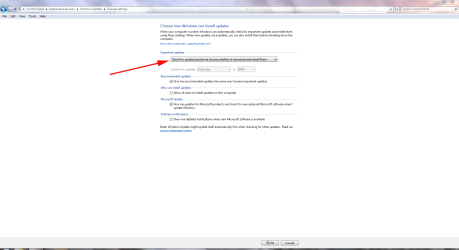
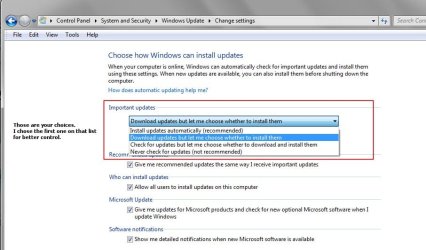
If you find it bothersome you can disable automatic updating and choose when and how you download them

WUP.PNG
 

My Computer

Computer Manufacturer/Model Number
HP Pavilion Elite 495UK
OS
Windows 7 Ultimate SP1 64-Bit
CPU
Intel Core i7 870 @ 2.93GHz
Motherboard
MSI 2A9C (CPU1)
Memory
8Gb Dual-Channel DDR3 @ 664MHz
Graphics Card(s)
nVidia GeForce GTX 460 1024MB dedicated RAM
Sound Card
Realtek HD Audio
Monitor(s) Displays
HP2310i
Screen Resolution
1920 x 1080
Hard Drives
1x1954GB Hitachi HDS22020ALA 330 (RAID), 1x1954GB Hitachi External for backup and storage
PSU
460W
Case
HP Elite
Cooling
Air cooled
Keyboard
Logitech K750 solar-powered keyboard
Mouse
Logitech Wireless M180 mouse
Internet Speed
2Mb
Other Info
Pure Avanti Flow Internet Radio with iPod Dock, 64Gb iPod, HP USB Speakers, Sony MDR-V500 Headphones, Sony Vaio F-Series Laptop
hi im new too this forum last week i installed windows 7 home premium 32 bit on my desktop pc it keeps asking me too install updates please restart pc ive got it set too install updates automatically is this normally what happen with new OS thank you

It was asking you to update and it was asking you to restart.
Did you do either of the above ?
If yes ......
were there any updates needed to be installed ?
what happened after you had restarted ? Was the screen telling you it was configuring ?

Have you double checked if the computer is set to do auto update ?
P.S. It is better to set it to do manual update.... better control.

If you don't mind, kindly reply with punctuation marks. I have trouble reading your way.
 

My Computer

Computer Manufacturer/Model Number
Acer Aspire 7741Z
OS
Windows 7 Home Premium 64-bit, SP1
CPU
Intel Pentium P6200, Cores 2, 2.13 GHz
Memory
4 GB
Graphics Card(s)
Intel HD
Sound Card
unknown
Monitor(s) Displays
17.3 inches
Screen Resolution
1600 x 900
Hard Drives
640 GB, 5400 PRM
hi thanks for reply when restarted pc. yes the screen tells me its configuring.yes i installed the updates when it asked me too.i have a green tick with the words saying install updates automatically[recommended].the other 3 boxes below that are check marked is this correct settings
 

My Computer

OS
windows xp professional
hi thanks for reply when restarted pc. yes the screen tells me its configuring.yes i installed the updates when it asked me too.i have a green tick with the words saying install updates automatically[recommended].the other 3 boxes below that are check marked is this correct settings

If you want " automatic udating " option, yes it is correct.

The only topic we brought up is the choice of ...
auto updating as you are doing, or
manual updating for better control of what you want to install, without letting the update center jam them down our throat ( figure of speech ).

The choice ( auto or manual updating ) is entirely up to you.

Other than that, you have done everything right. I don't see anything you should be concerned of.

Image 28.jpg
 

My Computer

Computer Manufacturer/Model Number
Acer Aspire 7741Z
OS
Windows 7 Home Premium 64-bit, SP1
CPU
Intel Pentium P6200, Cores 2, 2.13 GHz
Memory
4 GB
Graphics Card(s)
Intel HD
Sound Card
unknown
Monitor(s) Displays
17.3 inches
Screen Resolution
1600 x 900
Hard Drives
640 GB, 5400 PRM
Pardon me, I forgot to answer this question of yours .....

Re : asking you to restart the computer

Only a few updates will require you to restart in order to complete the installation, hence the configuring screen you saw.
Majority of the updates will not need to do that.
 

My Computer

Computer Manufacturer/Model Number
Acer Aspire 7741Z
OS
Windows 7 Home Premium 64-bit, SP1
CPU
Intel Pentium P6200, Cores 2, 2.13 GHz
Memory
4 GB
Graphics Card(s)
Intel HD
Sound Card
unknown
Monitor(s) Displays
17.3 inches
Screen Resolution
1600 x 900
Hard Drives
640 GB, 5400 PRM
thank you for help much appreciated
 

My Computer

OS
windows xp professional
thank you for help much appreciated

You are welcome.

If your questions have been answered satisfactorily, please click the " Mark this thread as solved " button.
 

My Computer

Computer Manufacturer/Model Number
Acer Aspire 7741Z
OS
Windows 7 Home Premium 64-bit, SP1
CPU
Intel Pentium P6200, Cores 2, 2.13 GHz
Memory
4 GB
Graphics Card(s)
Intel HD
Sound Card
unknown
Monitor(s) Displays
17.3 inches
Screen Resolution
1600 x 900
Hard Drives
640 GB, 5400 PRM
Back
Top