Windows7 Minimalist RAM question.

Local time
1:21 PM
Messages
7
I don't want this to turn into an argument over used ram.

I've got specific needs based on the apps that I run that will use up all available memory(3d rendering).

I'm currently running Vista with 3gig memory.

I want to go to 7, and upgrade to 4 or 8(need to mobo research to see what mine can handle)

My concern however is how much memory can be freed up.
When I run minimally, I can run about 600mb at idle.(I started using the sidebar so I have a network monitor, + a custom theme).

I was wondering if Windows 7, run without super fetch and indexing can approach this. It's a specific question I've been searching all over for. Most reviews are of how good it's features are for normal consumers/users, and this is the first forum where I've seen atleast intelligent looking debates on the topic.

Again, please don't turn this into that debate. I'm looking for RAM usage while idle(right after the dust for startup settles). The only apps I'm running are AVG, Sidebar, Audio / Mouse drivers/adjustors + a theme now, and I'm running around 900mb used.

Thank you in advance for your input.
 

My Computer

Computer Manufacturer/Model Number
Bleh, Gateway
OS
Vista
CPU
2.2 Phenom
Motherboard
Good question
Memory
3g
Graphics Card(s)
Nvidia 512
Sound Card
Onboard
Monitor(s) Displays
1080p/i 25.5 inch Samsung TOC
Hard Drives
500g sata OS (both 7200 i believe)
120g IDE Older storagte drive
PSU
default
Case
default
Cooling
default
If you have 4 or 8 GB of RAM there's really nothing to be concerned about. Windows 7 will run fine in even 2GB of RAM.

Keep in mind that Windows will cache stuff but free up RAM when needed. Check the resource monitor, Memory tab, and you will see what I mean. The cached memory (or standby) can be free'd at any time.
 

My Computer

Computer Manufacturer/Model Number
Too many to list.
OS
XP, Seven, 2008R2
CPU
AMD, Intel, VIA
Motherboard
Various
Memory
Corsair, Kingston, etc.
Graphics Card(s)
ATI, NVIDIA
Monitor(s) Displays
Samsung
Hard Drives
Maxtor, Western Digital
Keyboard
qwerty
Internet Speed
22 Mb/s @ home, 1 Gb/s @ server
Other Info
All of my systems still run fastest on XP 32-bit for the most part. Win7 is fun to play with, but I still prefer XP for raw speed, security, and functionality.
I know windows 7 runs fine.

Thanks for the assurance. I am, however looking for peak performance of the actual apps that I will be running, and the only way for that to happen is to have as much RAM waiting for them as possible.

I'm not going to debate it. To me, an OS is something on which to run programs. The programs are what is important, and the resources they use(In my case, 100% of available resources, all 4 cores and all of the memory). If those resources are not available, then the program performance suffers.

Your needs may be different, that's fine, but "it works" really doesn't answer my question, nor does it apply to my needs.

I'm using Vista right now, and it has some bugs, but bugs I'll have to deal with if 7 cannot do what I hope it can.
 

My Computer

Computer Manufacturer/Model Number
Bleh, Gateway
OS
Vista
CPU
2.2 Phenom
Motherboard
Good question
Memory
3g
Graphics Card(s)
Nvidia 512
Sound Card
Onboard
Monitor(s) Displays
1080p/i 25.5 inch Samsung TOC
Hard Drives
500g sata OS (both 7200 i believe)
120g IDE Older storagte drive
PSU
default
Case
default
Cooling
default
What is there about my answer to debate? I am only speaking facts.

if 7 cannot do what I hope it can.

And what might that be?

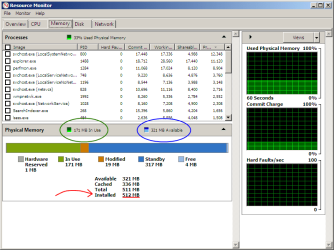
Right now I have Win7 running in a VM with 512MB of RAM. And I haven't even done anything to tweak it besides changing theme and disabling Defender, it's a clean install.
 

Attachments

  • resmon.png
    resmon.png
    18.7 KB · Views: 179

My Computer

Computer Manufacturer/Model Number
Too many to list.
OS
XP, Seven, 2008R2
CPU
AMD, Intel, VIA
Motherboard
Various
Memory
Corsair, Kingston, etc.
Graphics Card(s)
ATI, NVIDIA
Monitor(s) Displays
Samsung
Hard Drives
Maxtor, Western Digital
Keyboard
qwerty
Internet Speed
22 Mb/s @ home, 1 Gb/s @ server
Other Info
All of my systems still run fastest on XP 32-bit for the most part. Win7 is fun to play with, but I still prefer XP for raw speed, security, and functionality.
What is there about my answer to debate? I am only speaking facts.

if 7 cannot do what I hope it can.

And what might that be?

Right now I have Win7 running in a VM with 512MB of RAM. And I haven't even done anything to tweak it besides changing theme and disabling Defender, it's a clean install.

Youre previous post was not an answer. The bolded part approaches what I asked for.

Thank you.

It is, however, a VM(I'm assuming that's virtual machine). Is that what a default(since you said it was a fresh install) load up will do also?
(IE, one logon, one destop, etc). I haven't played with the multiple desktop idea since I was on linux years ago, and have no idea how it functions within Windows 7(and won't be using it, atleast not while rendering)

If so, that's exactly what I was looking for.

Bah, edited and clicked the wrong button.
Edit:
It looks like 1/3. From what I've seen however, it looks like a certain % of your total will be used no matter what.

So in my case, it would use 1g of my 3, with the same settings.

What I'm hoping, now that I've seen it at those numbers, if I could scale back the usage and free up more than the 2/3 that's open.

Meaning, if you can run at 171, I can too, regardless of my total ram.
 

My Computer

Computer Manufacturer/Model Number
Bleh, Gateway
OS
Vista
CPU
2.2 Phenom
Motherboard
Good question
Memory
3g
Graphics Card(s)
Nvidia 512
Sound Card
Onboard
Monitor(s) Displays
1080p/i 25.5 inch Samsung TOC
Hard Drives
500g sata OS (both 7200 i believe)
120g IDE Older storagte drive
PSU
default
Case
default
Cooling
default
Youre previous post was not an answer. The bolded part approaches what I asked for.

Actually all my second post was is to illustrate what I said in my first post.

Thank you.

Glad to help :)

It is, however, a VM(I'm assuming that's virtual machine). Is that what a default(since you said it was a fresh install) load up will do also?

It depends on how much RAM you have. Refer to my first post.
 

My Computer

Computer Manufacturer/Model Number
Too many to list.
OS
XP, Seven, 2008R2
CPU
AMD, Intel, VIA
Motherboard
Various
Memory
Corsair, Kingston, etc.
Graphics Card(s)
ATI, NVIDIA
Monitor(s) Displays
Samsung
Hard Drives
Maxtor, Western Digital
Keyboard
qwerty
Internet Speed
22 Mb/s @ home, 1 Gb/s @ server
Other Info
All of my systems still run fastest on XP 32-bit for the most part. Win7 is fun to play with, but I still prefer XP for raw speed, security, and functionality.
I know windows 7 runs fine.

Thanks for the assurance. I am, however looking for peak performance of the actual apps that I will be running, and the only way for that to happen is to have as much RAM waiting for them as possible.

I'm not going to debate it. To me, an OS is something on which to run programs. The programs are what is important, and the resources they use(In my case, 100% of available resources, all 4 cores and all of the memory). If those resources are not available, then the program performance suffers.

Your needs may be different, that's fine, but "it works" really doesn't answer my question, nor does it apply to my needs.

I'm using Vista right now, and it has some bugs, but bugs I'll have to deal with if 7 cannot do what I hope it can.
.
Your question is quite vague in that you don't state which programs you run and why the memory management in Vista does not run them properly. The theory is Windows dumps a lot of the ram into the cache so that it's potentially useful instead of doing nothing, and then frees it on demand as needed. In practice it has always worked for me, and by "worked" I mean I've never received an out of memory error or had the system crash when running applications. That said I don't know of a way to effectively manipulate the memory. So called "ram defraggers" have never demonstrated that they do anything useful in my experience, but that is the only type of third party app that claims to do what you want.

Why not just try Windows 7 RC1?
 

My Computer

Computer type
PC/Desktop
OS
Windows 7 x64
CPU
Intel Core2 Extreme Q6850 3.00GHz
Motherboard
EVGA 132-CK-NF79
Memory
8 GB
Graphics Card(s)
Radeon R7 260X
Sound Card
Xonar DS
Hard Drives
Hitachi Deskstar 1 tb
I'm not going to debate it. To me, an OS is something on which to run programs. The programs are what is important, and the resources they use(In my case, 100% of available resources, all 4 cores and all of the memory). If those resources are not available, then the program performance suffers.

You seem to assume that anything other than a very high "free memory" value equates to a suboptimal starting position for your important apps.

That is an incorrect assumption.

If memory pages pertaining to your apps are "cached", those apps will start and run (at the beginning) a lot faster than if they need to be moved in to memory from scratch. Hence, disabling prefetch/superfetch would have the exact opposite effect from what you intended.
 

My Computer

Computer Manufacturer/Model Number
Multiple machines in various stages of decomposition.
OS
Win7x64
Somehow I knew it'd turn into a thread in which people try to convince me that superfetch is a good thing no matter what, I'm sure it is for people that only do very light actual computing(99% of consumer).

Edit:
I don't care about program start or boot up speeds, BTW. That is all that superfetch seems to be good for. I care about my apps being as powerful as possible well AFTER they've started up.

My first post was specific, I'm sorry you couldn't understand, there are remedial english classes which may help your reading comprehension skills.

I asked how much idle RAM could be paired down to in Window's 7, compared to what I can do with Vista(well under 30%, right about 20%, when I give up all bells and whistles[That's 600mb of my 3gig]).

When I run minimally, I can run about 600mb at idle.(I started using the sidebar so I have a network monitor, + a custom theme).

I was wondering if Windows 7, run without super fetch and indexing can approach this.


My objective is to find out how much ram can be freed up in Windows 7 before I even try it. I am not posting because I want people to try to convince me that isn't a good idea, or that cows fly, or to even tell me to "try it myself". Why even haunt a forum if your best answer is, "go find out on your own"?

I asked, in an open manner, if windows 7 can run equivalent to what I can make Vista run at, as far as memory usage goes.

The why's and wherefores (actual used apps for example) are irrelevant to the question. If you can't get by that simple idea, those classes I mentioned probably won't help you.

I want to know X, so you respond with Y, Z, and tell me that I shouldn't even want X, but still don't tell me much about X.

Apparently this is the wrong place to ask a question and even hope for an answer relative to the actual qestion.
 

My Computer

Computer Manufacturer/Model Number
Bleh, Gateway
OS
Vista
CPU
2.2 Phenom
Motherboard
Good question
Memory
3g
Graphics Card(s)
Nvidia 512
Sound Card
Onboard
Monitor(s) Displays
1080p/i 25.5 inch Samsung TOC
Hard Drives
500g sata OS (both 7200 i believe)
120g IDE Older storagte drive
PSU
default
Case
default
Cooling
default
When I run minimally, I can run about 600mb at idle.(I started using the sidebar so I have a network monitor, + a custom theme).

I was wondering if Windows 7, run without super fetch and indexing can approach this.

Does anyone else have trouble understanding my screenshot that clearly shows Windows 7 way below 600MB memory usage?
 

My Computer

Computer Manufacturer/Model Number
Too many to list.
OS
XP, Seven, 2008R2
CPU
AMD, Intel, VIA
Motherboard
Various
Memory
Corsair, Kingston, etc.
Graphics Card(s)
ATI, NVIDIA
Monitor(s) Displays
Samsung
Hard Drives
Maxtor, Western Digital
Keyboard
qwerty
Internet Speed
22 Mb/s @ home, 1 Gb/s @ server
Other Info
All of my systems still run fastest on XP 32-bit for the most part. Win7 is fun to play with, but I still prefer XP for raw speed, security, and functionality.
When I run minimally, I can run about 600mb at idle.(I started using the sidebar so I have a network monitor, + a custom theme).

I was wondering if Windows 7, run without super fetch and indexing can approach this.

Does anyone else have trouble understanding my screenshot that clearly shows Windows 7 way below 600MB memory usage?

Antism: You can lead a horse to water, but that doesnt make him a duck..

Some people only see what they want to see...
 

My Computer

Computer type
PC/Desktop
Computer Manufacturer/Model Number
LENOVO K450 @3.0GHZ
OS
64-bit Windows 8.1 Pro
CPU
Core(TM) i5 CPU 4330 Haswell @ 3.20GHz
Motherboard
LENOVO
Memory
12.00 GB
Graphics Card(s)
Intel(R) HD Graphics
Sound Card
Intel HD integtrated
Monitor(s) Displays
HP 25' ISP Monitor
Screen Resolution
1900/1020
Hard Drives
(1) ST1000DM003-1CH162 (2) Generic STORAGE DEVICE USB Device (3) Generic STORAGE DEVICE USB Device
Internet Speed
100mb down/10mb up
omega,

At this point I'm just going to recommend that you try out Windows 7 for yourself. Google for the Windows 7 Enterprise Trial.

but, in the end, you are going to come to the same conclusion as we did.
 

My Computer

Computer Manufacturer/Model Number
Too many to list.
OS
XP, Seven, 2008R2
CPU
AMD, Intel, VIA
Motherboard
Various
Memory
Corsair, Kingston, etc.
Graphics Card(s)
ATI, NVIDIA
Monitor(s) Displays
Samsung
Hard Drives
Maxtor, Western Digital
Keyboard
qwerty
Internet Speed
22 Mb/s @ home, 1 Gb/s @ server
Other Info
All of my systems still run fastest on XP 32-bit for the most part. Win7 is fun to play with, but I still prefer XP for raw speed, security, and functionality.
I want to know X, so you respond with Y, Z, and tell me that I shouldn't even want X, but still don't tell me much about X.

It's because X demonstrates a lack of understanding which may become harmful to your real goals. This is what you're asking, roughly translated:

"In order to be fast, I need my car to be as light as possible. Therefore, I'm planning to save weight by ripping out the turbocharger. Please let me know what weight savings are possible along those lines."

If you want to have an "intelligent looking debate", you've come to the right place. However, you need to participate.
 

My Computer

Computer Manufacturer/Model Number
Multiple machines in various stages of decomposition.
OS
Win7x64
What I see in the screenshot is a system that uses about 30% of it's total memory.

I conceded that as fact, even noted that it's near about what I want, but still not the 20% I can achieve with Vista.

My 600mb requirement is only relative to a system with 3gig of memory, not a seperate system with 512.

You can lead a horse to water, but if it turns out there's dead animals and piles of feces in it, no one will drink from it, lease of all the horse.

You're leading me to irrelevant information, and telling me what I "should" want windows 7 to do(as a group of responders), and doing so in a snide a way as possible. Only after much of that, it does come out that :

It depends on how much RAM you have. Refer to my first post.

Where in the first post is still irrelevant to my querry.

Couldn't you have just posted that first bolded sentence right away?

No, you had to go the route where you play a geek sheek pompous asshole.
 

My Computer

Computer Manufacturer/Model Number
Bleh, Gateway
OS
Vista
CPU
2.2 Phenom
Motherboard
Good question
Memory
3g
Graphics Card(s)
Nvidia 512
Sound Card
Onboard
Monitor(s) Displays
1080p/i 25.5 inch Samsung TOC
Hard Drives
500g sata OS (both 7200 i believe)
120g IDE Older storagte drive
PSU
default
Case
default
Cooling
default
Dude, i think you want to know the idle RAM usage by Win7

So, for me its around 500-550MB on normal start (with ESET Smart Security4 + 4 Gadgets + Aero and all) And i have only 2GB of RAM

Win 7 performs much much better than Win Vista, check it out, you wont be disappointed
 

My Computer

Computer Manufacturer/Model Number
Apple - MBP 5,4
OS
Win 7 64, OSX Snow Leopard
CPU
Intel Core 2 Duo P8700
Memory
4 GB 1066 MHz DDR3
Graphics Card(s)
nVidia 9400 M
Screen Resolution
1440x900
Hard Drives
WD Caviar Black 500GB 7200RPM
What I see in the screenshot is a system that uses about 30% of it's total memory.

That's 30% of five hundred and twelve Megabytes

Do you think that a system with 4 or 8 GB of RAM is going to struggle when a system with 512 MB doesn't?

I fail to see your logic.
 

My Computer

Computer Manufacturer/Model Number
Too many to list.
OS
XP, Seven, 2008R2
CPU
AMD, Intel, VIA
Motherboard
Various
Memory
Corsair, Kingston, etc.
Graphics Card(s)
ATI, NVIDIA
Monitor(s) Displays
Samsung
Hard Drives
Maxtor, Western Digital
Keyboard
qwerty
Internet Speed
22 Mb/s @ home, 1 Gb/s @ server
Other Info
All of my systems still run fastest on XP 32-bit for the most part. Win7 is fun to play with, but I still prefer XP for raw speed, security, and functionality.
I want to know X, so you respond with Y, Z, and tell me that I shouldn't even want X, but still don't tell me much about X.

It's because X demonstrates a lack of understanding which may become harmful to your real goals. This is what you're asking, roughly translated:

"In order to be fast, I need my car to be as light as possible. Therefore, I'm planning to save weight by ripping out the turbocharger. Please let me know what weight savings are possible along those lines."

If you want to have an "intelligent looking debate", you've come to the right place. However, you need to participate.

X Is the number I achieve in Vista, which I've benched with and without Superfetch. Superfetch proves to cause degraded performance after program start up.

No where do I really infer that memory use has anything to do with speed, but rather directly typed that it involves application stability.

What you're saying is "You don't need free memory, because even Vista frees it up just fine".

In my case, it doesn't. Even if it did, if Windows 7, at bare minimum operates at a larger number than my Vista does at bare minimum, my querry is still legitimate. The more ram, the more capable my app.

We're not talking winamp or something here, we are talking 3d rendering, where it can take hours of all system resources(CPU, RAM, page file, etc) running at 100% to render a photorealistic image. A situation in which an OS trying to do anything automatically, can[and does] ruin the work or time invested in the render alone.

Vista does just that when Superfetch is on. I already summed that up.

What I see in the screenshot is a system that uses about 30% of it's total memory.

That's 30% of five hundred and twelve Megabytes

Do you think that a system with 4 or 8 GB of RAM is going to struggle when a system with 512 MB doesn't?

I fail to see your logic.

A system with 512 of ram couldn't even open some of the apps/files I use. Aside from demonstrating the 1/3 ratio, the point is completely useless.

The system isn't the problem. This "automatically freeing of memory" is. It doesn't work. Maybe it's not fast enough, I don't know, I don't care. I don't use it, period.

The point is, that the more available ram, the more stable/capable my apps become. If 7 can offer me more or an equal amount, I'll use it(if just to get rid of buggy/annoying vista). If not, I won't.

Apparently, it can't beat my 20%, it's limit is 30%, regardless of how much ram one has. You did say it was a fresh install. Does that # fall if superfetch is turned off? Anyone?

You all don't have to even believe me, but you don't have to preach to me either. A simple answer will suffice.

If 7 can't compete, I'd be better off upgrading memory and/or Vista 64, or even reverting to XP, though that could be a trial.
 

My Computer

Computer Manufacturer/Model Number
Bleh, Gateway
OS
Vista
CPU
2.2 Phenom
Motherboard
Good question
Memory
3g
Graphics Card(s)
Nvidia 512
Sound Card
Onboard
Monitor(s) Displays
1080p/i 25.5 inch Samsung TOC
Hard Drives
500g sata OS (both 7200 i believe)
120g IDE Older storagte drive
PSU
default
Case
default
Cooling
default
Apparently, it can't beat my 20%, it's limit is 30%, regardless of how much ram one has. You did say it was a fresh install.

Yes I can beat your 20% all day long. Like I said, I hadn't even tweaked anything. In fact, with 4 or 8GB of RAM it probably doesn't even need tweaking anyways. After all, it already works OK in 512 MB. Of course it isn't going to run intensive 3D modeling apps in 512MB of RAM. That was never the point.
 

My Computer

Computer Manufacturer/Model Number
Too many to list.
OS
XP, Seven, 2008R2
CPU
AMD, Intel, VIA
Motherboard
Various
Memory
Corsair, Kingston, etc.
Graphics Card(s)
ATI, NVIDIA
Monitor(s) Displays
Samsung
Hard Drives
Maxtor, Western Digital
Keyboard
qwerty
Internet Speed
22 Mb/s @ home, 1 Gb/s @ server
Other Info
All of my systems still run fastest on XP 32-bit for the most part. Win7 is fun to play with, but I still prefer XP for raw speed, security, and functionality.
Apparently, it can't beat my 20%, it's limit is 30%, regardless of how much ram one has. You did say it was a fresh install.

Yes I can beat your 20% all day long. Like I said, I hadn't even tweaked anything. In fact, with 4 or 8GB of RAM it probably doesn't even need tweaking anyways. After all, it already works OK in 512 MB. Of course it isn't going to run intensive 3D modeling apps in 512MB of RAM. That was never the point.

But it is my point. It was never about how well 7 performs, but how well(not fast, but well) my apps can peform within 7. The more ram, the more my apps can do. With 32bit limits(current OS, and some of the apps), upgrading ram can be pointless(4gig max(including RAM+Video memory, and whatever else uses those addresses[unclear on that]). That's why freeing up as much as possible is my goal.
 

My Computer

Computer Manufacturer/Model Number
Bleh, Gateway
OS
Vista
CPU
2.2 Phenom
Motherboard
Good question
Memory
3g
Graphics Card(s)
Nvidia 512
Sound Card
Onboard
Monitor(s) Displays
1080p/i 25.5 inch Samsung TOC
Hard Drives
500g sata OS (both 7200 i believe)
120g IDE Older storagte drive
PSU
default
Case
default
Cooling
default
Realize that Windows core uses a similar amount of RAM no matter how much you have. So, with 8GB of RAM you will have loads and loads of more available memory than I do with a 512MB machine.

Sure, the more RAM you have, the more it will allocate to help speed things up. But it doesn't change the fact that memory will be freed if/when it's needed by other applications.

By the way, if you have some benchmarks proving that superfetch does indeed slow your programs down, I'd be glad to take a look.

But please only use Windows 7 for the test. As I said earlier, there is a free trial available from Microsoft. Have fun.
 

My Computer

Computer Manufacturer/Model Number
Too many to list.
OS
XP, Seven, 2008R2
CPU
AMD, Intel, VIA
Motherboard
Various
Memory
Corsair, Kingston, etc.
Graphics Card(s)
ATI, NVIDIA
Monitor(s) Displays
Samsung
Hard Drives
Maxtor, Western Digital
Keyboard
qwerty
Internet Speed
22 Mb/s @ home, 1 Gb/s @ server
Other Info
All of my systems still run fastest on XP 32-bit for the most part. Win7 is fun to play with, but I still prefer XP for raw speed, security, and functionality.
Back
Top