
Windows7 UltimateX64 doesn't seem to want to use all the memory!

LoveWindows7

New member
Local time
1:26 PM
Messages
5
I haven't used a paging file for a long time, because it makes the computer super slow, but these days as I was in need of more memory, unfortunately I invented to test the paging, and the result was that I didn't like it, so I removed the paging, but now windows doesn't want to use all the memory, it's not like before.
I have 16GB(4x4)I have noticed that windows only uses +-8GB, then it gives the message "Out of memory please close programs" even with memory left!
In Msconfig->Settings, I already left Maxima memory unchecked.(As I was checking when it is unchecked the system should use the maximum)
Control Panel\All Control Panel Items\System --> Installed memory (16GB)
I don't understand it looks like this crap is bugged
Look at this strange SS, when the "Available Virtual" reaches 0 it returns the message "Out of memory please close programs"
Thanks for help
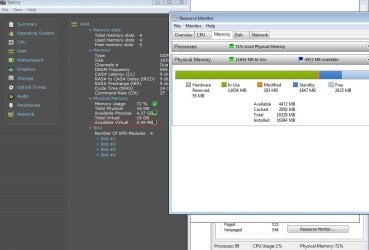
xxxxxxxxxx.jpg
 

My Computers My Computers

  • At a glance

    Windows 7 Ultimate x64Intel Core i7 3770 @ 3.40GHz16,0GB Dual-Channel DDR3 @ 665 Mhz (9-9-9-24)2047MB NVIDIA GeForce GTX 760 (Gigabyte)
    Computer type
    PC/Desktop
    OS
    Windows 7 Ultimate x64
    CPU
    Intel Core i7 3770 @ 3.40GHz
    Motherboard
    Gigabyte Technology Co. Ltd. B75M-D3H
    Memory
    16,0GB Dual-Channel DDR3 @ 665 Mhz (9-9-9-24)
    Graphics Card(s)
    2047MB NVIDIA GeForce GTX 760 (Gigabyte)
    Hard Drives
    500GB KINGSTON SA400
    Antivirus
    Kaspersky
    Browser
    Chorme
  • Computer type
    PC/Desktop
I'm not an expert. You don't say what you don't like about the paging file. Have you set virtual memory to both a minimum and maximum of 32 GB? How much free space do you have on your HD? Do you occasionally run the Disk Cleanup from System Tools making sure that Recycle Bin and Temporary Files are selected? You would reboot after running it.
 

My Computer My Computer

At a glance

Windows 7 Pro SP1 64 bit8 GB
Computer type
Laptop
Computer Manufacturer/Model Number
Dell M6500 Precision Work Station
OS
Windows 7 Pro SP1 64 bit
Memory
8 GB
Screen Resolution
1920x
Internet Speed
30 Mbps
Antivirus
Norton Security
Browser
IE 11
Paging is trash, it's written to the SSD, it's slow, and it wears out the SSD for nothing, but I'm not arguing who likes to paging and who doesn't.The screenshot above was taken with pagination turned off.Anyway, thanks for your interaction
 

My Computers My Computers

  • At a glance

    Windows 7 Ultimate x64Intel Core i7 3770 @ 3.40GHz16,0GB Dual-Channel DDR3 @ 665 Mhz (9-9-9-24)2047MB NVIDIA GeForce GTX 760 (Gigabyte)
    Computer type
    PC/Desktop
    OS
    Windows 7 Ultimate x64
    CPU
    Intel Core i7 3770 @ 3.40GHz
    Motherboard
    Gigabyte Technology Co. Ltd. B75M-D3H
    Memory
    16,0GB Dual-Channel DDR3 @ 665 Mhz (9-9-9-24)
    Graphics Card(s)
    2047MB NVIDIA GeForce GTX 760 (Gigabyte)
    Hard Drives
    500GB KINGSTON SA400
    Antivirus
    Kaspersky
    Browser
    Chorme
  • Computer type
    PC/Desktop
please post the complete ram page details

notes
the MS screenshot can be ignored.....
W7 will pick up the "inserted" total Ram but the Motherboard will only show Usable ram

according to the intel site RAM should be modulated at 1333 or 1600 ...... 665 is way to low
 

My Computer My Computer

At a glance

W7 home premium 32bit/W7HP 64bit/w10 tp insid...E5300 dual core3gbNvidia Geforce 7100 Nforce 630i
Computer type
PC/Desktop
Computer Manufacturer/Model Number
medionl/Aspire 6930G/acer x55a
OS
W7 home premium 32bit/W7HP 64bit/w10 tp insider ring
CPU
E5300 dual core
Motherboard
medion MS7366
Memory
3gb
Graphics Card(s)
Nvidia Geforce 7100 Nforce 630i
Monitor(s) Displays
avixc
Internet Speed
n (isp resticted to 72)
Antivirus
mse/pands
Browser
palemoon
Other Info
Belkin Fd7050 n USB using Railink RT2870 drivers, more upto date
Paging is trash, it's written to the SSD, it's slow, and it wears out the SSD for nothing, but I'm not arguing who likes to paging and who doesn't.The screenshot above was taken with pagination turned off.Anyway, thanks for your interaction

I'm not sure what you mean "it's written to the SSD." It should only write to the virtual memory on the SSD when all RAM is used and it helps to periodically clean it up. Temporary files seem to cause a slow down, even if a disk/SSD has lots of free space. Sorry I mistook your Kingston to be a hard drive. However, you can do the same things I suggested with a SSD. Major difference is that, after running the Disk Cleanup, you would run a Trim operation following the reboot.
 

My Computer My Computer

At a glance

Windows 7 Pro SP1 64 bit8 GB
Computer type
Laptop
Computer Manufacturer/Model Number
Dell M6500 Precision Work Station
OS
Windows 7 Pro SP1 64 bit
Memory
8 GB
Screen Resolution
1920x
Internet Speed
30 Mbps
Antivirus
Norton Security
Browser
IE 11
I'm not sure what you mean "it's written to the SSD." It should only write to the virtual memory on the SSD when all RAM is used and it helps to periodically clean it up. Temporary files seem to cause a slow down, even if a disk/SSD has lots of free space. Sorry I mistook your Kingston to be a hard drive. However, you can do the same things I suggested with a SSD. Major difference is that, after running the Disk Cleanup, you would run a Trim operation following the reboot.
Yes, I know how pagination works,pagination is bad, you shouldn't use pagination unless you really need it and you don't have memory.
My pagination is set to off.

- - - Updated - - -

please post the complete ram page details

notes
the MS screenshot can be ignored.....
W7 will pick up the "inserted" total Ram but the Motherboard will only show Usable ram

according to the intel site RAM should be modulated at 1333 or 1600 ...... 665 is way to low

It's because it's in Dual-channel 665x2

I already set maximum memory in msconfigIn the MyComputer shortcut "Memory installed 16.0 GB (usable 15.5 GB)But windows can't use more than 8GB of memory, this crap is bugged.Does anyone here use above 8GB of Ram with paging disabled? example 16GB ?
 

My Computers My Computers

  • At a glance

    Windows 7 Ultimate x64Intel Core i7 3770 @ 3.40GHz16,0GB Dual-Channel DDR3 @ 665 Mhz (9-9-9-24)2047MB NVIDIA GeForce GTX 760 (Gigabyte)
    Computer type
    PC/Desktop
    OS
    Windows 7 Ultimate x64
    CPU
    Intel Core i7 3770 @ 3.40GHz
    Motherboard
    Gigabyte Technology Co. Ltd. B75M-D3H
    Memory
    16,0GB Dual-Channel DDR3 @ 665 Mhz (9-9-9-24)
    Graphics Card(s)
    2047MB NVIDIA GeForce GTX 760 (Gigabyte)
    Hard Drives
    500GB KINGSTON SA400
    Antivirus
    Kaspersky
    Browser
    Chorme
  • Computer type
    PC/Desktop
Out of curiosity, what are you doing that uses even 8 GB? I have 4 GB on my Vista x64 system and have done lots of video encoding without a problem. I have virtual memory in use. Ditto for my Win 7 x64 Pro with 8 GB. Neither has a SSD.
 

My Computer My Computer

At a glance

Windows 7 Pro SP1 64 bit8 GB
Computer type
Laptop
Computer Manufacturer/Model Number
Dell M6500 Precision Work Station
OS
Windows 7 Pro SP1 64 bit
Memory
8 GB
Screen Resolution
1920x
Internet Speed
30 Mbps
Antivirus
Norton Security
Browser
IE 11
Back
Top