
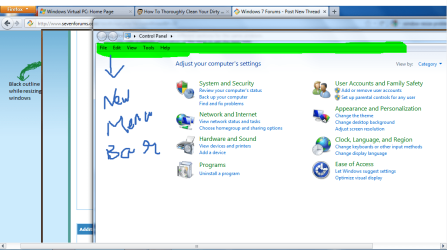
First I will Clearly Explain My problem. When we resize windows in windows 7 we will click on the title bar and hold and drag. Till Yesterday It was working like that. Now recently it is resizing like It would do in XP. that is it does not move the window of the active program itself but shows a black outline of the program window and only when i release the click it is moving the window to that place and i hate that black outline. I want the window itself to be moved. Also a new menu bar appears in every window from "control panel" to "My computer". You can see what all i said in the screenshot i have uploaded
Attachments
My Computer
- Computer Manufacturer/Model Number
- HCL
- OS
- Windows 7 Ultimate 32bit
- CPU
- Intel Quadcore E5500 @2.8 GHz
- Motherboard
- IPM41
- Memory
- 4 Gigs
- Sound Card
- Logitech 5.1
- Monitor(s) Displays
- 22" LCD
- Hard Drives
- Seagate 500 GB
- PSU
- 400 W