
Windows7x64 reports no support for hardware virtualization and no VT

Compound1080

New member
Local time
3:35 AM
Messages
8
hey guys,

Am a newbie on this forum.

I have the weirdest problem which I posted on notebookreview(dot)com: 137 views and not even a single reply.

Firstly system details:
System:> Alienware M17 R1
RAM:> 8GB
Processor:> Intel Core2 Duo Mobile T9600 @2.8 GHz
OS: Windows 7 Ultimate x64 with SP1 and all latest updates

Issue:

My Windows 7 Ultimate x64 says No hardware virtulization when it was yes previously.

I've tried using different tools and they all say no.

- havdetectiontool = no
- Securable = no
-VMware-guest64check-5.5.0-18463 = no
-Intel Processor identification Tool = no

But I remember seeing Yes for them before and VM Guestchecker also said this system is capable of VT under this VMWare product (VMWare Workstation 6.5). I had also installed 64bit OSs in a good few VMs on this system.

I then installed Windows7 x64 Ultimate only another harddisk on the same machine as it has 2 bays for HDD and guess what was the outcome when I ran the same above tools! They all gave YES!

I just can't figure out how that's possible. Now the new Win7 build is not fully patched but I am nearly certain that some Win7 updates have caused this issue but can't track down what it is and how to avoid it so that I can patch this build with all other latest patches.

Any help on this will bring me back to sanity :p

Thanks in advance
 

My Computer My Computer

At a glance

Windows7 Ultimate x64Intel Core2 Duo Mobile T96008GB512MB ATI HD Radeon 3870 Crossfire
Computer Manufacturer/Model Number
Alienware M17 R1
OS
Windows7 Ultimate x64
CPU
Intel Core2 Duo Mobile T9600
Memory
8GB
Graphics Card(s)
512MB ATI HD Radeon 3870 Crossfire
Sound Card
Realtek HD
Most likely, some BIOS settings have changed. You can check BIOS settings, especially check whether hardware virtualization (VT-x) is enabled.

You may also want to update your bios, check Dell's website for possible updates.
 

My Computer My Computer

At a glance

windows 7
OS
windows 7
Thanks... I did flash the BIOS with different versions but didn't help. My BIOS version doesn't show details about VT-x (Pheonix SecureCore).

How come the same machine but a different OS install (on a different HDD) reports that VT is enabled, and hardware virutalization is also available? That's what bugs me...
 

My Computer My Computer

At a glance

Windows7 Ultimate x64Intel Core2 Duo Mobile T96008GB512MB ATI HD Radeon 3870 Crossfire
Computer Manufacturer/Model Number
Alienware M17 R1
OS
Windows7 Ultimate x64
CPU
Intel Core2 Duo Mobile T9600
Memory
8GB
Graphics Card(s)
512MB ATI HD Radeon 3870 Crossfire
Sound Card
Realtek HD
This occured to me once with a MacBook. After install/uninstall Microsoft Virtual PC, hardware virtualization becomes disabled. Yes, it's very weird. Seems some register controls that capability, so it's possible for some software to change it programmatically.

You can try to install some virtulizer, e.g., virtualbox, to check whether VT-X is on or off. Play with 64-bit guest, if you can still run 64-bit guest, that means VT-x is actually on, because 65-bit guest only works when VT-x is enabled.

Just in case the reporting tools are somewhat buggy.
 

My Computer My Computer

At a glance

windows 7
OS
windows 7
ok thanks, atleast i'm not the only one. The sole reason for this issue started with VMWare workstation 6.5 which I'd installed on the OS that currently reports no hardware virtualization. I'd then setup a couple x64 guest OSs on this VMWare. I used to regularly use these x64 guest OSs and after a few weeks I started up my VMWare Workstation and tried to start the guest 64bit OS. I then saw the dreaded message ("This host is VT capable but VT is not enabled in the BIOS"). But my BIOS (Phoenix SecureCore) doesn't support this VT flag.

I then knew something was wrong and tried to flash my BIOS with various versions but of no use.

Then the rest of the story is what I mentioned in my initial post. Separate HDD with same OS Win7x64. I never installed VMWare on this second OS though. I should give it a try but I don't see any issues as the tools above don't compain of H/W Virtualization.
Maybe I should uninstall VMWare on my primary OS and check what the tools report.

It is very very strange though if VMWare did this. I will log a bug report with them.
 

My Computer My Computer

At a glance

Windows7 Ultimate x64Intel Core2 Duo Mobile T96008GB512MB ATI HD Radeon 3870 Crossfire
Computer Manufacturer/Model Number
Alienware M17 R1
OS
Windows7 Ultimate x64
CPU
Intel Core2 Duo Mobile T9600
Memory
8GB
Graphics Card(s)
512MB ATI HD Radeon 3870 Crossfire
Sound Card
Realtek HD
I've seen this with OSes where a hypervisor gets enabled, but those were all server OSes (once the machine is booting on top of the hypervisor, all of these come back as not available - the hypervisor is actually hiding them ;)). Since this is a Win7 client, I'm not sure how that's possible, but anything is possible I suppose. Might be interesting to see what Coreinfo says about your CPU.
 

My Computer My Computer

At a glance

Windows 10 Pro x64Intel Core i7 4790K @ 4.5GHz32GB DDR3Nvidia GeForce GTX970
Computer type
PC/Desktop
Computer Manufacturer/Model Number
Custom
OS
Windows 10 Pro x64
CPU
Intel Core i7 4790K @ 4.5GHz
Motherboard
Asus Maximus Hero VII
Memory
32GB DDR3
Graphics Card(s)
Nvidia GeForce GTX970
Sound Card
Realtek HD Audio
Screen Resolution
1920x1200
Hard Drives
1x Samsung 250GB SSD
4x WD RE 2TB (RAIDZ)
PSU
Corsair AX760i
Case
Fractal Design Define R4
Cooling
Noctua NH-D15
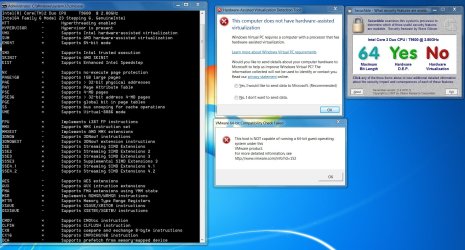
Hmm. Coreinfo seems to grab the right info!

I haven't install Hypervisor. Is the the one from VMWare? Coreinfo shows "Hypervisor is present"! What the...??
What's this Hypervisor and where did it get installed? Does it come along with VMWare Workstation?

It's good to know though about this Hypervisor causing this issue.
Check out the screenshot comparing different outputs including Coreinfo.
 

Attachments

  • ScreenHunter_01 Oct. 13 18.11.jpg
    ScreenHunter_01 Oct. 13 18.11.jpg
    243.4 KB · Views: 111

My Computer My Computer

At a glance

Windows7 Ultimate x64Intel Core2 Duo Mobile T96008GB512MB ATI HD Radeon 3870 Crossfire
Computer Manufacturer/Model Number
Alienware M17 R1
OS
Windows7 Ultimate x64
CPU
Intel Core2 Duo Mobile T9600
Memory
8GB
Graphics Card(s)
512MB ATI HD Radeon 3870 Crossfire
Sound Card
Realtek HD
Guys,

After working on this issue for several hours/days by reinstalling my OS and take a restore point at each and every MS update, I found the root cause to be my antivirus security suite: Bitdefender Total Security 2012.
Up until me installing the AV, all the aforementioned tools were reporting that HAV is available. Once I installed Bitdefender, the tools reported NO to HAV.

I then uninstalled Bitdefender and even without rebooting my system, I found that tools reported YES to HAV. I cannot imagine that such an AV solution could alter my processor's capability.
I then found this on Bitdefender's forum: BitDefender Forum > [escalated]After Installing Vt Is Not Working
who's got the EXACT issue.
Bitdefender should have released patches to solve this issue though I see workarounds mentioned within that forum page, but I'm not doing any workarounds when I had paid for this AV solution!

So I'm after just bombarding them with this info, otherwise they will have a very very bad feedback from me and will look for a refund (though I like the product) and will alter all my friends about this. That means guys who're on this forum and reading this thread would also know the situation.

I thought I would post this because it will be useful to all people with my combination of x64-OS, hardware and AV solution.

I will update ye all once I hear back from Bitdefender, but just be aware of this and escalate straight to Bitdefender.
 

My Computer My Computer

At a glance

Windows7 Ultimate x64Intel Core2 Duo Mobile T96008GB512MB ATI HD Radeon 3870 Crossfire
Computer Manufacturer/Model Number
Alienware M17 R1
OS
Windows7 Ultimate x64
CPU
Intel Core2 Duo Mobile T9600
Memory
8GB
Graphics Card(s)
512MB ATI HD Radeon 3870 Crossfire
Sound Card
Realtek HD
Thank you for the follow-up - this is good to know. I am not sure a lot of us still use BD, but I'm sure there are enough that this is good to know.
 

My Computer My Computer

At a glance

Windows 10 Pro x64Intel Core i7 4790K @ 4.5GHz32GB DDR3Nvidia GeForce GTX970
Computer type
PC/Desktop
Computer Manufacturer/Model Number
Custom
OS
Windows 10 Pro x64
CPU
Intel Core i7 4790K @ 4.5GHz
Motherboard
Asus Maximus Hero VII
Memory
32GB DDR3
Graphics Card(s)
Nvidia GeForce GTX970
Sound Card
Realtek HD Audio
Screen Resolution
1920x1200
Hard Drives
1x Samsung 250GB SSD
4x WD RE 2TB (RAIDZ)
PSU
Corsair AX760i
Case
Fractal Design Define R4
Cooling
Noctua NH-D15
I've emailed and emailed Bitdefender since the time I found out the cause of this issue and not ONCE did they reply to my email. You can see now why NOT to choose BD anymore. They have no fix for this issue as of now and no response. I will be asking for money back for sure!

I can see that this webpage is coming up on Google's first search page for BD and Hardware virtualization. Hopefully then will see the impact.

I'll update you guys when I hear back anything, if at all.....
 

My Computer My Computer

At a glance

Windows7 Ultimate x64Intel Core2 Duo Mobile T96008GB512MB ATI HD Radeon 3870 Crossfire
Computer Manufacturer/Model Number
Alienware M17 R1
OS
Windows7 Ultimate x64
CPU
Intel Core2 Duo Mobile T9600
Memory
8GB
Graphics Card(s)
512MB ATI HD Radeon 3870 Crossfire
Sound Card
Realtek HD
See these links:

https://www.phoenix.com/pages/phoenix-securecore-tm

Then

https://www.phoenix.com/pages/bios-updates-from-esupportcom

Then

PhoenixBIOS.com | The Official BIOS Update and Support Center for Phoenix Technologies

The first address has a link to the second at the "Services" tab at the top of its page. The second link posted takes you to the third. As far as it's known the 3rd party service involved is THE official handler for Phoenix updates and deals with all other manufacturers. I hope this helps.
smile.gif
 

My Computer My Computer

At a glance

Windows 7 Home Premium 32 Bit
Computer type
Laptop
Computer Manufacturer/Model Number
Gateway
OS
Windows 7 Home Premium 32 Bit
Back
Top