WindowsUpdate_80070570

dell1545

New member
Local time
1:57 AM
Messages
14
Dear all,

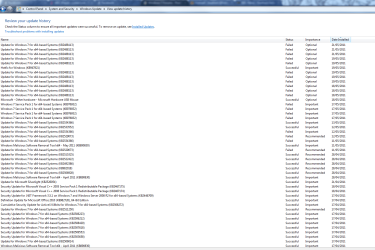
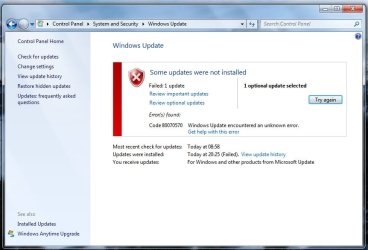
I am unable to install various updates for the past few months due to the above error, which I receive upon every attempt.

The most recent failed updates attempted are:
- Windows 7 SP1 for x64-based Systems (kb976932)
- Update for Windows 7 for x64-based Systems (kb2488113)

Please find attached files detailing errors, and update histories, which may be of use.

I have contacted Windows support, and followed through their suggestions, but I have received no further correspondence from them, after none of their suggestions worked. Please find attached txt file detailing their suggestions.

Any help would be appreciated.

Thank you in advance,

Matt
 

Attachments
My Computer

OS
Windows 7 Home Premium 64bit
Matt,
* For trouble shooting -
I suggest you try to install one IMPORTANT update at a time.
See how that goes. If successful continue with the important ones only, one at a time.

* For SP1 KB 976932 use the link below - .


Download details: Windows 7 and Windows Server 2008 R2 Service Pack 1 (KB976932)

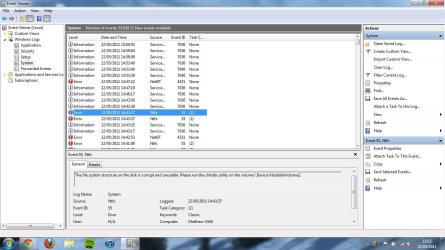
* Have you checked in Event Viewer ?
Event Viewer - Windows Logs - System & Application.
Check for any red error messages to do with this problem.


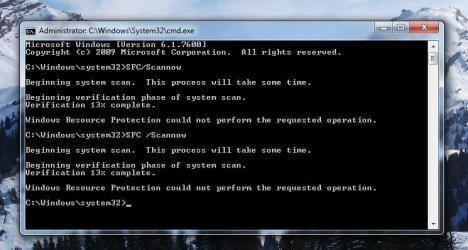
* Wouldn't harm to do a System File Check.
Go to Start > Run,. and type cmd,. now type sfc /scannow
Take note of the message at the end.

* How do I reset Windows Update components?

How do I reset Windows Update components?

* If the above gives you no joy -
Microsoft have provided you with sound advice thus far.
I would suggest you continue to take advantage of the no-charge support from Microsoft for Windows Update issues.
Mention your ID - Microsoft Support Incident: SRX1154568975
If necessary follow up by phone.


* FYI -
Windows Update errors – A troubleshooting guide - 4sysops
 

My Computer

Computer Manufacturer/Model Number
LAPTOP. HP Pavilion dv7-4010TX .
OS
Win 7 Ultimate 64-bit. SP1.
CPU
Intel i7 -720QM.[1.6GHz Turbo Boost 2.8GHz. 6MB Cache.]
Memory
8 DDR 3 RAM. 1066MHZ
Graphics Card(s)
ATI 1024 MB. DDR3. Radeon HD5650
Monitor(s) Displays
17.3" High Definition Brightview LCD. LED Backlit.
Screen Resolution
1600 x 900.
Hard Drives
640GB
Case
Laptop / notebook.
Mouse
Logitech Anywhere mouse. MX.
Internet Speed
ADSL [ but too slow ]
Hello Matt, and welcome to the Seven Forums!

Try what @JMH has said above first. I completely agree with everything @JMH has said. Not going to repeat it!

From your WindowsUpdate.log:

Code:
2011-05-19    19:56:04:555    3520    f24    Handler    FATAL: CBS called Error with 0x80070570,
Send Microsoft C:\Windows\Logs\CBS\CBS.log. Right click on it > Send To > Compressed (zipped) folder first.

Upload the .zip here as well, if you like, as that is the most important log for your error message.

Good luck!

Richard
 

My Computer

Computer Manufacturer/Model Number
Dell XPS 420
OS
Vista Home Premium x86 SP2
CPU
Intel Core 2 Quad Q9300 2.50GHz
Motherboard
Stock Dell 0TP406
Memory
4 gb (DDR2 800) 400MHz
Graphics Card(s)
ATI Radeon HD 3870 (512 MBytes)
Monitor(s) Displays
1 x Dell 2007FP and 1 x (old) Sonic flat screen
Screen Resolution
1600 x 1200 and 1280 x 1204
Hard Drives
1 x 640Gb (SATA 300) Western Digital: WDC WD6400AAKS-75A7B0 1 x 1Tb (SATA 600) Western Digital: Caviar Black, SATA 6GB/S, 64Mb cache, 8ms Western Digital: WDC WD1002FAEX-00Z3A0 ATA Device
Case
Dell XPS 420
Cooling
Stock Fan
Keyboard
Dell Bluetooth
Mouse
Advent Optical ADE-WG01 (colour change light up)
Internet Speed
Varies from 10kb/s to 170kb/s. So unreliable it is not funny
Other Info
ASUS USB 3.0 5Gbps/SATA 6Gbps - PCI-Express Combo Controller Card (U3S6)
Errors

Thank you for your help.

Upon running a system file check, it stopped at 13%. (Please find attached).

Event viewer highlighted multiple errors - a few of them sounding quite severe. Please find attached files.

Also, following Richard's advice I received an error stating the file was not found or no-read permission. I checked the permission of this folder and found access was ticked to both read and write for system, administrators, users (only me) so doesn't seem to be a problem there.

If it helps, I did receive a 'blue screen of death' last week with the error: IRQL not less or equal. (I think I had the same error last year, and needed to get the hard-drive replaced - hopefully it will not be the case here).

Thank you for your help.

P.S. I am continuing receiving support from Microsoft on this issue but response time is slower so would be keen to keep both channels flowing. Thanks again.
 

Attachments

  • system error events viewer.jpg
    system error events viewer.jpg
    118 KB · Views: 15
  • systemscanerror.jpg
    systemscanerror.jpg
    45.4 KB · Views: 15

My Computer

OS
Windows 7 Home Premium 64bit

My Computer

Computer Manufacturer/Model Number
Dell XPS 420
OS
Vista Home Premium x86 SP2
CPU
Intel Core 2 Quad Q9300 2.50GHz
Motherboard
Stock Dell 0TP406
Memory
4 gb (DDR2 800) 400MHz
Graphics Card(s)
ATI Radeon HD 3870 (512 MBytes)
Monitor(s) Displays
1 x Dell 2007FP and 1 x (old) Sonic flat screen
Screen Resolution
1600 x 1200 and 1280 x 1204
Hard Drives
1 x 640Gb (SATA 300) Western Digital: WDC WD6400AAKS-75A7B0 1 x 1Tb (SATA 600) Western Digital: Caviar Black, SATA 6GB/S, 64Mb cache, 8ms Western Digital: WDC WD1002FAEX-00Z3A0 ATA Device
Case
Dell XPS 420
Cooling
Stock Fan
Keyboard
Dell Bluetooth
Mouse
Advent Optical ADE-WG01 (colour change light up)
Internet Speed
Varies from 10kb/s to 170kb/s. So unreliable it is not funny
Other Info
ASUS USB 3.0 5Gbps/SATA 6Gbps - PCI-Express Combo Controller Card (U3S6)
Perhaps time for a repair install Matt.
 

My Computer

Computer Manufacturer/Model Number
HP Pavillion dv-7 1005 Tx
OS
Win 8 Release candidate 8400
CPU
[email protected]
Memory
4 gigs
Graphics Card(s)
Nvidia 9600M
Sound Card
HD built-in
Monitor(s) Displays
17" Wxga
Screen Resolution
1440x900
Cooling
none
Internet Speed
45Mb down 5Mb up
Does that mean wiping my computer, reinstalling my OS, then transferring files from a back-up?

Seems a bit extreme, considering the only issue is I can't install updates.

Could the cause be physical i.e. could the hard-drive replaced need replaced? Laptop is still in warranty.
 

My Computer

OS
Windows 7 Home Premium 64bit

My Computer

Computer Manufacturer/Model Number
LAPTOP. HP Pavilion dv7-4010TX .
OS
Win 7 Ultimate 64-bit. SP1.
CPU
Intel i7 -720QM.[1.6GHz Turbo Boost 2.8GHz. 6MB Cache.]
Memory
8 DDR 3 RAM. 1066MHZ
Graphics Card(s)
ATI 1024 MB. DDR3. Radeon HD5650
Monitor(s) Displays
17.3" High Definition Brightview LCD. LED Backlit.
Screen Resolution
1600 x 900.
Hard Drives
640GB
Case
Laptop / notebook.
Mouse
Logitech Anywhere mouse. MX.
Internet Speed
ADSL [ but too slow ]
Hello again, Matt!

Sorry for the delay in responding!

The CBS.log is usually quite helpful, but today it was extremely helpful!

Both your SFC and Windows Update errors are caused by one corrupt file.

This file:
Code:
%SystemRoot%\WinSxS\amd64_microsoft-windows-directx-direct3d10.1_31bf3856ad364e35_6.1.7600.20830_none_acd92199dc3ca79f\d3d10_1.dll
I can fix this. I can do a replace on reboot. Or I could do it from the offline environment. The other alternative is you do a Repair Install. Link is above. I am more than willing to fix it. There will be a tiny element of risk, as with all things, especially as this is a core Windows File, but I have done this procedure many times before, and so far have a completely clean record.

I am also not sure if a Repair Install is actually going to work. It may well fail and roll back.

It is your choice. If you ask around on this forum, people who see a SFC error will immediately run a mile, and quote Repair Install. (an ever so slight generalisation)

SFC corrupts are actually quite easy to fix. But since I seem to be the only person who does them, I have to offer you the alternative otherwise I might get into trouble!

If you have a disk, and just want to insert it and get this over with, then fine. If you don't have an SP1 disk, then give me the go ahead, and I shall perform a quick and simple switch in - switch out. It really isn't unsafe, and maybe the more people I do this on, the more people will see that SFC corruptions can be fixed!

Anyway, about your BSoDs, it looks very much like your network card driver is at fault here.

At the moment, the dumps are being very clear in their analysis. You are using an old, 2009 version of the netw5v64.sys driver. And the dumps point to a clear driver issue with this dump. The obvious solution is the update the driver using either your system manufacturer's website, or via Intel (please update whatever networking/Ethernet drivers you can find on those websites): Intel® Driver Update Utility

If the BSoDs do continue, we can widen our net, but I am not going to do that until the highly likely driver is updated!

Richard
 

My Computer

Computer Manufacturer/Model Number
Dell XPS 420
OS
Vista Home Premium x86 SP2
CPU
Intel Core 2 Quad Q9300 2.50GHz
Motherboard
Stock Dell 0TP406
Memory
4 gb (DDR2 800) 400MHz
Graphics Card(s)
ATI Radeon HD 3870 (512 MBytes)
Monitor(s) Displays
1 x Dell 2007FP and 1 x (old) Sonic flat screen
Screen Resolution
1600 x 1200 and 1280 x 1204
Hard Drives
1 x 640Gb (SATA 300) Western Digital: WDC WD6400AAKS-75A7B0 1 x 1Tb (SATA 600) Western Digital: Caviar Black, SATA 6GB/S, 64Mb cache, 8ms Western Digital: WDC WD1002FAEX-00Z3A0 ATA Device
Case
Dell XPS 420
Cooling
Stock Fan
Keyboard
Dell Bluetooth
Mouse
Advent Optical ADE-WG01 (colour change light up)
Internet Speed
Varies from 10kb/s to 170kb/s. So unreliable it is not funny
Other Info
ASUS USB 3.0 5Gbps/SATA 6Gbps - PCI-Express Combo Controller Card (U3S6)
Gentlemen,

Firstly, thank you all for you help - it's very kind of you all, and your expertise is appreciated as all of this is totally over my head!

I have updated the Intel wireless drivers and it also came up for an update for the chipset so I have successfully installed both of these. Thanks. Perhaps I should run a Dell Scan of my system to update any further drivers?

Regarding a repair install, the only discs I have are all marked Dell - they are not retail versions - so I understand I'm not able to do a repair. I will list the discs I have anyway for clarity:
- Win 7 64 Reinstallation DVD (Dell)
- Win Vista 64 Reinstallation DVD (Dell)
- Win 7 Upgrade Option (for upgrade from Win Vista) (Dell)
I would guess the option to do a clean install is there if needs be, but of course I would rather not.

Richard, you've kindly offered to fix the core file. I would guess this would be carried out under Remote Desktop? Or I'm I mistaken. I feel it's the best option. Please instruct me on any preparations I need to do.

(In terms of back ups I have my USER file backed up using Comodo software, and also a Windows System Image back up from a few weeks ago. (I wasn't able to successfully back up user files using Windows software - perhaps a result of this corrupt file?)

Much obliged,

Matt
 

My Computer

OS
Windows 7 Home Premium 64bit
Matt,

niemiro will be back asap.
Good luck.


Re
your comment
Gentlemen,

Firstly, thank you all for you help ........

You got the "gentle" part correct.
Man I am not. ;)
Jan.
 

My Computer

Computer Manufacturer/Model Number
LAPTOP. HP Pavilion dv7-4010TX .
OS
Win 7 Ultimate 64-bit. SP1.
CPU
Intel i7 -720QM.[1.6GHz Turbo Boost 2.8GHz. 6MB Cache.]
Memory
8 DDR 3 RAM. 1066MHZ
Graphics Card(s)
ATI 1024 MB. DDR3. Radeon HD5650
Monitor(s) Displays
17.3" High Definition Brightview LCD. LED Backlit.
Screen Resolution
1600 x 900.
Hard Drives
640GB
Case
Laptop / notebook.
Mouse
Logitech Anywhere mouse. MX.
Internet Speed
ADSL [ but too slow ]
Jan,

I do apologise! Sorry for this mistake! Thank you to you too for your help! :)

Best wishes,

Matt
 

My Computer

OS
Windows 7 Home Premium 64bit
Jan,

I do apologise! Sorry for this mistake! Thank you to you too for your help! :)

Best wishes,

Matt

Thanks -but no need to apologize.:)
I will watch this thread with great interest to see the results.
 

My Computer

Computer Manufacturer/Model Number
LAPTOP. HP Pavilion dv7-4010TX .
OS
Win 7 Ultimate 64-bit. SP1.
CPU
Intel i7 -720QM.[1.6GHz Turbo Boost 2.8GHz. 6MB Cache.]
Memory
8 DDR 3 RAM. 1066MHZ
Graphics Card(s)
ATI 1024 MB. DDR3. Radeon HD5650
Monitor(s) Displays
17.3" High Definition Brightview LCD. LED Backlit.
Screen Resolution
1600 x 900.
Hard Drives
640GB
Case
Laptop / notebook.
Mouse
Logitech Anywhere mouse. MX.
Internet Speed
ADSL [ but too slow ]
Gentlemen,

Firstly, thank you all for you help - it's very kind of you all, and your expertise is appreciated as all of this is totally over my head!

I have updated the Intel wireless drivers and it also came up for an update for the chipset so I have successfully installed both of these. Thanks. Perhaps I should run a Dell Scan of my system to update any further drivers?

Regarding a repair install, the only discs I have are all marked Dell - they are not retail versions - so I understand I'm not able to do a repair. I will list the discs I have anyway for clarity:
- Win 7 64 Reinstallation DVD (Dell)
- Win Vista 64 Reinstallation DVD (Dell)
- Win 7 Upgrade Option (for upgrade from Win Vista) (Dell)
I would guess the option to do a clean install is there if needs be, but of course I would rather not.

Richard, you've kindly offered to fix the core file. I would guess this would be carried out under Remote Desktop? Or I'm I mistaken. I feel it's the best option. Please instruct me on any preparations I need to do.

(In terms of back ups I have my USER file backed up using Comodo software, and also a Windows System Image back up from a few weeks ago. (I wasn't able to successfully back up user files using Windows software - perhaps a result of this corrupt file?)

Much obliged,

Matt

Good day to you, Matt!

Since you seem as though you may be interested, I shall explain what I do on each step. This is usually a two step process. And there should be no need for Remote Desktop :) It isn't really very hard. All you have to do is download a good copy of the file from me, put it in a special place, and then run a command to tell Windows to replace the bad with the good. More on this later.

First, a few of your other questions:

I have updated the Intel wireless drivers and it also came up for an update for the chipset so I have successfully installed both of these. Thanks. Perhaps I should run a Dell Scan of my system to update any further drivers?

At the moment, not. Intel should have updated you nicely. If the BSoDs continue, I shall look once again at the dumps, and consider trying Dell, but for the moment leave things as they stand :)

Regarding a repair install, the only discs I have are all marked Dell - they are not retail versions - so I understand I'm not able to do a repair. I will list the discs I have anyway for clarity:

Thanks for listing your disks. I think that you may be able to do a Repair Install...someone may well correct me, but don't worry. It is far quicker just to fix the issue.

(In terms of back ups I have my USER file backed up using Comodo software, and also a Windows System Image back up from a few weeks ago. (I wasn't able to successfully back up user files using Windows software - perhaps a result of this corrupt file?)

Quite likely. I am glad you have backups. Just in case (although you really don't need to worry)

If you have any more questions, don't hesitate to ask!

Right, this fix is a two step process. The first step is to confirm that the file is indeed corrupt. This is because although Windows reports the file to be corrupt, it is actually possible that instead of the file being corrupt, the catalogs Windows uses are corrupt)

This was more of a problem in XP. In XP, SFC and all of the behind the scenes work was very basic, and could easily go wrong. In Vista, Microsoft did an absolutely fantastic job of making the behind the scenes Component Based Servicing (CBS) etc. really, really neat and accurate. In XP, occasinally SFC reported 100 file failed signature verification, and then we target the catroot2 folder at a guess.

In Vista/7, Windows is almost always correct in working out whether it is the file or catalogue which is corrupt, but it is not in my nature to be only 95% certain. And it doesn't take very long to check. Step one is just this quick check. Also, in Vista/7, we can home in one an actual fix for whatever CBS corruption there is, whereas in XP we just rebuild caches until the error was resolved!

So, next time someone says that XP is better than Vista, nod wisely and tell them that the ground up Component Based Servicing system in Vista makes your life so much happier! :party: lol.

Right, without further ado!

OTLI.gif
OTL - Download or alternative link here and here

Please Download OTL to your Desktop
  • Double click on the icon to run it. Make sure most other windows are closed to let it run uninterrupted.
  • Under the Custom Scan box paste this in
/md5start
d3d10_1.dll
/md5stop
  • Click the None button, followed by Run Scan button. The scan wont take long (between 5 - 15 minutes)
  • When the scan completes, it will open one notepad window. OTL.Txt. This is saved in the same location as OTL.
  • Please copy (Edit->Select All, Edit->Copy) the contents of this file, and post it here.
Thanks a lot!

Richard
 

My Computer

Computer Manufacturer/Model Number
Dell XPS 420
OS
Vista Home Premium x86 SP2
CPU
Intel Core 2 Quad Q9300 2.50GHz
Motherboard
Stock Dell 0TP406
Memory
4 gb (DDR2 800) 400MHz
Graphics Card(s)
ATI Radeon HD 3870 (512 MBytes)
Monitor(s) Displays
1 x Dell 2007FP and 1 x (old) Sonic flat screen
Screen Resolution
1600 x 1200 and 1280 x 1204
Hard Drives
1 x 640Gb (SATA 300) Western Digital: WDC WD6400AAKS-75A7B0 1 x 1Tb (SATA 600) Western Digital: Caviar Black, SATA 6GB/S, 64Mb cache, 8ms Western Digital: WDC WD1002FAEX-00Z3A0 ATA Device
Case
Dell XPS 420
Cooling
Stock Fan
Keyboard
Dell Bluetooth
Mouse
Advent Optical ADE-WG01 (colour change light up)
Internet Speed
Varies from 10kb/s to 170kb/s. So unreliable it is not funny
Other Info
ASUS USB 3.0 5Gbps/SATA 6Gbps - PCI-Express Combo Controller Card (U3S6)
Richard,

Thanks for the advice.

Please find the following result:


OTL logfile created on: 24/05/2011 08:54:33 - Run 1
OTL by OldTimer - Version 3.2.23.0 Folder = C:\Users\Matthew\Desktop
64bit- Home Premium Edition (Version = 6.1.7600) - Type = NTWorkstation
Internet Explorer (Version = 9.0.8112.16421)
Locale: 00000809 | Country: United Kingdom | Language: ENG | Date Format: dd/MM/yyyy

4.00 Gb Total Physical Memory | 2.52 Gb Available Physical Memory | 63.10% Memory free
7.99 Gb Paging File | 6.27 Gb Available in Paging File | 78.50% Paging File free
Paging file location(s): ?:\pagefile.sys [binary data]

%SystemDrive% = C: | %SystemRoot% = C:\Windows | %ProgramFiles% = C:\Program Files (x86)
Drive C: | 465.66 Gb Total Space | 275.70 Gb Free Space | 59.21% Space Free | Partition Type: NTFS
Drive E: | 1.84 Gb Total Space | 0.02 Gb Free Space | 0.90% Space Free | Partition Type: FAT

Computer Name: MATTHEW-1545 | User Name: Matthew | Logged in as Administrator.
Boot Mode: Normal | Scan Mode: Current user | Include 64bit Scans
Company Name Whitelist: Off | Skip Microsoft Files: Off | No Company Name Whitelist: Off | File Age = 30 Days

========== Custom Scans ==========


< MD5 for: D3D10_1.DLL >
[2011/01/17 06:47:13 | 000,161,792 | ---- | M] (Microsoft Corporation) MD5=2DE90400A63818FA38C4C5C9ADB166BF -- C:\Windows\winsxs\x86_microsoft-windows-directx-direct3d10.1_31bf3856ad364e35_6.1.7601.17544_none_5210778d07ec83d8\d3d10_1.dll
[2010/11/02 05:25:43 | 000,161,792 | ---- | M] (Microsoft Corporation) MD5=3954A03A729FE37D5B4B35BF06745F85 -- C:\Windows\SysWOW64\d3d10_1.dll
[2010/11/02 05:25:43 | 000,161,792 | ---- | M] (Microsoft Corporation) MD5=3954A03A729FE37D5B4B35BF06745F85 -- C:\Windows\winsxs\x86_microsoft-windows-directx-direct3d10.1_31bf3856ad364e35_6.1.7600.20830_none_50ba861623df3669\d3d10_1.dll
[2011/01/17 06:36:28 | 000,161,792 | ---- | M] (Microsoft Corporation) MD5=6C467D0074067C13E814EBD456FC90B7 -- C:\Windows\winsxs\x86_microsoft-windows-directx-direct3d10.1_31bf3856ad364e35_6.1.7601.21643_none_5299140e210b0a4b\d3d10_1.dll
[2009/07/14 02:15:07 | 000,161,792 | ---- | M] (Microsoft Corporation) MD5=6E05F39AF5B91CEE0D2A84501EEEDBD8 -- C:\Windows\winsxs\x86_microsoft-windows-directx-direct3d10.1_31bf3856ad364e35_6.1.7600.16385_none_4fffd3890ae5ac6b\d3d10_1.dll
[2009/07/14 02:15:07 | 000,161,792 | ---- | M] (Microsoft Corporation) MD5=6E05F39AF5B91CEE0D2A84501EEEDBD8 -- C:\Windows\winsxs\x86_microsoft-windows-directx-direct3d10.1_31bf3856ad364e35_6.1.7600.20781_none_508574de2406de4e\d3d10_1.dll
[2009/07/14 02:15:07 | 000,161,792 | ---- | M] (Microsoft Corporation) MD5=6E05F39AF5B91CEE0D2A84501EEEDBD8 -- C:\Windows\winsxs\x86_microsoft-windows-directx-direct3d10.1_31bf3856ad364e35_6.1.7601.17514_none_5230e75107d43005\d3d10_1.dll
[2011/01/17 07:19:28 | 000,197,120 | ---- | M] (Microsoft Corporation) MD5=71EE52D3B12CFADADE01044C3EA46D9A -- C:\Windows\winsxs\amd64_microsoft-windows-directx-direct3d10.1_31bf3856ad364e35_6.1.7601.21643_none_aeb7af91d9687b81\d3d10_1.dll
[2010/11/02 06:17:47 | 000,197,120 | ---- | M] (Microsoft Corporation) MD5=A8A206DEE0567DFB36AA3435D4CFA3CE -- C:\Windows\SysNative\d3d10_1.dll
[2011/01/17 06:38:38 | 000,161,792 | ---- | M] (Microsoft Corporation) MD5=B8473011F59A6AA2B35E84AA19D707CF -- C:\Windows\winsxs\x86_microsoft-windows-directx-direct3d10.1_31bf3856ad364e35_6.1.7600.16741_none_502719a90ac8cbe7\d3d10_1.dll
[2010/11/02 06:12:06 | 000,197,120 | ---- | M] (Microsoft Corporation) MD5=C5148DDA65E361A78F6372CCA637A5EE -- C:\Windows\winsxs\amd64_microsoft-windows-directx-direct3d10.1_31bf3856ad364e35_6.1.7600.16699_none_ac17a5fac3479663\d3d10_1.dll
[2011/01/17 06:30:18 | 000,161,792 | ---- | M] (Microsoft Corporation) MD5=C5907DE0CAF506C7FA39C25EE7D0ED09 -- C:\Windows\winsxs\x86_microsoft-windows-directx-direct3d10.1_31bf3856ad364e35_6.1.7600.20882_none_5086770e2405f4cc\d3d10_1.dll
[2010/11/02 05:35:34 | 000,161,792 | ---- | M] (Microsoft Corporation) MD5=C5F549970AC071EA452E58B6422C94FA -- C:\Windows\winsxs\x86_microsoft-windows-directx-direct3d10.1_31bf3856ad364e35_6.1.7600.16699_none_4ff90a770aea252d\d3d10_1.dll
[2009/07/14 02:40:25 | 000,197,120 | ---- | M] (Microsoft Corporation) MD5=D63BEE2A8B22482F7080A8D3F2E1A733 -- C:\Windows\winsxs\amd64_microsoft-windows-directx-direct3d10.1_31bf3856ad364e35_6.1.7600.16385_none_ac1e6f0cc3431da1\d3d10_1.dll
[2009/07/14 02:40:25 | 000,197,120 | ---- | M] (Microsoft Corporation) MD5=D63BEE2A8B22482F7080A8D3F2E1A733 -- C:\Windows\winsxs\amd64_microsoft-windows-directx-direct3d10.1_31bf3856ad364e35_6.1.7600.20781_none_aca41061dc644f84\d3d10_1.dll
[2009/07/14 02:40:25 | 000,197,120 | ---- | M] (Microsoft Corporation) MD5=D63BEE2A8B22482F7080A8D3F2E1A733 -- C:\Windows\winsxs\amd64_microsoft-windows-directx-direct3d10.1_31bf3856ad364e35_6.1.7601.17514_none_ae4f82d4c031a13b\d3d10_1.dll
[2011/01/17 12:09:14 | 000,197,120 | ---- | M] (Microsoft Corporation) MD5=E1374D37477322D4956604711008C69D -- C:\Windows\winsxs\amd64_microsoft-windows-directx-direct3d10.1_31bf3856ad364e35_6.1.7601.17544_none_ae2f1310c049f50e\d3d10_1.dll
[2011/01/17 07:17:00 | 000,197,120 | ---- | M] (Microsoft Corporation) MD5=E52A95ED91EB87FE72971CBB6B665C27 -- C:\Windows\winsxs\amd64_microsoft-windows-directx-direct3d10.1_31bf3856ad364e35_6.1.7600.16741_none_ac45b52cc3263d1d\d3d10_1.dll
[2011/01/17 07:12:54 | 000,197,120 | ---- | M] (Microsoft Corporation) MD5=E8C88115B6AE3DBAE9B7E176F10872FB -- C:\Windows\winsxs\amd64_microsoft-windows-directx-direct3d10.1_31bf3856ad364e35_6.1.7600.20882_none_aca51291dc636602\d3d10_1.dll

< End of report >
 

My Computer

OS
Windows 7 Home Premium 64bit
Hello again, Matt!

How goes it with Microsoft? What is the status with them?

Anyway, I shall continue! Well done on the log! Excellent work!

That file is completely missing. I had a slight suspicion that that might have been the case. SFC doesn't trip over a corrupt file (it wouldn't be much use if it did!), but it does occasionally trip over big corruptions, such as whole missing directories or files. Anyway, file missing is a safer operation. There is no overwrite, and your computer is almost fully functional without that file!

Your CBS Error code is STATUS_FILE_CORRUPT_ERROR, which is a rarer error code. More common error codes (but for slightly different meanings) are:

ERROR_SXS_ASSEMBLY_NOT_FOUND
ERROR_SXS_FILE_HASH_MISMATCH
ERROR_FILE_NOT_FOUND (mapped from STATUS_OBJECT_NAME_NOT_FOUND)
ERROR_PATH_NOT_FOUND (mapped from STATUS_OBJECT_PATH_NOT_FOUND)

I am curious as to why this didn't show up in your CheckSUR.log. I would have expected a CSI Payload File Missing error. I am wondering if this other error code has something to do with it.

Anyway, this is slightly beside the point. I shall just replace the file (replacing the file is all that is required)

Please dig out your install disk (we are not actually going to reinstall, just replace the file from the offline environment)

Please download the attached Packs.zip. Unzip it into your C:\ drive, creating a structure like this: C:\Packs\Windows\winsxs....

Then please follow METHOD ONE, STEPS 1 - 6 here: http://www.sevenforums.com/tutorials/139810-sfc-scannow-run-command-prompt-boot.html

Basically, boot into your disk, and find out your drive letter, and then open up a Command Prompt. Don't worry about doing it wrong. Nothing too drastic will happen! Just have another go! But do try to get it right :)

Then, instead of actually using SFC, please type the following Command and press enter:

robocopy {boot partition}:\Packs {boot partition}:\ /E /IS

For example, robocopy C:\Packs C:\ /E /IS

A lot of text will scroll across the screen while file databases are built, and then one tiny copy operation will happen at the end! (building file databases will take just about half the time of OTL, so not too long)

Don't panic about what is going on! It will all go alright!

Then reboot into Windows, and re-test Windows Update!

Feel free to ask any questions you may have, and the very best of luck!

Richard
 

Attachments

My Computer

Computer Manufacturer/Model Number
Dell XPS 420
OS
Vista Home Premium x86 SP2
CPU
Intel Core 2 Quad Q9300 2.50GHz
Motherboard
Stock Dell 0TP406
Memory
4 gb (DDR2 800) 400MHz
Graphics Card(s)
ATI Radeon HD 3870 (512 MBytes)
Monitor(s) Displays
1 x Dell 2007FP and 1 x (old) Sonic flat screen
Screen Resolution
1600 x 1200 and 1280 x 1204
Hard Drives
1 x 640Gb (SATA 300) Western Digital: WDC WD6400AAKS-75A7B0 1 x 1Tb (SATA 600) Western Digital: Caviar Black, SATA 6GB/S, 64Mb cache, 8ms Western Digital: WDC WD1002FAEX-00Z3A0 ATA Device
Case
Dell XPS 420
Cooling
Stock Fan
Keyboard
Dell Bluetooth
Mouse
Advent Optical ADE-WG01 (colour change light up)
Internet Speed
Varies from 10kb/s to 170kb/s. So unreliable it is not funny
Other Info
ASUS USB 3.0 5Gbps/SATA 6Gbps - PCI-Express Combo Controller Card (U3S6)
  • Like
Reactions: JMH
Richard,

Thanks for all the above analysis and information. I'm busy with exams at the moment but I finish later today (:D) so I will attempt your solution this evening.

Regarding Microsoft, please find below transcript:

______________________________________________________________________________________________

Dear Matthew,

Thank you for keep in touch.

I understand that the issue still persists after renaming the Windows Update Softwaredistribution folder. I also understand that when running the SFC, a message prompted that “Windows Resource Protection could not perform the requested operation.”

Matthew, I also understand that you have invested a significant amount of effort and time on this issue.

Based on this situation, I suggest we perform an In-place Upgrade directly to repair the corrupted system components. I would like to explain that the In-place Upgrade is a tool to repair the system. Through the special upgrade process, we will be able to repair the system. The In-place Upgrade will not affect settings like photos, movies, documents, etc. that are saved on the computer. Please perform the following steps:

In-place Upgrade
=============
1. Insert the Windows 7 installation or upgrade DVD in the computer's DVD drive.
2. Click Start and choose Computer.
3. Please find the "setup.exe" file in the DVD-ROM and double click it.
4. Click Install now.
5. If we are prompted to input the product key, please click Next without inputting any key. The setup wizard will prompt and ask if you agree to install Windows 7 without the key. Please choose to confirm.
6. When you reach the "Which type of installation do you want" screen, click Upgrade to upgrade the system files of Windows 7.

Note 1: When you asked if you want to update your system before In-Place Upgrade, please choose Do not update.

Note 2: While performing the In-place Upgrade, the system will restart automatically (several times) to merge the files and programs. Please leave the computer alone and do not configure it until In-place Upgrade is completed. The system will start Windows 7 once it is upgraded.

When the In-place Upgrade finishes please restart the computer and go to Windows Update to test the issue again.

Please try my suggestions and let me know the results at your earliest convenience. Thank you for your effort and patience.

I'm waiting for your reply. Have a nice day.

Best Regards,

Tracy Liang

______________________________________________________________________________________________-

I don't know how much this differs to your solution.

Which do you advise I try first?

Regards,

Matt
 

My Computer

OS
Windows 7 Home Premium 64bit
Hello Matt!

Good luck with your exams! Mine are after half term, so two weeks time :)

An in-place upgrade is just another name for a Repair Install. They are the same thing.

Both solutions will work. My solution is slightly more technical, but slightly quicker. It is your choice.

Both options have been layed before you! Both are fine! Take your pick, and don't worry, because neither is better than the other.

Richard
 

My Computer

Computer Manufacturer/Model Number
Dell XPS 420
OS
Vista Home Premium x86 SP2
CPU
Intel Core 2 Quad Q9300 2.50GHz
Motherboard
Stock Dell 0TP406
Memory
4 gb (DDR2 800) 400MHz
Graphics Card(s)
ATI Radeon HD 3870 (512 MBytes)
Monitor(s) Displays
1 x Dell 2007FP and 1 x (old) Sonic flat screen
Screen Resolution
1600 x 1200 and 1280 x 1204
Hard Drives
1 x 640Gb (SATA 300) Western Digital: WDC WD6400AAKS-75A7B0 1 x 1Tb (SATA 600) Western Digital: Caviar Black, SATA 6GB/S, 64Mb cache, 8ms Western Digital: WDC WD1002FAEX-00Z3A0 ATA Device
Case
Dell XPS 420
Cooling
Stock Fan
Keyboard
Dell Bluetooth
Mouse
Advent Optical ADE-WG01 (colour change light up)
Internet Speed
Varies from 10kb/s to 170kb/s. So unreliable it is not funny
Other Info
ASUS USB 3.0 5Gbps/SATA 6Gbps - PCI-Express Combo Controller Card (U3S6)
I decided to go for the cd option as I didn't back myself on the technical route and am happy to say the issue is all resolved.

I am now running Windows 7 SP 1 and can install all updates in a breeze.

Thank you to everyone who helped, and especially to Richard, for your fantastic support and know-how.

Much appreciated,

Matt
 

My Computer

OS
Windows 7 Home Premium 64bit
Back
Top