Winhlp32.exe

Sven

New member
Power User
Local time
3:13 AM
Messages
236
Location
Denmark

My Computer

OS
Windows 7 Ultimate x64
CPU
Intel E6850 3,0 running 3,6 Ghz
Motherboard
Gigabyte DS4 P35
Memory
2x2 and Gb Corsair PC6400 CAS5 - 4GB total
Graphics Card(s)
Nvidia Geforce 260GTX
Sound Card
Creative X-Fi Fata1ty Gamer Extreme
Monitor(s) Displays
Samsung 2493hm
Screen Resolution
1920*1200
Hard Drives
Intel X25-M SSD for system
2x 1Tb Samsung F1 as seperate discs
PSU
Zahlman 850HP
Case
Shg
Cooling
Evo 120
Keyboard
Logitech G15 (blue backlight)
Mouse
Logitech G5 laser
Internet Speed
25/25 mbit
Other Info
1 Samsung SATA dvd-burner
1 LiteOn SATA dvd-burner

My Computer

Computer Manufacturer/Model Number
Multiple machines in various stages of decomposition.
OS
Win7x64
To install the correct version of this update, you must know your Windows version. Additionally, you must be logged on to Windows as an administrator. If you are not sure which Windows version is installed, or if you need help verifying that you are an administrator, click here to verify your environment (Help and Support) . Then, download the correct update by clicking one of the following links.

Note At this time, there is no WinHlp32.exe download available for Windows 7 or for Windows Server 2008 R2. However, separate downloads for Windows 7 and Windows Server 2008 R2 will be offered after the RTM versions of these products are available to public.
 
To install the correct version of this update, you must know your Windows version. Additionally, you must be logged on to Windows as an administrator. If you are not sure which Windows version is installed, or if you need help verifying that you are an administrator, click here to verify your environment (Help and Support) . Then, download the correct update by clicking one of the following links.

Note At this time, there is no WinHlp32.exe download available for Windows 7 or for Windows Server 2008 R2. However, separate downloads for Windows 7 and Windows Server 2008 R2 will be offered after the RTM versions of these products are available to public.

See, if they'd used big red bold font in the KB article, I'd have noticed it ;)
 

My Computer

Computer Manufacturer/Model Number
Multiple machines in various stages of decomposition.
OS
Win7x64
See, if they'd used big red bold font in the KB article, I'd have noticed it ;)
I didn't see that part earlier this year when I encountered the same problem. I spent a few minutes cursing compatibility mode.

You live, you learn, you RTFM.
 
LOL. I must not have noticed that either.

Managed to get it to work, though.

If I remember correctly,

Take ownership of winhlp32.exe in windows folder and rename

Replace with the one in attached .zip

Accociate .hlp files with new winhlp32 in windows folder via Open With.

View attachment winhlp32.zip

Worked for me on a previous build - not sure may have been 7100.

Then I found :

Windows Help program (WinHlp32.exe) - Windows Live

Rt click and run as admin on the Install.cmd. I think I still needed to rename the winhlp.exe.mui in windows\en-us and rename winhlp in windows, then copy the new ones across.
 

My Computers

System One System Two

  • Computer type
    PC/Desktop
    OS
    7 X64
    CPU
    i5 8400
    Motherboard
    gigabyte b365m ds3h
    Memory
    2x8gb 3200mhz
    Hard Drives
    various
    PSU
    pure power 11 400w cm
    Case
    Coolermaster
    Cooling
    cryorig m9i
  • Computer type
    PC/Desktop
    OS
    7x64
    CPU
    g5400
    Motherboard
    ga b365m ds3h
    Memory
    8gb ddr4 2400
    PSU
    xfx pro 450w
I believe you can also use "right Click' and select open as-> and do a text file.

~Lordbob
 

My Computer

Computer Manufacturer/Model Number
Hera
OS
Windows 7 Ultimate x64, Mint 9
CPU
Intel i5-2500k
Motherboard
ASUS P8P67 Pro
Memory
2x 4Gb Corsair VENGEANCE DDR3-1600
Graphics Card(s)
NVidia GeForce N260GTX Twin Frozr
Sound Card
Realtek HD OnBoard Audio
Monitor(s) Displays
ASUS 24" Monitor
Screen Resolution
1920x1080
Hard Drives
G.SKILL Phoenix Series 60GB SATA II MLC Internal Solid State Drive (SSD)
SAMSUNG Spinpoint F3R 1TB 7200 RPM 32MB Cache SATA II
PSU
Cooler Master Real Power Pro 750W
Case
Cooler Master Haf 932
Cooling
Fans
Keyboard
Razer Tarantula
Mouse
Razer Lachesis
Internet Speed
not fast enough
I believe you can also use "right Click' and select open as-> and do a text file.

~Lordbob
Workable.

Notepad:
'D D ÿÿÿÿ W & ÿÿÿÿc 1 ¸ ÿÿÿÿÿÿÿÿ ÿÿÿÿc Ä Contacting the Authors of This Program è u * "€Ñ € € ‚‚‚‚‚‚‚ÿ The author of this program would like to thank those users on the speedguide.net forums as well as the cablenut.com forums for their endless support and feedback about the tweaks and settings which this program provides. For those of you interested in contacting the author of the cable modem tweaks, email CableNut at the following address: edit@home.com For information about any DSL tweaks provided or available for the program, email dannjr at the following email address: O c Ä / ,€A €

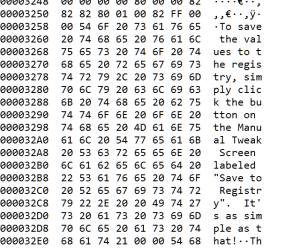
EditPad Pro:

.
 

Attachments

  • Capture.PNG
    Capture.PNG
    16.2 KB · Views: 30
Hmmm..... Not perfect then. Works for .nfo files.

~Lordbob
 

My Computer

Computer Manufacturer/Model Number
Hera
OS
Windows 7 Ultimate x64, Mint 9
CPU
Intel i5-2500k
Motherboard
ASUS P8P67 Pro
Memory
2x 4Gb Corsair VENGEANCE DDR3-1600
Graphics Card(s)
NVidia GeForce N260GTX Twin Frozr
Sound Card
Realtek HD OnBoard Audio
Monitor(s) Displays
ASUS 24" Monitor
Screen Resolution
1920x1080
Hard Drives
G.SKILL Phoenix Series 60GB SATA II MLC Internal Solid State Drive (SSD)
SAMSUNG Spinpoint F3R 1TB 7200 RPM 32MB Cache SATA II
PSU
Cooler Master Real Power Pro 750W
Case
Cooler Master Haf 932
Cooling
Fans
Keyboard
Razer Tarantula
Mouse
Razer Lachesis
Internet Speed
not fast enough

My Computers

System One System Two

  • Computer type
    PC/Desktop
    OS
    7 X64
    CPU
    i5 8400
    Motherboard
    gigabyte b365m ds3h
    Memory
    2x8gb 3200mhz
    Hard Drives
    various
    PSU
    pure power 11 400w cm
    Case
    Coolermaster
    Cooling
    cryorig m9i
  • Computer type
    PC/Desktop
    OS
    7x64
    CPU
    g5400
    Motherboard
    ga b365m ds3h
    Memory
    8gb ddr4 2400
    PSU
    xfx pro 450w
...You live, you learn, you RTFM.
And then you page SIW2.

:roflmao:

I haven't tried it on 7600 - so it might go horribly wrong. :devil2:

Assuming it works - should be able to open the help file directly from the app's help menu.
Well, we're waiting. <-- www

Opening from the Help menu did not work on my test app.

Oddly, I got the best readability from DAMN NFO Viewer.
 

My Computers

System One System Two

  • Computer type
    PC/Desktop
    OS
    7 X64
    CPU
    i5 8400
    Motherboard
    gigabyte b365m ds3h
    Memory
    2x8gb 3200mhz
    Hard Drives
    various
    PSU
    pure power 11 400w cm
    Case
    Coolermaster
    Cooling
    cryorig m9i
  • Computer type
    PC/Desktop
    OS
    7x64
    CPU
    g5400
    Motherboard
    ga b365m ds3h
    Memory
    8gb ddr4 2400
    PSU
    xfx pro 450w
That works.

Good job.

I just ran the installer. Nothing else, but I did have to associate the file type via Open With...
 
When I try to view the helpfile from older programs, I only get to this website, I cannot open Help files that require the Windows Help (WinHlp32.exe) program
but I can't get it to load winhlp32.exe or winhlp64.exe.
How do I get the older Windows help to work in Windows 7?

Are you saying the Vista-specific winhlp32 download link (from that KB article) doesn't work for you? If so, why not - what are the error messages and/or obstacles?

I have tried to download the .zipfile from this thread, but that does not work. The installprogram in the zipfile can't take ownership of winhlp32.exe (run as administrator), and I can't rename winhlp32.exe, not even as "administrator". When rightclicking on the file and selecting properties, the ONLY way to allow renaming or deleting this file is by "thrustedinstaller". The "administrator" has only reading rights on this file.
How do I do that?
I have even tried to boot from another harddrive (win 7 RC1), and then tried to rename it in build 7264, but no luck.

btw, I'm running build 7264 64bits, and I don't have Vista at all, so downloading is my only option.
 

My Computer

OS
Windows 7 Ultimate x64
CPU
Intel E6850 3,0 running 3,6 Ghz
Motherboard
Gigabyte DS4 P35
Memory
2x2 and Gb Corsair PC6400 CAS5 - 4GB total
Graphics Card(s)
Nvidia Geforce 260GTX
Sound Card
Creative X-Fi Fata1ty Gamer Extreme
Monitor(s) Displays
Samsung 2493hm
Screen Resolution
1920*1200
Hard Drives
Intel X25-M SSD for system
2x 1Tb Samsung F1 as seperate discs
PSU
Zahlman 850HP
Case
Shg
Cooling
Evo 120
Keyboard
Logitech G15 (blue backlight)
Mouse
Logitech G5 laser
Internet Speed
25/25 mbit
Other Info
1 Samsung SATA dvd-burner
1 LiteOn SATA dvd-burner

My Computer

OS
Windows 7 Ultimate x64
CPU
Intel E6850 3,0 running 3,6 Ghz
Motherboard
Gigabyte DS4 P35
Memory
2x2 and Gb Corsair PC6400 CAS5 - 4GB total
Graphics Card(s)
Nvidia Geforce 260GTX
Sound Card
Creative X-Fi Fata1ty Gamer Extreme
Monitor(s) Displays
Samsung 2493hm
Screen Resolution
1920*1200
Hard Drives
Intel X25-M SSD for system
2x 1Tb Samsung F1 as seperate discs
PSU
Zahlman 850HP
Case
Shg
Cooling
Evo 120
Keyboard
Logitech G15 (blue backlight)
Mouse
Logitech G5 laser
Internet Speed
25/25 mbit
Other Info
1 Samsung SATA dvd-burner
1 LiteOn SATA dvd-burner
When I try to view the helpfile from older programs, I only get to this website, I cannot open Help files that require the Windows Help (WinHlp32.exe) program
but I can't get it to load winhlp32.exe or winhlp64.exe.
How do I get the older Windows help to work in Windows 7?

Are you saying the Vista-specific winhlp32 download link (from that KB article) doesn't work for you? If so, why not - what are the error messages and/or obstacles?

I have tried to download the .zipfile from this thread, but that does not work. The installprogram in the zipfile can't take ownership of winhlp32.exe (run as administrator), and I can't rename winhlp32.exe, not even as "administrator". When rightclicking on the file and selecting properties, the ONLY way to allow renaming or deleting this file is by "thrustedinstaller". The "administrator" has only reading rights on this file.
How do I do that?
I have even tried to boot from another harddrive (win 7 RC1), and then tried to rename it in build 7264, but no luck.

btw, I'm running build 7264 64bits, and I don't have Vista at all, so downloading is my only option.

Merge this regfile - then rt click the winhlp32.exe in the windows folder and Take ownership - you should be able to rename it then.

View attachment Taking Ownership.reg

Seem to remember I needed to do that on some builds - you may need to do the same to the winhlp32.exe.mui in the windows\en-us folder.
 

My Computers

System One System Two

  • Computer type
    PC/Desktop
    OS
    7 X64
    CPU
    i5 8400
    Motherboard
    gigabyte b365m ds3h
    Memory
    2x8gb 3200mhz
    Hard Drives
    various
    PSU
    pure power 11 400w cm
    Case
    Coolermaster
    Cooling
    cryorig m9i
  • Computer type
    PC/Desktop
    OS
    7x64
    CPU
    g5400
    Motherboard
    ga b365m ds3h
    Memory
    8gb ddr4 2400
    PSU
    xfx pro 450w
Did you try the second method - using this?

Windows Help program (WinHlp32.exe) - Windows Live


Yes. the Install.cmd can't take ownership of winhlp32.exe, so it can't install. I run it as "administrator", but that don't help.
Turn off UAC for the install, then turn it back on.

Control Panel
User Accounts
Change User Account Control settings


UAC has been off all the time, as I turned it off almost right after installation of build7264
 

My Computer

OS
Windows 7 Ultimate x64
CPU
Intel E6850 3,0 running 3,6 Ghz
Motherboard
Gigabyte DS4 P35
Memory
2x2 and Gb Corsair PC6400 CAS5 - 4GB total
Graphics Card(s)
Nvidia Geforce 260GTX
Sound Card
Creative X-Fi Fata1ty Gamer Extreme
Monitor(s) Displays
Samsung 2493hm
Screen Resolution
1920*1200
Hard Drives
Intel X25-M SSD for system
2x 1Tb Samsung F1 as seperate discs
PSU
Zahlman 850HP
Case
Shg
Cooling
Evo 120
Keyboard
Logitech G15 (blue backlight)
Mouse
Logitech G5 laser
Internet Speed
25/25 mbit
Other Info
1 Samsung SATA dvd-burner
1 LiteOn SATA dvd-burner
Back
Top