WinLiveMail 'find message' windows disappear off screen

koalady

New member
Local time
1:15 AM
Messages
31
(using 2011 version) When I execute FIND > MESSAGE, the 'Find Message' window opens, as shown in the tab on the Task Bar. But it is invisible. I can see the animation at opening, as it rushes off screen at the upper right corner. But I cannot find the window. No other windows from any other programs have this problem! Shrinking the screen doesn't work.
I'm baffled. Any ideas?
 

My Computer My Computer

Computer Manufacturer/Model Number
dell inspiron 15
OS
windows 7
You could try a repair install of Windows Live Essentials via Programs and Features.
 

My Computer My Computer

Computer type
PC/Desktop
Computer Manufacturer/Model Number
OQO 2+
OS
Windows 8 Pro w/MC 32-bit
CPU
Intel Atom 1.86 GHz
Motherboard
OQO 2+
Memory
2 GB
Graphics Card(s)
Intel GMA 500
Sound Card
IDT
Monitor(s) Displays
LCD
Screen Resolution
800 x 480 (portable) 1280 x 1024 (docked)
Hard Drives
64 GB SSD
PSU
9 Ah Battery (portable) or OQO Brick (docked)
Case
Shirt Pocket Sized
Cooling
Tiny Fan
Keyboard
Slide out (portable) DiNovo Edge (docked)
Mouse
Eraser head (portable) Logitech Bluetooth (docked)
Internet Speed
WWAN or 802.11G (portable) T1 (docked)
Browser
IE 10
Other Info
DVD-RW OQO Docking Station
solved

Roncerr: thank you for your prompt reply! And it worked - sort of! That is, it works, but it's too bad it is degraded from the XP version, which allowed the selection of individual fields (To, From, Subject, etc) to limit the searches to.
I would never have found this in that 'Essentials' package, as I have never used any other components than WLMail. Thank you again,
koalady
 

My Computer My Computer

Computer Manufacturer/Model Number
dell inspiron 15
OS
windows 7
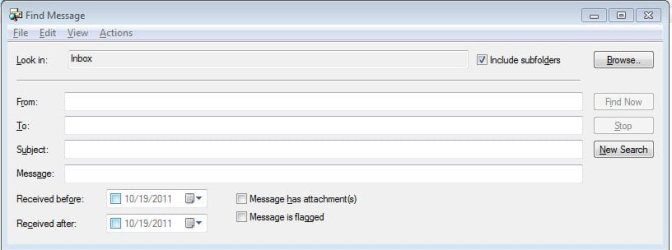
Here is my Find dialog box for WLM 2009; isn't 2011 the same?
 

Attachments

  • WLM Find.JPG
    WLM Find.JPG
    29.8 KB · Views: 4

My Computer My Computer

Computer type
PC/Desktop
Computer Manufacturer/Model Number
OQO 2+
OS
Windows 8 Pro w/MC 32-bit
CPU
Intel Atom 1.86 GHz
Motherboard
OQO 2+
Memory
2 GB
Graphics Card(s)
Intel GMA 500
Sound Card
IDT
Monitor(s) Displays
LCD
Screen Resolution
800 x 480 (portable) 1280 x 1024 (docked)
Hard Drives
64 GB SSD
PSU
9 Ah Battery (portable) or OQO Brick (docked)
Case
Shirt Pocket Sized
Cooling
Tiny Fan
Keyboard
Slide out (portable) DiNovo Edge (docked)
Mouse
Eraser head (portable) Logitech Bluetooth (docked)
Internet Speed
WWAN or 802.11G (portable) T1 (docked)
Browser
IE 10
Other Info
DVD-RW OQO Docking Station
only half solved

Here is my Find dialog box for WLM 2009; isn't 2011 the same?

Ah, that looks familiar, yes I used that in 2009. Also in 2010. But I find no such screen in the 2011 version. On the main menu is:
HOME > FIND > OPTIONS 1) FIND TEXT
2) MESSAGE
They work well if that is what you want. But if you want restrictions as in that window, you seem to be out of luck! Or at least, I am.
 

My Computer My Computer

Computer Manufacturer/Model Number
dell inspiron 15
OS
windows 7
In 2009, I can expose the detailed find message dialog by highlighting any folder in the left pane and using Ctrl-Shift-F. Let us know what happens if you do that in 2011.

Also I found this Q&A:

Q: Is there an equivalent of the "find message " in Live Mail that we used in XP? I used to be able to use "From", "To", "Subject" after clicking on
"Find" to retrieve an email.

A: Wave 4 Version 15(currently in beta) Alt O FI or Ribbon/Folders tab/Find
 

My Computer My Computer

Computer type
PC/Desktop
Computer Manufacturer/Model Number
OQO 2+
OS
Windows 8 Pro w/MC 32-bit
CPU
Intel Atom 1.86 GHz
Motherboard
OQO 2+
Memory
2 GB
Graphics Card(s)
Intel GMA 500
Sound Card
IDT
Monitor(s) Displays
LCD
Screen Resolution
800 x 480 (portable) 1280 x 1024 (docked)
Hard Drives
64 GB SSD
PSU
9 Ah Battery (portable) or OQO Brick (docked)
Case
Shirt Pocket Sized
Cooling
Tiny Fan
Keyboard
Slide out (portable) DiNovo Edge (docked)
Mouse
Eraser head (portable) Logitech Bluetooth (docked)
Internet Speed
WWAN or 802.11G (portable) T1 (docked)
Browser
IE 10
Other Info
DVD-RW OQO Docking Station
@roncerr: sorry for delay, Your Wave 4 idea seems to apply only to a games machine. I tried your ctrl-sh-F. It didn't work. And somewhere in messing with it, the existing 'fix' vanished and could not be restored! Vanishing 'Find' windows again. Rebooting didn't help. So in desperation I tried changing the screen resolution from the "recommended" 1366 x 768 to a lower one. 1024x768 didn't work, then 1280x720 did, and even the lowest, 800x600, worked. Counter-intuitive! Even weirder, when I rebooted and tried 1366x768 again, it worked! So I have no confidence the same bizarre events won't happen again, but meanwhile am counting my blessings.
 

My Computer My Computer

Computer Manufacturer/Model Number
dell inspiron 15
OS
windows 7
...in desperation I tried changing the screen resolution from the "recommended" 1366 x 768 to a lower one... Even weirder, when I rebooted and tried 1366x768 again, it worked!...
That reminds me of my favorite Windows quote from The Black Viper www.blackviper.com : "If you haven't already rebooted...reboot now. If you have rebooted...reboot again."
 

My Computer My Computer

Computer type
PC/Desktop
Computer Manufacturer/Model Number
OQO 2+
OS
Windows 8 Pro w/MC 32-bit
CPU
Intel Atom 1.86 GHz
Motherboard
OQO 2+
Memory
2 GB
Graphics Card(s)
Intel GMA 500
Sound Card
IDT
Monitor(s) Displays
LCD
Screen Resolution
800 x 480 (portable) 1280 x 1024 (docked)
Hard Drives
64 GB SSD
PSU
9 Ah Battery (portable) or OQO Brick (docked)
Case
Shirt Pocket Sized
Cooling
Tiny Fan
Keyboard
Slide out (portable) DiNovo Edge (docked)
Mouse
Eraser head (portable) Logitech Bluetooth (docked)
Internet Speed
WWAN or 802.11G (portable) T1 (docked)
Browser
IE 10
Other Info
DVD-RW OQO Docking Station
Back
Top