Solved winload.exe digital signature cannot be verified error code:0xc0000428

homehome

New member
Local time
3:04 AM
Messages
9
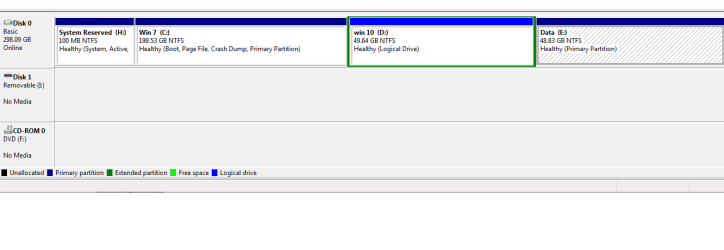
I want to dual boot windows 7 and windows 10.

I have windows 7 installed on my C drive. (disk manage image attached)

Win 10 (D drive) where I want to install windows 10.

IN installation process:
"Getting files ready for installation" completes about 25% and then it reboots and shows the error.

http://www.tenforums.com/attachment...ows-10-clean-install-6_install_windows_10.jpg


In boot option I have
1) Windows setup
2) Windows 7

When I click on option 1(setup), it shows the error and setup cannot from that point progress.

I have no problem booting and running windows 7(option 2).
 

Attachments

  • disk.png
    disk.png
    8.7 KB · Views: 1

My Computer My Computer

Computer type
PC/Desktop
OS
Windows 7
Hmm, maybe the logical partition causes a problem. (You can install on a logical as long as boot files are on primary as far as I know but who knows :)).

Is the iso in good shape? Any memory issues?
 

My Computer My Computer

Computer type
PC/Desktop
Computer Manufacturer/Model Number
Custom Build
OS
Windows 7 Ultimate x64 SP1
CPU
AMD Phenom 2 1090T
Motherboard
Gigabyte GA-890FXA-UD5
Memory
2x8GB Kingston HyperX Fury Black 1600Mhz Unganged
Graphics Card(s)
MSI GTX 970 Gaming 4G
Sound Card
Realtek On-Board HD 7.1 Audio / Logitech G35
Monitor(s) Displays
3xAcer GD245HQ
Screen Resolution
1920x1080
Hard Drives
Samsung 850 Pro 512GB SSD - OS /
WD Caviar Black SATA 3 - 1 TBx2 - Dynamic RAID 0 /
WD Caviar Green SATA 2 - 640GBx2 - Dynamic RAID 0 /
WD Caviar Green SATA 2 - 640GB - Internal Backup /
Seagate Barracude SATA 3 - 3TB - External Backup/ Sync
PSU
HighPower 1000W
Case
Cooler Master HAF 932
Cooling
Noctua NH-D14
Keyboard
Logitech G19
Mouse
Logitech G500
Internet Speed
100/4 Mbit Cable (100GB quota)
Antivirus
ZoneAlarm Extreme Security / MBAM Pro / MBAE Free / SAS Free

Browser
IE 11 - Firefox - Chrome
Other Info
Logitech F710/ G27/ G940/ Z5500 // TrackIR 5 // Nvidia 3D Surround Vision
No problem with iso.

Even if I try to install on C drive it gives same error.
 

My Computer My Computer

Computer type
PC/Desktop
OS
Windows 7
In BIOS, SATA operation mode AHCI or RAID? Maybe you need pre-install drivers?
 

My Computer My Computer

Computer type
PC/Desktop
Computer Manufacturer/Model Number
Custom Build
OS
Windows 7 Ultimate x64 SP1
CPU
AMD Phenom 2 1090T
Motherboard
Gigabyte GA-890FXA-UD5
Memory
2x8GB Kingston HyperX Fury Black 1600Mhz Unganged
Graphics Card(s)
MSI GTX 970 Gaming 4G
Sound Card
Realtek On-Board HD 7.1 Audio / Logitech G35
Monitor(s) Displays
3xAcer GD245HQ
Screen Resolution
1920x1080
Hard Drives
Samsung 850 Pro 512GB SSD - OS /
WD Caviar Black SATA 3 - 1 TBx2 - Dynamic RAID 0 /
WD Caviar Green SATA 2 - 640GBx2 - Dynamic RAID 0 /
WD Caviar Green SATA 2 - 640GB - Internal Backup /
Seagate Barracude SATA 3 - 3TB - External Backup/ Sync
PSU
HighPower 1000W
Case
Cooler Master HAF 932
Cooling
Noctua NH-D14
Keyboard
Logitech G19
Mouse
Logitech G500
Internet Speed
100/4 Mbit Cable (100GB quota)
Antivirus
ZoneAlarm Extreme Security / MBAM Pro / MBAE Free / SAS Free
Browser
IE 11 - Firefox - Chrome
Other Info
Logitech F710/ G27/ G940/ Z5500 // TrackIR 5 // Nvidia 3D Surround Vision
No I dont think I need any driver because few months back I was able to install win 10 when it first came out.

Can you tell me reasons behind Windows not able to verify winload.exe????

I am able to overwrite win7 on c drive with win7 only but cannot overwrite with win8 or win10.
So I think problem is with my installed win7.
 

My Computer My Computer

Computer type
PC/Desktop
OS
Windows 7
Back
Top