Solved winload.exe problem after fresh install.

jeraldo

New member
Local time
2:21 AM
Messages
8
please help. i have formated my laptop and has done a fresh install on it with windows 7 but after entering my username, computer name and password it will reboot then after that the winload.exe problem appears. ive repeated the installation multiple times and still get the same problem.
 

My Computer

OS
Windows 7 32-bit

My Computer

Computer type
PC/Desktop
Computer Manufacturer/Model Number
Dell XPS 420
OS
Windows 10, Home Clean Install
CPU
Intel Core2 processsor Q8200(2.33Ghz 1333FSB) Quad Core Tech
Motherboard
Dell
Memory
6 gb
Graphics Card(s)
ATI Radeon 256MB HD3650
Sound Card
Intergrated 7.1 Channel Audio
Monitor(s) Displays
Dell SP2009W 20"
Hard Drives
640 GB Serial ATA Hard drive
Cooling
Fan
Keyboard
Dell USB Keyboard
Mouse
Dell Premium Optical USB
Internet Speed
DSL 2.85
Are you using OEM manufacturer's Recovery Disks?
 

My Computer

OS
ME/XP/Vista/Win7
Nope im not using oem. ive used the dvd to install on the same machine before.

ive got much worse problem now. i cant boot my laptop. gets stuck in the acer screen. cant even get to BIOS set up.
 

My Computer

OS
Windows 7 32-bit
Hello jeraldo, welcome to Seven Forums!


It would be best to do a complete wipe of the Hard Disk Drive / Solid State Drive and then start the installation process again, have a look at Step One of the Optimize tutorial below; after you have copied out or made back-ups of the data you need to save to external media, then boot the Windows 7 installation media to do the wipe secure erase to the HDD / SSD and be sure to post back with any further questions you may have and to keep us informed.

:info: Whether you use diskpart to run either the clean all command to completely wipe a HDD / SSD or just the clean command to remove the format configuration data and don't use diskpart to create at least a single partition to do the installation to, letting the Windows installer do the format you will end up with the new Windows 7 System Reserved partition, if you want to make your own decision whether this partition is added, study these two (2) options below.
  • Then if you do not want to create the new Windows 7 "System Reserved" partition use the outline in Step Two #2 to create, format and mark Active a single 100GB partition to do the installation to.
  • If you do want to create the "System Reserved" partition use the outline in Step Two #3 to create, format and mark Active the System Reserved partition and then create and format the 100GB partition to do the installation to.
Either way, running the clean all then creating and formatting the partition(s) using diskpart will get you the best possible space to do a clean install of Windows 7 to; you can always extend the Windows partition to include the remaining unallocated space on the HDD / SSD or create additional Primary partitions or an Extended partition after the installation completes if you choose.

SSD / HDD : Optimize for Windows Reinstallation

DISKPART : At PC Startup

Do a Clean Install with a Upgrade Windows 7 Version

 

My Computer

Computer Manufacturer/Model Number
* BFK Customs *
OS
W 7 64-bit Ultimate
CPU
Intel Q9550 Yorkfield
Motherboard
ASUS P5Q Pro
Memory
8GB Dominator 8500C5D
Graphics Card(s)
ATI : XFX 5870
Sound Card
Realtek HD Audio 7-1
Monitor(s) Displays
1x 47" LCD HDMI & 3x 26" LCD HDMI
Screen Resolution
1920x1080P & 1920x1200
Hard Drives
1x 80GB Intel X25-M G2 SSD : 1x 500GB & 1x 640GB WD Caviar Black(s)
PSU
Corsair 620HX
Case
Cooler Master RC-690
Cooling
Tuniq Tower 120, 2x 140mm and 3x 120mm case fans
Keyboard
Microsoft 500
Mouse
Razer Diamondback 3G
Internet Speed
14 Mb/s
Other Info
1x Koutech 3Gb/s SATA HDD Hot Swap Rack
Nope im not using oem. ive used the dvd to install on the same machine before.

ive got much worse problem now. i cant boot my laptop. gets stuck in the acer screen. cant even get to BIOS set up.

Try removing the HD & see if it will boot to BIOS.
 

My Computer

OS
ME/XP/Vista/Win7
thanks for the replies guys. will try later. i still have a job interview later and this problem is realy freakin ne off. dont have much experience with laptop hdd though but ill give it a go.
 

My Computer

OS
Windows 7 32-bit
well. my laptop is still under warranty. so i guess i cant try your suggestions for now. cant open the HDD dock. do you think theyll fix it for a BIOS problem? problem is how am i going to back my data up. i guess its bye bye to my files. :\
 

My Computer

OS
Windows 7 32-bit
If you're concerned about voiding your warranty then use the included one-year Tech Support to resolve the issue.

Let us know how it works out.
 
well. my laptop is still under warranty. so i guess i cant try your suggestions for now. cant open the HDD dock. do you think theyll fix it for a BIOS problem? problem is how am i going to back my data up. i guess its bye bye to my files. :\
If you have data on the disk then you could try to read it in a number of ways by booting to a CD/DVD.
eg.
1) Boot from a system repair disk or installation DVD and use the install driver option to explore connected drives. (Of course your not actually installing a driver).
2) Download a program like Hirens boot CD. Start the mini XP & use it's Windows explorer.
Download Hiren

You can also use the Macrium image software on Hirens and try to make an image of your current disk. You may be able to mount this image and extract the data later.
 

My Computer

Computer type
PC/Desktop
Computer Manufacturer/Model Number
Own build
OS
Windows 7x64 Home Premium SP1
CPU
Intel i7 2600k
Motherboard
ASUS P8Z68 Deluxe
Memory
G.Skill Ripjaws (DDR3-1600) 2x4GB
Graphics Card(s)
Nvidia GeForce GTS 450; Intel HD Graphics 3000(GT2+)
Monitor(s) Displays
Dell Ultrasharp IPS panel U2311H, Samsung SyncMaster P2350
Screen Resolution
1920x1080
Hard Drives
Samsung 850 Pro SSD 256GB, Samsung SSD 840 120GB, Seagates 1TB Barracuda ST31000528AS x2
PSU
Seasonic M12II 520W
Case
Lian Li Lancool PC-K60
Cooling
Case: 1x120mm, 3x140mm CPU: Hyper 212+
Keyboard
Logitech MK520 (wireless)
Mouse
Logitech MK520
Internet Speed
6-7 Mbps
Antivirus
Norton Security Premium, Malwarebytes on 2 (MSE on 3rd PC)
Browser
FireFox
Other Info
Audio: Logitech Z523 2.1

My Computer

OS
ME/XP/Vista/Win7
I thought there was a tutorial that discussed the method 1) I referred to but couldn't find it. My oversight, BFK did indeed provide a link to it!

However, I would seriously consider downloading Hirens boot CD which you can use to copy out your data and make a Macrium image before sending your PC off. You make the Macrium image from the Hirens mini XP environment not by booting into Windows 7. The Macrium imaging software is incorporated into Hirens.


PS: for the record, after some digging, my first exposure to method 1) was here which post dates the referenced tutorial. Appologies to Theog.
 
Last edited:

My Computer

Computer type
PC/Desktop
Computer Manufacturer/Model Number
Own build
OS
Windows 7x64 Home Premium SP1
CPU
Intel i7 2600k
Motherboard
ASUS P8Z68 Deluxe
Memory
G.Skill Ripjaws (DDR3-1600) 2x4GB
Graphics Card(s)
Nvidia GeForce GTS 450; Intel HD Graphics 3000(GT2+)
Monitor(s) Displays
Dell Ultrasharp IPS panel U2311H, Samsung SyncMaster P2350
Screen Resolution
1920x1080
Hard Drives
Samsung 850 Pro SSD 256GB, Samsung SSD 840 120GB, Seagates 1TB Barracuda ST31000528AS x2
PSU
Seasonic M12II 520W
Case
Lian Li Lancool PC-K60
Cooling
Case: 1x120mm, 3x140mm CPU: Hyper 212+
Keyboard
Logitech MK520 (wireless)
Mouse
Logitech MK520
Internet Speed
6-7 Mbps
Antivirus
Norton Security Premium, Malwarebytes on 2 (MSE on 3rd PC)
Browser
FireFox
Other Info
Audio: Logitech Z523 2.1
guys have any idea on how to disable quick boot via shortcut key and by not getting into bios settings? need to see my POST. thanks.
 

My Computer

OS
Windows 7 32-bit
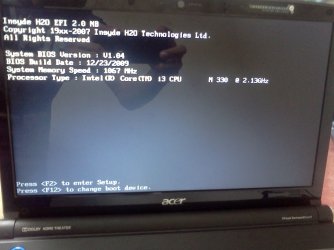
finally got my POST to show up. but it gets stuck in here. when i press F2 or any other keys it just beeps. but i can restart it using ctrl+alt+del.

please see attached image.
 

Attachments

  • IMG1006.jpg
    IMG1006.jpg
    237 KB · Views: 14

My Computer

OS
Windows 7 32-bit
Try removing the HD, & reboot.
Post back with new picture.
 

My Computer

OS
ME/XP/Vista/Win7
Hi thid is what i got after removing my hdd.

http://db.tt/vghCPft

Sorry for the link to my dropbox having problems attaching the pic from my phone.
 

My Computer

OS
Windows 7 32-bit
You disconnected your disk as someone told you - correct?
Your BIOS is stopping in the POST where I would expect it to. No bootable device was found.
If your PC is under warranty don't touch/flash the BIOS just return it after backing up your data. The Hirens Boot CD is a more convenient way to get your data off as I suggested before.

If out of warranty still try booting to a Hirens Boot CD or USB flash drive.
 

My Computer

Computer type
PC/Desktop
Computer Manufacturer/Model Number
Own build
OS
Windows 7x64 Home Premium SP1
CPU
Intel i7 2600k
Motherboard
ASUS P8Z68 Deluxe
Memory
G.Skill Ripjaws (DDR3-1600) 2x4GB
Graphics Card(s)
Nvidia GeForce GTS 450; Intel HD Graphics 3000(GT2+)
Monitor(s) Displays
Dell Ultrasharp IPS panel U2311H, Samsung SyncMaster P2350
Screen Resolution
1920x1080
Hard Drives
Samsung 850 Pro SSD 256GB, Samsung SSD 840 120GB, Seagates 1TB Barracuda ST31000528AS x2
PSU
Seasonic M12II 520W
Case
Lian Li Lancool PC-K60
Cooling
Case: 1x120mm, 3x140mm CPU: Hyper 212+
Keyboard
Logitech MK520 (wireless)
Mouse
Logitech MK520
Internet Speed
6-7 Mbps
Antivirus
Norton Security Premium, Malwarebytes on 2 (MSE on 3rd PC)
Browser
FireFox
Other Info
Audio: Logitech Z523 2.1
hi guys! finally got my laptop to work with the said hard disk.

what i did is i removed the hard disk to see if i can get into BIOS without it. and i did got into BIOS without the HDD.


then just like what Bare Foot Kid said, i wiped out my hard disk using diskpart. i did it in XP after backing up my files. thanks a lot to everyone who replied in this thread! :)
 

My Computer

OS
Windows 7 32-bit
Back
Top