Solved Winsock alteration and Carbonite install failure?

markg2

New member
Member
VIP
Local time
8:40 PM
Messages
477
Carbonite stopped communicating with its servers last week. Today was the 3rd Carbonite person trying to fix the program--after uninstall it will install but fails trying to register with home. Today's technician was a senior person on the escalation team.

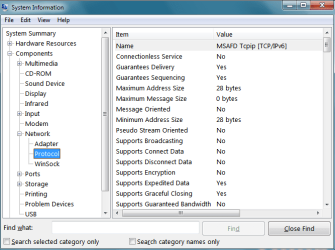
His only thought at this point has to do with a previous installation of Lavasoft altering the Winsock name. The uninstall did not put Winsock back to its Windows default configuration (name). The current 'Name' is LavasoftLSP over [MSAFD Tepip [UDP/IP] per System Summary/Components/Network/Protocol.


Although I have no memory of installing Lavasoft in 2015 there's a scattering of Lavasoft files and folders on the machine dated 10/19/2015.

According to Carbonite this may be the reason their software is failing when attempting to register with their servers at the end of installation. Dealing with the Lavasoft condition is out of their responsibility.

Carbonite suggested that Lavasoft should not only reset the Winsock setting to default but also should have a thorough removal tool or know what else may be lingering from the uninstall and possibly interfering with Carbonite's ability to call home and install satisfactorily.

I'm not holding my breadth for Lavasoft help. Is there a util that will automatically reset winsock to the Window's default getting rid of whatever Lavasoft has added?

I tried installing Revo Installer but there's not enough of Lavasoft present for same to see it.

Mark
 
Last edited:

My Computer My Computer

At a glance

Windows 7 & Windows 10
Computer type
PC/Desktop
OS
Windows 7 & Windows 10
I go this from the internet:
@netsh winsock reset & int ip reset
netsh winsock reset
netsh int ip reset
pause
exit

Perhaps, all you need to do is run the winsock netsh line in a dox box clicked Run As Administrator
 

My Computer My Computer

At a glance

Windows 7 Professional 64-bitDesktop i5; Acers i5 & i7desktop 16GB; 1 Acer 8GB & 1 Acer 16GB
Computer type
PC/Desktop
Computer Manufacturer/Model Number
Antec desktop; Acer Aspire laptops
OS
Windows 7 Professional 64-bit
CPU
Desktop i5; Acers i5 & i7
Memory
desktop 16GB; 1 Acer 8GB & 1 Acer 16GB
Hard Drives
1TB split into 2 equal partitions [OS and data] usable by RJS
Internet Speed
AT&T DSL
Browser
FF, GChrome, msIE
Other Info
Windows 7 Firewall, Emsisoft AM/AV, MSE [scan-only], SpywareBlaster, Ruiware/BillP combine

My Computer My Computer

At a glance

Windows 10 Pro. 64/ version 1709 Windows 7 Pr...Intel i7-6800K @ 4.3Corsair Platinum 16 gig @2400EVGA GTX 1070 OC
Computer type
PC/Desktop
Computer Manufacturer/Model Number
Home made Desktop
OS
Windows 10 Pro. 64/ version 1709 Windows 7 Pro/64
CPU
Intel i7-6800K @ 4.3
Motherboard
ASUS X-99 Deluxe II
Memory
Corsair Platinum 16 gig @2400
Graphics Card(s)
EVGA GTX 1070 OC
Monitor(s) Displays
Asus 27" LED LCD/VE278Q
Screen Resolution
1920-1080 or 1280-720 HDMI
Hard Drives
INTEL SSD 730-240 Gb Sata 3.0/
PSU
EVGA Platium 1200W
Case
Phanteks Luxe Tempered Glass 8 fans/ one radiator
Cooling
XSPC/ Water Cooled CPU
Keyboard
Das 4 Professional
Mouse
Logitech M705/MX Anywhere 2-S
Internet Speed
100 mbits
Antivirus
Microsoft Security Essentials/ Malwarebytes Premium 3.0/ SAS
Browser
I.E. 11 default/Firefox/ ISP Time Warner Cable/Spectrum
Other Info
LG BluRay Burner/
Sound system-KLipsch-THX/
Icy Dock ssd Hot Swap bays.
Your suggested util sure looked like it had the potential to fix the problem and it did fix 'something' per the results but not my problem. It appears that a reset of the Winsock TCP/IP does not change any name/values that were altered by a program back to the default.

I'm attaching 2 screenshots just to be sure you all see the problem. One is from my wife's (Connie) machine with no problem and the protocol value(s) is default and the other is my (Mark) machine that has I think 3 of the top name/values altered by Lavasoft. As you scroll down the Protocol screen on the machine and get past the first several groups, the balance of the groups have the default name/value.

Mark
 

Attachments

  • msinfo 32_Connie.png
    msinfo 32_Connie.png
    18.4 KB · Views: 59
  • msinfo32_Mark.PNG
    msinfo32_Mark.PNG
    16.8 KB · Views: 3

My Computer My Computer

At a glance

Windows 7 & Windows 10
Computer type
PC/Desktop
OS
Windows 7 & Windows 10
I'm no expert on such matters but if it was my computer I would try using a Restore Point before the Lavasoft program was installed. Then if need be set the default settings again.
 

My Computer My Computer

At a glance

Windows 10 Pro. 64/ version 1709 Windows 7 Pr...Intel i7-6800K @ 4.3Corsair Platinum 16 gig @2400EVGA GTX 1070 OC
Computer type
PC/Desktop
Computer Manufacturer/Model Number
Home made Desktop
OS
Windows 10 Pro. 64/ version 1709 Windows 7 Pro/64
CPU
Intel i7-6800K @ 4.3
Motherboard
ASUS X-99 Deluxe II
Memory
Corsair Platinum 16 gig @2400
Graphics Card(s)
EVGA GTX 1070 OC
Monitor(s) Displays
Asus 27" LED LCD/VE278Q
Screen Resolution
1920-1080 or 1280-720 HDMI
Hard Drives
INTEL SSD 730-240 Gb Sata 3.0/
PSU
EVGA Platium 1200W
Case
Phanteks Luxe Tempered Glass 8 fans/ one radiator
Cooling
XSPC/ Water Cooled CPU
Keyboard
Das 4 Professional
Mouse
Logitech M705/MX Anywhere 2-S
Internet Speed
100 mbits
Antivirus
Microsoft Security Essentials/ Malwarebytes Premium 3.0/ SAS
Browser
I.E. 11 default/Firefox/ ISP Time Warner Cable/Spectrum
Other Info
LG BluRay Burner/
Sound system-KLipsch-THX/
Icy Dock ssd Hot Swap bays.
No restore point even close.
 

My Computer My Computer

At a glance

Windows 7 & Windows 10
Computer type
PC/Desktop
OS
Windows 7 & Windows 10
Well Mark so far not good. What I will do is go back to the ranch and see if I can find some help.
Hang in there.

If it was my computer I would search the entire system for anything Lavasoft including the registry, but I not qualified to give instructions on doing such a thing.
One mistake and it's door stop time.

Do you have Backups in house? Only having online backup is not a good thing?
 

My Computer My Computer

At a glance

Windows 10 Pro. 64/ version 1709 Windows 7 Pr...Intel i7-6800K @ 4.3Corsair Platinum 16 gig @2400EVGA GTX 1070 OC
Computer type
PC/Desktop
Computer Manufacturer/Model Number
Home made Desktop
OS
Windows 10 Pro. 64/ version 1709 Windows 7 Pro/64
CPU
Intel i7-6800K @ 4.3
Motherboard
ASUS X-99 Deluxe II
Memory
Corsair Platinum 16 gig @2400
Graphics Card(s)
EVGA GTX 1070 OC
Monitor(s) Displays
Asus 27" LED LCD/VE278Q
Screen Resolution
1920-1080 or 1280-720 HDMI
Hard Drives
INTEL SSD 730-240 Gb Sata 3.0/
PSU
EVGA Platium 1200W
Case
Phanteks Luxe Tempered Glass 8 fans/ one radiator
Cooling
XSPC/ Water Cooled CPU
Keyboard
Das 4 Professional
Mouse
Logitech M705/MX Anywhere 2-S
Internet Speed
100 mbits
Antivirus
Microsoft Security Essentials/ Malwarebytes Premium 3.0/ SAS
Browser
I.E. 11 default/Firefox/ ISP Time Warner Cable/Spectrum
Other Info
LG BluRay Burner/
Sound system-KLipsch-THX/
Icy Dock ssd Hot Swap bays.
It's defiantly a winsock issue. https://www.reasoncoresecurity.com/...c25cc6c15a7b42cfbde6ce1b892d57e9c04381f2.aspx you might need to install ad-aware from them as a trial or something and then uninstall it from add and remove to put your stuff to normal. Before doing that install everything https://www.voidtools.com/ and type lavasoft and see what it finds for you. Can you also post how many adapters your system has above the protocol section, perhaps it left a tunneling adapter behind but I would think the cabronite people would have found that. I would also scan your system for malware if you don't remember even using anything lavasoft.
 

My Computer My Computer

At a glance

10 Pro x64Ryzen 9 3900X64GB(4x16GB) DDR4EVGA 1080ti FTW3
Computer type
PC/Desktop
Computer Manufacturer/Model Number
Custom
OS
10 Pro x64
CPU
Ryzen 9 3900X
Motherboard
Asrock x370 Tachi
Memory
64GB(4x16GB) DDR4
Graphics Card(s)
EVGA 1080ti FTW3
Sound Card
ASUS Xonar Essence STX (V4 Bursons), ODAC rev B, NFB-11, O2
Monitor(s) Displays
3xASUS PB278Q/R, Optoma HD142X
Screen Resolution
3x1440p, 1080p
Hard Drives
512GB 850 EVO(OS, Programs)
4TB (Movies)
3TB (Downloads)
3TB (Programs)
1TB HDD (Games)
2x6TB R1 (videos)
PSU
AX760
Case
Fractal Define R5
Cooling
NH-D15S
Keyboard
Massdrop Ctrl with Box Navy's
Mouse
G903, Alioth XXL Mat
Internet Speed
280/40
Antivirus
MBAM, ESET
Browser
Canary 64 Bit
Other Info
I also own a Thinkpad P50 Xeon 4K, X220T, X1C5
Try running the attached Winsock reset bat file (Download to desktop> Right click on .bat file and choose Run as administrator).

View attachment renew-ip-reset-winsock.bat

Easiest fix if it corrects your added entries. If no change:

You might try running the Network Diagnostics

Manual steps to recover from Winsock2 corruption for Windows Vista users
Winsock corruption can cause connectivity problems. To resolve this issue by using Network Diagnostics in Windows Vista, follow these steps:
Click , and then click Network.
Click Network and Sharing Center.
In the Network and Sharing Center box, click Diagnose and Repair.
Note You may also access the Network and Sharing Center in Control Panel.

This should apply to Windows 7 as well Source

This would not help your Carbonite issue, but the Lavasoft may not be the issue if you have the original 10 entries

MSAFD Tcpip [TCP/IP]
MSAFD Tcpip [UDP/IP]
MSAFD Tcpip [TCP/IPv6]
MSAFD Tcpip [UDP/IPv6]
RSVP UDP Service Provider
RSVP TCP Service Provider
RSVP UDPv6 Service Provider
RSVP TCPv6 Service Provider
MSAFD NetBIOS [\Device\NetBT_Tcpip...

Lavasoft does add that entry, but it may not have REPLACED an original entry

https://www.reasoncoresecurity.com/...c25cc6c15a7b42cfbde6ce1b892d57e9c04381f2.aspx

A Guy
 

My Computer My Computer

At a glance

Windows 10 Home x64INTEL Core i5-750 Quad-Core 3.37GHzHyperX Fury Black Series 8GB (2 x 4GB) 1866MhzEVGA GeForce GTX 750 Superclocked 1GB 128-Bit...
Computer type
PC/Desktop
OS
Windows 10 Home x64
CPU
INTEL Core i5-750 Quad-Core 3.37GHz
Motherboard
ASUS P7P55D
Memory
HyperX Fury Black Series 8GB (2 x 4GB) 1866Mhz
Graphics Card(s)
EVGA GeForce GTX 750 Superclocked 1GB 128-Bit GDDR5
Monitor(s) Displays
LG 32MA68HY 32" IPS
Screen Resolution
1920 x 1080
Hard Drives
Samsung 840 Evo 120GB, SEAGATE 500GB Barracuda® 7200.12, SATA 3 Gb/s, 7200 RPM, 16MB cache
PSU
ANTEC TruePower New TP-550, 80 PLUS, 550W
Case
ANTEC Three Hundred Illusion
Cooling
COOLER MASTER Hyper 212 Plus, 4 x 120mm 1 x 140mm Noctua's
Internet Speed
85 + Mbps
Antivirus
Avast
Browser
Vivaldi
Thanks rvcjew and A Guy for coming to help.
 

My Computer My Computer

At a glance

Windows 10 Pro. 64/ version 1709 Windows 7 Pr...Intel i7-6800K @ 4.3Corsair Platinum 16 gig @2400EVGA GTX 1070 OC
Computer type
PC/Desktop
Computer Manufacturer/Model Number
Home made Desktop
OS
Windows 10 Pro. 64/ version 1709 Windows 7 Pro/64
CPU
Intel i7-6800K @ 4.3
Motherboard
ASUS X-99 Deluxe II
Memory
Corsair Platinum 16 gig @2400
Graphics Card(s)
EVGA GTX 1070 OC
Monitor(s) Displays
Asus 27" LED LCD/VE278Q
Screen Resolution
1920-1080 or 1280-720 HDMI
Hard Drives
INTEL SSD 730-240 Gb Sata 3.0/
PSU
EVGA Platium 1200W
Case
Phanteks Luxe Tempered Glass 8 fans/ one radiator
Cooling
XSPC/ Water Cooled CPU
Keyboard
Das 4 Professional
Mouse
Logitech M705/MX Anywhere 2-S
Internet Speed
100 mbits
Antivirus
Microsoft Security Essentials/ Malwarebytes Premium 3.0/ SAS
Browser
I.E. 11 default/Firefox/ ISP Time Warner Cable/Spectrum
Other Info
LG BluRay Burner/
Sound system-KLipsch-THX/
Icy Dock ssd Hot Swap bays.
Hallelujah! A Guy's batch file did the trick :-).

For Layback Bear and others general info--

Yesterday I did try installing Lavasoft with the theory of uninstalling with Revo Uninstaller Pro that is excellent at removing all traces of a program if the program was installed with RU on the machine and you could use the 'trace' option. That idea was temporarily thwarted by a bug in the current LS version that upon initiation of uninstall LS prompts to reboot and aborts the process. There's a file fix that they've been handing out on their forum and I've been waiting until Monday to get the file, reinstall LS, run the file and uninstall with RU. I've been using Everywhere (a long trusted util) to check on LS remnants all the while. Since I had initiated the uninstall with RU same attempted to do its work but (according to Everywhere) I've still got way more LS left than prior since RU relies first upon the target program's native uninstaller and then does its thing with all the leftovers.

I'm going to try reinstalling Carbonite again since, if the Carbonite guy's theory is correct, the rest of LS shouldn't be problematic. If the install fails, I'll still follow through with the complete plan outlined above to eradicate LS, run the batch file and try the Carbonite install again.

Thanks a ton!

Mark
 

My Computer My Computer

At a glance

Windows 7 & Windows 10
Computer type
PC/Desktop
OS
Windows 7 & Windows 10
I don't know of this (Everywhere). Could you explain?
 

My Computer My Computer

At a glance

Windows 10 Pro. 64/ version 1709 Windows 7 Pr...Intel i7-6800K @ 4.3Corsair Platinum 16 gig @2400EVGA GTX 1070 OC
Computer type
PC/Desktop
Computer Manufacturer/Model Number
Home made Desktop
OS
Windows 10 Pro. 64/ version 1709 Windows 7 Pro/64
CPU
Intel i7-6800K @ 4.3
Motherboard
ASUS X-99 Deluxe II
Memory
Corsair Platinum 16 gig @2400
Graphics Card(s)
EVGA GTX 1070 OC
Monitor(s) Displays
Asus 27" LED LCD/VE278Q
Screen Resolution
1920-1080 or 1280-720 HDMI
Hard Drives
INTEL SSD 730-240 Gb Sata 3.0/
PSU
EVGA Platium 1200W
Case
Phanteks Luxe Tempered Glass 8 fans/ one radiator
Cooling
XSPC/ Water Cooled CPU
Keyboard
Das 4 Professional
Mouse
Logitech M705/MX Anywhere 2-S
Internet Speed
100 mbits
Antivirus
Microsoft Security Essentials/ Malwarebytes Premium 3.0/ SAS
Browser
I.E. 11 default/Firefox/ ISP Time Warner Cable/Spectrum
Other Info
LG BluRay Burner/
Sound system-KLipsch-THX/
Icy Dock ssd Hot Swap bays.
Awesome, the previous steps to reset were not wrong, just missing what you specifically needed, which was the catalog reset (the contents of the bat file in text for clarification)

Code:
ipconfig /release
pause
ipconfig /renew
pause
netsh winsock reset [B][COLOR="Red"]catalog[/COLOR][/B]
pause
netsh int ip reset reset.log
pause

If your Carbonite issue remains, then this has not been why. At that point, you might change the path of this thread, or start another asking why the service will not connect. As much info as possible, including any changes made before it started failing, and error codes, etc. A firewall or security program can block something like that. Being unfamiliar with Carbonite, beyond knowing it is a cloud backup, I don't know if it installs a service on your machine, etc.

A Guy
 
Last edited:

My Computer My Computer

At a glance

Windows 10 Home x64INTEL Core i5-750 Quad-Core 3.37GHzHyperX Fury Black Series 8GB (2 x 4GB) 1866MhzEVGA GeForce GTX 750 Superclocked 1GB 128-Bit...
Computer type
PC/Desktop
OS
Windows 10 Home x64
CPU
INTEL Core i5-750 Quad-Core 3.37GHz
Motherboard
ASUS P7P55D
Memory
HyperX Fury Black Series 8GB (2 x 4GB) 1866Mhz
Graphics Card(s)
EVGA GeForce GTX 750 Superclocked 1GB 128-Bit GDDR5
Monitor(s) Displays
LG 32MA68HY 32" IPS
Screen Resolution
1920 x 1080
Hard Drives
Samsung 840 Evo 120GB, SEAGATE 500GB Barracuda® 7200.12, SATA 3 Gb/s, 7200 RPM, 16MB cache
PSU
ANTEC TruePower New TP-550, 80 PLUS, 550W
Case
ANTEC Three Hundred Illusion
Cooling
COOLER MASTER Hyper 212 Plus, 4 x 120mm 1 x 140mm Noctua's
Internet Speed
85 + Mbps
Antivirus
Avast
Browser
Vivaldi
Awesome, the previous steps to reseat were not wrong, just missing what you specifically needed, which was the catalog reset (the contents of the bat file in text for clarification)

Code:
ipconfig /release
pause
ipconfig /renew
pause
netsh winsock reset [B][COLOR="Red"]catalog[/COLOR][/B]
pause
netsh int ip reset reset.log
pause

If your Carbonite issue remains, then this has not been why. At that point, you might change the path of this thread, or start another asking why the service will not connect. As much info as possible, including any changes made before it started failing, and error codes, etc. A firewall or security program can block something like that. Being unfamiliar with Carbonite, beyond knowing it is a cloud backup, I don't know if it installs a service on your machine, etc.

A Guy

My father uses Carbonite on his work server, I'll see if I can remote in tonight and see if any services are added with it.
 

My Computer My Computer

At a glance

10 Pro x64Ryzen 9 3900X64GB(4x16GB) DDR4EVGA 1080ti FTW3
Computer type
PC/Desktop
Computer Manufacturer/Model Number
Custom
OS
10 Pro x64
CPU
Ryzen 9 3900X
Motherboard
Asrock x370 Tachi
Memory
64GB(4x16GB) DDR4
Graphics Card(s)
EVGA 1080ti FTW3
Sound Card
ASUS Xonar Essence STX (V4 Bursons), ODAC rev B, NFB-11, O2
Monitor(s) Displays
3xASUS PB278Q/R, Optoma HD142X
Screen Resolution
3x1440p, 1080p
Hard Drives
512GB 850 EVO(OS, Programs)
4TB (Movies)
3TB (Downloads)
3TB (Programs)
1TB HDD (Games)
2x6TB R1 (videos)
PSU
AX760
Case
Fractal Define R5
Cooling
NH-D15S
Keyboard
Massdrop Ctrl with Box Navy's
Mouse
G903, Alioth XXL Mat
Internet Speed
280/40
Antivirus
MBAM, ESET
Browser
Canary 64 Bit
Other Info
I also own a Thinkpad P50 Xeon 4K, X220T, X1C5
markg2
Thank you for clarifying Everything Search.
 

My Computer My Computer

At a glance

Windows 10 Pro. 64/ version 1709 Windows 7 Pr...Intel i7-6800K @ 4.3Corsair Platinum 16 gig @2400EVGA GTX 1070 OC
Computer type
PC/Desktop
Computer Manufacturer/Model Number
Home made Desktop
OS
Windows 10 Pro. 64/ version 1709 Windows 7 Pro/64
CPU
Intel i7-6800K @ 4.3
Motherboard
ASUS X-99 Deluxe II
Memory
Corsair Platinum 16 gig @2400
Graphics Card(s)
EVGA GTX 1070 OC
Monitor(s) Displays
Asus 27" LED LCD/VE278Q
Screen Resolution
1920-1080 or 1280-720 HDMI
Hard Drives
INTEL SSD 730-240 Gb Sata 3.0/
PSU
EVGA Platium 1200W
Case
Phanteks Luxe Tempered Glass 8 fans/ one radiator
Cooling
XSPC/ Water Cooled CPU
Keyboard
Das 4 Professional
Mouse
Logitech M705/MX Anywhere 2-S
Internet Speed
100 mbits
Antivirus
Microsoft Security Essentials/ Malwarebytes Premium 3.0/ SAS
Browser
I.E. 11 default/Firefox/ ISP Time Warner Cable/Spectrum
Other Info
LG BluRay Burner/
Sound system-KLipsch-THX/
Icy Dock ssd Hot Swap bays.
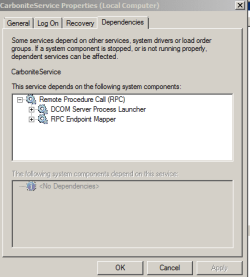
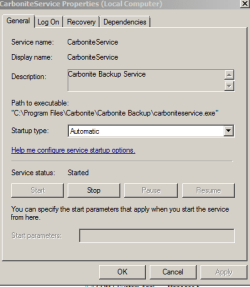
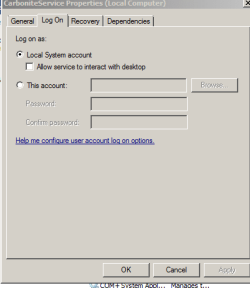
I know you said no more until a new thread but this will save you checking your dad's machine. Carbonite does run as a service. Carbonite is sort of running on my machine. It's installed but not functioning absent it registering with their servers.

Attached are the relevant screenshots.

Mark
 

Attachments

  • Service 1.PNG
    Service 1.PNG
    8 KB · Views: 45
  • Service 2.PNG
    Service 2.PNG
    7.8 KB · Views: 31
  • Service 3.PNG
    Service 3.PNG
    6 KB · Views: 31

My Computer My Computer

At a glance

Windows 7 & Windows 10
Computer type
PC/Desktop
OS
Windows 7 & Windows 10
Ah alright, he actually just told me they have switched to data health instead so it was not on there anyway. I remember it calling home quite frequently though. Have you looked at your host files?
 

My Computer My Computer

At a glance

10 Pro x64Ryzen 9 3900X64GB(4x16GB) DDR4EVGA 1080ti FTW3
Computer type
PC/Desktop
Computer Manufacturer/Model Number
Custom
OS
10 Pro x64
CPU
Ryzen 9 3900X
Motherboard
Asrock x370 Tachi
Memory
64GB(4x16GB) DDR4
Graphics Card(s)
EVGA 1080ti FTW3
Sound Card
ASUS Xonar Essence STX (V4 Bursons), ODAC rev B, NFB-11, O2
Monitor(s) Displays
3xASUS PB278Q/R, Optoma HD142X
Screen Resolution
3x1440p, 1080p
Hard Drives
512GB 850 EVO(OS, Programs)
4TB (Movies)
3TB (Downloads)
3TB (Programs)
1TB HDD (Games)
2x6TB R1 (videos)
PSU
AX760
Case
Fractal Define R5
Cooling
NH-D15S
Keyboard
Massdrop Ctrl with Box Navy's
Mouse
G903, Alioth XXL Mat
Internet Speed
280/40
Antivirus
MBAM, ESET
Browser
Canary 64 Bit
Other Info
I also own a Thinkpad P50 Xeon 4K, X220T, X1C5
Don't know what you mean by host files?

I just received a post from the LS forum. Once I reinstall LS (which I will now do) there's a file I must delete and then the uninstall works.

Btw, the only downside I've seen thus far with the batch file is that it turns off the Apple Bonjour service and Apple let's you know you need to turn it back on and reboot.

Mark
 

My Computer My Computer

At a glance

Windows 7 & Windows 10
Computer type
PC/Desktop
OS
Windows 7 & Windows 10

My Computer My Computer

At a glance

10 Pro x64Ryzen 9 3900X64GB(4x16GB) DDR4EVGA 1080ti FTW3
Computer type
PC/Desktop
Computer Manufacturer/Model Number
Custom
OS
10 Pro x64
CPU
Ryzen 9 3900X
Motherboard
Asrock x370 Tachi
Memory
64GB(4x16GB) DDR4
Graphics Card(s)
EVGA 1080ti FTW3
Sound Card
ASUS Xonar Essence STX (V4 Bursons), ODAC rev B, NFB-11, O2
Monitor(s) Displays
3xASUS PB278Q/R, Optoma HD142X
Screen Resolution
3x1440p, 1080p
Hard Drives
512GB 850 EVO(OS, Programs)
4TB (Movies)
3TB (Downloads)
3TB (Programs)
1TB HDD (Games)
2x6TB R1 (videos)
PSU
AX760
Case
Fractal Define R5
Cooling
NH-D15S
Keyboard
Massdrop Ctrl with Box Navy's
Mouse
G903, Alioth XXL Mat
Internet Speed
280/40
Antivirus
MBAM, ESET
Browser
Canary 64 Bit
Other Info
I also own a Thinkpad P50 Xeon 4K, X220T, X1C5
Back
Top