
Solved Winsxs - Safe to delete?

lehnerus2000

New member
Guru
Gold Member
VIP
Local time
12:35 AM
Messages
4,058
Location
Adelaide
When I installed Windows 7 (64 bit) in June/July (2010) it was using about 12 GB of the 20 GB partition I allocated to it.
It is now up to 17 GB (I'm gaining about 1 GB/month)!
At this rate my partition will be full early next year! :cry:

My setup:
I have disabled Hiberantion (8 GB saved)
I have my Page File on a seperate partition (12 GB saved).
I don't install/save anything to my OS partition, if I get the choice (no programs, docs, music, videos, etc.).

In XP, update info used to get stored on the OS partition and it was possible to "safely" delete it.
I have noticed that the Winsxs folder is currently 6.84 GB.
It seems to be full of driver files.
Are these files being used or are they backups?

Here is an image showing Glary Disk Analysis and Windows Explorer info.
Note that the figures don't seem to match!
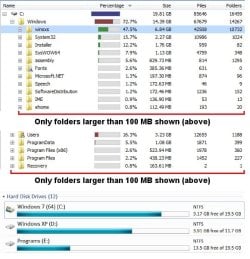
Disk Analysis 03.jpg

Any suggestions as to how I can avoid disaster, without having to reorganise my entire HDD setup (which is a PITA)?
 

My Computer My Computer

Computer type
PC/Desktop
Computer Manufacturer/Model Number
n/a
OS
W7 Ultimate SP1, LM19.2 MATE, W10 Home 1703, W10 Pro 1703 VM, #All 64 bit
CPU
AMD Phenom II x6 1100T, 3.3 GHz
Motherboard
ASUS M4A88T-M/USB3 (AM3)
Memory
12GB DDR3 1333 G-Skill (4GB x 2), G-Skill (2GB x 2)
Graphics Card(s)
NVIDIA GeForce GTX 660
Sound Card
Realtek?
Monitor(s) Displays
Samsung S23B350
Screen Resolution
1920x1080
Hard Drives
WD Green 2TB (SATA), WD Green 3TB (SATA), WD Blue 4TB (SATA), WD Blue 6TB (SATA)
PSU
Cooler Master
Case
Antec GX300 Tower
Cooling
3x Antec TRICOOL 120mm Fans
Mouse
Wired Optical
Internet Speed
DSL
Antivirus
Avast
Browser
Pale Moon (64 bit)
Other Info
2018-12-27 Upgraded HDDs
2015-12-10 Upgraded case, graphics card, storage
2015-08-15 Upgraded motherboard & RAM
2015-07-15 Upgraded LM17.1 to LM17.2
This will reduce the size of the winsxs folder


  1. Click Start > Run
  2. Type in CMD and press [enter]
  3. At the command prompt, type COMPCLN and press [enter]
  4. Press Y when prompted to continue
More info on winsxs
 

My Computer My Computer

Computer type
PC/Desktop
Computer Manufacturer/Model Number
Custom Build
OS
Windows 10 Pro x64, Arch Linux
CPU
Intel Core 2 Quad Q8200 OC'd 3.08GHz
Motherboard
Asus Rampage formula LGA775
Memory
8GB DDR2 900Mhz
Graphics Card(s)
MSI GT730 2GB GDDR5 (Kepler)
Sound Card
Supreme FX2
Monitor(s) Displays
Samsung LS22F350 LED
Screen Resolution
1080P
Hard Drives
Kingston SSDNow UV400 120GB, 500GB Hitachi, 2TB Samsung, 500GB Seagate FreeAgent, 640GB Samsung, 160GB Toshiba (Arch)
PSU
AeroCool 500W Bronze
Cooling
Cooler Master V6 + 3X fans
Keyboard
Prolink keyboard
Mouse
Logitech M705
Internet Speed
1MiB/s
Browser
Chrome Beta
Winsxs - Safe to delete?
No.

You're probably increasing in size from system restore points. You could turn it off (not recommend), or you could also delete older points to get back some space. You could also regulate the size it takes up. Be sure you know what you're doing and what it will do before you do it though.

http://www.sevenforums.com/tutorials/336-system-protection-restore-points-delete.html
http://www.sevenforums.com/tutorials/335-system-protection-change-disk-space-usage.html
http://www.sevenforums.com/tutorials/330-system-protection-turn-off.html
 

My Computer My Computer

Computer type
PC/Desktop
Computer Manufacturer/Model Number
Airbot 2.0
OS
Windows 7 Ultimate x64 SP1
CPU
Core i7 920 (D0) @ 4Ghz, *26c idle *65c full load on air
Motherboard
Asus P6X58D Premium - Sata 6Gb/s - USB 3.0
Memory
12GB DDR3 Corsair Dominator -CMD12GX3M6A1600C8 at 1600MHz
Graphics Card(s)
Zotac Geforce GTX 770
Sound Card
ASUS Xonar D2X
Monitor(s) Displays
1 LG 24" Flatron W2453V-PF 1 Samsung 24" P2450H both 2ms RT
Screen Resolution
1920x1080@60hz
Hard Drives
1 Samsung 250GB 840 Evo SSD
1 OCZ Vertex2 180GB SSD
1 TB Samsung Spinpoint F1 7200RPM 32MB cache
2 500GB WD Caviar Blacks 7200RPM 32MB cache (WD5001AALS)

Pioneer DVD Burner DVR-S18M
PSU
Corsair HX1000W
Case
Cooler Master HAF 932
Cooling
Case Fans *3 230mm, *1 140mm/CPU - *Tuniq Tower 120 Extreme
Keyboard
Logitech Wireless MK700
Mouse
Logitech Wireless MK700
Internet Speed
DL 15 Mbps UL 0.98 Mbps
Antivirus
None
Browser
Firefox Nightly
Other Info
Processor-7.7 *RAM- 7.9 *Graphics-7.9 *Gaming Graphics- 7.9 *SSD- 7.8 W.E.I final score= 7.7
*Phone- LG Nexus 5
Winsxs is the system! If you want to know how big Windows is, the Winsxs folder will tell you within error. But everything in the system is a hardlink to a file in Winsxs. Everything in System32 links to files in Winsxs. This has the side effect of making the Windows folder seem large when in reality it is not. This is because most software the computes the size fail to understand hardlinks.
 

My Computer My Computer

Computer type
PC/Desktop
Computer Manufacturer/Model Number
Alienware Aurora ALX R4
OS
Windows 10 Pro (x64)
CPU
Intel Core i7-3930K (3.2GHz - 4.5GHz)
Motherboard
Alienware Aurora-R4 x79
Memory
4x Samsung 4GB PC3-12800 DDR3 (16GB 1600MHz)
Graphics Card(s)
Nvidia Geforce GTX 690
Sound Card
SteelSeries Siberia Elite
Monitor(s) Displays
Dell UltraSharp U3011
Screen Resolution
2560x1600
Hard Drives
Samsung 850 Pro 256 GB, Seagate 1TB Desktop Hybrid HDD, 2x Western Digital 4TB Green HDD
PSU
875W Some Dell PSU <.<
Case
Alienware Aurora ALX
Cooling
Custom Liquid Cooling (EK CPU & GPU blocks) dual EK 480RAD
Keyboard
Logitech G710+ Mechanical
Mouse
Logitech G700s
Internet Speed
Verizon Fios (50 mbps average)
Other Info
Server: Intel NUC D54250WYK: i5-4250U, 16GB, 256 GB mSATA, Windows Server 2012 R2
Thanks Guys

This will reduce the size of the winsxs folder


  1. Click Start > Run
  2. Type in CMD and press [enter]
  3. At the command prompt, type COMPCLN and press [enter]
  4. Press Y when prompted to continue
More info on winsxs

Thanks yowanvista (that link was interesting). :)

Does that command compress rarely used files (i.e. the same as selecting the option in the Disk Cleanup window) ?
OR
Does that command compress the drive (i.e. the same as selecting the compress option in the Drive properties window) ?

Winsxs - Safe to delete?
No.

You're probably increasing in size from system restore points. You could turn it off (not recommend), or you could also delete older points to get back some space. You could also regulate the size it takes up. Be sure you know what you're doing and what it will do before you do it though.

http://www.sevenforums.com/tutorials/336-system-protection-restore-points-delete.html
http://www.sevenforums.com/tutorials/335-system-protection-change-disk-space-usage.html
http://www.sevenforums.com/tutorials/330-system-protection-turn-off.html

Thanks Airbot. :)

I currently have 800 MB of restore points.
My System Restore is set to 1 GB (maximum disk space).

I cull them every month (when I create my system images).
Windows seems to automatically cull them (without my permission) anyway.

Winsxs is the system! If you want to know how big Windows is, the Winsxs folder will tell you within error. But everything in the system is a hardlink to a file in Winsxs. Everything in System32 links to files in Winsxs. This has the side effect of making the Windows folder seem large when in reality it is not. This is because most software the computes the size fail to understand hardlinks.

Thanks Logicearth. :)

Are you saying that the System32 folder is being reported twice?
Are you saying that I actually have more space on my OS partition, than is being reported by Windows Explorer?
Shouldn't Explorer "know" about this and report the correct amount of HDD space available?

The implication of the information from yowanvista's link, is that eventually the OS partition will be filled with "useless" leftover program components, as a result of constant updating (e.g. Adobe programs, AV, etc.).

Doesn't that mean that I will eventually have to reinstall Windows (and the latest versions of my software) to reduce the winsxs folder size (to allow more space for MS updates and for defragmentation)?
 

My Computer My Computer

Computer type
PC/Desktop
Computer Manufacturer/Model Number
n/a
OS
W7 Ultimate SP1, LM19.2 MATE, W10 Home 1703, W10 Pro 1703 VM, #All 64 bit
CPU
AMD Phenom II x6 1100T, 3.3 GHz
Motherboard
ASUS M4A88T-M/USB3 (AM3)
Memory
12GB DDR3 1333 G-Skill (4GB x 2), G-Skill (2GB x 2)
Graphics Card(s)
NVIDIA GeForce GTX 660
Sound Card
Realtek?
Monitor(s) Displays
Samsung S23B350
Screen Resolution
1920x1080
Hard Drives
WD Green 2TB (SATA), WD Green 3TB (SATA), WD Blue 4TB (SATA), WD Blue 6TB (SATA)
PSU
Cooler Master
Case
Antec GX300 Tower
Cooling
3x Antec TRICOOL 120mm Fans
Mouse
Wired Optical
Internet Speed
DSL
Antivirus
Avast
Browser
Pale Moon (64 bit)
Other Info
2018-12-27 Upgraded HDDs
2015-12-10 Upgraded case, graphics card, storage
2015-08-15 Upgraded motherboard & RAM
2015-07-15 Upgraded LM17.1 to LM17.2
This will reduce the size of the winsxs folder


  1. Click Start > Run
  2. Type in CMD and press [enter]
  3. At the command prompt, type COMPCLN and press [enter]
  4. Press Y when prompted to continue
More info on winsxs


what will this compress?
 

My Computer My Computer

Computer Manufacturer/Model Number
Gateway/NV7923u & NV79C52u Laptops
OS
windows 7 professional & ultimate 64bit laptops
CPU
2.27 boost to 2.53 & 2.53 boost to 2.80
Motherboard
Mobile Intel® HM55 Express Chipset ???
Memory
4GB
Graphics Card(s)
Intel® Graphics Media Accelerator HD
Sound Card
realtek High-definition audio support
Monitor(s) Displays
17.3 " HD 1600 x 900
Hard Drives
hatachi Travelstar 5400 500GB & west digital 500GB
Internet Speed
35MB fios

My Computer My Computer

Computer Manufacturer/Model Number
Self-Built in July 2009
OS
Windows 7 Ultimate x64
CPU
Intel Q9550 2.83Ghz OC'd to 3.40Ghz
Motherboard
Gigabyte GA-EP45-UD3R rev. 1.1, F12 BIOS
Memory
8GB G.Skill PI DDR2-800, 4-4-4-12 timings
Graphics Card(s)
EVGA 1280MB Nvidia GeForce GTX570
Sound Card
Realtek ALC899A 8 channel onboard audio
Monitor(s) Displays
23" Acer x233H
Screen Resolution
1920x1080
Hard Drives
Intel X25-M 80GB Gen 2 SSD
Western Digital 1TB Caviar Black, 32MB cache. WD1001FALS
PSU
Corsair 620HX modular
Case
Antec P182
Cooling
stock
Keyboard
ABS M1 Mechanical
Mouse
Logitech G9 Laser Mouse
Internet Speed
15/2 cable modem
Other Info
Windows and Linux enthusiast. Logitech G35 Headset.

My Computer My Computer

OS
Win7U 64 RTM
CPU
Q9550
Motherboard
GA-EP45-UD3R
Memory
8GB Gskill
Graphics Card(s)
ASUS|EAH4850/HTDI/1GD3/A
Sound Card
xfi Plat
Monitor(s) Displays
Dell 2405fpw
Screen Resolution
1920x1200
Hard Drives
Seagate & WD sata Drives
PSU
Antec
Case
Antec
Keyboard
MS Natural Ergonomic 4000
Mouse
Logitech MX610 USB Cordless
Thanks Guys

Here is a thread I posted with information on WinSXS and how confusing it is.
http://www.sevenforums.com/general-...folder-not-actually-consuming-lots-space.html

Thanks pparks1. :)

That is an interesting link.


Since the Australian Dollar has sky-rocketed recently, PC components have become quite inexpensive.

I bought a 1.5 GB TB WD HDD in August for $100 (they are now only $80).
I can get a 2 GB TB WD HDD for $100 now.

Strangely, Flash sticks and SSDs didn't really drop at the same rate.

Download the HD utility from the mfr website and it will clone your drive and enlarge the partitions on the new drive as it copies to the new drive.

Thanks for that tip about the HDD utility. :)

Much easier than constantly trying to trim disk usage.

James

It is definitely easier to transfer everything to a new drive, than it is to move data and resize partitions.
 
Last edited:

My Computer My Computer

Computer type
PC/Desktop
Computer Manufacturer/Model Number
n/a
OS
W7 Ultimate SP1, LM19.2 MATE, W10 Home 1703, W10 Pro 1703 VM, #All 64 bit
CPU
AMD Phenom II x6 1100T, 3.3 GHz
Motherboard
ASUS M4A88T-M/USB3 (AM3)
Memory
12GB DDR3 1333 G-Skill (4GB x 2), G-Skill (2GB x 2)
Graphics Card(s)
NVIDIA GeForce GTX 660
Sound Card
Realtek?
Monitor(s) Displays
Samsung S23B350
Screen Resolution
1920x1080
Hard Drives
WD Green 2TB (SATA), WD Green 3TB (SATA), WD Blue 4TB (SATA), WD Blue 6TB (SATA)
PSU
Cooler Master
Case
Antec GX300 Tower
Cooling
3x Antec TRICOOL 120mm Fans
Mouse
Wired Optical
Internet Speed
DSL
Antivirus
Avast
Browser
Pale Moon (64 bit)
Other Info
2018-12-27 Upgraded HDDs
2015-12-10 Upgraded case, graphics card, storage
2015-08-15 Upgraded motherboard & RAM
2015-07-15 Upgraded LM17.1 to LM17.2
2 gb hdd for $100? Are you in 1980?

:?
 

My Computer My Computer

OS
Windows 7 64bit
CPU
Q6600
Motherboard
asus
Memory
4gb
Graphics Card(s)
ATI 5850 512mb
Sound Card
realtec on board
Monitor(s) Displays
2
PSU
750watt

My Computer My Computer

Computer type
PC/Desktop
Computer Manufacturer/Model Number
n/a
OS
W7 Ultimate SP1, LM19.2 MATE, W10 Home 1703, W10 Pro 1703 VM, #All 64 bit
CPU
AMD Phenom II x6 1100T, 3.3 GHz
Motherboard
ASUS M4A88T-M/USB3 (AM3)
Memory
12GB DDR3 1333 G-Skill (4GB x 2), G-Skill (2GB x 2)
Graphics Card(s)
NVIDIA GeForce GTX 660
Sound Card
Realtek?
Monitor(s) Displays
Samsung S23B350
Screen Resolution
1920x1080
Hard Drives
WD Green 2TB (SATA), WD Green 3TB (SATA), WD Blue 4TB (SATA), WD Blue 6TB (SATA)
PSU
Cooler Master
Case
Antec GX300 Tower
Cooling
3x Antec TRICOOL 120mm Fans
Mouse
Wired Optical
Internet Speed
DSL
Antivirus
Avast
Browser
Pale Moon (64 bit)
Other Info
2018-12-27 Upgraded HDDs
2015-12-10 Upgraded case, graphics card, storage
2015-08-15 Upgraded motherboard & RAM
2015-07-15 Upgraded LM17.1 to LM17.2
Back
Top