WinToolkit problem

megabit

New member
Local time
3:00 AM
Messages
6
Hello,

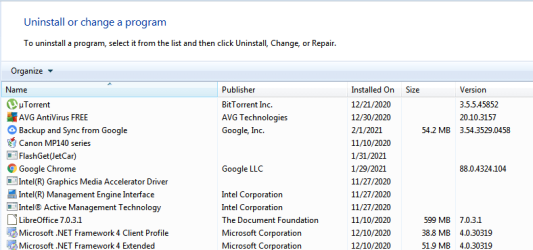
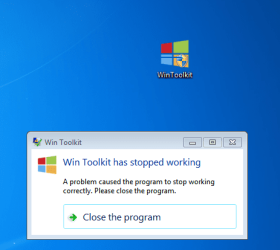
I really want to model Windows 7 to my liking by adding various programs, drivers, desktop themes, etc. Sorry, I can't run the Wintoolkit software. I am attaching photos where I get the error message.

I have NET framework 4.0 installed, but the program does not start.

What do I need to integrate into my operating system to make full use of the modeling program. I work with Windows 7 Lite x86


Win Toolkit, formerly Windows 7 Toolkit, is designed to help you integrate your Updates, Drivers, Theme Packs, Tweaks, Wallpapers, Addons, SFX Installers, Gadgets and remove the things you don't want from your Windows installation disk. Win Toolkit is the first program of its kind to integrate your favourite programs into your Windows installation disk! It features an All-In-One Tool, Component Removal, AIO Disk Creator, ISO Maker, Registry Hive Editor, SoLoR SP1 Updates, USB Boot Prep, Unattended Creator. Win Toolkit also features tools like Addon Maker, Update Retriever, CAB Update Installer, Capture Image, Force Unmount, Language Pack Converter, MSP Extractor (MS Office), MSU to CAB Converter, SWM Merger, WIM Manager, WIM Splitter, and lots more.
 

Attachments
  • Capture12.PNG
    Capture12.PNG
    130.9 KB · Views: 25
  • Capture43242432.PNG
    Capture43242432.PNG
    40.1 KB · Views: 0

My Computer

Computer type
PC/Desktop
OS
Windows 7 Home Premium

My Computers

System One System Two

  • Computer type
    PC/Desktop
    OS
    7 X64
    CPU
    i5 8400
    Motherboard
    gigabyte b365m ds3h
    Memory
    2x8gb 3200mhz
    Hard Drives
    various
    PSU
    pure power 11 400w cm
    Case
    Coolermaster
    Cooling
    cryorig m9i
  • Computer type
    PC/Desktop
    OS
    7x64
    CPU
    g5400
    Motherboard
    ga b365m ds3h
    Memory
    8gb ddr4 2400
    PSU
    xfx pro 450w
I have nothing but issues with Win Toolkit. It does seem to run okay, so I can't complain about that but no matter what I do the Installation is FUBAR. Even if all I do is add my drivers Windows ends up running like crap and certain programs won't run. I've tried every conceivable thing one can imagine to no avail. I've had to accept that I must be a moron without any idea of what I'm doing. I've had similar issues with RT7lite and NTlite and long ago gave up on the idea of building an install with my drivers integrated.
 

My Computer

Computer type
PC/Desktop
Computer Manufacturer/Model Number
Custom Intel Desktop
OS
Windows 7 Pro x64 SP1 Build 7601
CPU
Core i5-4690K @3.5Ghz
Motherboard
ASUS Z97-C
Memory
16Gb DDR3-1600 Nemix Gaming RAM
Graphics Card(s)
evga Geforce GTX 980
Sound Card
Creative Soundblaster Z PCIe
Monitor(s) Displays
22" Acer V226HQL
Screen Resolution
1920x1080
Hard Drives
2 x 240Gb SATA III 6Gb/s SSD RAID 0 @C:\
2 x 300Gb SATA III 6Gb/s WD VelociRaptor 10K HDD RAID 0 @D:\
1 x 1Tb SATA III 6Gb/s SSD @E:\
PSU
evga 750W (100-N1-0750-L1 750 N1) ATX12V / EPS12V
Case
DIYPC Ranger-R4-R
Cooling
Thermaltake Contac Silent 12 150W-TDP
Keyboard
Magegee Backlit USB Keyboard
Mouse
Logitech MX-518 Optical Gaming mouse
Internet Speed
13Mb/s DSL-Fiber Connection / EDUP Gigabit Ethernet PCIe
Browser
Mozilla Firefox v75.0 x64
Check out nLite instead.
 

My Computer

Computer type
PC/Desktop
OS
Windows 7 Ultimate x64
Hello again,

I managed to run the Wintoolkit program, but I have difficulty integrating add-ons into the system. Maybe the problem is with Autorun.

There are two methods for integrating addons.
The first one uses plugins ending in a WA file extension, but unfortunately I couldn't find any on the internet. WA File Extension - What is a .wa file and how do I open it?

The second method uses additives similar to those in nlite. Because I have some experience, I tried to make such and embed them, but then it shows an error.
I tried to integrate the programs
nlite
nlite addon maker
Rufus

Where could be the problem.
 

My Computer

Computer type
PC/Desktop
OS
Windows 7 Home Premium

My Computers

System One System Two

  • Computer type
    PC/Desktop
    OS
    7 X64
    CPU
    i5 8400
    Motherboard
    gigabyte b365m ds3h
    Memory
    2x8gb 3200mhz
    Hard Drives
    various
    PSU
    pure power 11 400w cm
    Case
    Coolermaster
    Cooling
    cryorig m9i
  • Computer type
    PC/Desktop
    OS
    7x64
    CPU
    g5400
    Motherboard
    ga b365m ds3h
    Memory
    8gb ddr4 2400
    PSU
    xfx pro 450w
Thanks.

I've seen these things. I still have no idea how to make these addons ending in WA. As far as I know there is a program for working with such files, but I forgot what it is called
Four Easy Ways to Open WA Files

My problem is completely different. I want to create my own SFX-based addons and integrate them. There is a menu for advanced users and there is a section for integrating addons with computed Universal Silent Switch Finder.

The nlite program has a similar option. There was even a site called winaddons.com that offered a number of software addons. Unfortunately, after 2013 it stopped working.

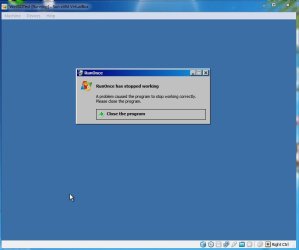
I will attach two sample addons and a photo of a virtual box showing RunOnce error

The name of the error is RunOnce has stopped working.
 

Attachments

My Computer

Computer type
PC/Desktop
OS
Windows 7 Home Premium
Why are you asking here? We don't know. Ask at the wintoolkit forum.
 

My Computers

System One System Two

  • Computer type
    PC/Desktop
    OS
    7 X64
    CPU
    i5 8400
    Motherboard
    gigabyte b365m ds3h
    Memory
    2x8gb 3200mhz
    Hard Drives
    various
    PSU
    pure power 11 400w cm
    Case
    Coolermaster
    Cooling
    cryorig m9i
  • Computer type
    PC/Desktop
    OS
    7x64
    CPU
    g5400
    Motherboard
    ga b365m ds3h
    Memory
    8gb ddr4 2400
    PSU
    xfx pro 450w
Back
Top