WinUSB Maker Didn't Finish, Now USB is unrecognizable

Miniia

New member
Local time
3:41 AM
Messages
3
Hi,

I tried using the WinUSB Maker to create a bootable USB. However, my computer shut down before it finished. Now, the computer doesn't even recognize that the USB is plugged in at all, as in not showing up in "My Computer." I want to format it back to a USB, but it's not even showing up.

What do I do?


Here's my info:
Windows 7 Ultimate
Processor: Intel (R) Celeron(R) CPU 500 @ 2.00GHz 2.00GHz
Installed memory (RAM): 3.00 GB
System type: 32-bit Operating System
 

My Computer My Computer

At a glance

Windows 7 Ultimate 32bit
OS
Windows 7 Ultimate 32bit
Miniia,
Welcome to SevenForums.

Help us to help you by filling out your System Specs and here is how:
Update your SevenForums System Specs
User CP (located on the top menu bar) |
Your Profile | Edit System Spec
(left-hand column)

To gather info, use Speccy (my favorite) or SIW or System Info

In the System Manufacturer Block, enter:
Manufacturer and Model and
ADD the word laptop, desktop, netbook or tablet.
For example:
Toshiba Satellite L305D notebook.

Provide full windows version info, for example:
MS Windows 7 Ultimate SP1 64-bit

Use the “Other Info” block for Optical Reader,
Mouse, touchpad, wifi adapter, speakers, monitor, etc

Scroll down and click on SAVE CHANGES.

You will find that in Speccy, you can select info from the display
using your mouse/touchpad and then paste that info into your specs.

SIW is a marvelous program, but the free version does not offer
this capability.
=======================================================
=======================================================

And here is how to prepare a UFD (a usb stick):


PREPARE A UFD/SSD/HDD FOR USE


UFD = USB Flash Device, such as, pen drive, thumb drive, usb stick.

Run CMD.EXE as administrator
[FONT=&quot]Ctrl + Esc | [/FONT][FONT=&quot]type Cmd in the “Search Box’ | do not hit Enter |
right-click on CMD.EXE in the list of Programs[/FONT] | YES button (if asked)

Use DiskPart ----{type commands, follow each by hitting ENTER}
Type DISKPART ------{starts DiskPart; command prompt changes to DISKPART> }[FONT=&quot][/FONT]
[FONT=&quot]Enter following DISKPART commands:[/FONT][FONT=&quot][/FONT]
[FONT=&quot]List disk ----------[/FONT][FONT=&quot]{list number assigned by DiskPart to the drives;
-------------------- note the numeral assigned to your UFD/SSD/HDD}
select disk 1 ------{the numeral 1 will be used in this example}
detail disk --------{info will help verify that you’ve selected the desired disk}
clean all ----------{write zeroes to all bytes of selected disk; depending upon [/FONT]
[FONT=&quot]-------------------- capacity and device speed, this can take awhile.[/FONT]
[FONT=&quot]-------------------- Any bad sectors will be so marked and avoided.[/FONT]
[FONT=&quot]-------------------- Wait for the DiskPart prompt to appear again.[/FONT]
[FONT=&quot]-------------------- The DiskPart> prompt will eventually appear.[/FONT]
[FONT=&quot]OR--OR--OR--OR[/FONT][FONT=&quot][/FONT]
[FONT=&quot]clean --------------{[/FONT][FONT=&quot]zeroes only first and last sectors to zero out boot info;[/FONT]
[FONT=&quot]-------------------- This is much quicker and suffices for most cases. }
[/FONT]If installing Win 7 to a SSD/HDD,
AND you want to let the Win 7 installer create partitions, then
go directly to the EXIT statements.
[FONT=&quot]create partition primary -[/FONT][FONT=&quot]{create a primary partition in the selected disk}
select partition 1 -------{select the partition you just created}
active -------------------{mark the partition as Active, ie, a system bootable partition}
format fs=ntfs quick -----{format the partition as ntfs}
assign -------------------{assign next available drive letter to the volume}
exit ---------------------{exit DISKPART and return to the command-shell prompt}[/FONT][FONT=&quot][/FONT]
[FONT=&quot]exit ---------------------[/FONT][FONT=&quot]{exit the command shell }[/FONT]
[FONT=&quot] [/FONT]
 

My Computer My Computer

At a glance

MS Windows 7 Ultimate SP1 64-bitAMD A10-4600M6.00 GB Dual-Channel DDR3 @ 798MHz (11-11-12-28)AMD Radeon HD 7660G
Computer Manufacturer/Model Number
Toshiba Satellite S875D-S7239 laptop
OS
MS Windows 7 Ultimate SP1 64-bit
CPU
AMD A10-4600M
Motherboard
AMD Pumori (Socket FT1)
Memory
6.00 GB Dual-Channel DDR3 @ 798MHz (11-11-12-28)
Graphics Card(s)
AMD Radeon HD 7660G
Sound Card
High Definition Audio Device
Monitor(s) Displays
Generic PnP Monitor (1600x900@60Hz)
Screen Resolution
1600x900@60Hz
Hard Drives
SSD 119GB Corsair CSSD-V128GB2 ATA Device
Keyboard
Standard PS/2 Keyboard
Mouse
HP Wireless Optical Mobile Mouse Model FHA-3410
Internet Speed
What the local pub, local coffee shop offers.
Other Info
Optical Drive:MATSHITA BD-CMB UJ160B ATA Device


Also have an Asus ha1002xp netbook with Win 7 Ultimate installed.
Okay, I will do those things.

When I go to listdisk, it only shows:

Disk 0 Online 74GB 871MB

I'm pretty sure that's only for my computer, not the usb.
The disk for the usb doesn't show.

What do I do now?
 

My Computer My Computer

At a glance

Windows 7 Ultimate 32bit
OS
Windows 7 Ultimate 32bit
Try using another usb port on your computer.
Try the stick on another computer.

The USB should show up.
 

My Computer My Computer

At a glance

MS Windows 7 Ultimate SP1 64-bitAMD A10-4600M6.00 GB Dual-Channel DDR3 @ 798MHz (11-11-12-28)AMD Radeon HD 7660G
Computer Manufacturer/Model Number
Toshiba Satellite S875D-S7239 laptop
OS
MS Windows 7 Ultimate SP1 64-bit
CPU
AMD A10-4600M
Motherboard
AMD Pumori (Socket FT1)
Memory
6.00 GB Dual-Channel DDR3 @ 798MHz (11-11-12-28)
Graphics Card(s)
AMD Radeon HD 7660G
Sound Card
High Definition Audio Device
Monitor(s) Displays
Generic PnP Monitor (1600x900@60Hz)
Screen Resolution
1600x900@60Hz
Hard Drives
SSD 119GB Corsair CSSD-V128GB2 ATA Device
Keyboard
Standard PS/2 Keyboard
Mouse
HP Wireless Optical Mobile Mouse Model FHA-3410
Internet Speed
What the local pub, local coffee shop offers.
Other Info
Optical Drive:MATSHITA BD-CMB UJ160B ATA Device


Also have an Asus ha1002xp netbook with Win 7 Ultimate installed.
I did all of that. Still not recognized.

But to reiterate, I used WinUSB Maker, it almost finished, but didn't. Would that affect it somehow?
 

My Computer My Computer

At a glance

Windows 7 Ultimate 32bit
OS
Windows 7 Ultimate 32bit
In any case, if the usb stick is not recognized in any usb port on your computer and also on another computer, diskpart does not see the usb stick, you can throw the usb stick in the trash.
 

My Computer My Computer

At a glance

MS Windows 7 Ultimate SP1 64-bitAMD A10-4600M6.00 GB Dual-Channel DDR3 @ 798MHz (11-11-12-28)AMD Radeon HD 7660G
Computer Manufacturer/Model Number
Toshiba Satellite S875D-S7239 laptop
OS
MS Windows 7 Ultimate SP1 64-bit
CPU
AMD A10-4600M
Motherboard
AMD Pumori (Socket FT1)
Memory
6.00 GB Dual-Channel DDR3 @ 798MHz (11-11-12-28)
Graphics Card(s)
AMD Radeon HD 7660G
Sound Card
High Definition Audio Device
Monitor(s) Displays
Generic PnP Monitor (1600x900@60Hz)
Screen Resolution
1600x900@60Hz
Hard Drives
SSD 119GB Corsair CSSD-V128GB2 ATA Device
Keyboard
Standard PS/2 Keyboard
Mouse
HP Wireless Optical Mobile Mouse Model FHA-3410
Internet Speed
What the local pub, local coffee shop offers.
Other Info
Optical Drive:MATSHITA BD-CMB UJ160B ATA Device


Also have an Asus ha1002xp netbook with Win 7 Ultimate installed.
One last ditch attempt.

Download USB Flash Drive Recovery Tool V 1.0.1.3 from Welcome to KINGMAX - Download Center- Driver

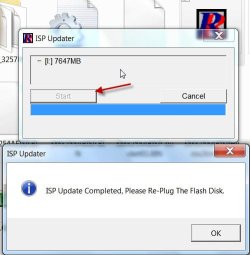
Don't worry that your drive isn't a Kingmax drive, it will work anyway because it is just going to completely write over your drive.Extract the rar file to a folder. Plug in your pendrive. Right click on Recovery tool .exe and Run it as administrator. If your pen drive shows up in the updater, consider yourself lucky. Click on Start and let it finish the job.

ISP Updater.jpg

Caution: This is a prescription drug for faulty pendrives, and may or may not revive the pendrive.Should only be tried as a last ditch attempt before throwing away the pendrive.
 
Last edited:

My Computer My Computer

At a glance

Windows 7 Home Premium 32 bit
OS
Windows 7 Home Premium 32 bit
Thanks, I hadn't spotted that program before.

Looks like it will handle quite a few drives - mainly Samsung - also Toshiba and some others.

Could be useful.
 

My Computers My Computers

  • At a glance

    7 X64i5 84002x8gb 3200mhz
    Computer type
    PC/Desktop
    OS
    7 X64
    CPU
    i5 8400
    Motherboard
    gigabyte b365m ds3h
    Memory
    2x8gb 3200mhz
    Hard Drives
    various
    PSU
    pure power 11 400w cm
    Case
    Coolermaster
    Cooling
    cryorig m9i
  • At a glance

    7x64g54008gb ddr4 2400
    Computer type
    PC/Desktop
    OS
    7x64
    CPU
    g5400
    Motherboard
    ga b365m ds3h
    Memory
    8gb ddr4 2400
    PSU
    xfx pro 450w
I am not so sure. In fact I am putting a cautionary note: This is a prescription drug for faulty pendrives, and may or may not revive the pendrive.Should only be tried as a last ditch attempt before throwing away the pendrive.

I do not want anyone to try it on a normally working pendrive.
 

My Computer My Computer

At a glance

Windows 7 Home Premium 32 bit
OS
Windows 7 Home Premium 32 bit
Yes, I am sure everyone realises that.

If windows isn't picking it up at all, you can see if Bootice will do it.

View attachment 223936

Otherwise , you may be able to get at it from a Linux live cd.
 

My Computers My Computers

  • At a glance

    7 X64i5 84002x8gb 3200mhz
    Computer type
    PC/Desktop
    OS
    7 X64
    CPU
    i5 8400
    Motherboard
    gigabyte b365m ds3h
    Memory
    2x8gb 3200mhz
    Hard Drives
    various
    PSU
    pure power 11 400w cm
    Case
    Coolermaster
    Cooling
    cryorig m9i
  • At a glance

    7x64g54008gb ddr4 2400
    Computer type
    PC/Desktop
    OS
    7x64
    CPU
    g5400
    Motherboard
    ga b365m ds3h
    Memory
    8gb ddr4 2400
    PSU
    xfx pro 450w
In my opinion if one has to use another operating system or a little 3rd party program to get this stick to work it's broke. Throw it away.
 

My Computer My Computer

At a glance

Windows 10 Pro. 64/ version 1709 Windows 7 Pr...Intel i7-6800K @ 4.3Corsair Platinum 16 gig @2400EVGA GTX 1070 OC
Computer type
PC/Desktop
Computer Manufacturer/Model Number
Home made Desktop
OS
Windows 10 Pro. 64/ version 1709 Windows 7 Pro/64
CPU
Intel i7-6800K @ 4.3
Motherboard
ASUS X-99 Deluxe II
Memory
Corsair Platinum 16 gig @2400
Graphics Card(s)
EVGA GTX 1070 OC
Monitor(s) Displays
Asus 27" LED LCD/VE278Q
Screen Resolution
1920-1080 or 1280-720 HDMI
Hard Drives
INTEL SSD 730-240 Gb Sata 3.0/
PSU
EVGA Platium 1200W
Case
Phanteks Luxe Tempered Glass 8 fans/ one radiator
Cooling
XSPC/ Water Cooled CPU
Keyboard
Das 4 Professional
Mouse
Logitech M705/MX Anywhere 2-S
Internet Speed
100 mbits
Antivirus
Microsoft Security Essentials/ Malwarebytes Premium 3.0/ SAS
Browser
I.E. 11 default/Firefox/ ISP Time Warner Cable/Spectrum
Other Info
LG BluRay Burner/
Sound system-KLipsch-THX/
Icy Dock ssd Hot Swap bays.
Whatever happened to the make do and mend society?

I always try and get something going. Doesn't always work, but it's worth a go.
 

My Computers My Computers

  • At a glance

    7 X64i5 84002x8gb 3200mhz
    Computer type
    PC/Desktop
    OS
    7 X64
    CPU
    i5 8400
    Motherboard
    gigabyte b365m ds3h
    Memory
    2x8gb 3200mhz
    Hard Drives
    various
    PSU
    pure power 11 400w cm
    Case
    Coolermaster
    Cooling
    cryorig m9i
  • At a glance

    7x64g54008gb ddr4 2400
    Computer type
    PC/Desktop
    OS
    7x64
    CPU
    g5400
    Motherboard
    ga b365m ds3h
    Memory
    8gb ddr4 2400
    PSU
    xfx pro 450w
In my opinion if one has to use another operating system or a little 3rd party program to get this stick to work it's broke. Throw it away.

I agree totally.

Even if you get the stick to work again, the stick will fail again shortly.

My time is more valuable than the time messing with a defective pendrive.
 

My Computer My Computer

At a glance

MS Windows 7 Ultimate SP1 64-bitAMD A10-4600M6.00 GB Dual-Channel DDR3 @ 798MHz (11-11-12-28)AMD Radeon HD 7660G
Computer Manufacturer/Model Number
Toshiba Satellite S875D-S7239 laptop
OS
MS Windows 7 Ultimate SP1 64-bit
CPU
AMD A10-4600M
Motherboard
AMD Pumori (Socket FT1)
Memory
6.00 GB Dual-Channel DDR3 @ 798MHz (11-11-12-28)
Graphics Card(s)
AMD Radeon HD 7660G
Sound Card
High Definition Audio Device
Monitor(s) Displays
Generic PnP Monitor (1600x900@60Hz)
Screen Resolution
1600x900@60Hz
Hard Drives
SSD 119GB Corsair CSSD-V128GB2 ATA Device
Keyboard
Standard PS/2 Keyboard
Mouse
HP Wireless Optical Mobile Mouse Model FHA-3410
Internet Speed
What the local pub, local coffee shop offers.
Other Info
Optical Drive:MATSHITA BD-CMB UJ160B ATA Device


Also have an Asus ha1002xp netbook with Win 7 Ultimate installed.
What ever happened to using time and money wisely.
 

My Computer My Computer

At a glance

Windows 10 Pro. 64/ version 1709 Windows 7 Pr...Intel i7-6800K @ 4.3Corsair Platinum 16 gig @2400EVGA GTX 1070 OC
Computer type
PC/Desktop
Computer Manufacturer/Model Number
Home made Desktop
OS
Windows 10 Pro. 64/ version 1709 Windows 7 Pro/64
CPU
Intel i7-6800K @ 4.3
Motherboard
ASUS X-99 Deluxe II
Memory
Corsair Platinum 16 gig @2400
Graphics Card(s)
EVGA GTX 1070 OC
Monitor(s) Displays
Asus 27" LED LCD/VE278Q
Screen Resolution
1920-1080 or 1280-720 HDMI
Hard Drives
INTEL SSD 730-240 Gb Sata 3.0/
PSU
EVGA Platium 1200W
Case
Phanteks Luxe Tempered Glass 8 fans/ one radiator
Cooling
XSPC/ Water Cooled CPU
Keyboard
Das 4 Professional
Mouse
Logitech M705/MX Anywhere 2-S
Internet Speed
100 mbits
Antivirus
Microsoft Security Essentials/ Malwarebytes Premium 3.0/ SAS
Browser
I.E. 11 default/Firefox/ ISP Time Warner Cable/Spectrum
Other Info
LG BluRay Burner/
Sound system-KLipsch-THX/
Icy Dock ssd Hot Swap bays.
You already said that.

Just giving the OP options.

Up to him what he wants to do.
 

My Computers My Computers

  • At a glance

    7 X64i5 84002x8gb 3200mhz
    Computer type
    PC/Desktop
    OS
    7 X64
    CPU
    i5 8400
    Motherboard
    gigabyte b365m ds3h
    Memory
    2x8gb 3200mhz
    Hard Drives
    various
    PSU
    pure power 11 400w cm
    Case
    Coolermaster
    Cooling
    cryorig m9i
  • At a glance

    7x64g54008gb ddr4 2400
    Computer type
    PC/Desktop
    OS
    7x64
    CPU
    g5400
    Motherboard
    ga b365m ds3h
    Memory
    8gb ddr4 2400
    PSU
    xfx pro 450w
Back
Top