winxp and win7

vipond

New member
Local time
11:33 PM
Messages
9
I currently have a Packard Bell with Quad core processor, 6 Gb ram etc. operating 64bit windows 7 home premium.

I want to install win xp for dual boot. This is because I am trying to operate several 32 bit program that are not compatable with win7 64bit

I was unable to put xp in the right partition. Sort of?

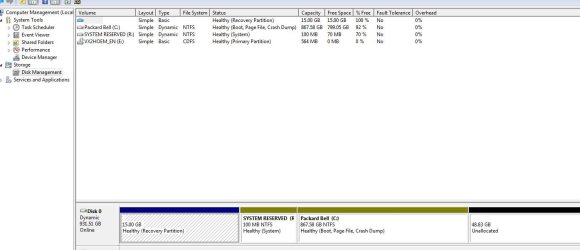
I have 4 partitions

1 Dynamic 1mb 0 free
2 PQservice(NTFS) 15360mb 6782 free
3 Dynamic 100mb 0 free
4 Dynamic 368942mb 0 free
Unpartitioned Space

When trying to install into 1 to 4 - I got the error cannot write onto Dynamic Drive?
When selecting unpartitioned space - error maximum number of partitions?

IMages may help my problem

http://img207.imageshack.us/img207/2439/dsc4033.jpg

http://img25.imageshack.us/img25/5052/dsc4035z.jpg

http://img253.imageshack.us/img253/2223/dsc4034g.jpg

The first error says. Maximum number of partitions already exist?

Its the default HD, i did create one but corrently deleted it again.

Thoughts

I have managed to show only 3 partitions with disk management but when installing winxp, another 'hidden' partition, at the beginning, shows up! This is only 1 mb and cannot be deleted. I still have 4 and unable to load winxp.

Someone out there must have loaded winxp onto a machine that already has win7 installed?

Any help would be appreciated
 

My Computer

OS
win 7 x64
Please post back a screenshot of your full Win 7 Disk Management drive map, using Snipping Tool in Start Menu, attach file with paper clip in reply box.

Tell us exactly what you would like the map to look like and we will give you the steps. You may need to move data or back it up externally - can you do that?
 
Last edited:
Thanks for your quick reply.

Yes I can backup on an external hard drive.

Will post snippet shortly

Many many thanks
 

My Computer

OS
win 7 x64
Here you go.
 

Attachments

  • Capture.JPG
    Capture.JPG
    63.9 KB · Views: 19

My Computer

OS
win 7 x64
Did you install Win7? If so, Did you make your Vista recovery disks from that Recovery partition, as it is disabled by Win7 installation anyway?

If you installed 7, was there a reason why you chose a Dynamic Disk format? This presents a lot of problems, and cannot be converted without deleting everything first.

If The Recov partition was for Vista and you have the disks made, then you can consider deleting it to free up a Primary Partition so you can install XP to the 49 gb unallocated space at the end.

If you want to keep the recov partition, next consider deleting the 100mb Sys Reserved partition since it is apparently counting it as a Primary partition. The System MBR can be recovered into Win7 afterward by running Startup Repair 3 separate times from the booted Win7 DVD.

Please also note the extra steps that must be taken when installing XP last in a dual boot with Win7, listed here at the end of Method Two: http://www.sevenforums.com/tutorials/8057-dual-boot-installation-windows-7-xp.html

I will ask SIW2 who is our top expert on partitioning to look at this tomorrow.

Whatever you decide, be sure to back up your files and a Win7 Backup Image so you can start over if necessary.
 
Did you install Win7? If so, Did you make your Vista recovery disks from that Recovery partition, as it is disabled by Win7 installation anyway?

If you installed 7, was there a reason why you chose a Dynamic Disk format? This presents a lot of problems, and cannot be converted without deleting everything first.

If The Recov partition was for Vista and you have the disks made, then you can consider deleting it to free up a Primary Partition so you can install XP to the 49 gb unallocated space at the end.

If you want to keep the recov partition, next consider deleting the 100mb Sys Reserved partition since it is apparently counting it as a Primary partition. The System MBR can be recovered into Win7 afterward by running Startup Repair 3 separate times from the booted Win7 DVD.

Please also note the extra steps that must be taken when installing XP last in a dual boot with Win7, listed here at the end of Method Two: http://www.sevenforums.com/tutorials/8057-dual-boot-installation-windows-7-xp.html

I will ask SIW2 who is our top expert on partitioning to look at this tomorrow.

Whatever you decide, be sure to back up your files and a Win7 Backup Image so you can start over if necessary.

Win7 came preinstalled, no disc

It also had a D:data drive. This I backuped up, something to do with Visual Baic? VC Distribut file?????. Anyway, backed this up, deleted drive D, expanded C, then shrunk C to give unalocated space.

Hope this makes sense.

Thanks
 

My Computer

OS
win 7 x64
In that case, you want to keep your Recovery Partition which is primary so it can be marked active to run Recovery from the first boot screen. The hidden EISA partition also needs to be kept.

I'll defer to SIW2 on this, but we have deleted the 100mb System Partition before and recovered the MBR into Win7, which might be the solution to freeing up a Primary partition.

However, the Dynamic formatting on only part of the HD confounds me. SIW2 will likely see it more clearly tomorrow.

Whatever you decide, be sure to back up your files and a Win7 Backup Image so you can start over if necessary. This greatly reduces the risk.

You can also look for a way to make Recovery Disks from that Recovery Partition as it usually serves that dual purpose. It will be in the utilities added by Packard Bell.
 
Back
Top