Solved Winzip Self Extracting file issue

kapeller

New member
Local time
6:49 PM
Messages
3
Hi

I have create a self extracting winzip exe file to place a file into this location C:\AALAAS\Prod which
currently exists. This works fine.

However, when I got to that location I fine that it also creates a AALAAS folder and Prod folder inside
this location C:\AALAAS\Prod. Why is this happening?

The file that is being extracted is place in its correct location.

Am I missing a setting?

Lou
 

My Computer

Computer type
Laptop
OS
win 7 64bit
How did you create it (what program)?
What parameters did you specify?
 

My Computer

Computer type
PC/Desktop
Computer Manufacturer/Model Number
Lenovo IdeaCenter 450
OS
Windows 10 Pro X64
CPU
Intel Quad Core i7-4770 @ 3.4Ghz
Memory
16.0GB PC3-12800 DDR3 SDRAM 1600 MHz
Graphics Card(s)
Intel Integrated HD Graphics
Sound Card
Realtek HD Audio
Monitor(s) Displays
HP 22" LCD
Screen Resolution
1680 x 1050
Hard Drives
250GB Samsung EVO SATA-3 SSD
2TB Seagate ST2000DM001 SATA-2
1.5TB Seagate ST3150041AS SATA
Keyboard
Dell USB
Mouse
Lenovo USB
Internet Speed
Cable via Road Runner 3MB Upload, 30MB Download
Antivirus
Windows Defender, MBAM Pro, MBAE
Browser
Seamonkey
Other Info
UEFI/GPT
PLDS DVD-RW DH16AERSH
Hi

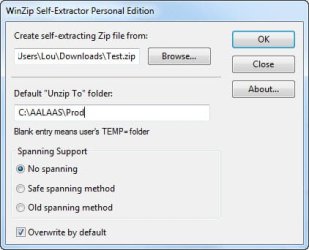
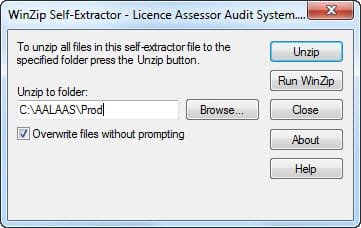
I have attached two files that show my settings.

Self Extract File 1.jpg

Self Extract File.jpg
 

My Computer

Computer type
Laptop
OS
win 7 64bit
When you created Test.zip, did you tell it to remember the folder paths?
What did the folder structure look like for the source you zipped to Test.zip?

If it's not something confidential can you upload Test.zip here along with the generated .exe?
 

My Computer

Computer type
PC/Desktop
Computer Manufacturer/Model Number
Lenovo IdeaCenter 450
OS
Windows 10 Pro X64
CPU
Intel Quad Core i7-4770 @ 3.4Ghz
Memory
16.0GB PC3-12800 DDR3 SDRAM 1600 MHz
Graphics Card(s)
Intel Integrated HD Graphics
Sound Card
Realtek HD Audio
Monitor(s) Displays
HP 22" LCD
Screen Resolution
1680 x 1050
Hard Drives
250GB Samsung EVO SATA-3 SSD
2TB Seagate ST2000DM001 SATA-2
1.5TB Seagate ST3150041AS SATA
Keyboard
Dell USB
Mouse
Lenovo USB
Internet Speed
Cable via Road Runner 3MB Upload, 30MB Download
Antivirus
Windows Defender, MBAM Pro, MBAE
Browser
Seamonkey
Other Info
UEFI/GPT
PLDS DVD-RW DH16AERSH
Hi

I finally nutted out what I was doing wrong!

Instead of creating a new instance of the winzip before I created the .exe file, I would just delete the old file out of the zip file and just copy a new file into the same zip file. The create the self extracting file. That then caused my problem.

However, when I created a new zip file then the self extracting .exe file all work Ok.

Hope this make sense.

So many thanks for your interest.
 

My Computer

Computer type
Laptop
OS
win 7 64bit
Glad you got it straightened out. Thanks for letting me know.
 

My Computer

Computer type
PC/Desktop
Computer Manufacturer/Model Number
Lenovo IdeaCenter 450
OS
Windows 10 Pro X64
CPU
Intel Quad Core i7-4770 @ 3.4Ghz
Memory
16.0GB PC3-12800 DDR3 SDRAM 1600 MHz
Graphics Card(s)
Intel Integrated HD Graphics
Sound Card
Realtek HD Audio
Monitor(s) Displays
HP 22" LCD
Screen Resolution
1680 x 1050
Hard Drives
250GB Samsung EVO SATA-3 SSD
2TB Seagate ST2000DM001 SATA-2
1.5TB Seagate ST3150041AS SATA
Keyboard
Dell USB
Mouse
Lenovo USB
Internet Speed
Cable via Road Runner 3MB Upload, 30MB Download
Antivirus
Windows Defender, MBAM Pro, MBAE
Browser
Seamonkey
Other Info
UEFI/GPT
PLDS DVD-RW DH16AERSH
Back
Top