
Hi All,
I'm connected to the net via an ethernet cable using the lan port on my motherboard.
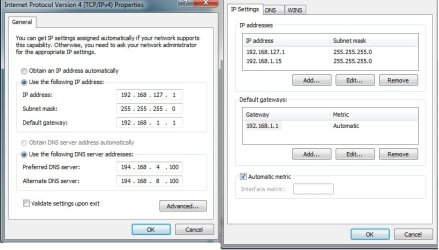
I've setup a static ip address no problems *192.168.1.15*
However, whenever I go and config the IPv4 - This ip address seems to always default to 192.168.127.1
The computer does still use the ip I set it, but this 127 ones always appears in the ip address list?
Is this normal for win7?
Any ideas??
I'm connected to the net via an ethernet cable using the lan port on my motherboard.
I've setup a static ip address no problems *192.168.1.15*
However, whenever I go and config the IPv4 - This ip address seems to always default to 192.168.127.1
The computer does still use the ip I set it, but this 127 ones always appears in the ip address list?
Is this normal for win7?
Any ideas??
Attachments
My Computer
- OS
- Win7 / XP Pro
