JavaScript is disabled. For a better experience, please enable JavaScript in your browser before proceeding.
You are using an out of date browser. It may not display this or other websites correctly.
You should upgrade or use an
alternative browser .
Wired things with the snipping tool
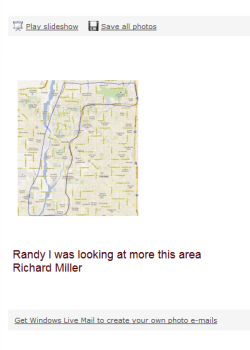
I snipped a google map then drew a line around the area I wanted and emailed it and this is what I got. When I click on the map I got the image with all the crap on it and then I need to click on the top where it says Capture1 "which is not on the image because I didn't get all of it" to open up the map again in it's large form. I just don't know why I got all this data and what to do so it doesn't happen again.
Doc1.docx
Doc1.docx
193.9 KB
· Views: 10
Capture2.PNG
44.2 KB
· Views: 21
Capture3.PNG
39.4 KB
· Views: 17
Last edited: Apr 6, 2012
Windows 7 x64 RC1, Vista Ultimate, XP Pro AMD 955 4 gigs - 1333 5750 Windows 7 x64 RC1, Vista Ultimate, XP Pro AMD 955 4 gigs - 1333 5750 i-inc 28" 1920x1200 2 SATA2 750 GB - 1 SATA2 1TB - 1 SATA3 1TB - 1 USB3 2TB - 1 USB3 500 GB, SSD 60 GB 7 Megs
New member
Guru
Gold Member
VIP
I am afraid I do not understand. I do not see a snipped map at all. Try to explain again.
Vista, Windows7, Mint Mate, Zorin, Windows 8 from 1.6GHz Duo to i7 HP, Dell, Gateway, Toshiba - 4 laptops and 2 desktops Vista, Windows7, Mint Mate, Zorin, Windows 8 from 1.6GHz Duo to i7 2x HP w2207 5x HDD, 7x SSD, 12x Externals with trackball - no mices Trackball mice DSL 6000
R.I.P. 7/09/2014
Guru
VIP
Right, did you save the snip as some image? The other crap is what you have downloaded previously.
Windows 7 Ultimate X64 SP1 Intel i5-2550K, Differing ~4.4-4.8GHz No buil... 16GB G.Skill Sniper 1866MHz @ 2133MHz 2x8GB ASUS GTX650TIB-DC2OC-2GD5, (650TI Boost) PC/Desktop Home Built Desktop By DataTech Windows 7 Ultimate X64 SP1 Intel i5-2550K, Differing ~4.4-4.8GHz No built in GPU ASUS P8Z68-V PRO/GEN3 16GB G.Skill Sniper 1866MHz @ 2133MHz 2x8GB ASUS GTX650TIB-DC2OC-2GD5, (650TI Boost) Onboard Realtek 5-1 Samsung P2570HD 1920x1080 Samsung 840 Pro 256GB SSD for OS, 500GB Seagate Constellation (Enterprise drive) for Data Corsair HX650W Inwin Dragon Rider Hyper 212 EVO w/two Noctua fans, push-pull, @1300 RPM E-Z Eyes, bright yellow keys with large characters steelseries SENSEI Laser Pro Gaming 48-51Mbs Mbs down, 11 Mbs up Xfinity Cable Norton Internet Security 2013 IE 10, Opera, Pale Moon if needed 4 case fans, LG BluRay-RE, ASUS DVD-RW, Mr. Fusion power supply, 1.21 gigawatts.
when I save the image to skydrive 29K this is what it does. If I send the entire image I don't have that problems but it's 480K. Any idea why I get all the extra data when it goes to skydrive because I'm using Live mail.
Windows 7 x64 RC1, Vista Ultimate, XP Pro AMD 955 4 gigs - 1333 5750 Windows 7 x64 RC1, Vista Ultimate, XP Pro AMD 955 4 gigs - 1333 5750 i-inc 28" 1920x1200 2 SATA2 750 GB - 1 SATA2 1TB - 1 SATA3 1TB - 1 USB3 2TB - 1 USB3 500 GB, SSD 60 GB 7 Megs
New member
Guru
Gold Member
VIP
I don't know what might happen via Live Mail. Why don't you just create a folder on Skydrive, open that folder and drag the picture into it.
Vista, Windows7, Mint Mate, Zorin, Windows 8 from 1.6GHz Duo to i7 HP, Dell, Gateway, Toshiba - 4 laptops and 2 desktops Vista, Windows7, Mint Mate, Zorin, Windows 8 from 1.6GHz Duo to i7 2x HP w2207 5x HDD, 7x SSD, 12x Externals with trackball - no mices Trackball mice DSL 6000