wireless card stop working randomly

bigday

New member
Local time
3:41 PM
Messages
3
My wireless card in my laptop (ASUS u46s) suddenly stop working randomly,
It randomly run smoothly or stop working completely. Yesterday I was running fine all day without any problem. Today it stopped to work after 5 minutes.

I tried to restore my computer, uninstall wireless driver in the devices manager but it just refuse to work.
And sometime my laptop can not event detect the wireless card (I scanned for hardware changes after remove the wireless card driver in devices manager but nothing show up until I restart the machine)

It's ,however, functioning without any issues when I boot in Ubuntu (so far at least ).

This not the first time this laptop has such issues. Last year the wireless card malfunctioned (in both windows 7 and Ubuntu) so I had to buy a new mini pci wireless card (intel N6300 AGN) and it had been working really well until 3 days ago.

I am unsure if this is another hardware problem or just a case of bad driver.

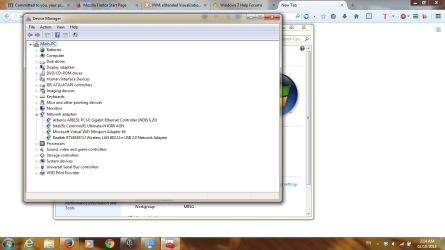
This is before I uninstall the driver

attachment.php


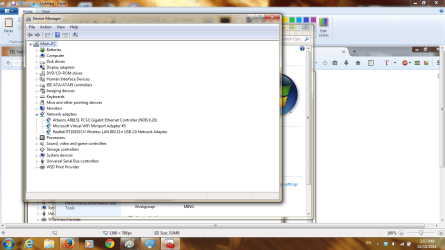
the wireless card not show up after that although I had scanned for hardware change.


attachment.php
 

Attachments

  • before uninstall.png
    before uninstall.png
    263.5 KB · Views: 24
  • Scaned.png
    Scaned.png
    340.7 KB · Views: 24
Last edited:

My Computer

Computer type
PC/Desktop
OS
operating system
Hello and welcome bigday mate sounds like you have another bad card my friend. It might be just a matter of taking it out and putting it straight back in - just a dodgy connection perhaps?

There seems to be quite a list of wifi adaptors there when the Asus site lists only the Intel one in the specs so to check just what there is in the machine you can try this

Using HW Info general components

Download HW Info andpick the right bit version - HWiNFO, HWiNFO32/64 - Download -(copy and paste this site into the search bar) If you do not need the runninginformation in the smaller right hand panel close it. In the left hand windowclick on the + for the individual device groupings and they will open out tothe various components.

Go on opening out furtheruntil you get to the device itself. click on it and it will highlight. In theright hand window there will be a very detailed description of that device asin brand, speeds model number etc etc These are very detailed and are just whatis needed for searching for drivers etc.

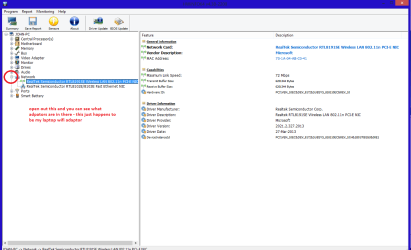
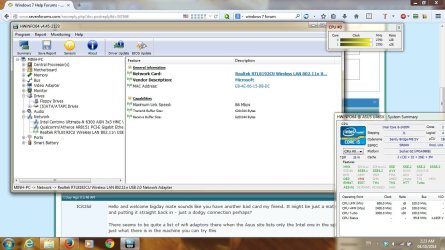
See my pic for anexample - in this I have opened out one my components and then highlighted one of the one you need andyou can see the detail.
The pic is of what is in my network adaptors yours might look different.
 

Attachments

  • HW INFO WIFI ADAPTOR.PNG
    HW INFO WIFI ADAPTOR.PNG
    85.2 KB · Views: 1

My Computer

Computer type
PC/Desktop
Computer Manufacturer/Model Number
Own build (new) Desk1 / Asus ROG Win 7 / Desk2 1st build
OS
Desk1 7 Home Prem / Desk2 10 Pro / Main lap Asus ROG 10 Pro 2 laptop Toshiba 7 Pro Asus P2520 7 & 10
CPU
Desk1 i5 3750K / Laptop i7 GTX 860M / Desk2 i5 2500
Motherboard
Desk1 Asus P877-V / Desk2 Gigabyte H67 UD3H / Laptop ?
Memory
Desk1 8GB (1866) / Desk2 16GB (1333) / Laptop 8Gb DDR3
Graphics Card(s)
Desk 1& 2NVidia GTX 650 & Laptops on board Intel
Sound Card
Desk 1 & 2 -XONAR DG Realtek High Def audio Laptop
Monitor(s) Displays
Desk 1 Benq HD 2450 / Desk2 Philips 24" / Laptop 17.5"
Screen Resolution
1920x1080 D1 & D2 & Laptop 1
Hard Drives
Desk1 Samsung 120GB 830 SSD
Asus ROG 256GB 850 Pro SSD
Desk2 Samsung 840 256 SSD
Toshiba 120GB EVO
PSU
Desk 1 Corsair HX 1050/ Laptop ? / Desk 2 Corsair HX 650
Case
Desk 1 Cooler HAF XM ? Toshiba laptop / Desk2 Coolermaster
Cooling
Fans on all Desk1 -2 Desk2 - all Coolermasters 5 Laptop ?
Keyboard
Desk 1 MS Sidewinder X6 Desk 2 MS Sidewinder X 4
Mouse
Desk 1&2 - Gigabyte MS 900 gamer - laptop - Logitec wireless
Internet Speed
ADSL2+
Other Info
One other Desktop (tester) and spare Toshba laptop both with SSD's
Running Kaspersky 2016 ISS on all machines config'd identically
Logitec audio stereo systems on each machine (x3)
Canon MG5250MFC
Router/modem TP-Link running WPA2SK
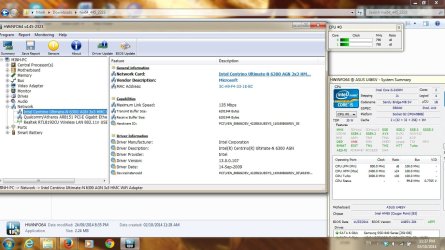
here is the information of my wifi card.
It is not the original card which malfunctioned 1 years ago, I think the name of the old card is intel N-1020 something.

Today all the connections are perfect, no drop or anything.

I have no ideas what is going on anymore....
 

Attachments

  • wireless card.jpg
    wireless card.jpg
    293.3 KB · Views: 2

My Computer

Computer type
PC/Desktop
OS
operating system
Ok mate well like they say if it isn't broken don't try mending it. This could have been nothing more than a simple glitch or we can hope so.

Just out of curiosity though could you post a pic of that Realtek highlighted so we can see the details on the right please?
 

My Computer

Computer type
PC/Desktop
Computer Manufacturer/Model Number
Own build (new) Desk1 / Asus ROG Win 7 / Desk2 1st build
OS
Desk1 7 Home Prem / Desk2 10 Pro / Main lap Asus ROG 10 Pro 2 laptop Toshiba 7 Pro Asus P2520 7 & 10
CPU
Desk1 i5 3750K / Laptop i7 GTX 860M / Desk2 i5 2500
Motherboard
Desk1 Asus P877-V / Desk2 Gigabyte H67 UD3H / Laptop ?
Memory
Desk1 8GB (1866) / Desk2 16GB (1333) / Laptop 8Gb DDR3
Graphics Card(s)
Desk 1& 2NVidia GTX 650 & Laptops on board Intel
Sound Card
Desk 1 & 2 -XONAR DG Realtek High Def audio Laptop
Monitor(s) Displays
Desk 1 Benq HD 2450 / Desk2 Philips 24" / Laptop 17.5"
Screen Resolution
1920x1080 D1 & D2 & Laptop 1
Hard Drives
Desk1 Samsung 120GB 830 SSD
Asus ROG 256GB 850 Pro SSD
Desk2 Samsung 840 256 SSD
Toshiba 120GB EVO
PSU
Desk 1 Corsair HX 1050/ Laptop ? / Desk 2 Corsair HX 650
Case
Desk 1 Cooler HAF XM ? Toshiba laptop / Desk2 Coolermaster
Cooling
Fans on all Desk1 -2 Desk2 - all Coolermasters 5 Laptop ?
Keyboard
Desk 1 MS Sidewinder X6 Desk 2 MS Sidewinder X 4
Mouse
Desk 1&2 - Gigabyte MS 900 gamer - laptop - Logitec wireless
Internet Speed
ADSL2+
Other Info
One other Desktop (tester) and spare Toshba laptop both with SSD's
Running Kaspersky 2016 ISS on all machines config'd identically
Logitec audio stereo systems on each machine (x3)
Canon MG5250MFC
Router/modem TP-Link running WPA2SK
it stop working again...oh I so hate my life sometime.

Anyway, you asked about the USB wifi card right. I bought it after my laptop having connectivity problem so I highly doubt that it has anything to do with the issue.
 

Attachments

  • wireless 2.jpg
    wireless 2.jpg
    287 KB · Views: 3

My Computer

Computer type
PC/Desktop
OS
operating system
Now perhaps I am not getting something here but just what is that card it mentions something about USB?? in that pic you sent me.
I ask because I do not know of any Realtek product that is a USB one the only references I can find is this https://wiki.debian.org/rtl819x and I am under the impression that it should be a dedicated chip on the motherboard.

The Realtek site gives me tis for the driver for that adaptor you have Realtek

Now the only other suggestion would be to use a wifi / USB dongle type like this
Netgear A6200 Dual Band Wifi USB Adapter A6200 | WiFi Adapters | Networking | Home | NETGEAR there are other brands of course like D-Link etc and I don't know if these will even be of any help.
I do know a member who is a bit of a boffin with networking problems although I think she works more with the actual set up ie modem / router / machine etc etc

See what you think of these options and let me know. I do feel sorry for you because I find networking stuff is so frustrating in your situation as I have been there done that:huh:
 

My Computer

Computer type
PC/Desktop
Computer Manufacturer/Model Number
Own build (new) Desk1 / Asus ROG Win 7 / Desk2 1st build
OS
Desk1 7 Home Prem / Desk2 10 Pro / Main lap Asus ROG 10 Pro 2 laptop Toshiba 7 Pro Asus P2520 7 & 10
CPU
Desk1 i5 3750K / Laptop i7 GTX 860M / Desk2 i5 2500
Motherboard
Desk1 Asus P877-V / Desk2 Gigabyte H67 UD3H / Laptop ?
Memory
Desk1 8GB (1866) / Desk2 16GB (1333) / Laptop 8Gb DDR3
Graphics Card(s)
Desk 1& 2NVidia GTX 650 & Laptops on board Intel
Sound Card
Desk 1 & 2 -XONAR DG Realtek High Def audio Laptop
Monitor(s) Displays
Desk 1 Benq HD 2450 / Desk2 Philips 24" / Laptop 17.5"
Screen Resolution
1920x1080 D1 & D2 & Laptop 1
Hard Drives
Desk1 Samsung 120GB 830 SSD
Asus ROG 256GB 850 Pro SSD
Desk2 Samsung 840 256 SSD
Toshiba 120GB EVO
PSU
Desk 1 Corsair HX 1050/ Laptop ? / Desk 2 Corsair HX 650
Case
Desk 1 Cooler HAF XM ? Toshiba laptop / Desk2 Coolermaster
Cooling
Fans on all Desk1 -2 Desk2 - all Coolermasters 5 Laptop ?
Keyboard
Desk 1 MS Sidewinder X6 Desk 2 MS Sidewinder X 4
Mouse
Desk 1&2 - Gigabyte MS 900 gamer - laptop - Logitec wireless
Internet Speed
ADSL2+
Other Info
One other Desktop (tester) and spare Toshba laptop both with SSD's
Running Kaspersky 2016 ISS on all machines config'd identically
Logitec audio stereo systems on each machine (x3)
Canon MG5250MFC
Router/modem TP-Link running WPA2SK
Update HP

I have a Presario F572US (F500). I resolved it by downloading the latest HP Update and Wi-Fi AC750 Portable Router that im currently using works again.
 

My Computer

Computer type
PC/Desktop
OS
Windows 7 64bit
Sorry late reply mate now have you tried Zoe's suggestion and did it solve the problem? If not I shall pass it onto someone I know who is good with this stuff.
 

My Computer

Computer type
PC/Desktop
Computer Manufacturer/Model Number
Own build (new) Desk1 / Asus ROG Win 7 / Desk2 1st build
OS
Desk1 7 Home Prem / Desk2 10 Pro / Main lap Asus ROG 10 Pro 2 laptop Toshiba 7 Pro Asus P2520 7 & 10
CPU
Desk1 i5 3750K / Laptop i7 GTX 860M / Desk2 i5 2500
Motherboard
Desk1 Asus P877-V / Desk2 Gigabyte H67 UD3H / Laptop ?
Memory
Desk1 8GB (1866) / Desk2 16GB (1333) / Laptop 8Gb DDR3
Graphics Card(s)
Desk 1& 2NVidia GTX 650 & Laptops on board Intel
Sound Card
Desk 1 & 2 -XONAR DG Realtek High Def audio Laptop
Monitor(s) Displays
Desk 1 Benq HD 2450 / Desk2 Philips 24" / Laptop 17.5"
Screen Resolution
1920x1080 D1 & D2 & Laptop 1
Hard Drives
Desk1 Samsung 120GB 830 SSD
Asus ROG 256GB 850 Pro SSD
Desk2 Samsung 840 256 SSD
Toshiba 120GB EVO
PSU
Desk 1 Corsair HX 1050/ Laptop ? / Desk 2 Corsair HX 650
Case
Desk 1 Cooler HAF XM ? Toshiba laptop / Desk2 Coolermaster
Cooling
Fans on all Desk1 -2 Desk2 - all Coolermasters 5 Laptop ?
Keyboard
Desk 1 MS Sidewinder X6 Desk 2 MS Sidewinder X 4
Mouse
Desk 1&2 - Gigabyte MS 900 gamer - laptop - Logitec wireless
Internet Speed
ADSL2+
Other Info
One other Desktop (tester) and spare Toshba laptop both with SSD's
Running Kaspersky 2016 ISS on all machines config'd identically
Logitec audio stereo systems on each machine (x3)
Canon MG5250MFC
Router/modem TP-Link running WPA2SK
Back
Top