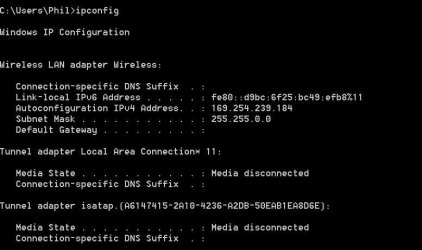
Hi guys!
I have had the same problem for a few days now, and have searched numerous forums and gone through hell and high water to fix it. nothing helped until I found the ultimate solution that will help everyone:
CALL YOUR ISP, TELL THEM WHAT HAPPENED AND THEY CAN CONFIGURE A NEW IP ADDRESS FOR YOUR CONNECTION. IT ONLY TAKES ABOUT HALF AN HOUR.
During this time you must keep your router/modem turned off, and after the ISP has fixed the problem (in my case it took half an hour) you must restart your machine with the router/modem on and connected. From then on it should be like nothing ever happened.
Just for the fun of it, here's a list of things I have tried without results:
release/renew ipconfig
restarting modem/router and computer about a zillion times
changing LAN card
creating a static IP
resetting winsock in command prompt
reinstalling Win7
reinstalling XP (I had a dual boot and I did both, losing all installations)
manually entering IP address
disabling/enabling local area connection
plugging and unplugging LAN cable
uninstalling and reinstalling LAN card driver
resetting modem/router using the reset button
And after all this, all it took was just a phone call.
This is because your ISP is THE ONLY authority when it comes to configuring your IP address. In this case, it can only be done from the outside. This is also the reason why Microsoft didn't announce any patches or fixes for this problem, because it is not their problem and responsibility.
Only one question remains, WHY is this happening? Noone has been able to answer this, and I have read tons of forum posts about it. Maybe even the guys that made Windows 7 don't know it.
I am going to copy this post on several other forums because I have seen the trouble that people are having with this problem.
If you find out why this is happening, please post it here.