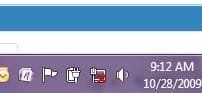
Wireless Connection Icon WTF?

Kiok

New member
Local time
12:18 PM
Messages
6
Hello everyone I'm having this weird issue where I'm connected to my internet it's working perfectly only with one problem. The wireless network Icon (You know at the bottom right) has the x mark. Which means you're not connected to any wireless networks, which I am currently and it's working (Internet works). :confused:


I know this a really weird problem, but hopefully someone has the soultion.

Thanks!
 

My Computer

OS
Windows 7 Ultimate x64 RTM
Memory
2 GIG
Hello everyone I'm having this weird issue where I'm connected to my internet it's working perfectly only with one problem. The wireless network Icon (You know at the bottom right) has the x mark. Which means you're not connected to any wireless networks, which I am currently and it's working (Internet works). :confused:


I know this a really weird problem, but hopefully someone has the soultion.

Thanks!

The X is probably from the wired card.

Go to the network adapters and set show icon for wired card off.

Wireless on, if not already

hope this works.

greetz
 

My Computer

OS
Win7 Build 7600 x86
CPU
Pentium II 300MHz
Motherboard
Asus
Memory
32mb EDO RAM
Graphics Card(s)
Diamond Viper
Sound Card
Soundblaster 16
Monitor(s) Displays
14" AOC CRT 16K color
Screen Resolution
800x600
Hard Drives
300mb Quantum fireball
PSU
110 Watts
Cooling
Passive
Keyboard
Trust Ergonomic
Mouse
Generic
Internet Speed
256K u 128K d
Please post a picture verifying what you said, Kiok - I think Squon may be correct, but we can only be sure if we can see the picture....
 

My Computers

System One System Two

  • Computer type
    PC/Desktop
    Computer Manufacturer/Model Number
    The Beast Model A (homebrew)
    OS
    Windows 11 21H2 Current build
    CPU
    AMD Ryzen 9 3950X
    Motherboard
    MSI MEG X570 GODLIKE
    Memory
    4 * 32 GB - Corsair Vengeance 3600 MHz
    Graphics Card(s)
    EVGA GeForce RTX 3080 Ti XC3 ULTRA GAMING (12G-P5-3955-KR)
    Sound Card
    Realtek® ALC1220 Codec
    Monitor(s) Displays
    2x Eve Spectrum ES07D03 4K Gaming Monitor (Matte) | Eve Spec
    Screen Resolution
    3x 3840 x 2160
    Hard Drives
    3x Samsung 980 Pro NVMe PCIe 4 M.2 2 TB SSD (MZ-V8P2T0B/AM) } 3x Sabrent Rocket NVMe 4.0 1 TB SSD
    PSU
    PC Power & Cooling’s Silencer Series 1050 Watt, 80 Plus Plat
    Case
    Fractal Design Define 7 XL Dark ATX Full Tower Case
    Cooling
    SteelSeries Apex Pro Wired Gaming Keyboard
    Keyboard
    SteelSeries Apex Pro
    Mouse
    Logitech MX Master 3S | MX Master 3 for business
    Internet Speed
    AT&T LightSpeed Gigabit Duplex Ftth
    Antivirus
    Windows Defender + MB 3
    Browser
    Nightly (default) + Firefox (stable),Chrome, Edge
  • Computer type
    PC/Desktop
    System Manufacturer/Model Number
    Dell Latitude E5470
    OS
    ChromeOS Flex Dev Channel (current)
    CPU
    Intel(R) Core(TM) i5-6300U CPU @ 2.40GHz, 2501 Mhz, 2 Core(s), 4 Logical Processor(s)
    Motherboard
    Dell
    Memory
    16 GB
    Graphics Card(s)
    Intel(R) HD Graphics 520
    Sound Card
    Intel(R) HD Graphics 520 + RealTek Audio
    Monitor(s) Displays
    Dell laptop display 15"
    Screen Resolution
    1920 * 1080
    Hard Drives
    Toshiba 128GB M.2 22300 drive
    INTEL Cherryville 520 Series SSDSC2CW180A 180 GB SATA III SSD
    PSU
    Dell
    Case
    Dell
    Cooling
    Dell
    Keyboard
    Dell
    Mouse
    Logitech MX Master 3S (shared w. Sys 1) | Dell TouchPad
    Internet Speed
    AT&T LightSpeed Gigabit Duplex Ftth
xe39di.jpg


I do have bridged connections so I'm pretty sure that may be the problem.
 

My Computer

OS
Windows 7 Ultimate x64 RTM
Memory
2 GIG
Yah, if you unbridge them it will probably revert to showing each connection individually....
 

My Computers

System One System Two

  • Computer type
    PC/Desktop
    Computer Manufacturer/Model Number
    The Beast Model A (homebrew)
    OS
    Windows 11 21H2 Current build
    CPU
    AMD Ryzen 9 3950X
    Motherboard
    MSI MEG X570 GODLIKE
    Memory
    4 * 32 GB - Corsair Vengeance 3600 MHz
    Graphics Card(s)
    EVGA GeForce RTX 3080 Ti XC3 ULTRA GAMING (12G-P5-3955-KR)
    Sound Card
    Realtek® ALC1220 Codec
    Monitor(s) Displays
    2x Eve Spectrum ES07D03 4K Gaming Monitor (Matte) | Eve Spec
    Screen Resolution
    3x 3840 x 2160
    Hard Drives
    3x Samsung 980 Pro NVMe PCIe 4 M.2 2 TB SSD (MZ-V8P2T0B/AM) } 3x Sabrent Rocket NVMe 4.0 1 TB SSD
    PSU
    PC Power & Cooling’s Silencer Series 1050 Watt, 80 Plus Plat
    Case
    Fractal Design Define 7 XL Dark ATX Full Tower Case
    Cooling
    SteelSeries Apex Pro Wired Gaming Keyboard
    Keyboard
    SteelSeries Apex Pro
    Mouse
    Logitech MX Master 3S | MX Master 3 for business
    Internet Speed
    AT&T LightSpeed Gigabit Duplex Ftth
    Antivirus
    Windows Defender + MB 3
    Browser
    Nightly (default) + Firefox (stable),Chrome, Edge
  • Computer type
    PC/Desktop
    System Manufacturer/Model Number
    Dell Latitude E5470
    OS
    ChromeOS Flex Dev Channel (current)
    CPU
    Intel(R) Core(TM) i5-6300U CPU @ 2.40GHz, 2501 Mhz, 2 Core(s), 4 Logical Processor(s)
    Motherboard
    Dell
    Memory
    16 GB
    Graphics Card(s)
    Intel(R) HD Graphics 520
    Sound Card
    Intel(R) HD Graphics 520 + RealTek Audio
    Monitor(s) Displays
    Dell laptop display 15"
    Screen Resolution
    1920 * 1080
    Hard Drives
    Toshiba 128GB M.2 22300 drive
    INTEL Cherryville 520 Series SSDSC2CW180A 180 GB SATA III SSD
    PSU
    Dell
    Case
    Dell
    Cooling
    Dell
    Keyboard
    Dell
    Mouse
    Logitech MX Master 3S (shared w. Sys 1) | Dell TouchPad
    Internet Speed
    AT&T LightSpeed Gigabit Duplex Ftth
I also have a weird network connection icon

:confused:

network icon.JPG

I also show an x on my network icon, but I am connected just fine. My connections are not bridged.

It was showing fine yesterday but then my computer did an automatic update - maybe something was changed?
 

My Computer

Computer Manufacturer/Model Number
Toshiba satellite a305-s6916
OS
windows 7
CPU
intel duo 2.0 GHz
Memory
4gb
Graphics Card(s)
ATI Mobility Radeon HD 3650
Sound Card
Realtek High Definition Audio
I too have this problem, but my Icon shows connections are available, like I haven't connected, when I clearly have. Running x64 Home Premium btw.
 

My Computer

OS
Windows 7 Home Premium x64
hey, i have the same problem as ksheffler.. weird icon with an x even tho i am connected.. any resolution to this issue?
 

My Computer

OS
windows 7 64bit
Did anyone find a solution to this? I am also having this problem (same as Ksheffler), there was an updateyesterday and I don't know if that changed something but it's an annoying and useless icon, it doesn't tell me the quality of my connection. How do i get the old bars icon back?
 

My Computer

Computer Manufacturer/Model Number
acer
OS
Windows 7 starter
CPU
intel atom processor n450 (1.66GHz, 512kb cache)
Memory
1gb
Monitor(s) Displays
10.1" led lcd
Hard Drives
160 GB
i have same problem :S
 

My Computer

OS
windows 7 home premium 64 bit
CPU
AMD PHENOM II BLACK EDITION
Motherboard
GIGABYTE MA78LMT-US2H
Memory
2*2GB
Monitor(s) Displays
LG FLATRON W1934S
Hard Drives
500GB SAMSUNG HD502HJ F3 SATA
PSU
STORM ICE 500W
Case
XCLIO GODSPEED ONE ADVANCED
If I remember rightly I had to go into my device manager and disable the non-wireless adapter to get it to change back to the regular icon with the bars. Only issue there is I will have to go into device manager again if I ever need to connect to a wired connection and re-enable it if I want to go online.
 

My Computer

Computer Manufacturer/Model Number
acer
OS
Windows 7 starter
CPU
intel atom processor n450 (1.66GHz, 512kb cache)
Memory
1gb
Monitor(s) Displays
10.1" led lcd
Hard Drives
160 GB
Change the Connections' order

What worked for me is as simple as this:

In the Network and Sharing Center click on Change adapter settings
Hit the Alt key and the menu bar will appear, then go to Advanced -> Advanced Settings

Now in the Connections' listbox you can set the priority of your network adapters. Put the wireless on top, restart and you should be fine
 

My Computer

Computer type
Laptop
Computer Manufacturer/Model Number
Acer
OS
Windows 7 Ultimate x64
CPU
Intel® Core i7-4700HQ
Memory
8 GB
Graphics Card(s)
NVIDIA GeForce GT 750M
Back
Top