Solved Wireless devices and wireless networks

jailbirdslanger

New member
I was curious to how vulnerable my home wireless network is to viruses based on the fact that there is constantly people coming and going on different devices such as iPADs, blackberrys, and droids. When they use my wireless connection, is data thats being sent/recieved on their devices prone to intrude my network and eventually end up in my PC?

Thanks
Eric
 

My Computer

Computer Manufacturer/Model Number
Custom - No OEM
OS
Windows 7 Professional x64
CPU
Intel Core i5 CPU 661 @, 3.33 GHz
Motherboard
BIOSTAR GROUP - TPower I55
Memory
16 GB
Graphics Card(s)
nVidia GeForce GTX 465 1024 MB GDDR5
Monitor(s) Displays
LG Flatron 22"
Screen Resolution
1920x1080
Hard Drives
1 TB - Hitachi
Case
ZALMAN
Keyboard
Dynex W7 Keyboard
Mouse
Logitech MX518
Internet Speed
CABLE 20 Down, 6 Up (wireless)
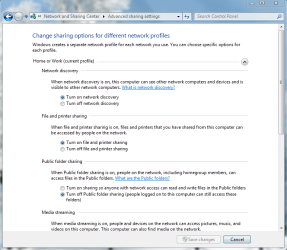
No, unless you have your pc set to receive files through sharing. Look in your advanced sharing settings, and only if you want, you can turn off file and printer sharing. There is a password setting on it so it makes it harder for people to break in if you have it enabled in the same sharing settings window. Here is a screenshot so you can see what it is:

Capture.PNG

Default is set to share, but the password is enabled. Even in sharing, most of the time they cannot give you anything (viruses, files, etc) unless you set the folders to be able to be modified. Sharing can be good with password enabled, as you can use printers or connect to friendly computers without having to use storage from somewhere else on the internet.

On the flip side, if you are using a stranger's Wireless network, they are able to give you viruses (however, this requires them to have some kind of sophistication and a deliberate desire to infect your computer). That is why you don't "barrow", or steal rather, someone else's wifi
 

My Computer

Computer type
PC/Desktop
Computer Manufacturer/Model Number
Custom Asus Build
OS
Microsoft Windows 8.1 Pro 64-bit
CPU
Intel(R) Core(TM) i3-4130 CPU @ 3.40GHz
Motherboard
B85M-E
Memory
8.00 GB
Graphics Card(s)
None
Sound Card
Realtek High Definition Audio
Monitor(s) Displays
Asus 23.6" Monitor
Screen Resolution
1920 x 1080 x 32 bits (4294967296 colors) @ 60 Hz
Hard Drives
INTEL SSDSC2BW180A4
Samsung SSD 840 PRO Series
PSU
Seasonic S12II-380Bronze
Case
Lian Li
Cooling
Fan, Passive
Keyboard
Logitech K120
Mouse
Microsoft Touch Mouse
Internet Speed
4ms Ping, 19.0 Mbps Download, 19.0 Mbps Upload
Antivirus
Eset Endpoint
Browser
Internet Explorer, Chrome
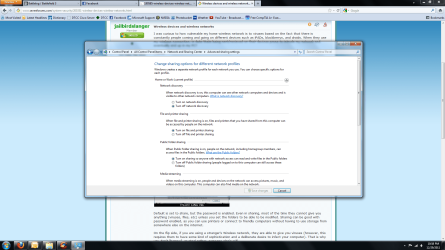
Thanks for the reply. It's a good thing I asked about this because the settings I had configured were all screwed up. I posted a screen shot of the settings I had prior to this post.

Security is my weaker subject when it comes to computers so thanks once again for your time.
 

Attachments

  • temp.png
    temp.png
    258.4 KB · Views: 18

My Computer

Computer Manufacturer/Model Number
Custom - No OEM
OS
Windows 7 Professional x64
CPU
Intel Core i5 CPU 661 @, 3.33 GHz
Motherboard
BIOSTAR GROUP - TPower I55
Memory
16 GB
Graphics Card(s)
nVidia GeForce GTX 465 1024 MB GDDR5
Monitor(s) Displays
LG Flatron 22"
Screen Resolution
1920x1080
Hard Drives
1 TB - Hitachi
Case
ZALMAN
Keyboard
Dynex W7 Keyboard
Mouse
Logitech MX518
Internet Speed
CABLE 20 Down, 6 Up (wireless)
Eric,

you may also make sure you have a good up to date antivirus. which one do you have?
 

My Computer

Computer type
PC/Desktop
Computer Manufacturer/Model Number
Custom Asus Build
OS
Microsoft Windows 8.1 Pro 64-bit
CPU
Intel(R) Core(TM) i3-4130 CPU @ 3.40GHz
Motherboard
B85M-E
Memory
8.00 GB
Graphics Card(s)
None
Sound Card
Realtek High Definition Audio
Monitor(s) Displays
Asus 23.6" Monitor
Screen Resolution
1920 x 1080 x 32 bits (4294967296 colors) @ 60 Hz
Hard Drives
INTEL SSDSC2BW180A4
Samsung SSD 840 PRO Series
PSU
Seasonic S12II-380Bronze
Case
Lian Li
Cooling
Fan, Passive
Keyboard
Logitech K120
Mouse
Microsoft Touch Mouse
Internet Speed
4ms Ping, 19.0 Mbps Download, 19.0 Mbps Upload
Antivirus
Eset Endpoint
Browser
Internet Explorer, Chrome
I have norton internet security 2011 on two of the computers that are on the network (which are the ones mainly used anyway). The other devices I'm unsure of what protection they have but these devices are the ones that roam in and out of my house.
 

My Computer

Computer Manufacturer/Model Number
Custom - No OEM
OS
Windows 7 Professional x64
CPU
Intel Core i5 CPU 661 @, 3.33 GHz
Motherboard
BIOSTAR GROUP - TPower I55
Memory
16 GB
Graphics Card(s)
nVidia GeForce GTX 465 1024 MB GDDR5
Monitor(s) Displays
LG Flatron 22"
Screen Resolution
1920x1080
Hard Drives
1 TB - Hitachi
Case
ZALMAN
Keyboard
Dynex W7 Keyboard
Mouse
Logitech MX518
Internet Speed
CABLE 20 Down, 6 Up (wireless)
Does norton work alright for you? I don't recall hearing anything bad about it, but AVG, avast, and McAfee are terrible. So you have virus protection, that is good. Seems like you are alright, just make sure you keep it updated every so often.

Internet explorer is the most secure browser, but also the most attacked, it would seem. I would use it or firefox (a pretty good browser itself), but this is entirely your choice. You might consider (unless you have already) using a password for your router so others aren't just using your wireless up.

Glad to be of help!
 

My Computer

Computer type
PC/Desktop
Computer Manufacturer/Model Number
Custom Asus Build
OS
Microsoft Windows 8.1 Pro 64-bit
CPU
Intel(R) Core(TM) i3-4130 CPU @ 3.40GHz
Motherboard
B85M-E
Memory
8.00 GB
Graphics Card(s)
None
Sound Card
Realtek High Definition Audio
Monitor(s) Displays
Asus 23.6" Monitor
Screen Resolution
1920 x 1080 x 32 bits (4294967296 colors) @ 60 Hz
Hard Drives
INTEL SSDSC2BW180A4
Samsung SSD 840 PRO Series
PSU
Seasonic S12II-380Bronze
Case
Lian Li
Cooling
Fan, Passive
Keyboard
Logitech K120
Mouse
Microsoft Touch Mouse
Internet Speed
4ms Ping, 19.0 Mbps Download, 19.0 Mbps Upload
Antivirus
Eset Endpoint
Browser
Internet Explorer, Chrome
Out off all virus programs I've used in the past ... norton picks up on more threats/potential threats than any of them
 

My Computer

Computer Manufacturer/Model Number
Custom - No OEM
OS
Windows 7 Professional x64
CPU
Intel Core i5 CPU 661 @, 3.33 GHz
Motherboard
BIOSTAR GROUP - TPower I55
Memory
16 GB
Graphics Card(s)
nVidia GeForce GTX 465 1024 MB GDDR5
Monitor(s) Displays
LG Flatron 22"
Screen Resolution
1920x1080
Hard Drives
1 TB - Hitachi
Case
ZALMAN
Keyboard
Dynex W7 Keyboard
Mouse
Logitech MX518
Internet Speed
CABLE 20 Down, 6 Up (wireless)
Alrighty, then it looks like you're secure :)
 

My Computer

Computer type
PC/Desktop
Computer Manufacturer/Model Number
Custom Asus Build
OS
Microsoft Windows 8.1 Pro 64-bit
CPU
Intel(R) Core(TM) i3-4130 CPU @ 3.40GHz
Motherboard
B85M-E
Memory
8.00 GB
Graphics Card(s)
None
Sound Card
Realtek High Definition Audio
Monitor(s) Displays
Asus 23.6" Monitor
Screen Resolution
1920 x 1080 x 32 bits (4294967296 colors) @ 60 Hz
Hard Drives
INTEL SSDSC2BW180A4
Samsung SSD 840 PRO Series
PSU
Seasonic S12II-380Bronze
Case
Lian Li
Cooling
Fan, Passive
Keyboard
Logitech K120
Mouse
Microsoft Touch Mouse
Internet Speed
4ms Ping, 19.0 Mbps Download, 19.0 Mbps Upload
Antivirus
Eset Endpoint
Browser
Internet Explorer, Chrome
Back
Top