Solved Wireless doesn't have valid ip configuration

taradenise

New member
I have a Dell Intel Pentium Desktop and a Toshiba laptop running Windows 7; the router is a Netgear RangeMax Wireless-N 150. Until 8/17/11 I was able to make wireless/wired connection with my laptop, I can make connection with desktop with no problem. When I run troubleshooter I'm informed that "Wireless doesn't have a valid ip configuration", or "connection between router access point, router cable, internet modem broken". Connection also defaults to "Unidentified network" instead of my home network. I have reset my laptop, desktop, cable modem, router; device manager informs me that all hardware is working properly also, I updated firmware, and verified the most recent drivers installed. Connection has been setup since July 2010 and I have experienced no problem up until now. If someone could assist me and help to to fix this problem I would really appreciate it:cry:
 

Attachments

  • snapshot.PNG
    snapshot.PNG
    87.1 KB · Views: 277

My Computer

OS
Windows 7 Homes Premium 32bit
Welcome to the forum taradenise!

Sorry to hear you are having problems!

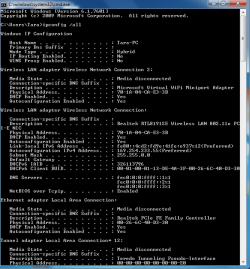
It is obvious from this image that you are not connecting to the router at all... the IP showing is an autoconfig IP starting with 169.254.xxx.xxx. So, your issue is probably with the router.

Since all was working fine earlier, I am willing to bet that on or around 8/17/11 you had power outtage, you unplugged, or moved your router. ??? :sarc:

If unplugged for a period of time, many routers will reset to factory defaults.

If you send me the same image from the desktop, along with the model and make of your router, I should be able to help you get this back up easily! :D
 

My Computer

Computer Manufacturer/Model Number
Homebrew PC - "Alpha_Dawg"
OS
Windows 7 Ultimate 64 bit Steve Ballmer Signature Edition
CPU
Intel Core 2 Quad - Q9550 - 2.83GHz stock - OC'd to 3.6GHz
Motherboard
Gigabyte EP45-UD3P
Memory
4GB DDR2 800MHz (PC6400) OCZ Reaper
Graphics Card(s)
Nvidia GE Force 8800 GTS
Sound Card
Asus Xonar DX
Monitor(s) Displays
Samsung SyncMaster 2333HD
Screen Resolution
1920 x 1080
Hard Drives
WD Caviar Black 750GB - 7200RPM - 32MB cache
WD Caviar Green 1.5TB - 5400RPM - 64MB cache
WD Caviar Green 2.0TB - 5400RPM - 64MB cache
PSU
PC Power & Cooling Silencer 750
Case
Gigabyte 3D Aurora
Cooling
Case is Air - 5ea. 120mm fans (mix of Arctic and Xigmatec)
Keyboard
MS Natural Wireless KB
Mouse
MS Wireless Mouse
Internet Speed
50 mbps down/5 mbps up
Other Info
AVerMedia - AVerTVHD G2 Dual Tuner Card
Wireless doesnt have valid ip configuration

Darryl,

Here is the information you requested, router is Netgear RangeMax Wireless N 150 Router wpn824n:)
 

Attachments

  • snapshot.PNG
    snapshot.PNG
    87.1 KB · Views: 135

My Computer

OS
Windows 7 Homes Premium 32bit
Darryl,

Here is the information you requested, router is Netgear RangeMax Wireless N 150 Router wpn824n:)


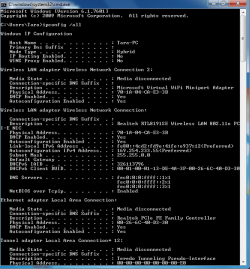
I think you attached the same image to this post... its the same as the first image. I need a screenshot of the desktop that is connecting to the Internet... then I can give you exact instructions for that netgear rtr.
 

My Computer

Computer Manufacturer/Model Number
Homebrew PC - "Alpha_Dawg"
OS
Windows 7 Ultimate 64 bit Steve Ballmer Signature Edition
CPU
Intel Core 2 Quad - Q9550 - 2.83GHz stock - OC'd to 3.6GHz
Motherboard
Gigabyte EP45-UD3P
Memory
4GB DDR2 800MHz (PC6400) OCZ Reaper
Graphics Card(s)
Nvidia GE Force 8800 GTS
Sound Card
Asus Xonar DX
Monitor(s) Displays
Samsung SyncMaster 2333HD
Screen Resolution
1920 x 1080
Hard Drives
WD Caviar Black 750GB - 7200RPM - 32MB cache
WD Caviar Green 1.5TB - 5400RPM - 64MB cache
WD Caviar Green 2.0TB - 5400RPM - 64MB cache
PSU
PC Power & Cooling Silencer 750
Case
Gigabyte 3D Aurora
Cooling
Case is Air - 5ea. 120mm fans (mix of Arctic and Xigmatec)
Keyboard
MS Natural Wireless KB
Mouse
MS Wireless Mouse
Internet Speed
50 mbps down/5 mbps up
Other Info
AVerMedia - AVerTVHD G2 Dual Tuner Card

Attachments

My Computer

Computer type
PC/Desktop
Computer Manufacturer/Model Number
Custom Built
OS
Windows 7 Professional x64 SP1 ; Windows Server 2012 R2 Standard
CPU
Intel Core i5 2400 @ 3.10GHz
Motherboard
Foxconn H67MP-S/-V/H67MP
Memory
8.0GB DDR3 @ 665MHz (2GBx4)
Graphics Card(s)
AMD Radeon HD 6870
Sound Card
Realtek High Definition Audio
Monitor(s) Displays
AOC 2243W & SMB1930NW
Screen Resolution
1440x900 & 1920x1080
Hard Drives
977GB Seagate ST31000524AS ATA Drive (SATA)
250GB WD iSCSI attached Drive
PSU
750W Gaming PSU
Case
Novatech Night
Cooling
Fan
Keyboard
Dell Standard PS/2 Keyboard
Mouse
R.A.T 07 Gaming Mouse
Internet Speed
Download: 10 Mbps Ping: 30ms Upload: 0.81 Mbps
Browser
Google Chrome
Other Info
Optiarc DVD RW AD-5260S ATA Device
Darryl,

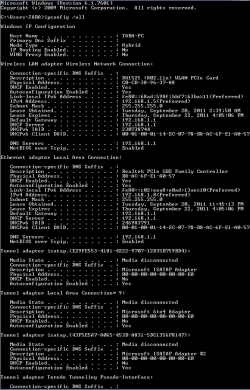
Here the snap shot
 

Attachments

  • snapshot desktop.PNG
    snapshot desktop.PNG
    59.2 KB · Views: 201

My Computer

OS
Windows 7 Homes Premium 32bit
OK... from the wired desktop, open a browser and type 192.168.1.1... that's your routers IP address.


This should open up a login screen... use admin as the username and password as the password (those are the netgear defaults)


Click Wireless Settings in the main menu bar of the wireless router.
Note that the default SSID is NETGEAR. The SSID is the name of your wireless network, you can change this to whatever you want.

You should also see a section labled wireless security... select WPA or WPA2 for wireless encryption and create a passphrase.

When done, make sure to click on Apply.

Now attempt to connect from your laptop and this time you may have to look at what wireless networks are in range... try to connect to the SSID you created above, and use the passphrase you created for wireless encryption.

Let me know if you need more assistance... and just in case hers is the user manual for your router...ftp://downloads.netgear.com/files/WPN824N_SM_25NOV2009.pdf
 

My Computer

Computer Manufacturer/Model Number
Homebrew PC - "Alpha_Dawg"
OS
Windows 7 Ultimate 64 bit Steve Ballmer Signature Edition
CPU
Intel Core 2 Quad - Q9550 - 2.83GHz stock - OC'd to 3.6GHz
Motherboard
Gigabyte EP45-UD3P
Memory
4GB DDR2 800MHz (PC6400) OCZ Reaper
Graphics Card(s)
Nvidia GE Force 8800 GTS
Sound Card
Asus Xonar DX
Monitor(s) Displays
Samsung SyncMaster 2333HD
Screen Resolution
1920 x 1080
Hard Drives
WD Caviar Black 750GB - 7200RPM - 32MB cache
WD Caviar Green 1.5TB - 5400RPM - 64MB cache
WD Caviar Green 2.0TB - 5400RPM - 64MB cache
PSU
PC Power & Cooling Silencer 750
Case
Gigabyte 3D Aurora
Cooling
Case is Air - 5ea. 120mm fans (mix of Arctic and Xigmatec)
Keyboard
MS Natural Wireless KB
Mouse
MS Wireless Mouse
Internet Speed
50 mbps down/5 mbps up
Other Info
AVerMedia - AVerTVHD G2 Dual Tuner Card
Darryl,

I verified the wireless settings of my router and they were actually as you described, do you or anyone else have any other suggestions, I'm still unable to make internet connection with my laptop. I'm haven't had any problems with wireless connection with my other devices; I also ran device manager and I'm informed that my hardware is working properly.
 

My Computer

OS
Windows 7 Homes Premium 32bit
What shows up in the wireless networks for the laptop? Can you send a screenshot?
 

My Computer

Computer Manufacturer/Model Number
Homebrew PC - "Alpha_Dawg"
OS
Windows 7 Ultimate 64 bit Steve Ballmer Signature Edition
CPU
Intel Core 2 Quad - Q9550 - 2.83GHz stock - OC'd to 3.6GHz
Motherboard
Gigabyte EP45-UD3P
Memory
4GB DDR2 800MHz (PC6400) OCZ Reaper
Graphics Card(s)
Nvidia GE Force 8800 GTS
Sound Card
Asus Xonar DX
Monitor(s) Displays
Samsung SyncMaster 2333HD
Screen Resolution
1920 x 1080
Hard Drives
WD Caviar Black 750GB - 7200RPM - 32MB cache
WD Caviar Green 1.5TB - 5400RPM - 64MB cache
WD Caviar Green 2.0TB - 5400RPM - 64MB cache
PSU
PC Power & Cooling Silencer 750
Case
Gigabyte 3D Aurora
Cooling
Case is Air - 5ea. 120mm fans (mix of Arctic and Xigmatec)
Keyboard
MS Natural Wireless KB
Mouse
MS Wireless Mouse
Internet Speed
50 mbps down/5 mbps up
Other Info
AVerMedia - AVerTVHD G2 Dual Tuner Card
Darryl,

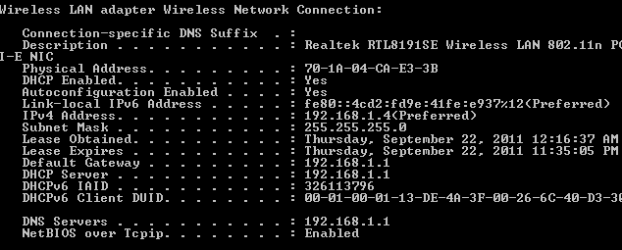
Here is the screen shot
 

Attachments

  • Laptop wireless snapshot.PNG
    Laptop wireless snapshot.PNG
    15.5 KB · Views: 136

My Computer

OS
Windows 7 Homes Premium 32bit
Hmmm... according to the new screenshot you are now connected to the router and you now have a valid IP addres within the same subnet as the router.

What AV product are you running? Have you tried disabling firewalls?

Also, how about a screenshot of Control Panel --> Network & Internet --> Network & Sharing Center ? While you are there please also take a screenie of the Manage Wireless Network Screen as well.

Dont worry, we will get this fixed... we have made some progress!
 

My Computer

Computer Manufacturer/Model Number
Homebrew PC - "Alpha_Dawg"
OS
Windows 7 Ultimate 64 bit Steve Ballmer Signature Edition
CPU
Intel Core 2 Quad - Q9550 - 2.83GHz stock - OC'd to 3.6GHz
Motherboard
Gigabyte EP45-UD3P
Memory
4GB DDR2 800MHz (PC6400) OCZ Reaper
Graphics Card(s)
Nvidia GE Force 8800 GTS
Sound Card
Asus Xonar DX
Monitor(s) Displays
Samsung SyncMaster 2333HD
Screen Resolution
1920 x 1080
Hard Drives
WD Caviar Black 750GB - 7200RPM - 32MB cache
WD Caviar Green 1.5TB - 5400RPM - 64MB cache
WD Caviar Green 2.0TB - 5400RPM - 64MB cache
PSU
PC Power & Cooling Silencer 750
Case
Gigabyte 3D Aurora
Cooling
Case is Air - 5ea. 120mm fans (mix of Arctic and Xigmatec)
Keyboard
MS Natural Wireless KB
Mouse
MS Wireless Mouse
Internet Speed
50 mbps down/5 mbps up
Other Info
AVerMedia - AVerTVHD G2 Dual Tuner Card
Darryl,

I'm running Webroot Internet Security Essentials, I disable firewall and I'm now able to connect to the internet. If I enable Windows firewall will it provide the same protection that Webroot firewall provided? I back up and running, thanks to you, I appreciate your patience and assitance in solving this problem:party:
 

My Computer

OS
Windows 7 Homes Premium 32bit
Darryl,

I'm running Webroot Internet Security Essentials, I disable firewall and I'm now able to connect to the internet. If I enable Windows firewall will it provide the same protection that Webroot firewall provided? I back up and running, thanks to you, I appreciate your patience and assitance in solving this problem:party:

taradenise:

Most routers have built in hardware based firewalls, which are usually superior to sw based firewalls, personally I do not run software firewalls as they create many such issues. Matter of fact a recent upgrade to Norton Internet Security 2012 on my home server caused all of my other PC's to no longer see the shared folders on that server... once I disabled the Norton firewall, all was back to normal!

And when your webroot expires, you may want to look at a better alternative... Norton has been voted the best antivirus product for the last 3-4 years by most of the well known PC magazines. If you want a less expensive AV product (free) try Microsofts Security Essentials.

Glad we got it sorted out for you!
 

My Computer

Computer Manufacturer/Model Number
Homebrew PC - "Alpha_Dawg"
OS
Windows 7 Ultimate 64 bit Steve Ballmer Signature Edition
CPU
Intel Core 2 Quad - Q9550 - 2.83GHz stock - OC'd to 3.6GHz
Motherboard
Gigabyte EP45-UD3P
Memory
4GB DDR2 800MHz (PC6400) OCZ Reaper
Graphics Card(s)
Nvidia GE Force 8800 GTS
Sound Card
Asus Xonar DX
Monitor(s) Displays
Samsung SyncMaster 2333HD
Screen Resolution
1920 x 1080
Hard Drives
WD Caviar Black 750GB - 7200RPM - 32MB cache
WD Caviar Green 1.5TB - 5400RPM - 64MB cache
WD Caviar Green 2.0TB - 5400RPM - 64MB cache
PSU
PC Power & Cooling Silencer 750
Case
Gigabyte 3D Aurora
Cooling
Case is Air - 5ea. 120mm fans (mix of Arctic and Xigmatec)
Keyboard
MS Natural Wireless KB
Mouse
MS Wireless Mouse
Internet Speed
50 mbps down/5 mbps up
Other Info
AVerMedia - AVerTVHD G2 Dual Tuner Card
Back
Top