Wireless Driver Issue

joel4119

New member
Local time
5:57 PM
Messages
3
Hi everyone,

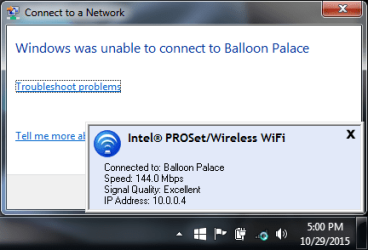
I have a Dell Inspiron 17R laptop that has some issues with its wireless network adapter. Whenever I turn on my laptop from sleep mode, it doesn't automatically connect to my wireless connection. While that's not a big deal, when I attempt to manually connect to it, one message says I'm connected while another says it can't (see WiFi.png attachment). As soon as I close the error message that says my laptop can't connect, the WiFi icon changes to show I'm connected.

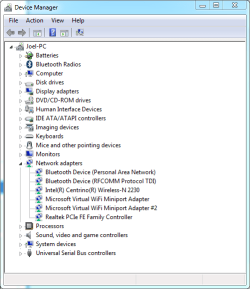
I'm guessing that the cause of this is a driver issue of some sort, so I'm trying to identify which driver I should uninstall to remedy it. My choices are in the Device Manager.png attachment. Any help identifying how to make the erroneous message go away would be very helpful! Let me know if you need any additional information from me.

Thank you,

Joel
 

Attachments
  • WiFi.png
    WiFi.png
    14 KB · Views: 16
  • Device Manager.png
    Device Manager.png
    15.5 KB · Views: 16

My Computer My Computer

At a glance

CAIntel Core i7-3610QM CPU @ 2.30GHz (8 CPUs), ...8192MB RAMNVIDIA GeForce GT 650M
Computer type
Laptop
Computer Manufacturer/Model Number
Dell Inspiron 17R
OS
CA
CPU
Intel Core i7-3610QM CPU @ 2.30GHz (8 CPUs), ~2.3GHz
Memory
8192MB RAM
Graphics Card(s)
NVIDIA GeForce GT 650M
Open Control Panel then Power Options.
Click on Change plan settings next to the plan in use.
Click on Change advanced power settings.
Expand Wireless Adapter settings, Power saving mode and set to Maximum performance. This should prevent the computer from shutting off power to the WiFi device, which is what is causing the problem you are seeing.
 

My Computer My Computer

At a glance

Windows 10 Pro X64Intel Quad Core i7-4770 @ 3.4Ghz16.0GB PC3-12800 DDR3 SDRAM 1600 MHzIntel Integrated HD Graphics
Computer type
PC/Desktop
Computer Manufacturer/Model Number
Lenovo IdeaCenter 450
OS
Windows 10 Pro X64
CPU
Intel Quad Core i7-4770 @ 3.4Ghz
Memory
16.0GB PC3-12800 DDR3 SDRAM 1600 MHz
Graphics Card(s)
Intel Integrated HD Graphics
Sound Card
Realtek HD Audio
Monitor(s) Displays
HP 22" LCD
Screen Resolution
1680 x 1050
Hard Drives
250GB Samsung EVO SATA-3 SSD
2TB Seagate ST2000DM001 SATA-2
1.5TB Seagate ST3150041AS SATA
Keyboard
Dell USB
Mouse
Lenovo USB
Internet Speed
Cable via Road Runner 3MB Upload, 30MB Download
Antivirus
Windows Defender, MBAM Pro, MBAE
Browser
Seamonkey
Other Info
UEFI/GPT
PLDS DVD-RW DH16AERSH
Hi Ztruker,

Thanks for your suggestion! Unfortunately both settings were already set to "Maximum Performance," so there must be something else causing this issue. What's really annoying is that this only started occurring after I bought a new SSD and had to reinstall of my laptop's drivers manually. This is the primary reason why I think I may have installed a bad driver for the my wireless network adapter. Any other suggestions are greatly appreciated!

Thanks,

Joel
 

My Computer My Computer

At a glance

CAIntel Core i7-3610QM CPU @ 2.30GHz (8 CPUs), ...8192MB RAMNVIDIA GeForce GT 650M
Computer type
Laptop
Computer Manufacturer/Model Number
Dell Inspiron 17R
OS
CA
CPU
Intel Core i7-3610QM CPU @ 2.30GHz (8 CPUs), ~2.3GHz
Memory
8192MB RAM
Graphics Card(s)
NVIDIA GeForce GT 650M
What model of the 17R do you have? What is the full model number?
Do you have a link to the dell website for your model?
 

My Computer My Computer

At a glance

Windows 10 Pro X64Intel Quad Core i7-4770 @ 3.4Ghz16.0GB PC3-12800 DDR3 SDRAM 1600 MHzIntel Integrated HD Graphics
Computer type
PC/Desktop
Computer Manufacturer/Model Number
Lenovo IdeaCenter 450
OS
Windows 10 Pro X64
CPU
Intel Quad Core i7-4770 @ 3.4Ghz
Memory
16.0GB PC3-12800 DDR3 SDRAM 1600 MHz
Graphics Card(s)
Intel Integrated HD Graphics
Sound Card
Realtek HD Audio
Monitor(s) Displays
HP 22" LCD
Screen Resolution
1680 x 1050
Hard Drives
250GB Samsung EVO SATA-3 SSD
2TB Seagate ST2000DM001 SATA-2
1.5TB Seagate ST3150041AS SATA
Keyboard
Dell USB
Mouse
Lenovo USB
Internet Speed
Cable via Road Runner 3MB Upload, 30MB Download
Antivirus
Windows Defender, MBAM Pro, MBAE
Browser
Seamonkey
Other Info
UEFI/GPT
PLDS DVD-RW DH16AERSH
I believe it's an Inspiron 17R SE 7720. It's a little old, however Dell still has a product support page for it:

Product Support | Dell US
 

My Computer My Computer

At a glance

CAIntel Core i7-3610QM CPU @ 2.30GHz (8 CPUs), ...8192MB RAMNVIDIA GeForce GT 650M
Computer type
Laptop
Computer Manufacturer/Model Number
Dell Inspiron 17R
OS
CA
CPU
Intel Core i7-3610QM CPU @ 2.30GHz (8 CPUs), ~2.3GHz
Memory
8192MB RAM
Graphics Card(s)
NVIDIA GeForce GT 650M
Back
Top