Solved wireless & Ethernet conflict

prukeyhi

New member
Power User
VIP
Local time
2:01 AM
Messages
224
Location
Haifa-IL
Hi friends,
i use my laptop mainly with wireless network,
i wonder if there is a setting to disable wireless network auto. when Ethernet cable plugged in (and vice versa)?

*without 3rd party app's

Thanx
 

My Computer

Computer type
PC/Desktop
OS
98SE/XP/windows7 32bit/ win10
What conflict are you having?

I run my laptop wirelessly most of the time as well but occasionally connect a Ethernet cable and everything works fine.
 

My Computer

Computer type
PC/Desktop
Computer Manufacturer/Model Number
Lenovo IdeaCenter 450
OS
Windows 10 Pro X64
CPU
Intel Quad Core i7-4770 @ 3.4Ghz
Memory
16.0GB PC3-12800 DDR3 SDRAM 1600 MHz
Graphics Card(s)
Intel Integrated HD Graphics
Sound Card
Realtek HD Audio
Monitor(s) Displays
HP 22" LCD
Screen Resolution
1680 x 1050
Hard Drives
250GB Samsung EVO SATA-3 SSD
2TB Seagate ST2000DM001 SATA-2
1.5TB Seagate ST3150041AS SATA
Keyboard
Dell USB
Mouse
Lenovo USB
Internet Speed
Cable via Road Runner 3MB Upload, 30MB Download
Antivirus
Windows Defender, MBAM Pro, MBAE
Browser
Seamonkey
Other Info
UEFI/GPT
PLDS DVD-RW DH16AERSH
i just do not want wireless & Ethernet to work together (only one at a time) on my laptop -no real conflict .
 

My Computer

Computer type
PC/Desktop
OS
98SE/XP/windows7 32bit/ win10

My Computer

Computer Manufacturer/Model Number
HP/ Pavilion P6751C
OS
windows 7 home premium 64 bit
CPU
AMD Phenom(tm) II X4 830 Processor, 2800 Mhz, 4 core
Motherboard
N-Alvorix-RS880-uATX (Alvorix) motherboard
Memory
12.00 GB
Graphics Card(s)
ATI Radeon 4200
Sound Card
Creative Labs Sound Blaster Recon3D
Monitor(s) Displays
46" Sony TV KDL-46NX810
Screen Resolution
1920x1090P
Hard Drives
1 TB
PSU
Internal 250W
Case
Mid-size ATX
Cooling
1 rear case fan
Keyboard
Logitech USB Wireless K800
Mouse
Logitech USB Wireless M305
Internet Speed
22mb-28mb
i just do not want wireless & Ethernet to work together (only one at a time) on my laptop -no real conflict .
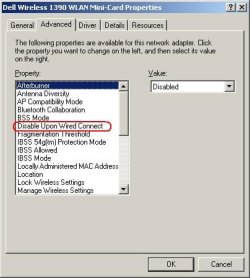
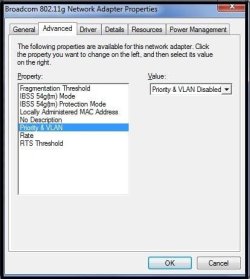
Does your wireless card support this feature?

d.JPG

Check via device manager.
 

My Computer

Computer type
Laptop
Computer Manufacturer/Model Number
Employer provided Dell Latitude
OS
W7 Pro SP1 64bit
CPU
i7
Memory
8GB
Graphics Card(s)
Intel HD Graphics
Hard Drives
crappy SSD
Antivirus
Employer mandated Symantec Endpoint Protection
Browser
Pale Moon 64bit, IE11 64bit & Chrome 64bit

Attachments

  • Untitled.jpg
    Untitled.jpg
    25.9 KB · Views: 31

My Computer

Computer type
PC/Desktop
OS
98SE/XP/windows7 32bit/ win10
Hi friends,
i use my laptop mainly with wireless network,
i wonder if there is a setting to disable wireless network auto. when Ethernet cable plugged in (and vice versa)?

*without 3rd party app's

Thanx

Windows already does this for you.
 

My Computer

Computer type
PC/Desktop
Computer Manufacturer/Model Number
Home built
OS
Windows 7 Ult, Windows 8.1 Pro,
CPU
Q9650-4.275GHz, E8600 4.5GHz, E6750-3.8GHz
Motherboard
Evga 780i FTW
Memory
G.Skill PC2 9600 1200Mhz 5 5 5 15 2T
Graphics Card(s)
GTX480
Sound Card
Asus Xonar D2
Monitor(s) Displays
HannsG
Screen Resolution
1680X1050
Hard Drives
GSkill Phoenix Pro 120GB SSD
PSU
ThermalTake Toughpower 1000Watt modular
Case
ThermalTake XaserV
Cooling
Xigmatek S1283
Keyboard
Logitech G15
Mouse
Logitech G9
Internet Speed
T1
Hi friends,
i use my laptop mainly with wireless network,
i wonder if there is a setting to disable wireless network auto. when Ethernet cable plugged in (and vice versa)?

*without 3rd party app's

Thanx

Windows already does this for you.

I believe he's asking for a manual way to disable. But, I agree Windows automatically does the switching. Otherwise, there would be a driver conflict.
 

My Computer

Computer Manufacturer/Model Number
HP/ Pavilion P6751C
OS
windows 7 home premium 64 bit
CPU
AMD Phenom(tm) II X4 830 Processor, 2800 Mhz, 4 core
Motherboard
N-Alvorix-RS880-uATX (Alvorix) motherboard
Memory
12.00 GB
Graphics Card(s)
ATI Radeon 4200
Sound Card
Creative Labs Sound Blaster Recon3D
Monitor(s) Displays
46" Sony TV KDL-46NX810
Screen Resolution
1920x1090P
Hard Drives
1 TB
PSU
Internal 250W
Case
Mid-size ATX
Cooling
1 rear case fan
Keyboard
Logitech USB Wireless K800
Mouse
Logitech USB Wireless M305
Internet Speed
22mb-28mb
I think that the OP was asking for this to happen automatically.
...disable wireless network auto. when Ethernet cable plugged in (and vice versa)...

Windows does the switching as far as the network traffic is concerned, but it does not automatically disable the unused NIC(s). Disabling unused NICs gets them out of the task manager's interface (and other tools). I have 4 physical and 3 virtual NICs on this laptop. All of the physical NICs can pull data at the same time when using VMs.

I only want to see the active ones being graphed in task manager on the host OS. I keep a shortcut on the desktop for each NIC so that I can enable/disable them as desired. Desktop shortcuts might be the only native option for the OP.
 

My Computer

Computer type
Laptop
Computer Manufacturer/Model Number
Employer provided Dell Latitude
OS
W7 Pro SP1 64bit
CPU
i7
Memory
8GB
Graphics Card(s)
Intel HD Graphics
Hard Drives
crappy SSD
Antivirus
Employer mandated Symantec Endpoint Protection
Browser
Pale Moon 64bit, IE11 64bit & Chrome 64bit
I think that the OP was asking for this to happen automatically.
...disable wireless network auto. when Ethernet cable plugged in (and vice versa)...

Windows does the switching as far as the network traffic is concerned, but it does not automatically disable the unused NIC(s). Disabling unused NICs gets them out of the task manager's interface (and other tools). I have 4 physical and 3 virtual NICs on this laptop. All of the physical NICs can pull data at the same time when using VMs.

I only want to see the active ones being graphed in task manager on the host OS. I keep a shortcut on the desktop for each NIC so that I can enable/disable them as desired. Desktop shortcuts might be the only native option for the OP.

All sounds good. Prehaps, the OP will follow you suggestion for a desktop shortcut.
 

My Computer

Computer Manufacturer/Model Number
HP/ Pavilion P6751C
OS
windows 7 home premium 64 bit
CPU
AMD Phenom(tm) II X4 830 Processor, 2800 Mhz, 4 core
Motherboard
N-Alvorix-RS880-uATX (Alvorix) motherboard
Memory
12.00 GB
Graphics Card(s)
ATI Radeon 4200
Sound Card
Creative Labs Sound Blaster Recon3D
Monitor(s) Displays
46" Sony TV KDL-46NX810
Screen Resolution
1920x1090P
Hard Drives
1 TB
PSU
Internal 250W
Case
Mid-size ATX
Cooling
1 rear case fan
Keyboard
Logitech USB Wireless K800
Mouse
Logitech USB Wireless M305
Internet Speed
22mb-28mb
Thanks guys,
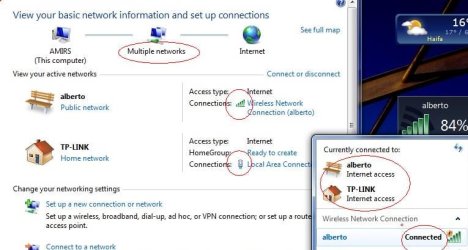
After Ethernet Lan cable connection , wireless is still on and active as well.
you see the situation in the photo and ipconfig/all cmd .
So i do not see windows does it auto. as chev65 wrote

*I should say that upon Ethernet Lan cable connection it is the dominant network even though 2 networks are present and active (Ethernet & wireless)

Code:
Microsoft Windows [Version 6.1.7601]
Copyright (c) 2009 Microsoft Corporation.  All rights reserved.

C:\Users\Amir>ipconfig/all

Windows IP Configuration

   Host Name . . . . . . . . . . . . : Amirs
   Primary Dns Suffix  . . . . . . . :
   Node Type . . . . . . . . . . . . : Hybrid
   IP Routing Enabled. . . . . . . . : No
   WINS Proxy Enabled. . . . . . . . : No

Wireless LAN adapter Wireless Network Connection:

   Connection-specific DNS Suffix  . :
   Description . . . . . . . . . . . : Broadcom 802.11g Network Adapter
   Physical Address. . . . . . . . . : 00-21-00-EA-86-B2
   DHCP Enabled. . . . . . . . . . . : Yes
   Autoconfiguration Enabled . . . . : Yes
   IPv4 Address. . . . . . . . . . . : 192.168.2.103(Preferred)
   Subnet Mask . . . . . . . . . . . : 255.255.255.0
   Lease Obtained. . . . . . . . . . : יום שישי 16 מרץ 2012 10:57:35
   Lease Expires . . . . . . . . . . : יום שלישי 19 ינואר 2038 05:14:07
   Default Gateway . . . . . . . . . : 192.168.2.1
   DHCP Server . . . . . . . . . . . : 192.168.2.1
   DNS Servers . . . . . . . . . . . : 192.168.2.1
   NetBIOS over Tcpip. . . . . . . . : Enabled

Ethernet adapter Local Area Connection:

   Connection-specific DNS Suffix  . :
   Description . . . . . . . . . . . : Broadcom NetLink (TM) Fast Ethernet
   Physical Address. . . . . . . . . : 00-23-5A-D3-4E-D8
   DHCP Enabled. . . . . . . . . . . : Yes
   Autoconfiguration Enabled . . . . : Yes
   IPv4 Address. . . . . . . . . . . : 192.168.1.14(Preferred)
   Subnet Mask . . . . . . . . . . . : 255.255.255.0
   Lease Obtained. . . . . . . . . . : יום שישי 16 מרץ 2012 10:42:33
   Lease Expires . . . . . . . . . . : יום שישי 16 מרץ 2012 11:56:39
   Default Gateway . . . . . . . . . : 192.168.1.1
   DHCP Server . . . . . . . . . . . : 192.168.1.1
   DNS Servers . . . . . . . . . . . : 192.168.1.1
   NetBIOS over Tcpip. . . . . . . . : Enabled

Tunnel adapter isatap.{D4EAFC1F-593C-4C10-B1B9-397C30B665DF}:

   Media State . . . . . . . . . . . : Media disconnected
   Connection-specific DNS Suffix  . :
   Description . . . . . . . . . . . : Microsoft ISATAP Adapter
   Physical Address. . . . . . . . . : 00-00-00-00-00-00-00-E0
   DHCP Enabled. . . . . . . . . . . : No
   Autoconfiguration Enabled . . . . : Yes

Tunnel adapter isatap.{B9933913-1B7E-4347-8CA2-A643496123BE}:

   Media State . . . . . . . . . . . : Media disconnected
   Connection-specific DNS Suffix  . :
   Description . . . . . . . . . . . : Microsoft ISATAP Adapter #2
   Physical Address. . . . . . . . . : 00-00-00-00-00-00-00-E0
   DHCP Enabled. . . . . . . . . . . : No
   Autoconfiguration Enabled . . . . : Yes

Tunnel adapter Teredo Tunneling Pseudo-Interface:

   Connection-specific DNS Suffix  . :
   Description . . . . . . . . . . . : Teredo Tunneling Pseudo-Interface
   Physical Address. . . . . . . . . : 00-00-00-00-00-00-00-E0
   DHCP Enabled. . . . . . . . . . . : No
   Autoconfiguration Enabled . . . . : Yes
   IPv6 Address. . . . . . . . . . . : 2001:0:4137:9e76:38cc:33b4:ab1b:2244(Pref
erred)
   Link-local IPv6 Address . . . . . : fe80::38cc:33b4:ab1b:2244%12(Preferred)
   Default Gateway . . . . . . . . . : ::
   NetBIOS over Tcpip. . . . . . . . : Disabled

C:\Users\Amir>ipconfig/all

Windows IP Configuration

   Host Name . . . . . . . . . . . . : Amirs
   Primary Dns Suffix  . . . . . . . :
   Node Type . . . . . . . . . . . . : Hybrid
   IP Routing Enabled. . . . . . . . : No
   WINS Proxy Enabled. . . . . . . . : No

Wireless LAN adapter Wireless Network Connection:

   Connection-specific DNS Suffix  . :
   Description . . . . . . . . . . . : Broadcom 802.11g Network Adapter
   Physical Address. . . . . . . . . : 00-21-00-EA-86-B2
   DHCP Enabled. . . . . . . . . . . : Yes
   Autoconfiguration Enabled . . . . : Yes
   IPv4 Address. . . . . . . . . . . : 192.168.2.103(Preferred)
   Subnet Mask . . . . . . . . . . . : 255.255.255.0
   Lease Obtained. . . . . . . . . . : יום שישי 16 מרץ 2012 10:57:35
   Lease Expires . . . . . . . . . . : יום שלישי 19 ינואר 2038 05:14:07
   Default Gateway . . . . . . . . . : 192.168.2.1
   DHCP Server . . . . . . . . . . . : 192.168.2.1
   DNS Servers . . . . . . . . . . . : 192.168.2.1
   NetBIOS over Tcpip. . . . . . . . : Enabled

Ethernet adapter Local Area Connection:

   Media State . . . . . . . . . . . : Media disconnected
   Connection-specific DNS Suffix  . :
   Description . . . . . . . . . . . : Broadcom NetLink (TM) Fast Ethernet
   Physical Address. . . . . . . . . : 00-23-5A-D3-4E-D8
   DHCP Enabled. . . . . . . . . . . : Yes
   Autoconfiguration Enabled . . . . : Yes

Tunnel adapter isatap.{D4EAFC1F-593C-4C10-B1B9-397C30B665DF}:

   Media State . . . . . . . . . . . : Media disconnected
   Connection-specific DNS Suffix  . :
   Description . . . . . . . . . . . : Microsoft ISATAP Adapter
   Physical Address. . . . . . . . . : 00-00-00-00-00-00-00-E0
   DHCP Enabled. . . . . . . . . . . : No
   Autoconfiguration Enabled . . . . : Yes

Tunnel adapter isatap.{B9933913-1B7E-4347-8CA2-A643496123BE}:

   Media State . . . . . . . . . . . : Media disconnected
   Connection-specific DNS Suffix  . :
   Description . . . . . . . . . . . : Microsoft ISATAP Adapter #2
   Physical Address. . . . . . . . . : 00-00-00-00-00-00-00-E0
   DHCP Enabled. . . . . . . . . . . : No
   Autoconfiguration Enabled . . . . : Yes

Tunnel adapter Teredo Tunneling Pseudo-Interface:

   Connection-specific DNS Suffix  . :
   Description . . . . . . . . . . . : Teredo Tunneling Pseudo-Interface
   Physical Address. . . . . . . . . : 00-00-00-00-00-00-00-E0
   DHCP Enabled. . . . . . . . . . . : No
   Autoconfiguration Enabled . . . . : Yes
   IPv6 Address. . . . . . . . . . . : 2001:0:4137:9e76:38cc:33b4:ab1b:2244(Pref
erred)
   Link-local IPv6 Address . . . . . : fe80::38cc:33b4:ab1b:2244%12(Preferred)
   Default Gateway . . . . . . . . . : ::
   NetBIOS over Tcpip. . . . . . . . : Disabled

C:\Users\Amir>ipconfig/all

Windows IP Configuration

   Host Name . . . . . . . . . . . . : Amirs
   Primary Dns Suffix  . . . . . . . :
   Node Type . . . . . . . . . . . . : Hybrid
   IP Routing Enabled. . . . . . . . : No
   WINS Proxy Enabled. . . . . . . . : No

Wireless LAN adapter Wireless Network Connection:

   Connection-specific DNS Suffix  . :
   Description . . . . . . . . . . . : Broadcom 802.11g Network Adapter
   Physical Address. . . . . . . . . : 00-21-00-EA-86-B2
   DHCP Enabled. . . . . . . . . . . : Yes
   Autoconfiguration Enabled . . . . : Yes
   IPv4 Address. . . . . . . . . . . : 192.168.2.103(Preferred)
   Subnet Mask . . . . . . . . . . . : 255.255.255.0
   Lease Obtained. . . . . . . . . . : יום שישי 16 מרץ 2012 10:57:35
   Lease Expires . . . . . . . . . . : יום שלישי 19 ינואר 2038 05:14:06
   Default Gateway . . . . . . . . . : 192.168.2.1
   DHCP Server . . . . . . . . . . . : 192.168.2.1
   DNS Servers . . . . . . . . . . . : 192.168.2.1
   NetBIOS over Tcpip. . . . . . . . : Enabled

Ethernet adapter Local Area Connection:

   Connection-specific DNS Suffix  . :
   Description . . . . . . . . . . . : Broadcom NetLink (TM) Fast Ethernet
   Physical Address. . . . . . . . . : 00-23-5A-D3-4E-D8
   DHCP Enabled. . . . . . . . . . . : Yes
   Autoconfiguration Enabled . . . . : Yes
   IPv4 Address. . . . . . . . . . . : 192.168.1.14(Preferred)
   Subnet Mask . . . . . . . . . . . : 255.255.255.0
   Lease Obtained. . . . . . . . . . : יום שישי 16 מרץ 2012 10:42:33
   Lease Expires . . . . . . . . . . : יום שישי 16 מרץ 2012 12:10:29
   Default Gateway . . . . . . . . . : 192.168.1.1
   DHCP Server . . . . . . . . . . . : 192.168.1.1
   DNS Servers . . . . . . . . . . . : 192.168.1.1
   NetBIOS over Tcpip. . . . . . . . : Enabled

Tunnel adapter isatap.{D4EAFC1F-593C-4C10-B1B9-397C30B665DF}:

   Media State . . . . . . . . . . . : Media disconnected
   Connection-specific DNS Suffix  . :
   Description . . . . . . . . . . . : Microsoft ISATAP Adapter
   Physical Address. . . . . . . . . : 00-00-00-00-00-00-00-E0
   DHCP Enabled. . . . . . . . . . . : No
   Autoconfiguration Enabled . . . . : Yes

Tunnel adapter isatap.{B9933913-1B7E-4347-8CA2-A643496123BE}:

   Media State . . . . . . . . . . . : Media disconnected
   Connection-specific DNS Suffix  . :
   Description . . . . . . . . . . . : Microsoft ISATAP Adapter #2
   Physical Address. . . . . . . . . : 00-00-00-00-00-00-00-E0
   DHCP Enabled. . . . . . . . . . . : No
   Autoconfiguration Enabled . . . . : Yes

Tunnel adapter Teredo Tunneling Pseudo-Interface:

   Connection-specific DNS Suffix  . :
   Description . . . . . . . . . . . : Teredo Tunneling Pseudo-Interface
   Physical Address. . . . . . . . . : 00-00-00-00-00-00-00-E0
   DHCP Enabled. . . . . . . . . . . : No
   Autoconfiguration Enabled . . . . : Yes
   IPv6 Address. . . . . . . . . . . : 2001:0:4137:9e76:1c47:177f:3f57:fef1(Pref
erred)
   Link-local IPv6 Address . . . . . : fe80::1c47:177f:3f57:fef1%12(Preferred)
   Default Gateway . . . . . . . . . : ::
   NetBIOS over Tcpip. . . . . . . . : Disabled

C:\Users\Amir>
 

Attachments

  • Untitled.jpg
    Untitled.jpg
    45 KB · Views: 22
Last edited:

My Computer

Computer type
PC/Desktop
OS
98SE/XP/windows7 32bit/ win10
Per PM request for how to create a desktop shortcut for a NIC:
(Consider watching at 720p and full screened.)


:-)
 

My Computer

Computer type
Laptop
Computer Manufacturer/Model Number
Employer provided Dell Latitude
OS
W7 Pro SP1 64bit
CPU
i7
Memory
8GB
Graphics Card(s)
Intel HD Graphics
Hard Drives
crappy SSD
Antivirus
Employer mandated Symantec Endpoint Protection
Browser
Pale Moon 64bit, IE11 64bit & Chrome 64bit
Thanks UsernameIssues:cool:
so it can be done manually only

Still asking in #12 ......
is it normal situation?
 

My Computer

Computer type
PC/Desktop
OS
98SE/XP/windows7 32bit/ win10
As far as I know - the only way to enable/disable a NIC is to do it manually or via a 3rd party app.

And you can drive Windows crazy with NICs:

nics.JPG
 

My Computer

Computer type
Laptop
Computer Manufacturer/Model Number
Employer provided Dell Latitude
OS
W7 Pro SP1 64bit
CPU
i7
Memory
8GB
Graphics Card(s)
Intel HD Graphics
Hard Drives
crappy SSD
Antivirus
Employer mandated Symantec Endpoint Protection
Browser
Pale Moon 64bit, IE11 64bit & Chrome 64bit
Back
Top