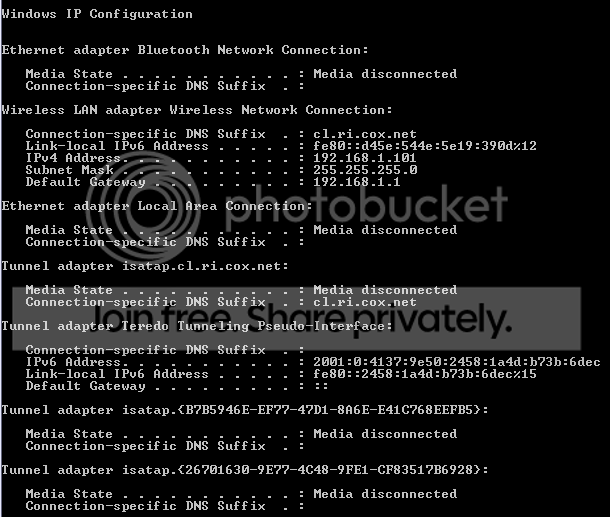
In my Vista Home Premium, my internet speed reached up to 144mbp/s. Now that I have Windows 7, it lurks around 10mbp/s. These speed are way too slow for me, as I spend 90% of my time on the computer online. Anyone know how to fix this? In Vista, when my network was a little slow, all I did was click Diagnose, and then Reset Network Adapter. That did the trick. I'm not sure how to do that within Windows 7. I also got an error when I clicked Diagnose.
Here's my System Information (if you want the whole DxDiag, I can post it):
------------------
System Information
------------------
Time of this report: 8/2/2009, 15:44:39
Machine name: *****-LAPTOP
Operating System: Windows 7 Ultimate 64-bit (6.1, Build 7100) (7100.winmain_win7rc.090421-1700)
Language: English (Regional Setting: English)
System Manufacturer: Dell Inc.
System Model: XPS M1530
BIOS: Phoenix ROM BIOS PLUS Version 1.10 A12
Processor: Intel(R) Core(TM)2 Duo CPU T8300 @ 2.40GHz (2 CPUs), ~2.4GHz
Memory: 4096MB RAM
Available OS Memory: 4094MB RAM
Page File: 1644MB used, 6541MB available
Windows Dir: C:\Windows
DirectX Version: DirectX 11
DX Setup Parameters: Not found
User DPI Setting: Using System DPI
System DPI Setting: 96 DPI (100 percent)
DWM DPI Scaling: Disabled
DxDiag Version: 6.01.7100.0000 64bit Unicode
Code:
Problems Found:
Your computer appears to be correctly configured, but the device or resource (DNS server) is not responding.------------------
System Information
------------------
Time of this report: 8/2/2009, 15:44:39
Machine name: *****-LAPTOP
Operating System: Windows 7 Ultimate 64-bit (6.1, Build 7100) (7100.winmain_win7rc.090421-1700)
Language: English (Regional Setting: English)
System Manufacturer: Dell Inc.
System Model: XPS M1530
BIOS: Phoenix ROM BIOS PLUS Version 1.10 A12
Processor: Intel(R) Core(TM)2 Duo CPU T8300 @ 2.40GHz (2 CPUs), ~2.4GHz
Memory: 4096MB RAM
Available OS Memory: 4094MB RAM
Page File: 1644MB used, 6541MB available
Windows Dir: C:\Windows
DirectX Version: DirectX 11
DX Setup Parameters: Not found
User DPI Setting: Using System DPI
System DPI Setting: 96 DPI (100 percent)
DWM DPI Scaling: Disabled
DxDiag Version: 6.01.7100.0000 64bit Unicode
My Computer
At a glance
Windows 7 RC Build 7100Intel Core 2 Duo 2.40 GHz4gb RAMnVidia GeForce m8600 GT
- Computer Manufacturer/Model Number
- Dell XPS m1530 Notebook
- OS
- Windows 7 RC Build 7100
- CPU
- Intel Core 2 Duo 2.40 GHz
- Memory
- 4gb RAM
- Graphics Card(s)
- nVidia GeForce m8600 GT
- Monitor(s) Displays
- Full HD 1920x1800 Resolution
- Hard Drives
- 128gb Samsung SSD
- Mouse
- Dell Bluetooth Travel Mouse
- Internet Speed
- Cox High Speed Internet 12.5mbps Preferred