Wireless laptop

lostsoul62

Banned
Local time
7:51 PM
Messages
380
Location
AZ
I have a laptop with a Net gear network adapter plug into the USB port and it works fine in hotels when given a key but not here at home. The 2nd wireless laptop works just fine without a key which is my wife’s. My laptop requires a network key when trying to log into my wife’s network (also called a WEP Key or WPA Key) I get a message saying "Type the key, and then click connect" I'm trying to get into my wife’s network but can't. My ISP provider doesn't know and Net gear wants more for tech support than I could buy another router. I really don't know anything about wireless so could anyone help me understand what's going on? I also want my desktop wirerless and can I do that with a USB port?
 
Last edited:

My Computer

OS
Windows 7 x64 RC1, Vista Ultimate, XP Pro
CPU
AMD 955
Memory
4 gigs - 1333
Graphics Card(s)
5750
Monitor(s) Displays
i-inc 28"
Screen Resolution
1920x1200
Hard Drives
2 SATA2 750 GB - 1 SATA2 1TB - 1 SATA3 1TB - 1 USB3 2TB - 1 USB3 500 GB, SSD 60 GB
Internet Speed
7 Megs
Hey Soul,

Yes, if you are talking about a USB network adapter, desktop computers can use them. If it is netgear, perhaps the simplest method would be to download the latest driver software from the website, then go into control panel and remove your current one. After that, install the one you just downloaded and follow the wizard. It should list the security of your router on its own, and all you need to do is put in the password. let me know if it works.

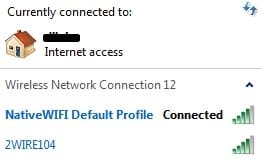
Note that the adapter stores profiles for each wireless location you visit. So that coffee shop you love will have a different profile than your wife's, which you will need to connect to
sd (2).jpg

You can download the software to a USB device from another computer and then load it to your computer if you cannot get internet
 

My Computer

Computer type
PC/Desktop
Computer Manufacturer/Model Number
Custom Asus Build
OS
Microsoft Windows 8.1 Pro 64-bit
CPU
Intel(R) Core(TM) i3-4130 CPU @ 3.40GHz
Motherboard
B85M-E
Memory
8.00 GB
Graphics Card(s)
None
Sound Card
Realtek High Definition Audio
Monitor(s) Displays
Asus 23.6" Monitor
Screen Resolution
1920 x 1080 x 32 bits (4294967296 colors) @ 60 Hz
Hard Drives
INTEL SSDSC2BW180A4
Samsung SSD 840 PRO Series
PSU
Seasonic S12II-380Bronze
Case
Lian Li
Cooling
Fan, Passive
Keyboard
Logitech K120
Mouse
Microsoft Touch Mouse
Internet Speed
4ms Ping, 19.0 Mbps Download, 19.0 Mbps Upload
Antivirus
Eset Endpoint
Browser
Internet Explorer, Chrome
Hey Soul,

Yes, if you are talking about a USB network adapter, desktop computers can use them. If it is netgear, perhaps the simplest method would be to download the latest driver software from the website, then go into control panel and remove your current one. After that, install the one you just downloaded and follow the wizard. It should list the security of your router on its own, and all you need to do is put in the password. let me know if it works.

That's just it I don't have the password so:
If I take a look at my wife’s laptop which is on the network is there any way I can find some information to get my laptop on the network or do I just have to reset the router?
 

My Computer

OS
Windows 7 x64 RC1, Vista Ultimate, XP Pro
CPU
AMD 955
Memory
4 gigs - 1333
Graphics Card(s)
5750
Monitor(s) Displays
i-inc 28"
Screen Resolution
1920x1200
Hard Drives
2 SATA2 750 GB - 1 SATA2 1TB - 1 SATA3 1TB - 1 USB3 2TB - 1 USB3 500 GB, SSD 60 GB
Internet Speed
7 Megs
The router password and network password are usually different. You do need those passwords to access the router and netword, respectively.

Hoever, you might not have even set a password for the router yet. Depending on the router, you can type its address into your wife's computer and when it pops up, log in. If either of you didn't set a password for it, the password could be anything from "password" to just being left blank. If you google this, you might get more info on what the preset password is, and what address your router uses. You then go into the router settings and change the network password.

Failing that, your only option would be to reset the router, log in to it, and set everything back up, including passwords.
 

My Computer

Computer type
PC/Desktop
Computer Manufacturer/Model Number
Custom Asus Build
OS
Microsoft Windows 8.1 Pro 64-bit
CPU
Intel(R) Core(TM) i3-4130 CPU @ 3.40GHz
Motherboard
B85M-E
Memory
8.00 GB
Graphics Card(s)
None
Sound Card
Realtek High Definition Audio
Monitor(s) Displays
Asus 23.6" Monitor
Screen Resolution
1920 x 1080 x 32 bits (4294967296 colors) @ 60 Hz
Hard Drives
INTEL SSDSC2BW180A4
Samsung SSD 840 PRO Series
PSU
Seasonic S12II-380Bronze
Case
Lian Li
Cooling
Fan, Passive
Keyboard
Logitech K120
Mouse
Microsoft Touch Mouse
Internet Speed
4ms Ping, 19.0 Mbps Download, 19.0 Mbps Upload
Antivirus
Eset Endpoint
Browser
Internet Explorer, Chrome
Back
Top