wireless limited access

nortel

New member
Local time
12:26 AM
Messages
13
Just recently I got a problem in my laptop.
It’s a wireless connection saying limited access
Laptop: sony vaio windows 7 home premium core i3 4gb ram.
I reinstalled (new updated drivers) all network drivers but no results! tryed to restore the system again no result. When I try to troubleshoot the problem system says there are some problems with wireless network driver.
Can’t fix it. Any suggestions?


My Computer

OS
windows7 home premium 64
How far away is the wireless router?
 

My Computer

Computer type
PC/Desktop
Computer Manufacturer/Model Number
HP Pavilion p6565uk
OS
Windows 7 Home Premium 64bit
CPU
AMD Phenom II X6 1035T @2.6GHz (hexacore) (=15.6GHz)
Motherboard
FOXCONN (2AA9)
Memory
6GB DDR3-1333 (running at 1066)
Graphics Card(s)
NVIDIA/MSI GeForce GTX 770 (2GB)
Sound Card
Realtek HD Audio (with 5.1 surround sound always on)
Monitor(s) Displays
HP 2311x (secondary-workspace), Sharp LL-T1620-H (primary)
Screen Resolution
1924x1080
Hard Drives
480GB Crucial M500 SSD
1TB internal WD Caviar Black
3TB Seagate Barracude 7200rpm (for media storage)
4TB Seagate Desktop drive (mirrored backup)
2TB Apple AirPort Time Capsule
1TB Seagate FreeAgent Desk
500GB Seagate External Desktop Drive
PSU
XCase Dolphin, 700W
Case
Stock HP one that came with it, mid-size ATX
Cooling
Stock fans, they're fairly quiet.
Keyboard
Microsoft Wireless Keyboard 2000+ HP Media Centre Remote
Mouse
Microsoft Wireless Mouse 2000
Internet Speed
20 Mbps down, 50 Mbps up
Antivirus
MSE
Browser
Chrome Beta
Other Info
Also:
- 13" Apple MacBook Air, 2013, i7 @ 1.7GHz, 8GB DDR3, 256GB SSD
- HP Deskjet 3050A
- Two HP ZV5000 laptops (the better of the two recently broke)
- A Compaq Evo D310 (has 2GB RAM and a 2.53GHz P4 but is curiously extremely slow)
- A desk fan - this weather is warm ;)
- A fair few retro consoles
- Too many cables behind the desk, probably a fire hazard.

My Computer

Computer type
PC/Desktop
Computer Manufacturer/Model Number
Custom Built
OS
Windows 7 Professional x64 SP1 ; Windows Server 2012 R2 Standard
CPU
Intel Core i5 2400 @ 3.10GHz
Motherboard
Foxconn H67MP-S/-V/H67MP
Memory
8.0GB DDR3 @ 665MHz (2GBx4)
Graphics Card(s)
AMD Radeon HD 6870
Sound Card
Realtek High Definition Audio
Monitor(s) Displays
AOC 2243W & SMB1930NW
Screen Resolution
1440x900 & 1920x1080
Hard Drives
977GB Seagate ST31000524AS ATA Drive (SATA)
250GB WD iSCSI attached Drive
PSU
750W Gaming PSU
Case
Novatech Night
Cooling
Fan
Keyboard
Dell Standard PS/2 Keyboard
Mouse
R.A.T 07 Gaming Mouse
Internet Speed
Download: 10 Mbps Ping: 30ms Upload: 0.81 Mbps
Browser
Google Chrome
Other Info
Optiarc DVD RW AD-5260S ATA Device
even right next to it... (limited access) same thing! other laptops have an access.
 

My Computer

OS
windows7 home premium 64
even if I try right next to it... useless same problem. other laptops can get an access.
 

My Computer

OS
windows7 home premium 64
have you fiddled around with the settings for your wireless receiver?
 

My Computer

Computer type
PC/Desktop
Computer Manufacturer/Model Number
HP Pavilion p6565uk
OS
Windows 7 Home Premium 64bit
CPU
AMD Phenom II X6 1035T @2.6GHz (hexacore) (=15.6GHz)
Motherboard
FOXCONN (2AA9)
Memory
6GB DDR3-1333 (running at 1066)
Graphics Card(s)
NVIDIA/MSI GeForce GTX 770 (2GB)
Sound Card
Realtek HD Audio (with 5.1 surround sound always on)
Monitor(s) Displays
HP 2311x (secondary-workspace), Sharp LL-T1620-H (primary)
Screen Resolution
1924x1080
Hard Drives
480GB Crucial M500 SSD
1TB internal WD Caviar Black
3TB Seagate Barracude 7200rpm (for media storage)
4TB Seagate Desktop drive (mirrored backup)
2TB Apple AirPort Time Capsule
1TB Seagate FreeAgent Desk
500GB Seagate External Desktop Drive
PSU
XCase Dolphin, 700W
Case
Stock HP one that came with it, mid-size ATX
Cooling
Stock fans, they're fairly quiet.
Keyboard
Microsoft Wireless Keyboard 2000+ HP Media Centre Remote
Mouse
Microsoft Wireless Mouse 2000
Internet Speed
20 Mbps down, 50 Mbps up
Antivirus
MSE
Browser
Chrome Beta
Other Info
Also:
- 13" Apple MacBook Air, 2013, i7 @ 1.7GHz, 8GB DDR3, 256GB SSD
- HP Deskjet 3050A
- Two HP ZV5000 laptops (the better of the two recently broke)
- A Compaq Evo D310 (has 2GB RAM and a 2.53GHz P4 but is curiously extremely slow)
- A desk fan - this weather is warm ;)
- A fair few retro consoles
- Too many cables behind the desk, probably a fire hazard.
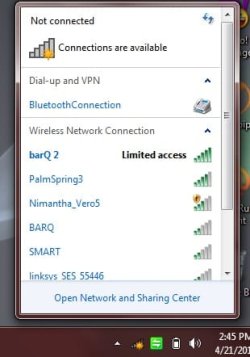
yes I have. and restored back to defoult. its actually like 4 empty bars with yellow dot on it and when u click on it to see to which wireless is connected it says limited access
 

My Computer

OS
windows7 home premium 64
Hi nortel, had a similar problem on the other half's lappy yesterday evening. She noticed that it was "configuring updates" when she switched it on. Since then there was no connectivity available. Checked router and tried using ethernet..no good. Tonight I did a system restore to a point previous to yesterday(I restored it back to a week ago). On completion all was back to normal so I'm putting it down to a duff update.
 

My Computer

OS
win7
yes I have. and restored back to defoult. its actually like 4 empty bars with yellow dot on it and when u click on it to see to which wireless is connected it says limited access

Does this happen to any other computers on your network?

Also what is your ISP

   Information
ISP = Internet Service Provider E.G BT, Sky ... etc


Many Thanks,
Josh
 

My Computer

Computer type
PC/Desktop
Computer Manufacturer/Model Number
Custom Built
OS
Windows 7 Professional x64 SP1 ; Windows Server 2012 R2 Standard
CPU
Intel Core i5 2400 @ 3.10GHz
Motherboard
Foxconn H67MP-S/-V/H67MP
Memory
8.0GB DDR3 @ 665MHz (2GBx4)
Graphics Card(s)
AMD Radeon HD 6870
Sound Card
Realtek High Definition Audio
Monitor(s) Displays
AOC 2243W & SMB1930NW
Screen Resolution
1440x900 & 1920x1080
Hard Drives
977GB Seagate ST31000524AS ATA Drive (SATA)
250GB WD iSCSI attached Drive
PSU
750W Gaming PSU
Case
Novatech Night
Cooling
Fan
Keyboard
Dell Standard PS/2 Keyboard
Mouse
R.A.T 07 Gaming Mouse
Internet Speed
Download: 10 Mbps Ping: 30ms Upload: 0.81 Mbps
Browser
Google Chrome
Other Info
Optiarc DVD RW AD-5260S ATA Device
any chance you could get your hands on a cheap USB wireless reciever?
a while back my wireless N receiver's settings got messed up as we were trying to get it to work with a really dodgy router (no, it wasn't a neighbours or anything, it was ours but it has wierd connection rights). After fiddling around with the settings, it still wouldn't connect. When I tried to connect it to a normal router that had worked before, it wouldn't work. I've now reverted back to using my wireless G one :/
So, I would recommend that you double check all the settings for the reciever again (I'm afarid the actual settings seem to be really hard to get to). Good luck :)
 

My Computer

Computer type
PC/Desktop
Computer Manufacturer/Model Number
HP Pavilion p6565uk
OS
Windows 7 Home Premium 64bit
CPU
AMD Phenom II X6 1035T @2.6GHz (hexacore) (=15.6GHz)
Motherboard
FOXCONN (2AA9)
Memory
6GB DDR3-1333 (running at 1066)
Graphics Card(s)
NVIDIA/MSI GeForce GTX 770 (2GB)
Sound Card
Realtek HD Audio (with 5.1 surround sound always on)
Monitor(s) Displays
HP 2311x (secondary-workspace), Sharp LL-T1620-H (primary)
Screen Resolution
1924x1080
Hard Drives
480GB Crucial M500 SSD
1TB internal WD Caviar Black
3TB Seagate Barracude 7200rpm (for media storage)
4TB Seagate Desktop drive (mirrored backup)
2TB Apple AirPort Time Capsule
1TB Seagate FreeAgent Desk
500GB Seagate External Desktop Drive
PSU
XCase Dolphin, 700W
Case
Stock HP one that came with it, mid-size ATX
Cooling
Stock fans, they're fairly quiet.
Keyboard
Microsoft Wireless Keyboard 2000+ HP Media Centre Remote
Mouse
Microsoft Wireless Mouse 2000
Internet Speed
20 Mbps down, 50 Mbps up
Antivirus
MSE
Browser
Chrome Beta
Other Info
Also:
- 13" Apple MacBook Air, 2013, i7 @ 1.7GHz, 8GB DDR3, 256GB SSD
- HP Deskjet 3050A
- Two HP ZV5000 laptops (the better of the two recently broke)
- A Compaq Evo D310 (has 2GB RAM and a 2.53GHz P4 but is curiously extremely slow)
- A desk fan - this weather is warm ;)
- A fair few retro consoles
- Too many cables behind the desk, probably a fire hazard.
Hi nortel, had a similar problem on the other half's lappy yesterday evening. She noticed that it was "configuring updates" when she switched it on. Since then there was no connectivity available. Checked router and tried using ethernet..no good. Tonight I did a system restore to a point previous to yesterday(I restored it back to a week ago). On completion all was back to normal so I'm putting it down to a duff update.


I didnt do anything actually to laptop. just woke up in morning and found it like this. I tryed to restore to a month back configurations or settings but no results at all
 

My Computer

OS
windows7 home premium 64
yes I have. and restored back to defoult. its actually like 4 empty bars with yellow dot on it and when u click on it to see to which wireless is connected it says limited access

Does this happen to any other computers on your network?

Also what is your ISP

   Information
ISP = Internet Service Provider E.G BT, Sky ... etc


Many Thanks,
Josh


no it's only my computer. I think it has nothing to do with ISP

thank you,
 

My Computer

OS
windows7 home premium 64
any chance you could get your hands on a cheap USB wireless reciever?
a while back my wireless N receiver's settings got messed up as we were trying to get it to work with a really dodgy router (no, it wasn't a neighbours or anything, it was ours but it has wierd connection rights). After fiddling around with the settings, it still wouldn't connect. When I tried to connect it to a normal router that had worked before, it wouldn't work. I've now reverted back to using my wireless G one :/
So, I would recommend that you double check all the settings for the reciever again (I'm afarid the actual settings seem to be really hard to get to). Good luck :)


I did like you recommended still the same.
 

My Computer

OS
windows7 home premium 64
Could you please Follow this Tutorial and Post back with your Results

See http://www.sevenforums.com/network-sharing/144365-network-posting-tips.html For More Information

Many Thanks,
Josh


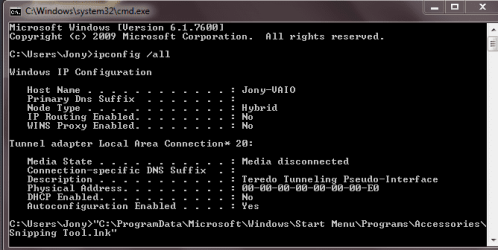
I got the picture and attached please have a look
You could try to release and renew your ip.. try the instructions here in this link.
ipconfig - Windows Command Line Utility

You may need to run a elevated command http://www.sevenforums.com/tutorials/783-elevated-command-prompt.html

Also you need to run a scan for malware as this kind of problem can be caused by infections of malware. This is what I use Malwarebytes' Anti-Malware: Malwarebytes
the free version is very good.
 

My Computer

Computer Manufacturer/Model Number
Gateway GT5692
OS
Windows 7 Ulti. x64
CPU
AMD Phenom 8450 triple-core 2.10 ghz
Memory
4GB
Graphics Card(s)
ATI Radion HD 3200
Monitor(s) Displays
Gateway FPD1775W
Screen Resolution
1280x720
Hard Drives
465.6613 Gibibytes
yes I have. and restored back to defoult. its actually like 4 empty bars with yellow dot on it and when u click on it to see to which wireless is connected it says limited access

Does this happen to any other computers on your network?

Also what is your ISP

   Information
ISP = Internet Service Provider E.G BT, Sky ... etc


Many Thanks,
Josh

this is the problem
 

Attachments

  • lim.jpg
    lim.jpg
    19.9 KB · Views: 9

My Computer

OS
windows7 home premium 64
Just recently I got a problem in my laptop.
It’s a wireless connection saying limited access
Laptop: sony vaio windows 7 home premium core i3 4gb ram.
I reinstalled (new updated drivers) all network drivers but no results! tryed to restore the system again no result. When I try to troubleshoot the problem system says there are some problems with wireless network driver.
Can’t fix it. Any suggestions?


this is the problem
 

Attachments

  • lim.jpg
    lim.jpg
    19.9 KB · Views: 2

My Computer

OS
windows7 home premium 64
Does this happen with a LAN Connection? (Ethernet)

What is the Model of your Router

Also how long has this been Happening?

Have you tried in Safe mode with networking?

See http://www.sevenforums.com/tutorials/69585-safe-mode.html For More Information

   Information
You will need to select Safe mode with Networking - Please Follow Method 1


Many Thanks,
Josh
 

My Computer

Computer type
PC/Desktop
Computer Manufacturer/Model Number
Custom Built
OS
Windows 7 Professional x64 SP1 ; Windows Server 2012 R2 Standard
CPU
Intel Core i5 2400 @ 3.10GHz
Motherboard
Foxconn H67MP-S/-V/H67MP
Memory
8.0GB DDR3 @ 665MHz (2GBx4)
Graphics Card(s)
AMD Radeon HD 6870
Sound Card
Realtek High Definition Audio
Monitor(s) Displays
AOC 2243W & SMB1930NW
Screen Resolution
1440x900 & 1920x1080
Hard Drives
977GB Seagate ST31000524AS ATA Drive (SATA)
250GB WD iSCSI attached Drive
PSU
750W Gaming PSU
Case
Novatech Night
Cooling
Fan
Keyboard
Dell Standard PS/2 Keyboard
Mouse
R.A.T 07 Gaming Mouse
Internet Speed
Download: 10 Mbps Ping: 30ms Upload: 0.81 Mbps
Browser
Google Chrome
Other Info
Optiarc DVD RW AD-5260S ATA Device
Back
Top