Solved Wireless mouse & USB KB randomly lockup the machine; non-responsive

js1701

New member
Local time
9:15 AM
Messages
3
Wireless mouse & USB KB randomly lockup the machine; non-responsive

Hello all,

I have newly loaded WIN 7 OS. Everything works but randomly, the wireless mouse & USB KB lockup & are non responsive. The only way to get them back is to do a hard power reset. I checked the Windows Event Viewer System Log & this error is showing up multiple times:

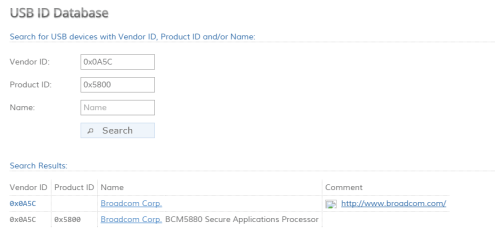
The driver \Driver\WUDFRd failed to load for the device USB\VID_0A5C&PID_5800&MI_01\6&66de6c9&0&0001.

Did a Google search & the posts show this is referencing a media card driver. I tried disabling the media card reader but still having the issue. I also applied this from Microsoft:

https://support.microsoft.com/en-us/kb/2519922

Any assistance would be appreciated. Thanks.
 

Attachments

  • error.png
    error.png
    50.3 KB · Views: 3

My Computer My Computer

Computer type
Laptop
Computer Manufacturer/Model Number
Dell Latitude 6400
OS
Win 7 Pro SP1 64bit
CPU
Intel Core Two Duo
Motherboard
P8400 2.26GHz 2.27GHz
Memory
4GB RAM
Antivirus
Avast

My Computer My Computer

Computer type
PC/Desktop
Computer Manufacturer/Model Number
Self Built
OS
Win 10 Pro x64
CPU
Intel I5-2500K @3.3GHz
Motherboard
Asrock P67 Extreme4
Memory
16GB G.Skill Ripjaws X (4x4GB)
Graphics Card(s)
EVGA GeForce 750 Ti SC 2GB
Sound Card
ASUS Xonar DG 5.1 Channels 24-bit 96KHz PCI Interface Sound
Monitor(s) Displays
auria eq2367
Screen Resolution
1920 x 1080
Hard Drives
250GB Samsung 850 EVO SSD
1TB WD Blue
1TB Hitachi
PSU
SeaSonic X 650W 80 Plus Gold
Case
Corsair Obsidian 750D
Cooling
Corsair H60, Three 140mm case fans
Keyboard
Logitech Wireless Keyboard K520
Mouse
Logitech Wireless Mouse M310
Internet Speed
Wave Broadband ~ 100 dn 5 up
Antivirus
Windows Defender, Malwarebytes Premium
Browser
Edge, IE11, Chrome
Other Info
Laptop specs: HP g7-1365dx /
CPU: AMD A6-3420M APU with Radeon(tm) HD Graphics /
RAM: Crucial 8Gb (2x4Gb) /
SSD: Crucial M4-CT128M4SSD2 ATA Device/ FW 000F /
GFX: AMD Radeon HD 6520G /
OS: Windows 10 Pro x64
Thanks for the reply.

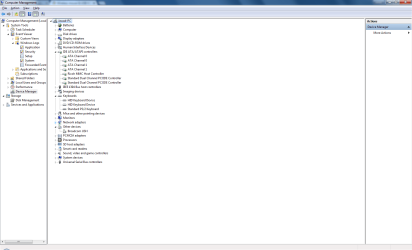
I may have mis-read the link then. I dont have any :warn: in my Device Manager but I did find the Broadcom you mentioned.

If its related to encryption, is that something I can disable/turn off?

Thanks.
 

Attachments

  • DeviceManager.png
    DeviceManager.png
    37.8 KB · Views: 3

My Computer My Computer

Computer type
Laptop
Computer Manufacturer/Model Number
Dell Latitude 6400
OS
Win 7 Pro SP1 64bit
CPU
Intel Core Two Duo
Motherboard
P8400 2.26GHz 2.27GHz
Memory
4GB RAM
Antivirus
Avast
You're welcome, I should have said or ? as well, that's why you got that initial warning in your screenshot in the first post.

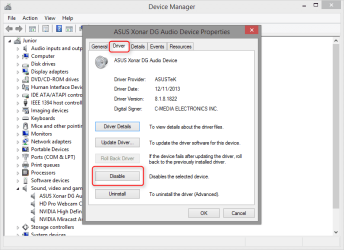
You can disable it in device manager,

2016-03-10_18h53_34.png

Or install the rest of the drivers,

How to Download the Latest Broadcom USH Drivers | Dell Bermuda

This is interesting from the notes,

Notes:
These drivers do not need the Dell ControlPoint System Manager software installed to work.
Refer to the Installation instructions provided on the driver page.
For more information on how to download and install drivers or if your computer is not listed in Table 1, refer to Dell Knowledge Base article: How to Use the Drivers and Downloads Website.
The Broadcom Unified Security Hub (USH) drivers are included in the Dell ControlPoint Security Device Driver Pack, these drivers are located in the ControlPoint download category for your computer.
It also includes drivers for: Broadcom Trusted Platform Module, Atmel Trusted Platform Module, STMicroelectronics Trusted Platform Module, Winbond Trusted Platform Module, O2Micro Smart Card Reader, Dell Smart Card Keyboard, UPEK TouchChip Fingerprint Reader, Authentec Fingerprint Reader, Vista Storage Driver Update (for ATAPI.SYS)
There are no Windows 8(8.1) or Windows 10 drivers for these devices. However you may be able to install them by using compatibility mode. Dell does not guarantee that the process will work on your computer.

Seems you were close after all, it's a type of card reader as well.
 

My Computer My Computer

Computer type
PC/Desktop
Computer Manufacturer/Model Number
Self Built
OS
Win 10 Pro x64
CPU
Intel I5-2500K @3.3GHz
Motherboard
Asrock P67 Extreme4
Memory
16GB G.Skill Ripjaws X (4x4GB)
Graphics Card(s)
EVGA GeForce 750 Ti SC 2GB
Sound Card
ASUS Xonar DG 5.1 Channels 24-bit 96KHz PCI Interface Sound
Monitor(s) Displays
auria eq2367
Screen Resolution
1920 x 1080
Hard Drives
250GB Samsung 850 EVO SSD
1TB WD Blue
1TB Hitachi
PSU
SeaSonic X 650W 80 Plus Gold
Case
Corsair Obsidian 750D
Cooling
Corsair H60, Three 140mm case fans
Keyboard
Logitech Wireless Keyboard K520
Mouse
Logitech Wireless Mouse M310
Internet Speed
Wave Broadband ~ 100 dn 5 up
Antivirus
Windows Defender, Malwarebytes Premium
Browser
Edge, IE11, Chrome
Other Info
Laptop specs: HP g7-1365dx /
CPU: AMD A6-3420M APU with Radeon(tm) HD Graphics /
RAM: Crucial 8Gb (2x4Gb) /
SSD: Crucial M4-CT128M4SSD2 ATA Device/ FW 000F /
GFX: AMD Radeon HD 6520G /
OS: Windows 10 Pro x64
Here's an update on the issue. I installed all the drivers as per Dell's driver utility, even if I had them. Apparently that Broadcom is for something called ControlVault. Anyway, I updated/replaced all the drivers with Dell ones & it seems to have fixed the issue. I let the system run since Friday night & it didnt lock up once. So far so good. Thanks for your assistance.
 

My Computer My Computer

Computer type
Laptop
Computer Manufacturer/Model Number
Dell Latitude 6400
OS
Win 7 Pro SP1 64bit
CPU
Intel Core Two Duo
Motherboard
P8400 2.26GHz 2.27GHz
Memory
4GB RAM
Antivirus
Avast
You're welcome. :)

Glad you got it sorted.
 

My Computer My Computer

Computer type
PC/Desktop
Computer Manufacturer/Model Number
Self Built
OS
Win 10 Pro x64
CPU
Intel I5-2500K @3.3GHz
Motherboard
Asrock P67 Extreme4
Memory
16GB G.Skill Ripjaws X (4x4GB)
Graphics Card(s)
EVGA GeForce 750 Ti SC 2GB
Sound Card
ASUS Xonar DG 5.1 Channels 24-bit 96KHz PCI Interface Sound
Monitor(s) Displays
auria eq2367
Screen Resolution
1920 x 1080
Hard Drives
250GB Samsung 850 EVO SSD
1TB WD Blue
1TB Hitachi
PSU
SeaSonic X 650W 80 Plus Gold
Case
Corsair Obsidian 750D
Cooling
Corsair H60, Three 140mm case fans
Keyboard
Logitech Wireless Keyboard K520
Mouse
Logitech Wireless Mouse M310
Internet Speed
Wave Broadband ~ 100 dn 5 up
Antivirus
Windows Defender, Malwarebytes Premium
Browser
Edge, IE11, Chrome
Other Info
Laptop specs: HP g7-1365dx /
CPU: AMD A6-3420M APU with Radeon(tm) HD Graphics /
RAM: Crucial 8Gb (2x4Gb) /
SSD: Crucial M4-CT128M4SSD2 ATA Device/ FW 000F /
GFX: AMD Radeon HD 6520G /
OS: Windows 10 Pro x64
Back
Top