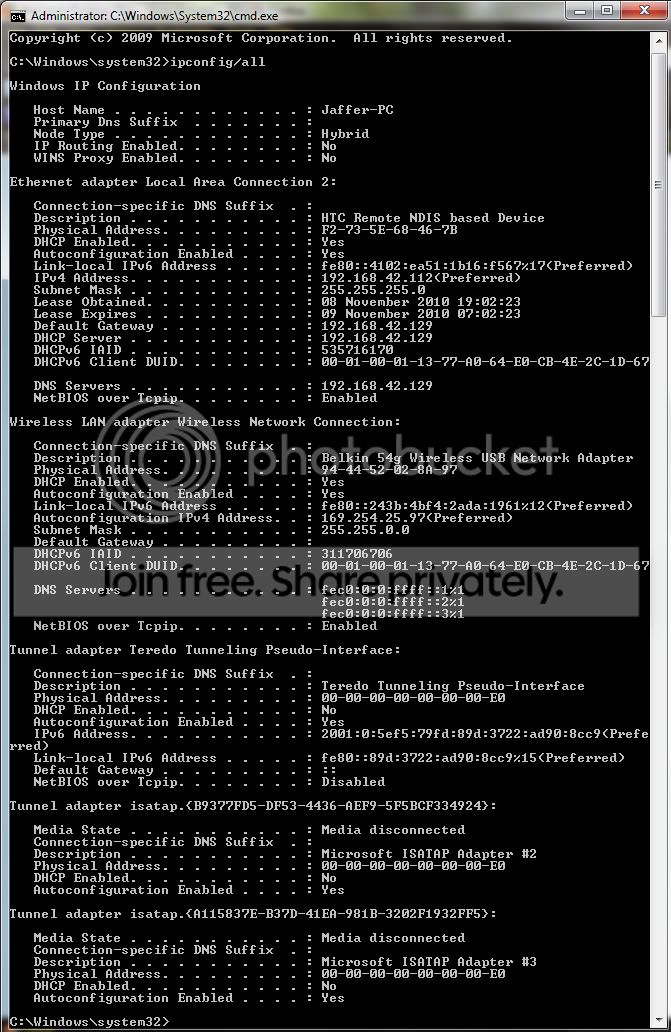
Wireless Network Connection" doesn't have a valid IP configuration

Revent

New member
Local time
3:10 AM
Messages
4
Wireless Network Connection" doesn't have a valid IP configuration

I'm using Windows 7 Ultimate 64 bit and I have a USB adaptor (a belkin on) but for some reason, my internet stopped working on my own computer. It will work on my phone and the computer that the router is connected to, but I get the error stated in the title. I am connected to the network, but the network is just listed as an un-identifed network with no internet acces.
Would really appreciate the help! Thanks :)
 

My Computer My Computer

Computer Manufacturer/Model Number
?
OS
Windows 7 Ultimate 64 bit
CPU
i7 930
Motherboard
Asus P6T
Memory
6 GB DDR3 Corsair XMS 3
Graphics Card(s)
ATI HD Radeon 5850
Could you Please Follow this and Post your Results also Run the Attached File as Administrator

This works for Windows 7 as well as Vista

See Network Posting Tips - Vista Forums For More Information

Many Thanks,
Josh
 

My Computer My Computer

Computer type
PC/Desktop
Computer Manufacturer/Model Number
Custom Built
OS
Windows 7 Professional x64 SP1 ; Windows Server 2012 R2 Standard
CPU
Intel Core i5 2400 @ 3.10GHz
Motherboard
Foxconn H67MP-S/-V/H67MP
Memory
8.0GB DDR3 @ 665MHz (2GBx4)
Graphics Card(s)
AMD Radeon HD 6870
Sound Card
Realtek High Definition Audio
Monitor(s) Displays
AOC 2243W & SMB1930NW
Screen Resolution
1440x900 & 1920x1080
Hard Drives
977GB Seagate ST31000524AS ATA Drive (SATA)
250GB WD iSCSI attached Drive
PSU
750W Gaming PSU
Case
Novatech Night
Cooling
Fan
Keyboard
Dell Standard PS/2 Keyboard
Mouse
R.A.T 07 Gaming Mouse
Internet Speed
Download: 10 Mbps Ping: 30ms Upload: 0.81 Mbps
Browser
Google Chrome
Other Info
Optiarc DVD RW AD-5260S ATA Device
Untitled-1-30.jpg

Okay, and it still doesn't work.
 

My Computer My Computer

Computer Manufacturer/Model Number
?
OS
Windows 7 Ultimate 64 bit
CPU
i7 930
Motherboard
Asus P6T
Memory
6 GB DDR3 Corsair XMS 3
Graphics Card(s)
ATI HD Radeon 5850
May I ask what country you are in this will Help Determine your Optimal IP Address
 

My Computer My Computer

Computer type
PC/Desktop
Computer Manufacturer/Model Number
Custom Built
OS
Windows 7 Professional x64 SP1 ; Windows Server 2012 R2 Standard
CPU
Intel Core i5 2400 @ 3.10GHz
Motherboard
Foxconn H67MP-S/-V/H67MP
Memory
8.0GB DDR3 @ 665MHz (2GBx4)
Graphics Card(s)
AMD Radeon HD 6870
Sound Card
Realtek High Definition Audio
Monitor(s) Displays
AOC 2243W & SMB1930NW
Screen Resolution
1440x900 & 1920x1080
Hard Drives
977GB Seagate ST31000524AS ATA Drive (SATA)
250GB WD iSCSI attached Drive
PSU
750W Gaming PSU
Case
Novatech Night
Cooling
Fan
Keyboard
Dell Standard PS/2 Keyboard
Mouse
R.A.T 07 Gaming Mouse
Internet Speed
Download: 10 Mbps Ping: 30ms Upload: 0.81 Mbps
Browser
Google Chrome
Other Info
Optiarc DVD RW AD-5260S ATA Device

My Computer My Computer

Computer Manufacturer/Model Number
?
OS
Windows 7 Ultimate 64 bit
CPU
i7 930
Motherboard
Asus P6T
Memory
6 GB DDR3 Corsair XMS 3
Graphics Card(s)
ATI HD Radeon 5850
I'm using Windows 7 Ultimate 64 bit and I have a USB adaptor (a belkin on) but for some reason, my internet stopped working on my own computer. It will work on my phone and the computer that the router is connected to, but I get the error stated in the title. I am connected to the network, but the network is just listed as an un-identifed network with no internet acces.
Would really appreciate the help! Thanks :)

If you want the wireless to work again simply reset your router then go through the routers wireless settings again and use WPA-2 security and AES encryption.

As it stands your wireless connection isn't getting anything at all from your router, no DNS, no default gateway or IP, no nothing. You will also need to unplug your eithernet cable in order for the wireless to work properly.
 

My Computer My Computer

Computer type
PC/Desktop
Computer Manufacturer/Model Number
Home built
OS
Windows 7 Ult, Windows 8.1 Pro,
CPU
Q9650-4.275GHz, E8600 4.5GHz, E6750-3.8GHz
Motherboard
Evga 780i FTW
Memory
G.Skill PC2 9600 1200Mhz 5 5 5 15 2T
Graphics Card(s)
GTX480
Sound Card
Asus Xonar D2
Monitor(s) Displays
HannsG
Screen Resolution
1680X1050
Hard Drives
GSkill Phoenix Pro 120GB SSD
PSU
ThermalTake Toughpower 1000Watt modular
Case
ThermalTake XaserV
Cooling
Xigmatek S1283
Keyboard
Logitech G15
Mouse
Logitech G9
Internet Speed
T1
Well, the thing is, I need to use WEP, and I'm not sure how to reset it.
 

My Computer My Computer

Computer Manufacturer/Model Number
?
OS
Windows 7 Ultimate 64 bit
CPU
i7 930
Motherboard
Asus P6T
Memory
6 GB DDR3 Corsair XMS 3
Graphics Card(s)
ATI HD Radeon 5850
Well, the thing is, I need to use WEP, and I'm not sure how to reset it.

There will be a recessed hole on the side of your router with a button inside, you need a paper clip to push the button. You usually need to hold it down until the lights on the router start flashing. It's usually best to look up the reset procedure for your particular router.

I'm not sure why you need to use WEP? Is your router really old or something? Your system certainly should be compatible with WPA2 with AES but I'm not sure which router you have.

Also, your wireless connection will not work as long as your eithernet cable is still plugged into your machine.
 

My Computer My Computer

Computer type
PC/Desktop
Computer Manufacturer/Model Number
Home built
OS
Windows 7 Ult, Windows 8.1 Pro,
CPU
Q9650-4.275GHz, E8600 4.5GHz, E6750-3.8GHz
Motherboard
Evga 780i FTW
Memory
G.Skill PC2 9600 1200Mhz 5 5 5 15 2T
Graphics Card(s)
GTX480
Sound Card
Asus Xonar D2
Monitor(s) Displays
HannsG
Screen Resolution
1680X1050
Hard Drives
GSkill Phoenix Pro 120GB SSD
PSU
ThermalTake Toughpower 1000Watt modular
Case
ThermalTake XaserV
Cooling
Xigmatek S1283
Keyboard
Logitech G15
Mouse
Logitech G9
Internet Speed
T1
Hi, I am receiving the following diagnostic when I try to connect to my Belkin router. I am in the United States and my roomate currently uses the same router with no problem... I have windows 7 home premium 32 bit.


Details about network adapter diagnosis:

Network adapter Wireless Network Connection driver information:

Description . . . . . . . . . . : Intel(R) WiFi Link 5100 AGN
Manufacturer . . . . . . . . . : Intel Corporation
Provider . . . . . . . . . . . : Microsoft
Version . . . . . . . . . . . : 12.4.1.4
Inf File Name . . . . . . . . . : C:\Windows\INF\netw5v32.inf
Inf File Date . . . . . . . . . : Monday, July 13, 2009 8:46:31 PM
Section Name . . . . . . . . . : Install_MPCIEX_GEN_5100_AGN_1x2_HMC_VISTA_MOW2
Hardware ID . . . . . . . . . . : pci\ven_8086&dev_4232&subsys_13018086
Instance Status Flags . . . . . : 0x180200a
Device Manager Status Code . . : 0
IfType . . . . . . . . . . . . : 71
Physical Media Type . . . . . . : 9


Diagnostics Information (Wireless Connectivity)
Details about wireless connectivity diagnosis:

Information for connection being diagnosed
Interface GUID: 4798af63-5372-4eac-88a2-1e56f6b8b2b1
Interface name: Intel(R) WiFi Link 5100 AGN
Interface type: Native WiFi

Connection incident diagnosed
Auto Configuration ID: 9
Connection ID: 10

Connection status summary
Connection started at: 2011-01-25 22:35:55-625
Profile match: Success
Pre-Association: Success
Association: Success
Security and Authentication: Success

List of visible access point(s): 22 item(s) total, 22 item(s) displayed
BSSID BSS Type PHY Signal(dB) Chnl/freq SSID
-------------------------------------------------------------------------
00-06-5A-A0-F6-69 Infra g -88 1 (Unnamed Network)
00-06-5A-40-FF-61 Infra g -81 11 (Unnamed Network)
00-06-5A-00-F6-69 Infra g -87 1 (Unnamed Network)
E0-91-F5-AB-B5-5D Infra <unknown> -73 3 devotion
00-06-5A-00-FF-61 Infra g -78 11 (Unnamed Network)
68-7F-74-24-1C-E5 Infra <unknown> -80 11 carter07-guest
00-12-0E-0F-4F-C7 Infra g -84 6 PG
00-26-F2-9E-A6-A5 Infra <unknown> -69 2 Brooklinedivas
00-06-5A-C0-FF-61 Infra g -80 11 (Unnamed Network)
00-26-F2-7D-72-1A Infra g -46 11 devotion1r
68-7F-74-24-1C-E4 Infra <unknown> -79 11 carter07
00-06-5A-40-F6-69 Infra g -87 1 (Unnamed Network)
00-22-75-A4-0C-D6 Infra <unknown> -68 1 Moist
00-22-3F-06-E8-31 Infra g -64 6 ToiletBowl
94-44-52-13-28-A3 Infra <unknown> -19 1 Belkin.38A3
30-46-9A-85-43-DE Infra <unknown> -86 1 Michiganfan
00-06-5A-A0-FF-61 Infra g -83 11 (Unnamed Network)
00-14-BF-8E-9E-84 Infra g -86 6 WJE
94-44-52-78-3E-48 Infra <unknown> -77 1 Belkin.3E48
00-06-5A-80-FF-61 Infra g 0 11 BrooklineWireless
00-06-5A-C0-F6-69 Infra g -85 1 (Unnamed Network)
00-06-5A-20-F6-69 Infra g -87 1 (Unnamed Network)

Connection History

Information for Auto Configuration ID 9

List of visible networks: 15 item(s) total, 15 item(s) displayed
BSS Type PHY Security Signal(RSSI) Compatible SSID
------------------------------------------------------------------------------
Infra g No 20 Yes BrooklineWireless
Infra g Yes 36 Yes (Unnamed Network)
Infra <unknown> Yes 45 Yes devotion
Infra <unknown> No 33 Yes carter07-guest
Infra g Yes 26 Yes PG
Infra <unknown> Yes 51 Yes Brooklinedivas
Infra g No 33 Yes (Unnamed Network)
Infra g Yes 68 Yes devotion1r
Infra <unknown> Yes 35 Yes carter07
Infra <unknown> Yes 41 Yes Moist
Infra g Yes 60 Yes ToiletBowl
Infra <unknown> Yes 99 Yes Belkin.38A3
Infra <unknown> Yes 23 Yes Michiganfan
Infra g Yes 23 Yes WJE
Infra <unknown> Yes 38 Yes Belkin.3E48

List of preferred networks: 18 item(s)
Profile: Belkin.38A3
SSID: Belkin.38A3
SSID length: 11
Connection mode: Infra
Security: Yes
Set by group policy: No
Connect even if network is not broadcasting: No
Connectable: No
Reason: 0x00028001
Profile: Stepintomyoffice
SSID: Stepintomyoffice
SSID length: 16
Connection mode: Infra
Security: Yes
Set by group policy: No
Connect even if network is not broadcasting: No
Connectable: No
Reason: 0x00028002
Profile: Apple Network 32b412
SSID: Apple Network 32b412
SSID length: 20
Connection mode: Infra
Security: No
Set by group policy: No
Connect even if network is not broadcasting: No
Connectable: No
Reason: 0x00028002
Profile: INFINITUM6830
SSID: INFINITUM6830
SSID length: 13
Connection mode: Infra
Security: Yes
Set by group policy: No
Connect even if network is not broadcasting: No
Connectable: No
Reason: 0x00028002
Profile: INFINITUM9286
SSID: INFINITUM9286
SSID length: 13
Connection mode: Infra
Security: Yes
Set by group policy: No
Connect even if network is not broadcasting: No
Connectable: No
Reason: 0x00028002
Profile: BC Royal
SSID: BC Royal
SSID length: 8
Connection mode: Infra
Security: Yes
Set by group policy: No
Connect even if network is not broadcasting: No
Connectable: No
Reason: 0x00028002
Profile: Belkin.3B9A
SSID: Belkin.3B9A
SSID length: 11
Connection mode: Infra
Security: Yes
Set by group policy: No
Connect even if network is not broadcasting: No
Connectable: No
Reason: 0x00028002
Profile: frumpy bitch
SSID: frumpy bitch
SSID length: 12
Connection mode: Infra
Security: Yes
Set by group policy: No
Connect even if network is not broadcasting: No
Connectable: No
Reason: 0x00028002
Profile: cape cod
SSID: cape cod
SSID length: 8
Connection mode: Infra
Security: No
Set by group policy: No
Connect even if network is not broadcasting: No
Connectable: No
Reason: 0x00028002
Profile: mowgli
SSID: mowgli
SSID length: 6
Connection mode: Infra
Security: Yes
Set by group policy: No
Connect even if network is not broadcasting: No
Connectable: No
Reason: 0x00028002
Profile: Katherine
SSID: Katherine
SSID length: 9
Connection mode: Infra
Security: Yes
Set by group policy: No
Connect even if network is not broadcasting: No
Connectable: No
Reason: 0x00028002
Profile: RHWLAN
SSID: RHWLAN
SSID length: 6
Connection mode: Infra
Security: Yes
Set by group policy: No
Connect even if network is not broadcasting: No
Connectable: No
Reason: 0x00028002
Profile: miss liz
SSID: miss liz
SSID length: 8
Connection mode: Infra
Security: Yes
Set by group policy: No
Connect even if network is not broadcasting: No
Connectable: No
Reason: 0x00028002
Profile: 85AC
SSID: 85AC
SSID length: 4
Connection mode: Infra
Security: Yes
Set by group policy: No
Connect even if network is not broadcasting: No
Connectable: No
Reason: 0x00028002
Profile: 1117
SSID: 1117
SSID length: 4
Connection mode: Infra
Security: Yes
Set by group policy: No
Connect even if network is not broadcasting: No
Connectable: No
Reason: 0x00028002
Profile: HILL
SSID: HILL
SSID length: 4
Connection mode: Infra
Security: Yes
Set by group policy: No
Connect even if network is not broadcasting: No
Connectable: No
Reason: 0x00028002
Profile: Lynch family
SSID: Lynch family
SSID length: 12
Connection mode: Infra
Security: Yes
Set by group policy: No
Connect even if network is not broadcasting: No
Connectable: No
Reason: 0x00028002
Profile: BostonCollege
SSID: BostonCollege
SSID length: 13
Connection mode: Infra
Security: No
Set by group policy: No
Connect even if network is not broadcasting: No
Connectable: No
Reason: 0x00028002

Information for Connection ID 10
Connection started at: 2011-01-25 22:35:55-625
Auto Configuration ID: 9
Profile: Belkin.38A3
SSID: Belkin.38A3
SSID length: 11
Connection mode: Infra
Security: Yes
Pre-Association and Association
Connectivity settings provided by hardware manufacturer (IHV): No
Security settings provided by hardware manufacturer (IHV): No
Profile matches network requirements: Success
Pre-association status: Success
Association status: Success
Last AP: 94-44-52-13-28-a3
Security and Authentication
Configured security type: WPA2-PSK
Configured encryption type: CCMP(AES)
802.1X protocol: No
Key exchange initiated: Yes
Unicast key received: Yes
Multicast key received: Yes
Number of security packets received: 0
Number of security packets sent: 0
Security attempt status: Success
Connectivity
Packet statistics
Ndis Rx: 0
Ndis Tx: 0
Unicast decrypt success: 0
Multicast decrypt success: 0
Unicast decrypt failure: 0
Multicast decrypt failure: 0
Rx success: 404
Rx failure: 0
Tx success: 2
Tx failure: 0
Tx retry: 0
Tx multiple retry: 0
Tx max lifetime exceeded: 0
Tx ACK failure: 0
Roaming history: 0 item(s)

Information for Auto Configuration ID 8

List of visible networks: 19 item(


Diagnostics Information (Wireless Connectivity)
Details about wireless connectivity diagnosis:

For complete information about this session see the wireless connectivity information event.

Helper Class: Auto Configuration
Initialize status: Success

Information for connection being diagnosed
Interface GUID: 4798af63-5372-4eac-88a2-1e56f6b8b2b1
Interface name: Intel(R) WiFi Link 5100 AGN
Interface type: Native WiFi

Result of diagnosis: There may be problem


Diagnostics Information (Wireless Network Adapter)
Details about wireless network adapter diagnosis:

For complete information about this session see the wireless connectivity information event.

Helper Class: Native WiFi MSM
Initialize status: Success

Information for connection being diagnosed
Interface GUID: 4798af63-5372-4eac-88a2-1e56f6b8b2b1
Interface name: Intel(R) WiFi Link 5100 AGN
Interface type: Native WiFi
Profile: Belkin.38A3
SSID: Belkin.38A3
SSID length: 11
Connection mode: Infra
Security: Yes
Connect even if network is not broadcasting: No

Result of diagnosis: There may be problem
 

My Computer My Computer

OS
Windows 7 Home Premium 32bit
Back
Top