
RhinoScooter
New member
- Local time
- 1:53 PM
- Messages
- 25
Hello everyone,
I was hoping you could have a clue about my problem.
For the last day or so my laptop (MSI) behaves erratic, 2 major events should be mentioned:
1. Yesterday eve I noticed that I'm not connected to the Internet and the network connection icon in the tray shows "no available networks". The connection was via the internal wireless adapter to the router in my apartment which is connected to a cable modem.
I know the router is still broadcasting because my smartphone can see that network, and all the other networks in the building. However there were no wireless networks in the list.
I reconfigured everything a month ago and it worked flawlessly until now.
Adapter model: Atheros AR5007EG
2. Soon after, the sound began to lag in 5 second cycles for every 15-20 seconds or so, as if the system is choking on CPU and can't process it. I've rebooted the system, switched down from 5.1 to stereo but nothing helps. I get distorted sound anywhere sound is played for longer than a few seconds.
Sound adapter model: Realtek High Definition Audio, one driver fits all as far as I know.
I have Ultimate x64 installed on it for almost a year now, and never had such problems.
I've tried rebooting a few times, disabled and enabled hardware, uninstalled and re-detected hardware, killed all processes in the background but nothing seems to do the trick.
Also, I've noticed in the past few days that the RAM usage seems a bit high relatively to what my system normally runs in background (AV, spybot, outlook, widgets, music player), today while connecting and disconnecting the network I've noticed the mouse pointer had strange latency whenever I'm connected to the internet.
I'm clueless. Any ideas?
I was hoping you could have a clue about my problem.
For the last day or so my laptop (MSI) behaves erratic, 2 major events should be mentioned:
1. Yesterday eve I noticed that I'm not connected to the Internet and the network connection icon in the tray shows "no available networks". The connection was via the internal wireless adapter to the router in my apartment which is connected to a cable modem.
I know the router is still broadcasting because my smartphone can see that network, and all the other networks in the building. However there were no wireless networks in the list.
I reconfigured everything a month ago and it worked flawlessly until now.
Adapter model: Atheros AR5007EG
2. Soon after, the sound began to lag in 5 second cycles for every 15-20 seconds or so, as if the system is choking on CPU and can't process it. I've rebooted the system, switched down from 5.1 to stereo but nothing helps. I get distorted sound anywhere sound is played for longer than a few seconds.
Sound adapter model: Realtek High Definition Audio, one driver fits all as far as I know.
I have Ultimate x64 installed on it for almost a year now, and never had such problems.
I've tried rebooting a few times, disabled and enabled hardware, uninstalled and re-detected hardware, killed all processes in the background but nothing seems to do the trick.
Also, I've noticed in the past few days that the RAM usage seems a bit high relatively to what my system normally runs in background (AV, spybot, outlook, widgets, music player), today while connecting and disconnecting the network I've noticed the mouse pointer had strange latency whenever I'm connected to the internet.
I'm clueless. Any ideas?
Attachments
My Computer
At a glance
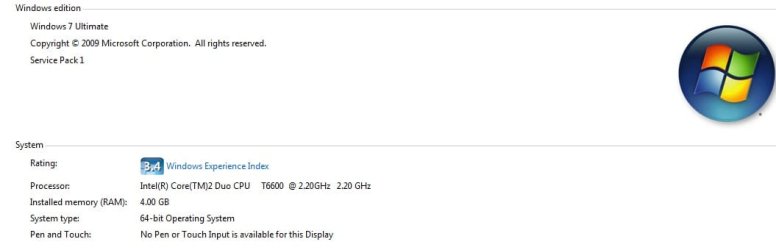
Windows 7 Ultimate x64 SP1Intel(R) Core(TM)2 Duo CPU T6600 @ 2.20GHz4.00 GB DDR-2Mobile Intel(R) 4 Series Express Chipset Family
- OS
- Windows 7 Ultimate x64 SP1
- CPU
- Intel(R) Core(TM)2 Duo CPU T6600 @ 2.20GHz
- Motherboard
- MSI MS-163K
- Memory
- 4.00 GB DDR-2
- Graphics Card(s)
- Mobile Intel(R) 4 Series Express Chipset Family
- Sound Card
- Realtek High Definition Audio
- Monitor(s) Displays
- 15.6" laptop default 60 Hz
- Screen Resolution
- 1280 x 800 x 32 bits (4294967296 colors) @ 60 Hz
- Hard Drives
- WDC WD3200BEVT-22ZCT0 ATA Device
- Other Info
- TP-Link router