Wireless Network: No Internet

rafaelcastro66

New member
Member
Local time
1:39 PM
Messages
4
Hi guys!

I installed Windows 7 Ultimate Edition on my Dell Inspiron 1545 (which uses an Intel Wireless card). At home, network works great, i set up a domestic network with a D-Link router and everything is fine.

But at work, i have access to a public network (from the hospital I work on) which has no password. I can connect to the network without problems, but I cant access the internet.

I've tried changing many of the settings, such as disabling firewall, NOD32, choosing domestic/corporate/public network or even running Windows diagnostics. Nothing works. I cant even ping, so its not just browser trouble.

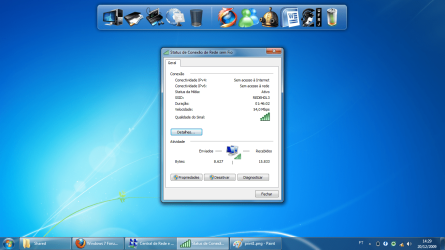
I observed that in the connection status both IPv4 and IPv6 connectivity are "without internet access".

I can only test it in sundays, since its the only day I'm at the hosp.

EDIT: Forgot to tell, other laptops can access the internet from the same place.

Thanks in advance! :D
 

My Computer

OS
W7 Ultimate Edition
CPU
Intel C2Q Q9550 @ 2.83 GHz
Memory
2x 2GB OCZ 1333
Graphics Card(s)
ATI HD4890 1GB GDDR5
Hi Rafael, welcome to the forums
1) try disabling IPv6
2) is there a proxy set up at the hospital?
 

My Computer

Computer Manufacturer/Model Number
Wally, Innc.
OS
Windows 7 x64 finally!
CPU
AMD Athlon II X2 240
Motherboard
Biostar TA790GX XE
Memory
OCZ Platinum 4GB DDR2 1066 (will not work past 800MHz)
Graphics Card(s)
MSI R4670-MD1G Radeon HD 4670 1GB 128-bit GDDR3
Sound Card
ATI High Definition Audio Device Realtek ALC888
Monitor(s) Displays
HP w19e
Screen Resolution
1440x900
Hard Drives
Western Digital Caviar Green WD5000AADS 500GB SATA
Western Digital Caviar Blue WD5000AAKS 500GB SATA
PSU
Athena Power Micro ATX 400W
Case
HEC 6T 6T10BB Black MicroATX Mini Tower
Cooling
stock
Keyboard
wired, many keys
Mouse
HP wireless, 2 buttons, 1 wheel
Internet Speed
DSL 2Mb (recently getting 1.65M!)
Welcome to the forum raphael.


Dell forum says this Quoted from Dell forum... I just talked to dell support, i changed my security to wpa2, now it's working, seems there are little problems still with the drivers and win7.

You should be able to change that security setting inside your router control panel.

"change security to wpa2" <<< Fix

Source: http://en.community.dell.com/forums/t/19307034.aspx

Read to very bottom of page.
 

My Computer

Computer type
PC/Desktop
Computer Manufacturer/Model Number
Home built
OS
Windows 7 Ult, Windows 8.1 Pro,
CPU
Q9650-4.275GHz, E8600 4.5GHz, E6750-3.8GHz
Motherboard
Evga 780i FTW
Memory
G.Skill PC2 9600 1200Mhz 5 5 5 15 2T
Graphics Card(s)
GTX480
Sound Card
Asus Xonar D2
Monitor(s) Displays
HannsG
Screen Resolution
1680X1050
Hard Drives
GSkill Phoenix Pro 120GB SSD
PSU
ThermalTake Toughpower 1000Watt modular
Case
ThermalTake XaserV
Cooling
Xigmatek S1283
Keyboard
Logitech G15
Mouse
Logitech G9
Internet Speed
T1
Hey folks, thanks for the answers.

I dont know if theres a proxy set up. Is there a way to find it out by myself? Ill try disabling IPv6 and see what happens next sunday.

chev65, its a public network, it has no security. I cant change that. If its a driver problem, i hope they fix it soon.
 

My Computer

OS
W7 Ultimate Edition
CPU
Intel C2Q Q9550 @ 2.83 GHz
Memory
2x 2GB OCZ 1333
Graphics Card(s)
ATI HD4890 1GB GDDR5
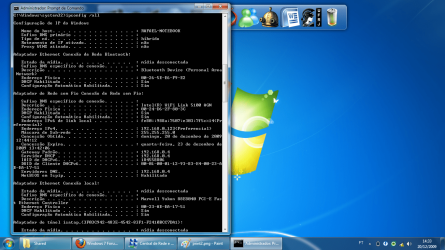
Can you please screenshot your "ipconfig /all".

Have you spoken to your hospital's network admin people? there could be a usage blocking. If not, lets see your ipconfig details.
 

My Computer

Computer Manufacturer/Model Number
Lenovo ThinkPad T60
OS
Windows 7 Ultimate 64Bit
CPU
GenuineIntel Intel(R) Core(TM) DuoCore T2400 @ 1.83GHz
Motherboard
Intel(R) 82801G (ICH7 Family)
Memory
2.00 GB
Graphics Card(s)
Mobile Intel(R) 945 Express Chipset
Sound Card
SoundMAX Integrated Digital HD Audio
Monitor(s) Displays
ThinkPad Display
Screen Resolution
1400x1050
Hard Drives
100Gb SATA
Keyboard
Standard Keyboard
Mouse
HID-compliant Mouse
Internet Speed
Cable Broadband - 54Mbps
Other Info
Intel(R) PRO/1000 PL Network Connection
11a/b/g Wireless LAN Mini PCI Express Adapter
I dont know if theres a proxy set up. Is there a way to find it out by myself?

Rafael, not that I know of, you will have to ask the IT people at the hospital. But, as you said it is a public network (I missed that before), I realize now that it is hardly the case.
Worth asking though.
 

My Computer

Computer Manufacturer/Model Number
Wally, Innc.
OS
Windows 7 x64 finally!
CPU
AMD Athlon II X2 240
Motherboard
Biostar TA790GX XE
Memory
OCZ Platinum 4GB DDR2 1066 (will not work past 800MHz)
Graphics Card(s)
MSI R4670-MD1G Radeon HD 4670 1GB 128-bit GDDR3
Sound Card
ATI High Definition Audio Device Realtek ALC888
Monitor(s) Displays
HP w19e
Screen Resolution
1440x900
Hard Drives
Western Digital Caviar Green WD5000AADS 500GB SATA
Western Digital Caviar Blue WD5000AAKS 500GB SATA
PSU
Athena Power Micro ATX 400W
Case
HEC 6T 6T10BB Black MicroATX Mini Tower
Cooling
stock
Keyboard
wired, many keys
Mouse
HP wireless, 2 buttons, 1 wheel
Internet Speed
DSL 2Mb (recently getting 1.65M!)
Ill screenshot ipconfig and post.

The problem is that the IT people dont work on sundays... Ill try to get in touch with them.

Thanx for the support.
 

My Computer

OS
W7 Ultimate Edition
CPU
Intel C2Q Q9550 @ 2.83 GHz
Memory
2x 2GB OCZ 1333
Graphics Card(s)
ATI HD4890 1GB GDDR5
If they are like the ones around here, they never work but are also not present on Sundays... :)
let us know when you can!
 

My Computer

Computer Manufacturer/Model Number
Wally, Innc.
OS
Windows 7 x64 finally!
CPU
AMD Athlon II X2 240
Motherboard
Biostar TA790GX XE
Memory
OCZ Platinum 4GB DDR2 1066 (will not work past 800MHz)
Graphics Card(s)
MSI R4670-MD1G Radeon HD 4670 1GB 128-bit GDDR3
Sound Card
ATI High Definition Audio Device Realtek ALC888
Monitor(s) Displays
HP w19e
Screen Resolution
1440x900
Hard Drives
Western Digital Caviar Green WD5000AADS 500GB SATA
Western Digital Caviar Blue WD5000AAKS 500GB SATA
PSU
Athena Power Micro ATX 400W
Case
HEC 6T 6T10BB Black MicroATX Mini Tower
Cooling
stock
Keyboard
wired, many keys
Mouse
HP wireless, 2 buttons, 1 wheel
Internet Speed
DSL 2Mb (recently getting 1.65M!)
Ok, here we go. Disabling IPv6 had no effect. Also, I couldnt contact the IT people, since they REALLY dont work on Sundays. :p

I made some screenshots, take a look.

Windows is in portuguese, but I think its understandable. Tell me if you have any trouble.
 

Attachments

  • print1.png
    print1.png
    74.6 KB · Views: 20
  • print2.png
    print2.png
    259.8 KB · Views: 29
  • print3.png
    print3.png
    184.7 KB · Views: 21
  • print4.png
    print4.png
    180.7 KB · Views: 13

My Computer

OS
W7 Ultimate Edition
CPU
Intel C2Q Q9550 @ 2.83 GHz
Memory
2x 2GB OCZ 1333
Graphics Card(s)
ATI HD4890 1GB GDDR5
The 192.168.x.x address is your local router address. Are u sure you have not manually input any IPs, DNS, DHCP etc. If you enabled DHCP your isp should be giving you a different IP.
 

My Computer

Computer Manufacturer/Model Number
Lenovo ThinkPad T60
OS
Windows 7 Ultimate 64Bit
CPU
GenuineIntel Intel(R) Core(TM) DuoCore T2400 @ 1.83GHz
Motherboard
Intel(R) 82801G (ICH7 Family)
Memory
2.00 GB
Graphics Card(s)
Mobile Intel(R) 945 Express Chipset
Sound Card
SoundMAX Integrated Digital HD Audio
Monitor(s) Displays
ThinkPad Display
Screen Resolution
1400x1050
Hard Drives
100Gb SATA
Keyboard
Standard Keyboard
Mouse
HID-compliant Mouse
Internet Speed
Cable Broadband - 54Mbps
Other Info
Intel(R) PRO/1000 PL Network Connection
11a/b/g Wireless LAN Mini PCI Express Adapter
Back
Top