Wireless on startup

MikeyG498

New member
Local time
5:30 PM
Messages
3
Hello I have some laptops running Windows 7 and I have them connected to a cisco access point manged by a Cisco Wireless Management system. When I first turn one of the PC's on and log in. It will connect to the wireless but has an exclamation point. When I diagnose the problem it says "The DNS server is not responding". If I do an ipconfig it has the right DNS server in. If I turn the wireless adaptor off on the PC and turn it back on it will reconnect with no issue. It only happens if the PC is shut down for more than 10 minutes. When I use another wireless access point that is not managed then it works fine. My personal PC ,running windows 7, also connects to the managed cisco wireless with no issue. Thanks for the help
 

My Computer

OS
Windows 7 32 bit
Hello MikeyG498,

Try going into device manager, top of page click the "view" , then choose "show hidden devices" Then go to Network adaptors and disable the "Microsoft Virtual WiFi Miniport Adapter" which has been known to cause this problem in the past.

Sometimes setting a static DNS in your IPv4 properties will work.

These are the most likely solutions but there are other reasons this can happen. The Technet thread below shows other solutions that have worked for others in the past.

Windows 7 DNS server not responding
 

My Computer

Computer type
PC/Desktop
Computer Manufacturer/Model Number
Home built
OS
Windows 7 Ult, Windows 8.1 Pro,
CPU
Q9650-4.275GHz, E8600 4.5GHz, E6750-3.8GHz
Motherboard
Evga 780i FTW
Memory
G.Skill PC2 9600 1200Mhz 5 5 5 15 2T
Graphics Card(s)
GTX480
Sound Card
Asus Xonar D2
Monitor(s) Displays
HannsG
Screen Resolution
1680X1050
Hard Drives
GSkill Phoenix Pro 120GB SSD
PSU
ThermalTake Toughpower 1000Watt modular
Case
ThermalTake XaserV
Cooling
Xigmatek S1283
Keyboard
Logitech G15
Mouse
Logitech G9
Internet Speed
T1
Thanks for the response chev. I did try that stuff before and it still does not work right. I actually do not even have the Microsoft Virtual WiFi Miniport Adapter. When the PC first turns on it will not contact DNS but if the just disconnect and reconnect then it works fine. Even when it is not connected to DNS I do any ipconfig and it has the right DNS info in there. This only happens on the Cisco Managed Access points and not other access point. I do have other machines running Windows 7 that connect to the Cisco Managed Access points and work right on start up.

The reason why it is big for us to get them started without having to disconnect and reconnect is because we have young kids using them and it is a real pain for us to get them to do that. Thanks again for your help.
 

My Computer

OS
Windows 7 32 bit
That would be a pain I agree.

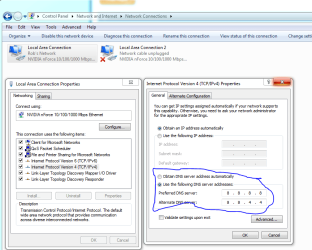
Try manually entering the DNS into the IPv4 properties rather than letting the Cisco AP find the DNS for you.
 

Attachments

  • DNS manual input.PNG
    DNS manual input.PNG
    35.9 KB · Views: 28

My Computer

Computer type
PC/Desktop
Computer Manufacturer/Model Number
Home built
OS
Windows 7 Ult, Windows 8.1 Pro,
CPU
Q9650-4.275GHz, E8600 4.5GHz, E6750-3.8GHz
Motherboard
Evga 780i FTW
Memory
G.Skill PC2 9600 1200Mhz 5 5 5 15 2T
Graphics Card(s)
GTX480
Sound Card
Asus Xonar D2
Monitor(s) Displays
HannsG
Screen Resolution
1680X1050
Hard Drives
GSkill Phoenix Pro 120GB SSD
PSU
ThermalTake Toughpower 1000Watt modular
Case
ThermalTake XaserV
Cooling
Xigmatek S1283
Keyboard
Logitech G15
Mouse
Logitech G9
Internet Speed
T1
I tried that and it still does not work. I think I did figure out what is causing it but not sure how I am going to fix it. If I give it a static DNS only it still does not work. But if I give it a static IP and DNS then it works fine. I think it has something to do with they way the Cisco Management is passing the DHCP info over. What is weird though is when I do an ipconfig all the info is correct when I use DHCP. I am going to see if I can find and XP machine to try.
 

My Computer

OS
Windows 7 32 bit
I tried that and it still does not work. I think I did figure out what is causing it but not sure how I am going to fix it. If I give it a static DNS only it still does not work. But if I give it a static IP and DNS then it works fine. I think it has something to do with they way the Cisco Management is passing the DHCP info over. What is weird though is when I do an ipconfig all the info is correct when I use DHCP. I am going to see if I can find and XP machine to try.

It must be a DHCP problem in that case. I can't imagine why it's not working unless it's set up for static IP's for some reason. Keep testing and maybe you will get to that bottom of it. A screen shot of your ipconfig /all might be helpful.
 

My Computer

Computer type
PC/Desktop
Computer Manufacturer/Model Number
Home built
OS
Windows 7 Ult, Windows 8.1 Pro,
CPU
Q9650-4.275GHz, E8600 4.5GHz, E6750-3.8GHz
Motherboard
Evga 780i FTW
Memory
G.Skill PC2 9600 1200Mhz 5 5 5 15 2T
Graphics Card(s)
GTX480
Sound Card
Asus Xonar D2
Monitor(s) Displays
HannsG
Screen Resolution
1680X1050
Hard Drives
GSkill Phoenix Pro 120GB SSD
PSU
ThermalTake Toughpower 1000Watt modular
Case
ThermalTake XaserV
Cooling
Xigmatek S1283
Keyboard
Logitech G15
Mouse
Logitech G9
Internet Speed
T1
Back
Top