Wireless Printer Port Confusion

Chris Nicola

New member
Power User
VIP
Local time
11:51 PM
Messages
170
I have set up my wireless D-Link print server to my Canon iP4850 and it worked fine. I later had to connect it to a usb cable to disable the ink monitors as this cannot be done in wireless mode. To make things easier I created a second instance of my printer and called it Canon USB set to a USB port. My original printer called Canon Wireless is set to the correct wireless TCP port IP_192.168.10.3P1.

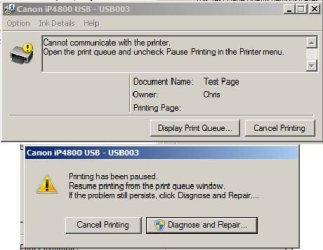
Then later with the USB cable disconnected when I tried to print to the wireless printer configured to the wireless port it did not print. But as an experiment I tried to print to the USB printer configured to the USB port that is not actually physically connected and it eventually prints wirelessly after an error message for a few seconds that says there is no communication with the printer.

At least I can still print wirelessly but there is some kind of scrambled port issue that prevents me printing without a delay and an error message. Does anyone have an idea what the problem is?

Your advice would be appreciated.

Kind Regards

Chris
 

My Computer

Computer type
PC/Desktop
Computer Manufacturer/Model Number
Desktop Custom built, Laptop Lenovo G575 Model 20081
OS
Desktop Win 10 Pro 64 bit, Laptop Win 7 Home 64 bit
CPU
Desktop Intel i7 4790 CPU 3.6 GHz, Laptop AMD C-50 1GHz
Motherboard
ASUS H81 Gamer
Memory
Desktop 16 Gbt, Laptop 4 Gbt
Graphics Card(s)
Desktop nvidea GeForce NTX960, Laptop AMD Raedon HD 6250M
Sound Card
Desktop onboard Realtec high definition audio nvidea HD aud
Monitor(s) Displays
BENQ G900 Digital 19 inch
Screen Resolution
1024 x 768
Hard Drives
Silicon Power SSD SATA 3.0 450b Gbt
Seagate 4 Tbt SSHD
PSU
Thermaltake 1000W
Case
Thermaltake
Cooling
Onboard case fans
Keyboard
Standard PS/2
Mouse
A4 Tech optical wireless PS/2
Internet Speed
10 Mbps
Antivirus
Microsoft Security Essentials
Other Info
DVD Samsung TSST corp CDDVDW - SATA
Hiya Chris

I',m assuming that 3P1 is a typo
TCP port IP_192.168.10.3P1

But have you tried connecting to the print server via your browser and doing a test print ?
Also what is the error that you eventually get (take a print screen and paste it in here to show us) just makes it easier to diagnose the problem ;)
 

My Computer

Computer type
PC/Desktop
Computer Manufacturer/Model Number
Self Built
OS
Windows 7 Ultimate 64bit
CPU
AMD Phenom Quad core 9950 black edition
Motherboard
Gigabyte
Memory
16Gb
Graphics Card(s)
2x XFX Radeon 5850
Sound Card
PCI Express X-Fi Titanium / Logitech G35
Monitor(s) Displays
2x HP 2410i
Screen Resolution
1920x1080
Hard Drives
2x 500Gb Seagate
1x 300Gb Seagate
1x 1Tb Seagate
2x 1Tb Hitatchi
PSU
Jean Tech Storm 700W
Case
Cooler Master COSMOS S
Cooling
Akasa Evo Blue Pro
Keyboard
Logitech G15
Mouse
Mad Catz M.M.O. 7
Internet Speed
12mb
Thanks for your reply. Sorry 192.168.10.3P1 is the port name and the address is 192.168.10.3

The printer will not do a test print from the Wireless printer properties window. It will do a test print wirelessly if I select the USB printer that is not physically connected by a USB port. I don't know how to print from my browser. Screenshot of error message that only lasts for a few seconds is attached.


Kind Regards
Chris
 

Attachments

  • Printer Error.JPG
    Printer Error.JPG
    32.1 KB · Views: 15

My Computer

Computer type
PC/Desktop
Computer Manufacturer/Model Number
Desktop Custom built, Laptop Lenovo G575 Model 20081
OS
Desktop Win 10 Pro 64 bit, Laptop Win 7 Home 64 bit
CPU
Desktop Intel i7 4790 CPU 3.6 GHz, Laptop AMD C-50 1GHz
Motherboard
ASUS H81 Gamer
Memory
Desktop 16 Gbt, Laptop 4 Gbt
Graphics Card(s)
Desktop nvidea GeForce NTX960, Laptop AMD Raedon HD 6250M
Sound Card
Desktop onboard Realtec high definition audio nvidea HD aud
Monitor(s) Displays
BENQ G900 Digital 19 inch
Screen Resolution
1024 x 768
Hard Drives
Silicon Power SSD SATA 3.0 450b Gbt
Seagate 4 Tbt SSHD
PSU
Thermaltake 1000W
Case
Thermaltake
Cooling
Onboard case fans
Keyboard
Standard PS/2
Mouse
A4 Tech optical wireless PS/2
Internet Speed
10 Mbps
Antivirus
Microsoft Security Essentials
Other Info
DVD Samsung TSST corp CDDVDW - SATA
Hiya Chris

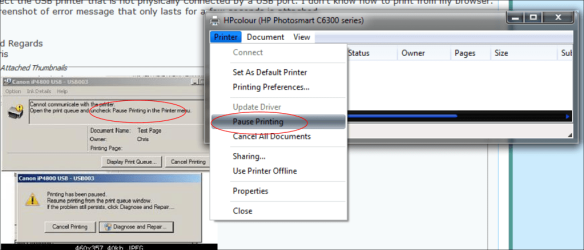
According to the error message it seems that the printer may be "paused" Try "un-pausing" the printer and try again.
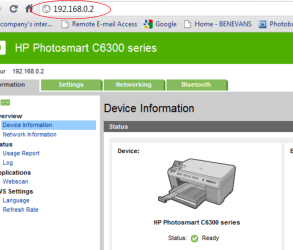
To test print from your browser just put the ip address of the print server into your browser and follow the on screen options ;)
 

Attachments

  • paused printer.png
    paused printer.png
    72.1 KB · Views: 16
  • print server.png
    print server.png
    68 KB · Views: 16

My Computer

Computer type
PC/Desktop
Computer Manufacturer/Model Number
Self Built
OS
Windows 7 Ultimate 64bit
CPU
AMD Phenom Quad core 9950 black edition
Motherboard
Gigabyte
Memory
16Gb
Graphics Card(s)
2x XFX Radeon 5850
Sound Card
PCI Express X-Fi Titanium / Logitech G35
Monitor(s) Displays
2x HP 2410i
Screen Resolution
1920x1080
Hard Drives
2x 500Gb Seagate
1x 300Gb Seagate
1x 1Tb Seagate
2x 1Tb Hitatchi
PSU
Jean Tech Storm 700W
Case
Cooler Master COSMOS S
Cooling
Akasa Evo Blue Pro
Keyboard
Logitech G15
Mouse
Mad Catz M.M.O. 7
Internet Speed
12mb
Thanks for your thoughts. When I try to unpause the printer nothing I do will unpause it. This is probably because the usb port is not attached. However after a few seconds the error message disappears and it starts printing wirelessly anyway.

What I should really be asking is why when I wish to print wirelessly I need to print to the wrong printer that is configured to a usb port that is not attached? Why can't I print directly to the wireless printer? When I type 192.168.10.3 in my browser it just does a Google search, there is no connection with my printer.

Kind Regards

chris
 

My Computer

Computer type
PC/Desktop
Computer Manufacturer/Model Number
Desktop Custom built, Laptop Lenovo G575 Model 20081
OS
Desktop Win 10 Pro 64 bit, Laptop Win 7 Home 64 bit
CPU
Desktop Intel i7 4790 CPU 3.6 GHz, Laptop AMD C-50 1GHz
Motherboard
ASUS H81 Gamer
Memory
Desktop 16 Gbt, Laptop 4 Gbt
Graphics Card(s)
Desktop nvidea GeForce NTX960, Laptop AMD Raedon HD 6250M
Sound Card
Desktop onboard Realtec high definition audio nvidea HD aud
Monitor(s) Displays
BENQ G900 Digital 19 inch
Screen Resolution
1024 x 768
Hard Drives
Silicon Power SSD SATA 3.0 450b Gbt
Seagate 4 Tbt SSHD
PSU
Thermaltake 1000W
Case
Thermaltake
Cooling
Onboard case fans
Keyboard
Standard PS/2
Mouse
A4 Tech optical wireless PS/2
Internet Speed
10 Mbps
Antivirus
Microsoft Security Essentials
Other Info
DVD Samsung TSST corp CDDVDW - SATA
Chris pal, if you can't establish a connection to the print server, then you'll never be able to print to the printer. Can you ping the print server? Open a command prompt (click "start" "run" type in cmd hit enter).
The command prompt will open. Then type in ping 192.168.10.3 you should be getting a reply back. Let us know what results you get ;)
 

My Computer

Computer type
PC/Desktop
Computer Manufacturer/Model Number
Self Built
OS
Windows 7 Ultimate 64bit
CPU
AMD Phenom Quad core 9950 black edition
Motherboard
Gigabyte
Memory
16Gb
Graphics Card(s)
2x XFX Radeon 5850
Sound Card
PCI Express X-Fi Titanium / Logitech G35
Monitor(s) Displays
2x HP 2410i
Screen Resolution
1920x1080
Hard Drives
2x 500Gb Seagate
1x 300Gb Seagate
1x 1Tb Seagate
2x 1Tb Hitatchi
PSU
Jean Tech Storm 700W
Case
Cooler Master COSMOS S
Cooling
Akasa Evo Blue Pro
Keyboard
Logitech G15
Mouse
Mad Catz M.M.O. 7
Internet Speed
12mb
Thanks again. I appreciate your help and support. I am now closer to solving the mystery. It seems there are two ways to print using the D-link software. One way is using the TCP web address. I finally realised that its not 192.168.10.3 but actually 192.168.10.1. When I entered it correctly then it started printing effortlessly from the wireless port. The other way it seems is using the D-link software which imitates a virtual usb port. One has to launch the PS-link software and click on the button that says "link". Then the printer will print as if configured to a usb port instead of a TCP port and the software does the wireless configuration in the background. If one forgets to click on "link" the printer will still print from a virtual usb port but there are delays and then the error messages pop up.

So all's well that ends well...for now at least!

Kind Regards

Chris
 

My Computer

Computer type
PC/Desktop
Computer Manufacturer/Model Number
Desktop Custom built, Laptop Lenovo G575 Model 20081
OS
Desktop Win 10 Pro 64 bit, Laptop Win 7 Home 64 bit
CPU
Desktop Intel i7 4790 CPU 3.6 GHz, Laptop AMD C-50 1GHz
Motherboard
ASUS H81 Gamer
Memory
Desktop 16 Gbt, Laptop 4 Gbt
Graphics Card(s)
Desktop nvidea GeForce NTX960, Laptop AMD Raedon HD 6250M
Sound Card
Desktop onboard Realtec high definition audio nvidea HD aud
Monitor(s) Displays
BENQ G900 Digital 19 inch
Screen Resolution
1024 x 768
Hard Drives
Silicon Power SSD SATA 3.0 450b Gbt
Seagate 4 Tbt SSHD
PSU
Thermaltake 1000W
Case
Thermaltake
Cooling
Onboard case fans
Keyboard
Standard PS/2
Mouse
A4 Tech optical wireless PS/2
Internet Speed
10 Mbps
Antivirus
Microsoft Security Essentials
Other Info
DVD Samsung TSST corp CDDVDW - SATA
It seems your printer is set to DHCP, you'll need to change that to a static IP address through the printer in wired mode. Stop the print spooler then delete the printer listed using the USB port. Once you have set the printer's IP, change the TCP port to the correct static IP and you should be good

 

My Computer

OS
7 Pro
Ah, so thats why the address keeps on changing! Thanks for the tip. I have changed it to a fixed IP address now so hopefully things will improve.

Kind Regards

Chris
 

My Computer

Computer type
PC/Desktop
Computer Manufacturer/Model Number
Desktop Custom built, Laptop Lenovo G575 Model 20081
OS
Desktop Win 10 Pro 64 bit, Laptop Win 7 Home 64 bit
CPU
Desktop Intel i7 4790 CPU 3.6 GHz, Laptop AMD C-50 1GHz
Motherboard
ASUS H81 Gamer
Memory
Desktop 16 Gbt, Laptop 4 Gbt
Graphics Card(s)
Desktop nvidea GeForce NTX960, Laptop AMD Raedon HD 6250M
Sound Card
Desktop onboard Realtec high definition audio nvidea HD aud
Monitor(s) Displays
BENQ G900 Digital 19 inch
Screen Resolution
1024 x 768
Hard Drives
Silicon Power SSD SATA 3.0 450b Gbt
Seagate 4 Tbt SSHD
PSU
Thermaltake 1000W
Case
Thermaltake
Cooling
Onboard case fans
Keyboard
Standard PS/2
Mouse
A4 Tech optical wireless PS/2
Internet Speed
10 Mbps
Antivirus
Microsoft Security Essentials
Other Info
DVD Samsung TSST corp CDDVDW - SATA
Back
Top