
Wireless problem

g2gg

New member
Local time
1:31 PM
Messages
1
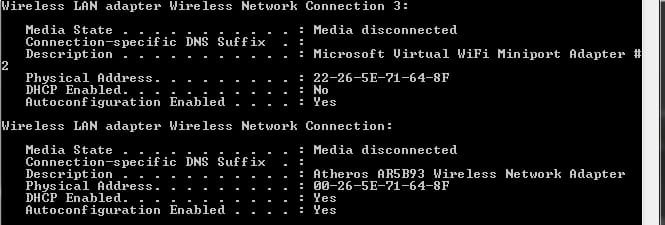
Hello. I have an Atheros wireless network adapter that worked fine till now. I usually use it to create a wireless local area for my iphone. But today i tryed to change the dynamic ip and put a static one to try something and after i tryed i change it back to the automatic obtain of ip. But now seem to dont work i got an error that is something wrong with adapter
 

Attachments
  • NewPicture043.jpg
    NewPicture043.jpg
    26.1 KB · Views: 14

My Computer

OS
Windows 7 x64

My Computer

Computer type
PC/Desktop
Computer Manufacturer/Model Number
Custom Asus Build
OS
Microsoft Windows 8.1 Pro 64-bit
CPU
Intel(R) Core(TM) i3-4130 CPU @ 3.40GHz
Motherboard
B85M-E
Memory
8.00 GB
Graphics Card(s)
None
Sound Card
Realtek High Definition Audio
Monitor(s) Displays
Asus 23.6" Monitor
Screen Resolution
1920 x 1080 x 32 bits (4294967296 colors) @ 60 Hz
Hard Drives
INTEL SSDSC2BW180A4
Samsung SSD 840 PRO Series
PSU
Seasonic S12II-380Bronze
Case
Lian Li
Cooling
Fan, Passive
Keyboard
Logitech K120
Mouse
Microsoft Touch Mouse
Internet Speed
4ms Ping, 19.0 Mbps Download, 19.0 Mbps Upload
Antivirus
Eset Endpoint
Browser
Internet Explorer, Chrome
Hello. I have an Atheros wireless network adapter that worked fine till now. I usually use it to create a wireless local area for my iphone. But today i tryed to change the dynamic ip and put a static one to try something and after i tryed i change it back to the automatic obtain of ip. But now seem to dont work i got an error that is something wrong with adapter

You might want to try disabling the Msoft virtual mini port adaptor then test to see if the problem persists. It may also help to stop using the shared wireless network with the following command.
Stop the wireless hosted network:
netsh wlan stop hostednetwork


If you still need to use the virtual mini port for the shared wireless connection you can always enable the virtual mini port again if you need it. Connectify has decent software for setting up a shared wireless connection. You can also use the manual method which is outlined in the following link.
http://www.winsupersite.com/article...ng-to-share-an-internet-connection-wirelessly
 

My Computer

Computer type
PC/Desktop
Computer Manufacturer/Model Number
Home built
OS
Windows 7 Ult, Windows 8.1 Pro,
CPU
Q9650-4.275GHz, E8600 4.5GHz, E6750-3.8GHz
Motherboard
Evga 780i FTW
Memory
G.Skill PC2 9600 1200Mhz 5 5 5 15 2T
Graphics Card(s)
GTX480
Sound Card
Asus Xonar D2
Monitor(s) Displays
HannsG
Screen Resolution
1680X1050
Hard Drives
GSkill Phoenix Pro 120GB SSD
PSU
ThermalTake Toughpower 1000Watt modular
Case
ThermalTake XaserV
Cooling
Xigmatek S1283
Keyboard
Logitech G15
Mouse
Logitech G9
Internet Speed
T1
Back
Top