Wireless router causing wired computers to lose connection.

Tron

New member
Local time
6:06 PM
Messages
6
My network has 3 computers connected through lan cables to an IP switch that connects to the gateway. The gateway is running the latest m0n0wall -1.33. I just got and connected a wireless router to my network (4th lan position on the switch) - setting it up as an access point. As soon as the router turns on, the wireless devices connect but the WIRED comps lose connection. My wired comps are running Win XP sp2. The wireless devices are a laptop running Windows 7 Home Premium 32 bit and an iPhone. Any advice?
 

My Computer

OS
Windows 7 Home Premium 32bit
Hi Tron and Welcome to SF,

Looks like the Gateway is also a router then you added a second router.

Might need to reconfigure the 2nd router, the Gateway's setting stays the same. Disable DHCP from the 2nd router and assign a Static IP Address to the second router with the same Subnet for ex. Gateway's IP is 192.168.1.1, you may assign a 192.168.1.2 Static IP to the second router.

See if that helps and let us know.
 

My Computer

Computer Manufacturer/Model Number
Lenovo Desktop/Samsung Laptop
OS
Win7 & Win8 64bit
CPU
Intel i5
Internet Speed
Charter-20 Mbps
Antivirus
Avast
Browser
FF, IE9 and Chrome
Thank you for your suggestions. However, all of the above was done beforehand. Since my posting, I have found the problem. There was an IP duplicate. The WLAN routers's WAN IP was the same as the gateway's LAN IP. As the router's WAN wasn't used anyway, I put them on different subnets. Now all devices can connect and browse and so on. Unfortunately, now I face a problem of a different kind. File sharing between wired and wireless computers isn't working. What would you recommend?
 

My Computer

OS
Windows 7 Home Premium 32bit
Having 2 different Subnets in one network - computers and network devices won't communicate.

The best practice and will resolve the issue is having them all in one Subnet. Please see Post# 2 on how to do this.
 

My Computer

Computer Manufacturer/Model Number
Lenovo Desktop/Samsung Laptop
OS
Win7 & Win8 64bit
CPU
Intel i5
Internet Speed
Charter-20 Mbps
Antivirus
Avast
Browser
FF, IE9 and Chrome
Just for clarity, I want to emphasize that the WAN connection on the wireless router is not utilized and the router is set up only as an access point connecting 'LAN jack' on the router to 'LAN jack' on the ipswitch.
 

My Computer

OS
Windows 7 Home Premium 32bit
Thanks for the snap shots. Do you have a simple diagram to post?
 

My Computer

Computer Manufacturer/Model Number
Lenovo Desktop/Samsung Laptop
OS
Win7 & Win8 64bit
CPU
Intel i5
Internet Speed
Charter-20 Mbps
Antivirus
Avast
Browser
FF, IE9 and Chrome
Very nice...I wish, would have seen Subnets :D...based on your Post# 3, they are on 2 diff Subnets.
Here is my LAN diagram:

http://img52.imageshack.us/img52/6739/landiag.jpg

Looking forward to hearing your suggestions on the resolution of the file sharing issue.
You may also give this a try, almost the same as Post# 2 but a lot more detailed.
Post# 3 from this Thread will give you a lot more detailed guide on how to accomplish this.

Do a test after, try pinging from your XP Computer to your Wireless computer.

Make sure that they are on the same Workgroup, Netbios need to be enabled on all computers.
Create identical UserNames and Passwords on all computers.

Share a C or D drive, give a Full access permission for now and see if they are able to access each other's shared Drive.

This tutorial might be of helped.
 
Last edited:

My Computer

Computer Manufacturer/Model Number
Lenovo Desktop/Samsung Laptop
OS
Win7 & Win8 64bit
CPU
Intel i5
Internet Speed
Charter-20 Mbps
Antivirus
Avast
Browser
FF, IE9 and Chrome
All of the above recommendations have already been implemented as can be seen from the pictures I have linked to.
All of the computers on my LAN diagram are on the same subnet (192.168.1._). Only other subnets are Opt1 (192.168.2._) which is the unused nic on the gateway and 192.168.10._ which is the WAN on the wireless router (the connection that is also unused).
NetBios is enabled on the Win7 box (wireless), don't know how to tell on the XP box (wired). Trying to see shares from under identical User Name accounts on both computers made no difference (account passwords were disabled on both).

Currently, both the WinXP and the Win7 comps can ping each other without any data loss. Therefore, data flows either way and the issue seems to be only OS related. The XP box sees 7's shares but 7 doesn't see XP's OR its own shares (in the Network section), nor does 7 see any computers on the network including self.

The tutorial link suggested covers an example of sharing btw W7 64bit and WinXP sp3. My W7 is 32bit and XP is sp2. Further, I do not wish to apply the sp3 patch. Every other step in the tutorial has been followed exactly. If you happen to know that the problem resides on the XP end, please advise if it can be fixed with a particular small patch (as a specific subcomponent of XP's sp3 package, for example). However, it seems unlikely that XP is at fault since 7 cannot even see itself.

 

My Computer

OS
Windows 7 Home Premium 32bit
Your wireless router needs to behave as a simple wireless switch or hub, not an access point with it's own routing enabled. This would allow your Monowall to act as Firewall/NAT/router for all your networked PCs, keeping the cables exactly as they are now.

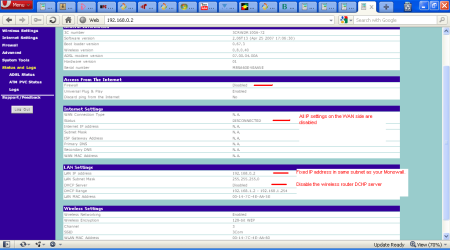
Basically you need to disable the WAN, firewall (if any), and AP features on the wireless router, and give it a fixed address within the subnet range of your Monowall.

See my 3COM ASDL OfficeConnect Wireless Router setup below:

3c.PNG

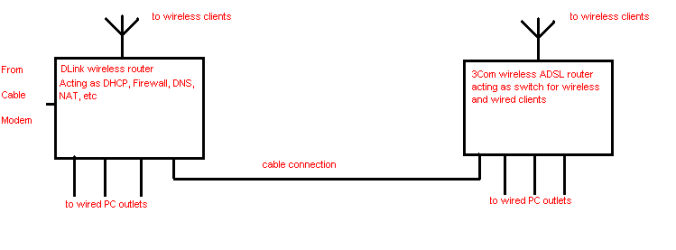
Once your WLAN wireless device is acting as a simple wireless switch, all the IP configuration settings on the Win7 laptop and iphone should look to the Monowall Gateway as the DHCP server etc., as in the system I use diagrammed below. My DLink is natively 192.168.0.1 and my 3Com is set to 192.168.0.2, with all wired and wireless clients in the range 192.168.0.3 - 192.168.0.255.
net.PNG

Internet access should be a no-brainer, but you may still find the Windows 7 - XP networking inconsistent.
 

My Computer

Computer Manufacturer/Model Number
Acer 7520, Packard Bell dot se, Acer travelmate 2423
OS
Win 7 Ult + Starter, XP Pro +Home, 2kAS, Linux Mint 8, SuperOS
CPU
AMD 64 Athlon X2 , Intel Atom N450, Intel Celeron M 1.50 Ghz
Motherboard
Acer Fuquene
Memory
2.5GB ; 1GB; 2GB
Graphics Card(s)
Nvidia GeForce7000m; Intel; Intel
Sound Card
Realtek AC57
Monitor(s) Displays
17" ;10.1"; 19"
Screen Resolution
1440x900;1024x600;1440x900;
Hard Drives
WD 80, WD 320;
PSU
19v
Case
Laptop
Cooling
Air
Internet Speed
9.7Mb/s down 0.99Mb/s up
Other Info
ISP VIRGINMEDIA 10M cable broadband - D-Link DIR615 wireless router, 3Com OfficeConnect ASDL router used as wireless extender switch
I'd run ipconfig /all on your computers and make that Node Type is not 'Peer to Peer'.
Currently, both the WinXP and the Windows 7 comps can ping each other without any data loss. Therefore, data flows either way and the issue seems to be only OS related. The XP box sees 7's shares but 7 doesn't see XP's OR its own shares (in the Network section), nor does 7 see any computers on the network including self
 

My Computer

Computer Manufacturer/Model Number
Lenovo Desktop/Samsung Laptop
OS
Win7 & Win8 64bit
CPU
Intel i5
Internet Speed
Charter-20 Mbps
Antivirus
Avast
Browser
FF, IE9 and Chrome
Back
Top