Wireless running slow, full strength, other devices off

MajorFoley

New member
Member
VIP
Local time
7:05 PM
Messages
254
Hey guys, recently my laptop has been running a bit slow despite being on full signal strength, it isnt even that far from the router, ive tried resetting the router but i dont think its the cause because my pc connected via ethernet is still running at max speed it normally reaches. Even when the pc is turned off the laptop is still slow, im wondering if anyone has any ideas.
 

My Computer My Computer

At a glance

windows 7 Ultimate Service pack 1 x64intel i5 2500k8gb RamSapphire AMD 6950 2gb
Computer type
PC/Desktop
OS
windows 7 Ultimate Service pack 1 x64
CPU
intel i5 2500k
Motherboard
Asus p8z68-v motherboard
Memory
8gb Ram
Graphics Card(s)
Sapphire AMD 6950 2gb
Screen Resolution
1920x1080
Hard Drives
2x samsung hd103SJ
1x ST2000DL003-9VT166
PSU
Silverstone silver 850watt power supply (ST85F-P)
Case
silverstone raven RV02-E
Keyboard
microsoft side winder x4
Mouse
Razer death adder v2
Hey guys, recently my laptop has been running a bit slow despite being on full signal strength, it isnt even that far from the router, ive tried resetting the router but i dont think its the cause because my pc connected via ethernet is still running at max speed it normally reaches. Even when the pc is turned off the laptop is still slow, im wondering if anyone has any ideas.

There are some router settings that will allow your 802.11n devices to run at full wireless N speeds but you need to use the 802.11n Only setting in your routers wireless set up page. The only draw back is that your legacy devices running wireless G or below won't be able to connect any more.

This setting will allow you to connect at full 802.11n speeds, the mixed settings would have you maxed out at 54Mbps where full speed can be up to 450Mbps for wireless N.
 

My Computer My Computer

At a glance

Windows 7 Ult, Windows 8.1 Pro,Q9650-4.275GHz, E8600 4.5GHz, E6750-3.8GHzG.Skill PC2 9600 1200Mhz 5 5 5 15 2TGTX480
Computer type
PC/Desktop
Computer Manufacturer/Model Number
Home built
OS
Windows 7 Ult, Windows 8.1 Pro,
CPU
Q9650-4.275GHz, E8600 4.5GHz, E6750-3.8GHz
Motherboard
Evga 780i FTW
Memory
G.Skill PC2 9600 1200Mhz 5 5 5 15 2T
Graphics Card(s)
GTX480
Sound Card
Asus Xonar D2
Monitor(s) Displays
HannsG
Screen Resolution
1680X1050
Hard Drives
GSkill Phoenix Pro 120GB SSD
PSU
ThermalTake Toughpower 1000Watt modular
Case
ThermalTake XaserV
Cooling
Xigmatek S1283
Keyboard
Logitech G15
Mouse
Logitech G9
Internet Speed
T1
Hey guys, recently my laptop has been running a bit slow despite being on full signal strength, it isnt even that far from the router, ive tried resetting the router but i dont think its the cause because my pc connected via ethernet is still running at max speed it normally reaches. Even when the pc is turned off the laptop is still slow, im wondering if anyone has any ideas.

There are some router settings that will allow your 802.11n devices to run at full wireless N speeds but you need to use the 802.11n Only setting in your routers wireless set up page. The only draw back is that your legacy devices running wireless G or below won't be able to connect any more.

This setting will allow you to connect at full 802.11n speeds, the mixed settings would have you maxed out at 54Mbps where full speed can be up to 450Mbps for wireless N.

Thats gonna be a problem if some devices connected dont support N speeds... guess i better check compatibility before i change that setting
 

My Computer My Computer

At a glance

windows 7 Ultimate Service pack 1 x64intel i5 2500k8gb RamSapphire AMD 6950 2gb
Computer type
PC/Desktop
OS
windows 7 Ultimate Service pack 1 x64
CPU
intel i5 2500k
Motherboard
Asus p8z68-v motherboard
Memory
8gb Ram
Graphics Card(s)
Sapphire AMD 6950 2gb
Screen Resolution
1920x1080
Hard Drives
2x samsung hd103SJ
1x ST2000DL003-9VT166
PSU
Silverstone silver 850watt power supply (ST85F-P)
Case
silverstone raven RV02-E
Keyboard
microsoft side winder x4
Mouse
Razer death adder v2
Hey guys, recently my laptop has been running a bit slow despite being on full signal strength, it isnt even that far from the router, ive tried resetting the router but i dont think its the cause because my pc connected via ethernet is still running at max speed it normally reaches. Even when the pc is turned off the laptop is still slow, im wondering if anyone has any ideas.

There are some router settings that will allow your 802.11n devices to run at full wireless N speeds but you need to use the 802.11n Only setting in your routers wireless set up page. The only draw back is that your legacy devices running wireless G or below won't be able to connect any more.

This setting will allow you to connect at full 802.11n speeds, the mixed settings would have you maxed out at 54Mbps where full speed can be up to 450Mbps for wireless N.

Thats gonna be a problem if some devices connected dont support N speeds... guess i better check compatibility before i change that setting

EDIT: ok changing this did not seem to help, could i screen share with anyone and see if they could help me find whats wrong?
 
Last edited:

My Computer My Computer

At a glance

windows 7 Ultimate Service pack 1 x64intel i5 2500k8gb RamSapphire AMD 6950 2gb
Computer type
PC/Desktop
OS
windows 7 Ultimate Service pack 1 x64
CPU
intel i5 2500k
Motherboard
Asus p8z68-v motherboard
Memory
8gb Ram
Graphics Card(s)
Sapphire AMD 6950 2gb
Screen Resolution
1920x1080
Hard Drives
2x samsung hd103SJ
1x ST2000DL003-9VT166
PSU
Silverstone silver 850watt power supply (ST85F-P)
Case
silverstone raven RV02-E
Keyboard
microsoft side winder x4
Mouse
Razer death adder v2
Hi there,

In addition, you may also change the wireless mode setting from your Wi-Fi adapter if available.

Is it in general it's slow? Perhaps when you are browsing or gaming, etc....?
Hey guys, recently my laptop has been running a bit slow despite being on full signal strength,

Do you have the latest driver for your Wi-Fi adapter?

Yes please....feel free to share some screen captures.
 

My Computer My Computer

At a glance

Win7 & Win8 64bitIntel i5
Computer Manufacturer/Model Number
Lenovo Desktop/Samsung Laptop
OS
Win7 & Win8 64bit
CPU
Intel i5
Internet Speed
Charter-20 Mbps
Antivirus
Avast
Browser
FF, IE9 and Chrome
There are some router settings that will allow your 802.11n devices to run at full wireless N speeds but you need to use the 802.11n Only setting in your routers wireless set up page. The only draw back is that your legacy devices running wireless G or below won't be able to connect any more.

This setting will allow you to connect at full 802.11n speeds, the mixed settings would have you maxed out at 54Mbps where full speed can be up to 450Mbps for wireless N.

Thats gonna be a problem if some devices connected dont support N speeds... guess i better check compatibility before i change that setting

EDIT: ok changing this did not seem to help, could i screen share with anyone and see if they could help me find whats wrong?

Honestly that setting is what you would use to improve wireless speeds but probably has nothing to do with your problem. The facts are there are a million reasons why your wireless appears to be slowing down, it can be anything from A/V software to a virus. These types of problems are extremely difficult to track down.

Your best bet is to start up in safe mode with networking to see if the problem persists. If the problem goes away in safe mode you can be sure there is a program or software or a virus on your machine that is causing the problem. Fixing it can be quite an adventure but it would at least narrow it down.

It's option 3 number 5 in the link below.
http://www.sevenforums.com/tutorials/69585-safe-mode.html
 

My Computer My Computer

At a glance

Windows 7 Ult, Windows 8.1 Pro,Q9650-4.275GHz, E8600 4.5GHz, E6750-3.8GHzG.Skill PC2 9600 1200Mhz 5 5 5 15 2TGTX480
Computer type
PC/Desktop
Computer Manufacturer/Model Number
Home built
OS
Windows 7 Ult, Windows 8.1 Pro,
CPU
Q9650-4.275GHz, E8600 4.5GHz, E6750-3.8GHz
Motherboard
Evga 780i FTW
Memory
G.Skill PC2 9600 1200Mhz 5 5 5 15 2T
Graphics Card(s)
GTX480
Sound Card
Asus Xonar D2
Monitor(s) Displays
HannsG
Screen Resolution
1680X1050
Hard Drives
GSkill Phoenix Pro 120GB SSD
PSU
ThermalTake Toughpower 1000Watt modular
Case
ThermalTake XaserV
Cooling
Xigmatek S1283
Keyboard
Logitech G15
Mouse
Logitech G9
Internet Speed
T1
Thats gonna be a problem if some devices connected dont support N speeds... guess i better check compatibility before i change that setting

EDIT: ok changing this did not seem to help, could i screen share with anyone and see if they could help me find whats wrong?

Honestly that setting is what you would use to improve wireless speeds but probably has nothing to do with your problem. The facts are there are a million reasons why your wireless appears to be slowing down, it can be anything from A/V software to a virus. These types of problems are extremely difficult to track down.
Yeah well tomorrow or later today, when its not 2:07 am im gonna post a couple of screen caps
 

My Computer My Computer

At a glance

windows 7 Ultimate Service pack 1 x64intel i5 2500k8gb RamSapphire AMD 6950 2gb
Computer type
PC/Desktop
OS
windows 7 Ultimate Service pack 1 x64
CPU
intel i5 2500k
Motherboard
Asus p8z68-v motherboard
Memory
8gb Ram
Graphics Card(s)
Sapphire AMD 6950 2gb
Screen Resolution
1920x1080
Hard Drives
2x samsung hd103SJ
1x ST2000DL003-9VT166
PSU
Silverstone silver 850watt power supply (ST85F-P)
Case
silverstone raven RV02-E
Keyboard
microsoft side winder x4
Mouse
Razer death adder v2
In addition to chev65's post, possibly try booting your machine into Safe mode with Networking to see if there is a third party application that may be slowing your speed down. Also possibly try to temporarily disable your A/V and test?

To boot your machine follow this (Option one) - http://www.sevenforums.com/tutorials/69585-safe-mode.html Please replace all references of 'Safe mode' with 'Safe Mode With Networking

Josh
 

My Computer My Computer

At a glance

Windows 7 Professional x64 SP1 ; Windows Serv...Intel Core i5 2400 @ 3.10GHz8.0GB DDR3 @ 665MHz (2GBx4)AMD Radeon HD 6870
Computer type
PC/Desktop
Computer Manufacturer/Model Number
Custom Built
OS
Windows 7 Professional x64 SP1 ; Windows Server 2012 R2 Standard
CPU
Intel Core i5 2400 @ 3.10GHz
Motherboard
Foxconn H67MP-S/-V/H67MP
Memory
8.0GB DDR3 @ 665MHz (2GBx4)
Graphics Card(s)
AMD Radeon HD 6870
Sound Card
Realtek High Definition Audio
Monitor(s) Displays
AOC 2243W & SMB1930NW
Screen Resolution
1440x900 & 1920x1080
Hard Drives
977GB Seagate ST31000524AS ATA Drive (SATA)
250GB WD iSCSI attached Drive
PSU
750W Gaming PSU
Case
Novatech Night
Cooling
Fan
Keyboard
Dell Standard PS/2 Keyboard
Mouse
R.A.T 07 Gaming Mouse
Internet Speed
Download: 10 Mbps Ping: 30ms Upload: 0.81 Mbps
Browser
Google Chrome
Other Info
Optiarc DVD RW AD-5260S ATA Device
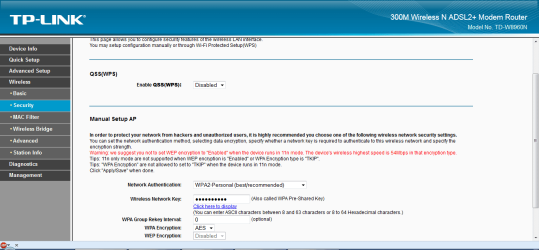
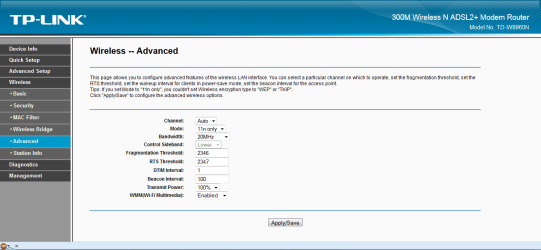
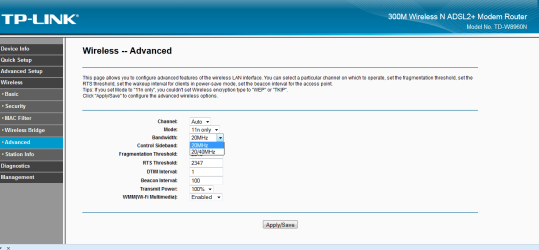
Hey guys here are a few screen caps of a couple of settings, if theres something specific of a screen cap needed let me know,
 

Attachments

  • screencap1.png
    screencap1.png
    40.9 KB · Views: 3
  • screencap2.png
    screencap2.png
    32.7 KB · Views: 2
  • screencap3.png
    screencap3.png
    32.2 KB · Views: 2

My Computer My Computer

At a glance

windows 7 Ultimate Service pack 1 x64intel i5 2500k8gb RamSapphire AMD 6950 2gb
Computer type
PC/Desktop
OS
windows 7 Ultimate Service pack 1 x64
CPU
intel i5 2500k
Motherboard
Asus p8z68-v motherboard
Memory
8gb Ram
Graphics Card(s)
Sapphire AMD 6950 2gb
Screen Resolution
1920x1080
Hard Drives
2x samsung hd103SJ
1x ST2000DL003-9VT166
PSU
Silverstone silver 850watt power supply (ST85F-P)
Case
silverstone raven RV02-E
Keyboard
microsoft side winder x4
Mouse
Razer death adder v2
Hey guys here are a few screen caps of a couple of settings, if theres something specific of a screen cap needed let me know,

The settings are fine but you need to start up in safe mode with Networking in order to narrow down the problem.

If the slow wireless problem doesn't occur in safe mode then you can be sure the problem is caused from an installed program or software.
 

My Computer My Computer

At a glance

Windows 7 Ult, Windows 8.1 Pro,Q9650-4.275GHz, E8600 4.5GHz, E6750-3.8GHzG.Skill PC2 9600 1200Mhz 5 5 5 15 2TGTX480
Computer type
PC/Desktop
Computer Manufacturer/Model Number
Home built
OS
Windows 7 Ult, Windows 8.1 Pro,
CPU
Q9650-4.275GHz, E8600 4.5GHz, E6750-3.8GHz
Motherboard
Evga 780i FTW
Memory
G.Skill PC2 9600 1200Mhz 5 5 5 15 2T
Graphics Card(s)
GTX480
Sound Card
Asus Xonar D2
Monitor(s) Displays
HannsG
Screen Resolution
1680X1050
Hard Drives
GSkill Phoenix Pro 120GB SSD
PSU
ThermalTake Toughpower 1000Watt modular
Case
ThermalTake XaserV
Cooling
Xigmatek S1283
Keyboard
Logitech G15
Mouse
Logitech G9
Internet Speed
T1
ok i think it was a couple of certain websites on their end, could have maybe been ddosed seeing as how my net seems to bet fine now, this thread will be marked as solved, but ill still take your advice and try out that safe mode stuff
 

My Computer My Computer

At a glance

windows 7 Ultimate Service pack 1 x64intel i5 2500k8gb RamSapphire AMD 6950 2gb
Computer type
PC/Desktop
OS
windows 7 Ultimate Service pack 1 x64
CPU
intel i5 2500k
Motherboard
Asus p8z68-v motherboard
Memory
8gb Ram
Graphics Card(s)
Sapphire AMD 6950 2gb
Screen Resolution
1920x1080
Hard Drives
2x samsung hd103SJ
1x ST2000DL003-9VT166
PSU
Silverstone silver 850watt power supply (ST85F-P)
Case
silverstone raven RV02-E
Keyboard
microsoft side winder x4
Mouse
Razer death adder v2
Ok i thought i solved the problem i was wrong, anyways, deciding to try something, i installed Net limiter on my computer and then used it to help see whats happening, anyways while i was watching a stream i saw how much Kb it was using at a steady rate, then BAM all the kb just drops till it becomes 0 and then after 5 or so seconds it goes back to normal, but this happens like every minute.
So if i go to safemode with networking how would i test for problems apart from trying just to use a web browser to surf the net?
 

My Computer My Computer

At a glance

windows 7 Ultimate Service pack 1 x64intel i5 2500k8gb RamSapphire AMD 6950 2gb
Computer type
PC/Desktop
OS
windows 7 Ultimate Service pack 1 x64
CPU
intel i5 2500k
Motherboard
Asus p8z68-v motherboard
Memory
8gb Ram
Graphics Card(s)
Sapphire AMD 6950 2gb
Screen Resolution
1920x1080
Hard Drives
2x samsung hd103SJ
1x ST2000DL003-9VT166
PSU
Silverstone silver 850watt power supply (ST85F-P)
Case
silverstone raven RV02-E
Keyboard
microsoft side winder x4
Mouse
Razer death adder v2
Go to command prompt and type the following exactly:

Code:
ping www.google.com -t

This will continuously send ICMP requests to google. Look for 'Request timed out' as these can indicate a unstable connection. To terminate the command press CTRL+C

Hope this helps,
Josh :)
 

My Computer My Computer

At a glance

Windows 7 Professional x64 SP1 ; Windows Serv...Intel Core i5 2400 @ 3.10GHz8.0GB DDR3 @ 665MHz (2GBx4)AMD Radeon HD 6870
Computer type
PC/Desktop
Computer Manufacturer/Model Number
Custom Built
OS
Windows 7 Professional x64 SP1 ; Windows Server 2012 R2 Standard
CPU
Intel Core i5 2400 @ 3.10GHz
Motherboard
Foxconn H67MP-S/-V/H67MP
Memory
8.0GB DDR3 @ 665MHz (2GBx4)
Graphics Card(s)
AMD Radeon HD 6870
Sound Card
Realtek High Definition Audio
Monitor(s) Displays
AOC 2243W & SMB1930NW
Screen Resolution
1440x900 & 1920x1080
Hard Drives
977GB Seagate ST31000524AS ATA Drive (SATA)
250GB WD iSCSI attached Drive
PSU
750W Gaming PSU
Case
Novatech Night
Cooling
Fan
Keyboard
Dell Standard PS/2 Keyboard
Mouse
R.A.T 07 Gaming Mouse
Internet Speed
Download: 10 Mbps Ping: 30ms Upload: 0.81 Mbps
Browser
Google Chrome
Other Info
Optiarc DVD RW AD-5260S ATA Device
Not sure if this has been posted before (just quickly skimmed), but move the router away from any interfering devices (cordless phones, microwaves, etc) or vice versa. Also, you could use inSSIDer to see what channel your neighbors are using, allowing you to change your channel to one that's far away from theirs (try for 3 channels apart from closest neighbor).
 

My Computer My Computer

At a glance

Windows 7 Professional x64Intel Core 2 Duo E7200, 2.53GHz @ 3.3GHz4GB Corsair XMS2 DDR2-800 @ 933MHzMSI GeForce GTX 460 v2 OC
Computer Manufacturer/Model Number
Custom
OS
Windows 7 Professional x64
CPU
Intel Core 2 Duo E7200, 2.53GHz @ 3.3GHz
Motherboard
EVGA 750i SLi FTW
Memory
4GB Corsair XMS2 DDR2-800 @ 933MHz
Graphics Card(s)
MSI GeForce GTX 460 v2 OC
Sound Card
Creative Labs Sound Blaster X-Fi Titanium PCI-E
Monitor(s) Displays
ASUS VH202T-P, 20"
Screen Resolution
1600x900
Hard Drives
500GB Seagate Barracuda SATA-II
120GB Seagate Barracuda ATA/133
PSU
Antec EA-750
Case
NZXT Tempest
Cooling
All stock air-cooling
Keyboard
Logitech K350
Mouse
Logitech M510
Internet Speed
20Mb/s / 4Mb/s
Back
Top