
Hi All,
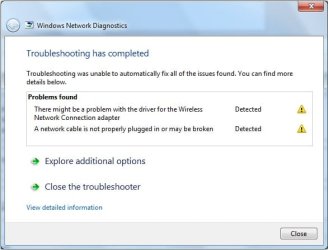
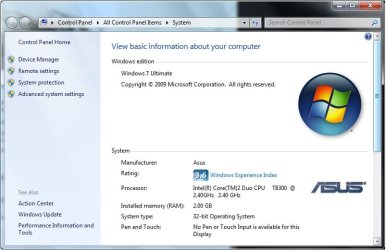
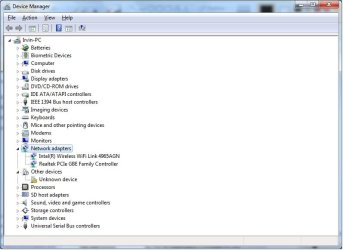
I'm using a Asus computer. My wireless connection suddenly ceased working. I searched several threads in this forum and i tried everything i possibly could such as updating my wireless drivers, disabling my network and enabling back, uninstalling and reinstalling the driver etc. I couldnt get it to work! I figured one of you experts might be able to help me out. Anyways, let me post the ipconfig.
 Windows IP Configuration
Host Name . . . . . . . . . . . . : Irvin-PC
Primary Dns Suffix . . . . . . . :
Node Type . . . . . . . . . . . . : Hybrid
IP Routing Enabled. . . . . . . . : No
WINS Proxy Enabled. . . . . . . . : No
Ethernet adapter Local Area Connection:
Connection-specific DNS Suffix . :
Description . . . . . . . . . . . : Realtek PCIe GBE Family Controller
Physical Address. . . . . . . . . : 00-1F-C6-4A-56-D8
DHCP Enabled. . . . . . . . . . . : Yes
Autoconfiguration Enabled . . . . : Yes
Link-local IPv6 Address . . . . . : fe80::6d83:457:2443:42fa%11(Preferred)
IPv4 Address. . . . . . . . . . . : 192.168.0.103(Preferred)
Subnet Mask . . . . . . . . . . . : 255.255.255.0
Lease Obtained. . . . . . . . . . : Thursday, April 28, 2011 9:27:27 PM
Lease Expires . . . . . . . . . . : Thursday, May 05, 2011 9:33:46 PM
Default Gateway . . . . . . . . . : 192.168.0.1
DHCP Server . . . . . . . . . . . : 192.168.0.1
DHCPv6 IAID . . . . . . . . . . . : 234889158
DHCPv6 Client DUID. . . . . . . . : 00-01-00-01-12-9B-ED-59-00-1F-C6-4A-56-D8
DNS Servers . . . . . . . . . . . : 192.168.0.1
NetBIOS over Tcpip. . . . . . . . : Enabled
Tunnel adapter isatap.{1181F46A-70D5-491B-9F45-AE1EF09BF823}:
Media State . . . . . . . . . . . : Media disconnected
Connection-specific DNS Suffix . :
Description . . . . . . . . . . . : Microsoft ISATAP Adapter
Physical Address. . . . . . . . . : 00-00-00-00-00-00-00-E0
DHCP Enabled. . . . . . . . . . . : No
Autoconfiguration Enabled . . . . : Yes
Tunnel adapter Teredo Tunneling Pseudo-Interface:
Connection-specific DNS Suffix . :
Description . . . . . . . . . . . : Teredo Tunneling Pseudo-Interface
Physical Address. . . . . . . . . : 00-00-00-00-00-00-00-E0
DHCP Enabled. . . . . . . . . . . : No
Autoconfiguration Enabled . . . . : Yes
IPv6 Address. . . . . . . . . . . : 2001:0:4137:9e76:423:30db:5074:bb38(Prefe
rred)
Link-local IPv6 Address . . . . . : fe80::423:30db:5074:bb38%12(Preferred)
Default Gateway . . . . . . . . . : ::
NetBIOS over Tcpip. . . . . . . . : Disabled
i tried flushing the dns to no avail..
C:\>ipconfig /release
Windows IP Configuration
Ethernet adapter Local Area Connection:
Connection-specific DNS Suffix . :
Link-local IPv6 Address . . . . . : fe80::6d83:457:2443:42fa%11
Default Gateway . . . . . . . . . :
Tunnel adapter isatap.{1181F46A-70D5-491B-9F45-AE1EF09BF823}:
Media State . . . . . . . . . . . : Media disconnected
Connection-specific DNS Suffix . :
Tunnel adapter Teredo Tunneling Pseudo-Interface:
Connection-specific DNS Suffix . :
IPv6 Address. . . . . . . . . . . : 2001:0:4137:9e76:423:30db:5074:bb38
Link-local IPv6 Address . . . . . : fe80::423:30db:5074:bb38%12
Default Gateway . . . . . . . . . : ::
C:\>ipconfig /renew
Windows IP Configuration
Ethernet adapter Local Area Connection:
Connection-specific DNS Suffix . :
Link-local IPv6 Address . . . . . : fe80::6d83:457:2443:42fa%11
IPv4 Address. . . . . . . . . . . : 192.168.0.103
Subnet Mask . . . . . . . . . . . : 255.255.255.0
Default Gateway . . . . . . . . . : 192.168.0.1
Tunnel adapter isatap.{1181F46A-70D5-491B-9F45-AE1EF09BF823}:
Media State . . . . . . . . . . . : Media disconnected
Connection-specific DNS Suffix . :
Tunnel adapter Teredo Tunneling Pseudo-Interface:
Connection-specific DNS Suffix . :
IPv6 Address. . . . . . . . . . . : 2001:0:4137:9e76:423:30db:5074:bb38
Link-local IPv6 Address . . . . . : fe80::423:30db:5074:bb38%12
Default Gateway . . . . . . . . . : ::
Really hope any of you pros can help me with this!
i'm desperate!!...
Thanks!


I'm using a Asus computer. My wireless connection suddenly ceased working. I searched several threads in this forum and i tried everything i possibly could such as updating my wireless drivers, disabling my network and enabling back, uninstalling and reinstalling the driver etc. I couldnt get it to work! I figured one of you experts might be able to help me out. Anyways, let me post the ipconfig.
Host Name . . . . . . . . . . . . : Irvin-PC
Primary Dns Suffix . . . . . . . :
Node Type . . . . . . . . . . . . : Hybrid
IP Routing Enabled. . . . . . . . : No
WINS Proxy Enabled. . . . . . . . : No
Ethernet adapter Local Area Connection:
Connection-specific DNS Suffix . :
Description . . . . . . . . . . . : Realtek PCIe GBE Family Controller
Physical Address. . . . . . . . . : 00-1F-C6-4A-56-D8
DHCP Enabled. . . . . . . . . . . : Yes
Autoconfiguration Enabled . . . . : Yes
Link-local IPv6 Address . . . . . : fe80::6d83:457:2443:42fa%11(Preferred)
IPv4 Address. . . . . . . . . . . : 192.168.0.103(Preferred)
Subnet Mask . . . . . . . . . . . : 255.255.255.0
Lease Obtained. . . . . . . . . . : Thursday, April 28, 2011 9:27:27 PM
Lease Expires . . . . . . . . . . : Thursday, May 05, 2011 9:33:46 PM
Default Gateway . . . . . . . . . : 192.168.0.1
DHCP Server . . . . . . . . . . . : 192.168.0.1
DHCPv6 IAID . . . . . . . . . . . : 234889158
DHCPv6 Client DUID. . . . . . . . : 00-01-00-01-12-9B-ED-59-00-1F-C6-4A-56-D8
DNS Servers . . . . . . . . . . . : 192.168.0.1
NetBIOS over Tcpip. . . . . . . . : Enabled
Tunnel adapter isatap.{1181F46A-70D5-491B-9F45-AE1EF09BF823}:
Media State . . . . . . . . . . . : Media disconnected
Connection-specific DNS Suffix . :
Description . . . . . . . . . . . : Microsoft ISATAP Adapter
Physical Address. . . . . . . . . : 00-00-00-00-00-00-00-E0
DHCP Enabled. . . . . . . . . . . : No
Autoconfiguration Enabled . . . . : Yes
Tunnel adapter Teredo Tunneling Pseudo-Interface:
Connection-specific DNS Suffix . :
Description . . . . . . . . . . . : Teredo Tunneling Pseudo-Interface
Physical Address. . . . . . . . . : 00-00-00-00-00-00-00-E0
DHCP Enabled. . . . . . . . . . . : No
Autoconfiguration Enabled . . . . : Yes
IPv6 Address. . . . . . . . . . . : 2001:0:4137:9e76:423:30db:5074:bb38(Prefe
rred)
Link-local IPv6 Address . . . . . : fe80::423:30db:5074:bb38%12(Preferred)
Default Gateway . . . . . . . . . : ::
NetBIOS over Tcpip. . . . . . . . : Disabled
i tried flushing the dns to no avail..
C:\>ipconfig /release
Windows IP Configuration
Ethernet adapter Local Area Connection:
Connection-specific DNS Suffix . :
Link-local IPv6 Address . . . . . : fe80::6d83:457:2443:42fa%11
Default Gateway . . . . . . . . . :
Tunnel adapter isatap.{1181F46A-70D5-491B-9F45-AE1EF09BF823}:
Media State . . . . . . . . . . . : Media disconnected
Connection-specific DNS Suffix . :
Tunnel adapter Teredo Tunneling Pseudo-Interface:
Connection-specific DNS Suffix . :
IPv6 Address. . . . . . . . . . . : 2001:0:4137:9e76:423:30db:5074:bb38
Link-local IPv6 Address . . . . . : fe80::423:30db:5074:bb38%12
Default Gateway . . . . . . . . . : ::
C:\>ipconfig /renew
Windows IP Configuration
Ethernet adapter Local Area Connection:
Connection-specific DNS Suffix . :
Link-local IPv6 Address . . . . . : fe80::6d83:457:2443:42fa%11
IPv4 Address. . . . . . . . . . . : 192.168.0.103
Subnet Mask . . . . . . . . . . . : 255.255.255.0
Default Gateway . . . . . . . . . : 192.168.0.1
Tunnel adapter isatap.{1181F46A-70D5-491B-9F45-AE1EF09BF823}:
Media State . . . . . . . . . . . : Media disconnected
Connection-specific DNS Suffix . :
Tunnel adapter Teredo Tunneling Pseudo-Interface:
Connection-specific DNS Suffix . :
IPv6 Address. . . . . . . . . . . : 2001:0:4137:9e76:423:30db:5074:bb38
Link-local IPv6 Address . . . . . : fe80::423:30db:5074:bb38%12
Default Gateway . . . . . . . . . : ::
Really hope any of you pros can help me with this!
i'm desperate!!...
Thanks!
Attachments
My Computer
- OS
- Windows 7 32bit
