Wireless Signal keep dropping.

DragonPoet

New member
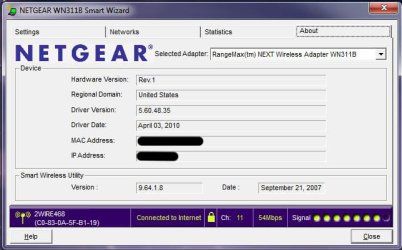
OK, so on my desktop, I have a Netgear RangeMax NEXT Wireless Adapter with Windows 7 Home Starter 64 bit. I downloaded the latest version directly from the Netgear website. The driver included a application to connect to wireless networks. Well my wireless signal keeps not really dropping... but eh... i guess disconnecting would be the best word. The bars that shows the wireless signal will fade and the little star will appear over it and it will say there is a problem (I can't exactly remember the wording, please forgive me). I have included some pictures and hopefully that will help. I can give any information upon request as I was not sure what kind of information was needed. Thanks in advance for your help! :D

P.S.
It disconnects when I try to connect through the Netgear application but when I connect through Windows, it will do just fine. But I would prefer to connect through the Netgear application.
 

Attachments

  • Netgear Smart Wizard.jpg
    Netgear Smart Wizard.jpg
    155.6 KB · Views: 12
  • Icon Tray 1 copy.jpg
    Icon Tray 1 copy.jpg
    28.4 KB · Views: 5
Last edited:

My Computer

Computer Manufacturer/Model Number
Gateway DX4600-15e
OS
Windows 7 Home Premium 64-bit SP1 Build 7601
CPU
AMD Phenom II X4 810 Deneb 45mm Technology
Motherboard
Gateway RS780 (AM2)
Memory
8GB Dual-Channel DDR2 @ 399MHz
Graphics Card(s)
ATI Radeon HD 3200 Graphics, GeForce GT 220
Sound Card
Realteck High Definition Audio
Hard Drives
1TB Western Digital SATA
Keyboard
Logitech Wave Keyboard K350
Mouse
Logitech Mouse M510
Internet Speed
3Mb/s
~Update~
Now it's happening through the Windows 7 application.
 

My Computer

Computer Manufacturer/Model Number
Gateway DX4600-15e
OS
Windows 7 Home Premium 64-bit SP1 Build 7601
CPU
AMD Phenom II X4 810 Deneb 45mm Technology
Motherboard
Gateway RS780 (AM2)
Memory
8GB Dual-Channel DDR2 @ 399MHz
Graphics Card(s)
ATI Radeon HD 3200 Graphics, GeForce GT 220
Sound Card
Realteck High Definition Audio
Hard Drives
1TB Western Digital SATA
Keyboard
Logitech Wave Keyboard K350
Mouse
Logitech Mouse M510
Internet Speed
3Mb/s
Were you having wireless connection issues prior to updating the driver?
 

My Computer

Computer Manufacturer/Model Number
HP 6000 Pro Micro Tower
OS
W7 Professional x64
CPU
Core 2 Duo 2.93
Memory
2 GB
Graphics Card(s)
ATI Radeon 4695
Monitor(s) Displays
Two HP 17's
Hard Drives
150GB Sata Drive
Case
Tiny. Kinda cute.
Keyboard
HP Supplied. Surprisingly nice.
Mouse
Gateway Mouse from an E2610D
Internet Speed
45 mbps
No I was not. Should I roll back the driver?
 

My Computer

Computer Manufacturer/Model Number
Gateway DX4600-15e
OS
Windows 7 Home Premium 64-bit SP1 Build 7601
CPU
AMD Phenom II X4 810 Deneb 45mm Technology
Motherboard
Gateway RS780 (AM2)
Memory
8GB Dual-Channel DDR2 @ 399MHz
Graphics Card(s)
ATI Radeon HD 3200 Graphics, GeForce GT 220
Sound Card
Realteck High Definition Audio
Hard Drives
1TB Western Digital SATA
Keyboard
Logitech Wave Keyboard K350
Mouse
Logitech Mouse M510
Internet Speed
3Mb/s
It seems to happen whenever I open PeerBlock. Is there any reason for this?
 

My Computer

Computer Manufacturer/Model Number
Gateway DX4600-15e
OS
Windows 7 Home Premium 64-bit SP1 Build 7601
CPU
AMD Phenom II X4 810 Deneb 45mm Technology
Motherboard
Gateway RS780 (AM2)
Memory
8GB Dual-Channel DDR2 @ 399MHz
Graphics Card(s)
ATI Radeon HD 3200 Graphics, GeForce GT 220
Sound Card
Realteck High Definition Audio
Hard Drives
1TB Western Digital SATA
Keyboard
Logitech Wave Keyboard K350
Mouse
Logitech Mouse M510
Internet Speed
3Mb/s
Sorry to post, yet again, but should I try the BSOD section? I have used it once before and found out that you can get help for more than just BSOD. Would that help and troubleshoot the problem?
 

My Computer

Computer Manufacturer/Model Number
Gateway DX4600-15e
OS
Windows 7 Home Premium 64-bit SP1 Build 7601
CPU
AMD Phenom II X4 810 Deneb 45mm Technology
Motherboard
Gateway RS780 (AM2)
Memory
8GB Dual-Channel DDR2 @ 399MHz
Graphics Card(s)
ATI Radeon HD 3200 Graphics, GeForce GT 220
Sound Card
Realteck High Definition Audio
Hard Drives
1TB Western Digital SATA
Keyboard
Logitech Wave Keyboard K350
Mouse
Logitech Mouse M510
Internet Speed
3Mb/s

My Computer

Computer Manufacturer/Model Number
HP 6000 Pro Micro Tower
OS
W7 Professional x64
CPU
Core 2 Duo 2.93
Memory
2 GB
Graphics Card(s)
ATI Radeon 4695
Monitor(s) Displays
Two HP 17's
Hard Drives
150GB Sata Drive
Case
Tiny. Kinda cute.
Keyboard
HP Supplied. Surprisingly nice.
Mouse
Gateway Mouse from an E2610D
Internet Speed
45 mbps
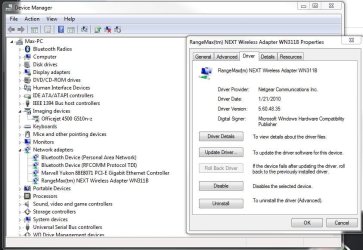
I cannot rollback the Driver. When Microsoft recognized it the first time, it recognized it as a "Boradcom" adapter. Now since I've installed the latest driver from the it now recognizes it as a "RangeMax" adapter. Also, now the connection disconnects and reconnects by itself.
 

Attachments

  • Driver Cannot Be Rolled Back.JPG
    Driver Cannot Be Rolled Back.JPG
    104.1 KB · Views: 13

My Computer

Computer Manufacturer/Model Number
Gateway DX4600-15e
OS
Windows 7 Home Premium 64-bit SP1 Build 7601
CPU
AMD Phenom II X4 810 Deneb 45mm Technology
Motherboard
Gateway RS780 (AM2)
Memory
8GB Dual-Channel DDR2 @ 399MHz
Graphics Card(s)
ATI Radeon HD 3200 Graphics, GeForce GT 220
Sound Card
Realteck High Definition Audio
Hard Drives
1TB Western Digital SATA
Keyboard
Logitech Wave Keyboard K350
Mouse
Logitech Mouse M510
Internet Speed
3Mb/s
Do you have the previous set of drivers installed anywhere?
 

My Computer

Computer Manufacturer/Model Number
HP 6000 Pro Micro Tower
OS
W7 Professional x64
CPU
Core 2 Duo 2.93
Memory
2 GB
Graphics Card(s)
ATI Radeon 4695
Monitor(s) Displays
Two HP 17's
Hard Drives
150GB Sata Drive
Case
Tiny. Kinda cute.
Keyboard
HP Supplied. Surprisingly nice.
Mouse
Gateway Mouse from an E2610D
Internet Speed
45 mbps
Not to my knowledge. What ever network drivers that where on there were the ones that Windows had installed itself...

(on a side note, nice sig btw)
 

My Computer

Computer Manufacturer/Model Number
Gateway DX4600-15e
OS
Windows 7 Home Premium 64-bit SP1 Build 7601
CPU
AMD Phenom II X4 810 Deneb 45mm Technology
Motherboard
Gateway RS780 (AM2)
Memory
8GB Dual-Channel DDR2 @ 399MHz
Graphics Card(s)
ATI Radeon HD 3200 Graphics, GeForce GT 220
Sound Card
Realteck High Definition Audio
Hard Drives
1TB Western Digital SATA
Keyboard
Logitech Wave Keyboard K350
Mouse
Logitech Mouse M510
Internet Speed
3Mb/s
I would go to Gateway's site, and download the older version of the network drivers, and then uninstall the device. When it prompts you to install it, specify the location as the older driver you downloaded (and if you need help with any of those steps, say so, and I'll spell'em out :) )


p.s: Thanks about the Sig! :)
 

My Computer

Computer Manufacturer/Model Number
HP 6000 Pro Micro Tower
OS
W7 Professional x64
CPU
Core 2 Duo 2.93
Memory
2 GB
Graphics Card(s)
ATI Radeon 4695
Monitor(s) Displays
Two HP 17's
Hard Drives
150GB Sata Drive
Case
Tiny. Kinda cute.
Keyboard
HP Supplied. Surprisingly nice.
Mouse
Gateway Mouse from an E2610D
Internet Speed
45 mbps
I have gotten some BSOD, so before I do anything I have posted a post in the BSOD forum (Located HERE) and see if that helps any. I have also linked to this thread so that they have more information for what they are working with. Thanks for all the help!

 

My Computer

Computer Manufacturer/Model Number
Gateway DX4600-15e
OS
Windows 7 Home Premium 64-bit SP1 Build 7601
CPU
AMD Phenom II X4 810 Deneb 45mm Technology
Motherboard
Gateway RS780 (AM2)
Memory
8GB Dual-Channel DDR2 @ 399MHz
Graphics Card(s)
ATI Radeon HD 3200 Graphics, GeForce GT 220
Sound Card
Realteck High Definition Audio
Hard Drives
1TB Western Digital SATA
Keyboard
Logitech Wave Keyboard K350
Mouse
Logitech Mouse M510
Internet Speed
3Mb/s
Back
Top