
Wireless speed only getting 14.5Mbps

Parker

New member
Member
VIP
Local time
1:06 AM
Messages
108
Location
Sydney, Australia.
Hey, just brought myself a new Wireless N USB adapter and I used to have a DWA-110 D-Link 802.11g, I've purchased it because I've been wanting to watch video files on one computer but they can be stored on several others as we have 1 laptops and two other PC's in the house).

Before I was getting 36Mbps (out of the 54Mbps?), but with the new wireless N device I'm only getting 14.5Mbps even though it's got more signal bars and what not.

Browsing the internet is fine but I thought I would be able to get like 60Mbps+ connection with this new adapter?

attachment.php
 

Attachments

  • internet.png
    internet.png
    8.8 KB · Views: 566

My Computer

Computer Manufacturer/Model Number
Custom Build
OS
Windows 7 x64 Ultimate
CPU
AMD Phenom II X4 955 @ 3.72GHz
Motherboard
Gigabyte GA-MA770T-UD3P
Memory
Patriot 8GB DDR3 1333MHz
Graphics Card(s)
NVIDIA GTX560
Sound Card
-
Monitor(s) Displays
LG 23" W2343T
Screen Resolution
1920 x 1080
Hard Drives
256GB Crucial M4 SSD - OS/program files
250GB - Internal HDD - User files
500GB - Internal HDD - Storage #1
1.5TB - Internal HDD - Storage #2
500GB - External HDD - Portable Storage #1
2TB - External HDD - Portable Storage #2
PSU
TT450W
Case
Thermaltake V3
Cooling
Blue Orb II
Keyboard
Compaq.
Mouse
Logitech MX518
Internet Speed
7Mbps.
Other Info
Cooling (couldn't fit it above).
2 x 120mm LED Blue Fan
1 x Blue Orb II [CPU Cooler]
Hi Parker,

Can you or do you have access to your router? You might have to navigate to the wireless tab of your router and fiddle with the wireless mode. If it's on a Mixed Mode, change it to an N or G/N, you may also try this method from your Wi-Fi device. It seems to be that your Wi-Fi device is not hand-shaking with your router's wireless mode.
 

My Computer

Computer Manufacturer/Model Number
Lenovo Desktop/Samsung Laptop
OS
Win7 & Win8 64bit
CPU
Intel i5
Internet Speed
Charter-20 Mbps
Antivirus
Avast
Browser
FF, IE9 and Chrome
I've got it set to my router set to 'mode: 11bgn'.
 

My Computer

Computer Manufacturer/Model Number
Custom Build
OS
Windows 7 x64 Ultimate
CPU
AMD Phenom II X4 955 @ 3.72GHz
Motherboard
Gigabyte GA-MA770T-UD3P
Memory
Patriot 8GB DDR3 1333MHz
Graphics Card(s)
NVIDIA GTX560
Sound Card
-
Monitor(s) Displays
LG 23" W2343T
Screen Resolution
1920 x 1080
Hard Drives
256GB Crucial M4 SSD - OS/program files
250GB - Internal HDD - User files
500GB - Internal HDD - Storage #1
1.5TB - Internal HDD - Storage #2
500GB - External HDD - Portable Storage #1
2TB - External HDD - Portable Storage #2
PSU
TT450W
Case
Thermaltake V3
Cooling
Blue Orb II
Keyboard
Compaq.
Mouse
Logitech MX518
Internet Speed
7Mbps.
Other Info
Cooling (couldn't fit it above).
2 x 120mm LED Blue Fan
1 x Blue Orb II [CPU Cooler]
Can you please change it to G/N, save the new setting then test your connection?
I've got it set to my router set to 'mode: 11bgn'.
 

My Computer

Computer Manufacturer/Model Number
Lenovo Desktop/Samsung Laptop
OS
Win7 & Win8 64bit
CPU
Intel i5
Internet Speed
Charter-20 Mbps
Antivirus
Avast
Browser
FF, IE9 and Chrome
I've only got Wireless modes:
11b
11bg
11bgn
11n (only)

My modem is a TP-LINK TD-W8960N (300M Wireless N ADSL2+ Modem/router)
 

My Computer

Computer Manufacturer/Model Number
Custom Build
OS
Windows 7 x64 Ultimate
CPU
AMD Phenom II X4 955 @ 3.72GHz
Motherboard
Gigabyte GA-MA770T-UD3P
Memory
Patriot 8GB DDR3 1333MHz
Graphics Card(s)
NVIDIA GTX560
Sound Card
-
Monitor(s) Displays
LG 23" W2343T
Screen Resolution
1920 x 1080
Hard Drives
256GB Crucial M4 SSD - OS/program files
250GB - Internal HDD - User files
500GB - Internal HDD - Storage #1
1.5TB - Internal HDD - Storage #2
500GB - External HDD - Portable Storage #1
2TB - External HDD - Portable Storage #2
PSU
TT450W
Case
Thermaltake V3
Cooling
Blue Orb II
Keyboard
Compaq.
Mouse
Logitech MX518
Internet Speed
7Mbps.
Other Info
Cooling (couldn't fit it above).
2 x 120mm LED Blue Fan
1 x Blue Orb II [CPU Cooler]
Multi post please ignore
 

My Computer

OS
Windows 7 Profesional 64 bit
Considering your USB adapter is a wireless N dongle I would change the router setting to 11N only to see what kind of speeds you get. I t may also be worth looking at checking the adapter setting via your computer (properties/configure/advanced) to see if the speed is been limited there.
 

My Computer

OS
Windows 7 Profesional 64 bit
Yes, choose the 802.11N (only), if there are others in your wireless network that have B/G devices, they will not connect to the AP if you change it to N. You should give them a heads up that you're fiddling with the router setting. I have my router set to B/G/N bec some of our wireless devices have B/G. You might as well try G, and see how your Wi-Fi device responds.
 

My Computer

Computer Manufacturer/Model Number
Lenovo Desktop/Samsung Laptop
OS
Win7 & Win8 64bit
CPU
Intel i5
Internet Speed
Charter-20 Mbps
Antivirus
Avast
Browser
FF, IE9 and Chrome
Still getting the same speeds even though I'm on 'n only'.

Restarted modem & had it on 'n Only' for about 12 hours before I gave up waiting for the increase.
 

My Computer

Computer Manufacturer/Model Number
Custom Build
OS
Windows 7 x64 Ultimate
CPU
AMD Phenom II X4 955 @ 3.72GHz
Motherboard
Gigabyte GA-MA770T-UD3P
Memory
Patriot 8GB DDR3 1333MHz
Graphics Card(s)
NVIDIA GTX560
Sound Card
-
Monitor(s) Displays
LG 23" W2343T
Screen Resolution
1920 x 1080
Hard Drives
256GB Crucial M4 SSD - OS/program files
250GB - Internal HDD - User files
500GB - Internal HDD - Storage #1
1.5TB - Internal HDD - Storage #2
500GB - External HDD - Portable Storage #1
2TB - External HDD - Portable Storage #2
PSU
TT450W
Case
Thermaltake V3
Cooling
Blue Orb II
Keyboard
Compaq.
Mouse
Logitech MX518
Internet Speed
7Mbps.
Other Info
Cooling (couldn't fit it above).
2 x 120mm LED Blue Fan
1 x Blue Orb II [CPU Cooler]
The only think that I could think of now is incompatibility of your Wi-Fi device with your router.
 

My Computer

Computer Manufacturer/Model Number
Lenovo Desktop/Samsung Laptop
OS
Win7 & Win8 64bit
CPU
Intel i5
Internet Speed
Charter-20 Mbps
Antivirus
Avast
Browser
FF, IE9 and Chrome
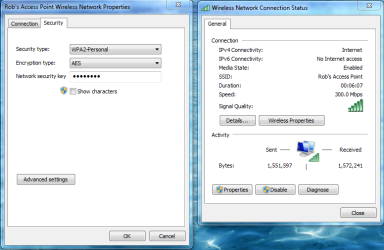
To get the best possible speed you also need to use WPA2 with AES encryption with the wireless N only setting in your routers wireless set up page.

You also need to use those settings in the Windows wireless connection manager as shown in the pictures below.

If you plan on streaming movies wirelessly you will also need to make sure that the wireless channel isn't being used by one of your neighbors. This is a very important step in order to get movie's to stream wirelessly. Xirrus WIFI inspector works well for this. http://www.xirrus.com/Products/Wi-Fi-Inspector

300Mbps is what you should be seeing if everything is set up correctly.
 

Attachments

  • 300mbps AES.PNG
    300mbps AES.PNG
    41.5 KB · Views: 46

My Computer

Computer type
PC/Desktop
Computer Manufacturer/Model Number
Home built
OS
Windows 7 Ult, Windows 8.1 Pro,
CPU
Q9650-4.275GHz, E8600 4.5GHz, E6750-3.8GHz
Motherboard
Evga 780i FTW
Memory
G.Skill PC2 9600 1200Mhz 5 5 5 15 2T
Graphics Card(s)
GTX480
Sound Card
Asus Xonar D2
Monitor(s) Displays
HannsG
Screen Resolution
1680X1050
Hard Drives
GSkill Phoenix Pro 120GB SSD
PSU
ThermalTake Toughpower 1000Watt modular
Case
ThermalTake XaserV
Cooling
Xigmatek S1283
Keyboard
Logitech G15
Mouse
Logitech G9
Internet Speed
T1
Back
Top