Wireless usb drops after 100secs

akb87

New member
Local time
2:40 PM
Messages
4
Hi everyone, so I did a clean install of windows 7 64 bit sp1 yesterday. It was an upgrade from windows 7 64 bit. The wireless usb worked fine before the upgrade. Now it won't stay connected for more than 100secs.

I have a TP-Link WN722N; d-link dir-655 router. I installed all the new drivers, disabled IPV6, don't have any firewall, anti virus, etc, but still it disconnects after 1min45sec. And I have to either unplug and plug it back it or use the trouble shoot option. And the trouble shoot would say "problem with wireless adapter or access point".

and I tried to go back to windows 7 64bit but the problem persisted, so I am stuck.

Please help, how do I fix this? this is so annoying.
 

My Computer

OS
Windows 7 Ultimate x64
akb87 - Welcome to SF,

Please try these recommendations:

Have you tried a wired connection? Were you able to replicate the issue?

Make sure that 'Obtain DNS server address automatically' is selected from your Wireless connection. Here's How.

Remove your network encryption from the router, test your connection after. If you can't connect, try a WEP security.

Disable the problematic Wireless Network Adapter's power saving mode from Device Manager, locate the Network Adapter=> Wi-Fi Adapter=. Properties=> Power Management Tab, in here you may disable any Power Save mode options by unchecking them off.

Test your connections after, and if it's still an issue please provide the following:
======================
Click on Start => in run or search box type cmd, press enter. Open up a command prompt, run as an Admin then Copy and Paste these ipconfig /all >c:\ipconfig.txt . Please attach the .txt file to be found in your Local Disk 'C' on your next post.

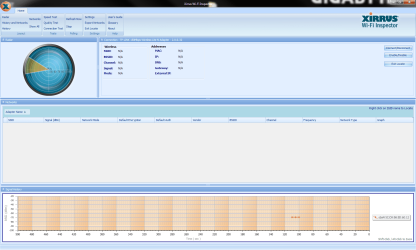
From your wireless computer pls. install and run Xirrus Wi-Fi Inspector.
Click on the 'Show Networks' to display all wireless networks on the xirrus icon on your desktop of if you have one running in a corner. Tap the Printscreen key on your keyboard, open up Paint then choose Edit from the Menu and select Paste, then SAVE it. Upload and attached it here, click on Go Advanced and locate Manage Attachments Tab and attached the file.

Please post back and give us an update.
 
Last edited:

My Computer

Computer Manufacturer/Model Number
Lenovo Desktop/Samsung Laptop
OS
Win7 & Win8 64bit
CPU
Intel i5
Internet Speed
Charter-20 Mbps
Antivirus
Avast
Browser
FF, IE9 and Chrome
Make sure this isn't checked.
Capture1.JPG
 

My Computer

Computer type
PC/Desktop
Computer Manufacturer/Model Number
Acer M5641
OS
Windows 7 Home Premium 64bit
CPU
Q6600
Motherboard
Nvidia MCP73PV
Memory
4GB.
Graphics Card(s)
Sapphire Vapor-X 5750
Sound Card
XFI Extreem music
Monitor(s) Displays
Acer X223W
Screen Resolution
1680x1050
Hard Drives
WD10 02FAEX
WD64 00AAKS
PSU
stock 450w
Case
acer
Cooling
stock
Keyboard
Microsoft Digital Media Pro.
Mouse
Logitech MX620
Internet Speed
49.51Mbs down 4.98Mbs up 17.6ms ping
Antivirus
MSE
Browser
Waterfox
Other Info
Shaw Cable
Netgear R6200
Hi all,

Thanks for helping.

1.Wired connection: worked fine. tested it for an hour, no drops.
2.'Obtain DNS server address automatically' is selected
3.disabled Power Save mode, no luck
4.disabled security option from router, still dropped after 90secs.
5.reset router, still drops.
6.try using wep, no luck

I really don't get what's going on. Should I go get another wireless usb to test it out? I have only been using this one for 3 months.
 

Attachments

  • ipconfig1.txt
    ipconfig1.txt
    2.7 KB · Views: 11
  • ipconfig2.txt
    ipconfig2.txt
    2.1 KB · Views: 7
  • xirrus result after few min.png
    xirrus result after few min.png
    66.6 KB · Views: 20
  • xirrus result when conncected.png
    xirrus result when conncected.png
    93.3 KB · Views: 22

My Computer

OS
Windows 7 Ultimate x64
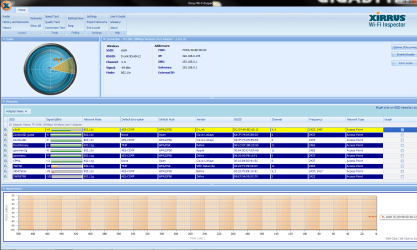
Thanks for the Xirrus snap shot. No one is using Channel 1, pls. change the Wireless Channel to 1 and see if it helps.

If changing the channel didn't help at all, and if your router has removable antenna, you may replace them with High Gain Antenna, get at least 9dBi or higher. You may also replace your Wi-Fi Adapter with High-Gain Antenna.

Pls check these out:
http://www.amazon.com/gp/aw/d/B003F6GTCO/ref=mp_s_a_13?qid=1302153361&sr=8-13
http://www.hawkingtech.com/products/productlist.php?CatID=32&FamID=58&ProdID=152
 
Last edited:

My Computer

Computer Manufacturer/Model Number
Lenovo Desktop/Samsung Laptop
OS
Win7 & Win8 64bit
CPU
Intel i5
Internet Speed
Charter-20 Mbps
Antivirus
Avast
Browser
FF, IE9 and Chrome
Thanks for the quick response 2xg! I changed the channel, no luck.

I don't think it's the reception. The router is right above my room, and I used the wireless usb on my laptop (running ubuntu) and it worked fine, no drops at all. I think it's the setting in windows or d-link. At this point, I am leaning toward windows, because Id never had a problem with wireless before the upgrade.
 

My Computer

OS
Windows 7 Ultimate x64
According from your Xirrus snap shot, your neighbors do have excellent Signal, yours is just okay.

If you can borrow somebody else's USB Wi-Fi Adapter and install it in your computer, see if you can duplicate the issue.
 

My Computer

Computer Manufacturer/Model Number
Lenovo Desktop/Samsung Laptop
OS
Win7 & Win8 64bit
CPU
Intel i5
Internet Speed
Charter-20 Mbps
Antivirus
Avast
Browser
FF, IE9 and Chrome
Just to update on the situation.
So it turns out it's not windows, it's not the router, it's not the wireless usb. It's the motherboard. For some strange reason, changing the settings for usb in the bios made it work.

Internet has been going strong for 2 days without dropping now. Will report back in a week to give a final update.

Thank you 2xg for all the help!
 

My Computer

OS
Windows 7 Ultimate x64
akb87 - Glad to hear that your internet has not been disconnected for 2 days now. I hope that it continues and thanks for posting back with an update.
 

My Computer

Computer Manufacturer/Model Number
Lenovo Desktop/Samsung Laptop
OS
Win7 & Win8 64bit
CPU
Intel i5
Internet Speed
Charter-20 Mbps
Antivirus
Avast
Browser
FF, IE9 and Chrome
Back
Top