Solved Wireless vs Ethernet

Mike Lynch

New member
Pro User
VIP
Local time
11:36 AM
Messages
958
Location
Clearwater Florida
It appears in the not-too-distant past, Somehow, all my PCs now connect via Wireless vs Ethernet. I am not way to Tech savvy to accomplish this nor do I want it. I pay for the Faster Ethernet and choose to use it. I called Spectrum twice, on different days and spoke to two different Agents. I ask how this be corrected and was told by the first Agent, "for some reason Microsoft has decided that that is the best way for your Systems to run". She further said Spectrum cannot help me. The second Agent just left it with, "well, it's working, and you have internet access". I'm at a loss! I'm hoping that some Forum Member can help me get back to Ethernet vs Wireless. On Monday, August 19, 2024, I'll give it my best shot. I'll open up the Tower and remove the "suspected" Wireless Card / Adapter in one of my PCs. This "might" force the O/S to use the Ethernet Adapter. If not, I'll put it back in and hopefully it will work again. If any Member has "any" other solution, PLEASE let me know how to reverse this situation PLEASE!
 

My Computer My Computer

At a glance

Microsoft Windows 7 Professional 64-bit 7601 ...Intel(R) Core(TM) i7-3770 CPU @ 3.40GHz8.00 GBIntel(R) HD Graphics 4000
Computer type
PC/Desktop
Computer Manufacturer/Model Number
Two HP Desktops. One in the Laundry Room / Bed Room.
OS
Microsoft Windows 7 Professional 64-bit 7601 Multiprocessor Free Service Pack 1
CPU
Intel(R) Core(TM) i7-3770 CPU @ 3.40GHz
Motherboard
Hewlett-Packard 3396
Memory
8.00 GB
Graphics Card(s)
Intel(R) HD Graphics 4000
Sound Card
(1) Realtek High Definition Audio (2) Intel(R) Display Aud
Monitor(s) Displays
Hanns-G
Screen Resolution
1440 x 900 x 32 bits (4294967296 colors) @ 59 Hz
Hard Drives
(1) ATA WDC WD40EZRX-00S SCSI Disk Device (2) HP Officejet Pro 86 USB Device (3) WD My Book 1230 USB Device
PSU
Whatever came with the CMT.
Case
HP CMT Black.
Cooling
Whatever came with the CMT.
Keyboard
Logitech K740.
Mouse
Microsoft Optical Mouse 1000.
Internet Speed
Spectrum 25Mbs.
Antivirus
WebRoot, Microsoft Security Essentials.
Browser
EDGE
Other Info
HP Officejet Pro 8600 Plus.
WD MyBook 4TB.

My Computers My Computers

  • At a glance

    Windows 7 pro/Windows 10 ProIntel i7 860 Quad core 2.8 ghz8 gbATI Radeon HD 5770 1 gb ram
    Computer type
    PC/Desktop
    Computer Manufacturer/Model Number
    HP Pavillion Elite HPE-250f
    OS
    Windows 7 pro/Windows 10 Pro
    CPU
    Intel i7 860 Quad core 2.8 ghz
    Memory
    8 gb
    Graphics Card(s)
    ATI Radeon HD 5770 1 gb ram
    Monitor(s) Displays
    Alienware 25 AW2521HF & Viewsonic
    Screen Resolution
    1920 x1080 & 1680x1050
    Hard Drives
    WD blue 1 tb & 500 gb.
    Browser
    FF of course.
    Other Info
    https://www.bestbuy.com/site/hp-pavilion-elite-desktop-intel-core-i7-processor-8gb-memory-1tb-hard-drive/9921493.p?skuId=9921493
  • At a glance

    Windows 2012 R2 Data center/Linux Minti3 9100 3.6GHz, 8M cache, 4C/4T8GB 2666MT/s DDR4 ECC UDIMM
    Computer type
    PC/Desktop
    System Manufacturer/Model Number
    Dell Poweredge T140
    OS
    Windows 2012 R2 Data center/Linux Mint
    CPU
    i3 9100 3.6GHz, 8M cache, 4C/4T
    Memory
    8GB 2666MT/s DDR4 ECC UDIMM
    Monitor(s) Displays
    Viewsonic
    Screen Resolution
    1680x1050
    Hard Drives
    1 TB & 750 GB
    Other Info
    https://www.dell.com/en-us/work/shop/productdetailstxn/poweredge-t140?~ck=bt
My mum got fast internet a few years ago, It was months later that I noticed that they used wifi to connect i was not happy either.

The reason in her case was that for the person installing the router it was just easier.

An other reason could be that the installer would have to drill holes in the wall or threw the floor and the person is not qualified to do that type of work.
 

My Computer My Computer

At a glance

Microsoft Windows 7 Ultimate 32-bit 7601Intel(R) Pentium(R) Dual CPU E2160 @ 1.80GHz4.00 GB(1) VNC Mirror Driver (2) Intel(R) G33/G31 Ex...
Computer type
PC/Desktop
Computer Manufacturer/Model Number
Compac
OS
Microsoft Windows 7 Ultimate 32-bit 7601
CPU
Intel(R) Pentium(R) Dual CPU E2160 @ 1.80GHz
Motherboard
MSI Boston
Memory
4.00 GB
Graphics Card(s)
(1) VNC Mirror Driver (2) Intel(R) G33/G31 Express Chipset
Sound Card
Disabled
Monitor(s) Displays
Headless
Screen Resolution
1280 x 960 x 32 bits (4294967296 colors) @ 60 Hz
Hard Drives
ST3320820AS ATA Device
Keyboard
Headless
Mouse
Headless
Antivirus
Malwarebytes pro
Other Info
Also
Windows 8.1 Laptop and Desktop both Acer
My mum got fast internet a few years ago, It was months later that I noticed that they used wifi to connect i was not happy either.

The reason in her case was that for the person installing the router it was just easier.

An other reason could be that the installer would have to drill holes in the wall or threw the floor and the person is not qualified to do that type of work.
Very good point. I have drilled or enlarged holes in my home so I can use ethernet vs wifi. Best paces are where pipes come up for water, registers etc. I bought a 50 foot ethernet cable once at home Depot for 20.00. Much better than wifi. you plug it in, it works.
 

My Computer My Computer

At a glance

Windows 7 x64 SP1AMD Athlon 64 X2 6000+ / 3.0 GHz6 GB
Computer type
PC/Desktop
Computer Manufacturer/Model Number
Gateway GT5656
OS
Windows 7 x64 SP1
CPU
AMD Athlon 64 X2 6000+ / 3.0 GHz
Motherboard
NVIDIA GeForce 6150 SE
Memory
6 GB
Monitor(s) Displays
Lenovo LED
Screen Resolution
1920 X 1080
Hard Drives
Windows on 500 GB spinner; Ubuntu 16 on Sandisk 250GB SSD; Bodhi5 on Samsung 250GB SSD; another old spinner for fooling around.
PSU
Original that came with computer
Keyboard
Logitech wireless
Mouse
Logitech wireless
Antivirus
Microsoft Sec Essentials
Browser
Vivaldi
Wireless is now faster than cable for a lot of people if you have old network cables and good wifi it can be faster 802.11ac transmits at a top speed of 1300 Mbps, almost three times faster than the 450 Mbps of 802.11n.
 

My Computer My Computer

At a glance

win 8 32 bit
Computer type
PC/Desktop
OS
win 8 32 bit
Wireless is now faster than cable for a lot of people if you have old network cables and good wifi it can be faster 802.11ac transmits at a top speed of 1300 Mbps, almost three times faster than the 450 Mbps of 802.11n.
That is only a theoretical speed for 802.11ac. In the lab you might see 700Mbps. I doubt you will ever see that speed in real world use.
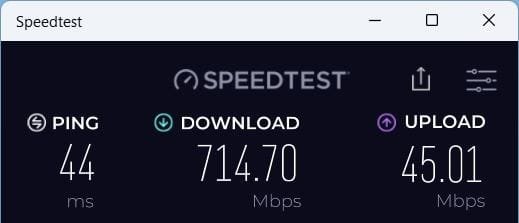
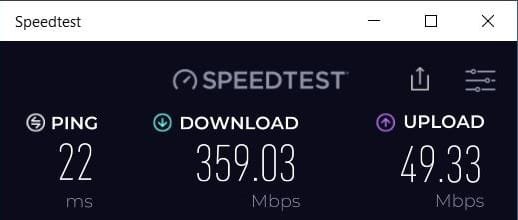
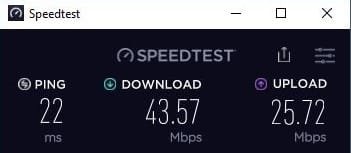
I have an Internet plan with 1200/200 Mbps. Here are the speeds I get with three of my laptops.

Laptop #1: 802.11ax (5GHz)

Laptop #1 802.11ax.jpg

Laptop #2: 802.11ac (5GHz)

Laptop #2 802.11ac.jpg

Laptop #3: 802.11n (2.4GHz)

Laptop #3 802.11n.jpg
 

My Computers My Computers

  • At a glance

    Windows 7 Professional 64bit / Windows 10 Hom...AMD FX-8350GSKILL Ripjaw-X PC3 12800 12GB (2x4GB, 2x2GB)ASUS ENGTX560 DCII OC/2DI/1GD5 1GB
    Computer type
    PC/Desktop
    Computer Manufacturer/Model Number
    Custom build
    OS
    Windows 7 Professional 64bit / Windows 10 Home 64bit
    CPU
    AMD FX-8350
    Motherboard
    Gigabyte GA-990FXA-UD3 (AM3+) Rev. 4.0
    Memory
    GSKILL Ripjaw-X PC3 12800 12GB (2x4GB, 2x2GB)
    Graphics Card(s)
    ASUS ENGTX560 DCII OC/2DI/1GD5 1GB
    Sound Card
    Integrated
    Monitor(s) Displays
    Asus VE228H (21.5-in)
    Screen Resolution
    1920x1080 60Hz
    Hard Drives
    SAMSUNG 870 EVO 1TB (2.5" SATA SSD)
    SAMSUNG 870 EVO 500GB (2.5" SATA SSD)
    PSU
    Antec TruePower (new) TP-650 (650 watts)
    Case
    Antec Three Hundred
    Cooling
    AMD stock (plan to upgrade to Cooler Master Hyper 212 EVO)
    Keyboard
    Logitech K540 (wireless)
    Mouse
    Logitech M310 (wireless)
    Internet Speed
    Comcast Gigabit X2 Internet (2100Mbps down / 300Mbps up)
    Browser
    Firefox, Edge, Chrome
    Other Info
    Optical drive: ASUS DRW-24B3ST/BLK/G (Black) (24X)
    External hard drives: 2TB & 6TB
    Internet Gateway: Comcast XB8
  • Computer type
    PC/Desktop
That is only a theoretical speed for 802.11ac. In the lab you might see 700Mbps. I doubt you will ever see that speed in real world use.
Plus you still have an outgoing of either cable or ethernet unless you get a fiber modem with wifi. If you use your own router at all the best you can usually hope for is a 1 gbps ethernet port. You'd have to specifically find one with a 10 gig ethernet outbound port to take full advantage of that speed. For home use that's just a gimmick. The last time I had to buy a home router they advertised those speeds for wireless but those routers still only had a 1 gig outbound ethernet port so I didn't even bother. If you have cable that's not worth it. Only fiber would be worth those speeds and even then you have to read the fine print since ISPs can throttle the speed.

I found an article with different 10 gig home routers here: Best 10Gbps Routers and mesh systems: : The True Top Five Lists | Dong Knows Tech They range from $350+. That's nothing compared to commercial routers.
 

My Computers My Computers

  • At a glance

    Windows 7 pro/Windows 10 ProIntel i7 860 Quad core 2.8 ghz8 gbATI Radeon HD 5770 1 gb ram
    Computer type
    PC/Desktop
    Computer Manufacturer/Model Number
    HP Pavillion Elite HPE-250f
    OS
    Windows 7 pro/Windows 10 Pro
    CPU
    Intel i7 860 Quad core 2.8 ghz
    Memory
    8 gb
    Graphics Card(s)
    ATI Radeon HD 5770 1 gb ram
    Monitor(s) Displays
    Alienware 25 AW2521HF & Viewsonic
    Screen Resolution
    1920 x1080 & 1680x1050
    Hard Drives
    WD blue 1 tb & 500 gb.
    Browser
    FF of course.
    Other Info
    https://www.bestbuy.com/site/hp-pavilion-elite-desktop-intel-core-i7-processor-8gb-memory-1tb-hard-drive/9921493.p?skuId=9921493
  • At a glance

    Windows 2012 R2 Data center/Linux Minti3 9100 3.6GHz, 8M cache, 4C/4T8GB 2666MT/s DDR4 ECC UDIMM
    Computer type
    PC/Desktop
    System Manufacturer/Model Number
    Dell Poweredge T140
    OS
    Windows 2012 R2 Data center/Linux Mint
    CPU
    i3 9100 3.6GHz, 8M cache, 4C/4T
    Memory
    8GB 2666MT/s DDR4 ECC UDIMM
    Monitor(s) Displays
    Viewsonic
    Screen Resolution
    1680x1050
    Hard Drives
    1 TB & 750 GB
    Other Info
    https://www.dell.com/en-us/work/shop/productdetailstxn/poweredge-t140?~ck=bt
Plus you still have an outgoing of either cable or ethernet unless you get a fiber modem with wifi. If you use your own router at all the best you can usually hope for is a 1 gbps ethernet port. You'd have to specifically find one with a 10 gig ethernet outbound port to take full advantage of that speed. For home use that's just a gimmick. The last time I had to buy a home router they advertised those speeds for wireless but those routers still only had a 1 gig outbound ethernet port so I didn't even bother. If you have cable that's not worth it. Only fiber would be worth those speeds and even then you have to read the fine print since ISPs can throttle the speed.

I found an article with different 10 gig home routers here: Best 10Gbps Routers and mesh systems: : The True Top Five Lists | Dong Knows Tech They range from $350+. That's nothing compared to commercial routers.
Where I live I have a choice of four major Internet providers including two that are all Fiber. I haven't gone with one with Fiber because they only provide streaming TV instead of the traditional cable TV.

Right now I have a 2000/200 Internet plan from my cable provider. I am using the ISP provided Gateway which is tri-band and supports WiFi 6E. Note one of Gateway's Ethernet ports is 2.5Gbps.

BTW, that is fastest cable Internet plan my ISP has. It may have faster Internet plans but they are Fiber. I don't know if my ISP offers Fiber at my address although they do in some parts of my city.

The two Fiber Internet plans are definitely offered at my address because I saw them run the Fiber on my street. Google Fiber offers 1/1 Gbps, 2/1 Gbps, and 5/5G bps Fiber plans. AT&T Fiber offers 300/300 Mbps, 500/500 Mbps, and 1/1 Gbps Fiber plans.

None of my devices support 6E although two support WiFi 6. None of my computers have an Ethernet port faster than 1Gbps. For now that is fast enough. I will reevaluate that in the future when I upgrade my computers and/or phones which will probably support Ethernet 2.5Gbps and/or WiFi 6E. Some of the higher end motherboards do support 10Gbps Ethernet. By that time they will probably support WiFi7 also.
 

My Computers My Computers

  • At a glance

    Windows 7 Professional 64bit / Windows 10 Hom...AMD FX-8350GSKILL Ripjaw-X PC3 12800 12GB (2x4GB, 2x2GB)ASUS ENGTX560 DCII OC/2DI/1GD5 1GB
    Computer type
    PC/Desktop
    Computer Manufacturer/Model Number
    Custom build
    OS
    Windows 7 Professional 64bit / Windows 10 Home 64bit
    CPU
    AMD FX-8350
    Motherboard
    Gigabyte GA-990FXA-UD3 (AM3+) Rev. 4.0
    Memory
    GSKILL Ripjaw-X PC3 12800 12GB (2x4GB, 2x2GB)
    Graphics Card(s)
    ASUS ENGTX560 DCII OC/2DI/1GD5 1GB
    Sound Card
    Integrated
    Monitor(s) Displays
    Asus VE228H (21.5-in)
    Screen Resolution
    1920x1080 60Hz
    Hard Drives
    SAMSUNG 870 EVO 1TB (2.5" SATA SSD)
    SAMSUNG 870 EVO 500GB (2.5" SATA SSD)
    PSU
    Antec TruePower (new) TP-650 (650 watts)
    Case
    Antec Three Hundred
    Cooling
    AMD stock (plan to upgrade to Cooler Master Hyper 212 EVO)
    Keyboard
    Logitech K540 (wireless)
    Mouse
    Logitech M310 (wireless)
    Internet Speed
    Comcast Gigabit X2 Internet (2100Mbps down / 300Mbps up)
    Browser
    Firefox, Edge, Chrome
    Other Info
    Optical drive: ASUS DRW-24B3ST/BLK/G (Black) (24X)
    External hard drives: 2TB & 6TB
    Internet Gateway: Comcast XB8
  • Computer type
    PC/Desktop
It appears in the not-too-distant past, Somehow, all my PCs now connect via Wireless vs Ethernet. I am not way to Tech savvy to accomplish this nor do I want it. I pay for the Faster Ethernet and choose to use it. I called Spectrum....

This is pretty poor service like usual for the ISP to say that. Do post 1 and disable the Wifi adapter while leaving the Ethernet adapter turned on.

- - - Updated - - -

The rest has to many factors

Roughly

wifi 5 - 6k mbps
wifi 6e - 10k mbps
wifi 7 - 20k mbps

Majority of consumer plans are gigabit connections so they top out at 1000mbps or 1gbps that would be 1% of wifi6e's potential

Bandwidth is also not just throughput it has to manage multiple streams so when you are paying for a fast plan then its also about multiple computers sharing that bandwidth, people get stuck on speeds but its just as important to think about saturation across devices because bandwidth is those 2 main areas not just 1.

Unless you have 10GBE connectivity in the home then you are subject to slower speeds across devices. Wifi 7 is still not really here yet so for now technically Ethernet cable is still faster if you have the right setup.

I would also say majority of the internet is still heavily shaping traffic so these high internet speeds don't really mean anything other than you can have more computers surfing online at once. Each of those computers can max out any given load it needs defined by what ever it is connecting to, a website is only going to let any given user download at X speed and not their pipes full potential. The internet wouldn't be unusable if everyone could be online at their full potential.
 
Last edited:

My Computers My Computers

  • At a glance

    10
    OS
    10
  • Computer type
    PC/Desktop
Back
Top