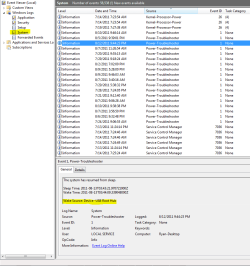
My ASUS P8Z68-Vpro win7(64) system will go to sleep manually (from the shutdown menu). I have power management set to turn off the monitor and go to sleep after one minute. After a minute the monitor turns off, but the computer fan keeps on going. (What used to happen is the computer would go to sleep, the fan would turn off, but then a second or two later the computer would wake up by itself. It's possible this has changed because I'm playing with various settings). In any event, I have never gotten it to go to sleep on its own and stay there. Even when I tell it to go to sleep manually on rare occasions it has also woken up unprovoked.
On the local area connection (Intel 82579) I've turned off all wake up things (Wake on lan, wake on link, etc.) I've allowed windows to sleep even when sharing multimedia. I've turned off wake on USB. The keyboard and mouse are now the only devices in the device manager that claim to have the ability to wake the computer up. I suspect the problem may be the D-Link DWA-556 wireless card (PCI slot), although it doesn't report that it has the ability to wake up the computer. But a few times when I have gotten the computer to go to sleep I was able to wake it up merely by screwing the antenna into the connector on the back ... even though the wireless connection had been disabled from the network and sharing control panel. Does this indicate that my wireless card is defective, or is there some setting on it that I don't know about.
Are there any other reasons the computer may not go to sleep or immediately wake up? (I have looked in the event viewer and haven't seen anything suspicious.) Does windows have a log somewhere that could tell me what is waking the computer up (or keeping it from sleeping.)
Thanks in advance for any suggestions.
~Paul
On the local area connection (Intel 82579) I've turned off all wake up things (Wake on lan, wake on link, etc.) I've allowed windows to sleep even when sharing multimedia. I've turned off wake on USB. The keyboard and mouse are now the only devices in the device manager that claim to have the ability to wake the computer up. I suspect the problem may be the D-Link DWA-556 wireless card (PCI slot), although it doesn't report that it has the ability to wake up the computer. But a few times when I have gotten the computer to go to sleep I was able to wake it up merely by screwing the antenna into the connector on the back ... even though the wireless connection had been disabled from the network and sharing control panel. Does this indicate that my wireless card is defective, or is there some setting on it that I don't know about.
Are there any other reasons the computer may not go to sleep or immediately wake up? (I have looked in the event viewer and haven't seen anything suspicious.) Does windows have a log somewhere that could tell me what is waking the computer up (or keeping it from sleeping.)
Thanks in advance for any suggestions.
~Paul
My Computer
- OS
- Windows 7 Home Premium 64 bit

 rb: :ar: Type Event Viewer in the search bar :ar: Select Event Viewer from the programs list :ar: Once opened select Windows Logs :ar: Then select the sub-category System :ar: Sort by Date or Source and look for Power-Troubleshooter in the source column. In the general details it should tell you what woke up the computer.