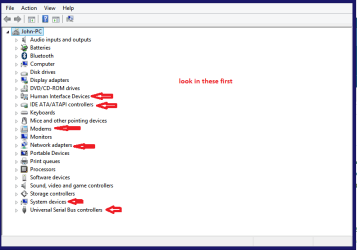
Hi! I got home from school and i saw that my internet didnt work, my wireless works but not the cable connection, and i dont have wireless on my pc.
It worked perfectly yesterday now i cant acces the internet.
The cable in my pc and the router is lighting or what i should call it. (Not so good at english)
I've tried to reset the router a couple times and that didnt work either!
One other Desktop (tester) and spare Toshba laptop both with SSD's
Running Kaspersky 2016 ISS on all machines config'd identically
Logitec audio stereo systems on each machine (x3)
Canon MG5250MFC
Router/modem TP-Link running WPA2SK
You can test the volts on the PSU with HWInfo HWiNFO, HWiNFO32/64 -Download < download the right bit version andclose the right hand window select Sensors and scroll down to the power sectionwhere you will see what the volts are doing see my pic.
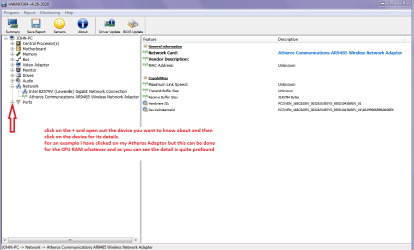
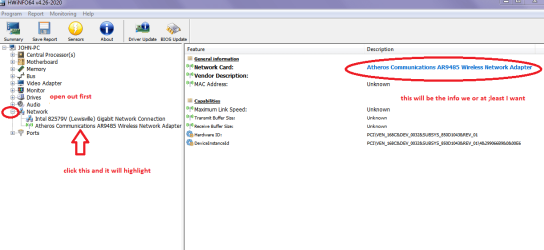
The original right hand window shows themachine running and is handy for that but for looking at the components in some detail close it and use themain left hand side panel FOR OTHER COMPONENTS
Open each + down into the componentitself and then click on it - in theright hand side will appear all sorts of details including brands speeds andother essential info that device. See pic for example.
Attachments
HW INFO DEVICES.PNG
89 KB
· Views: 2
My Computer
Computer type
PC/Desktop
Computer Manufacturer/Model Number
Own build (new) Desk1 / Asus ROG Win 7 / Desk2 1st build
OS
Desk1 7 Home Prem / Desk2 10 Pro / Main lap Asus ROG 10 Pro 2 laptop Toshiba 7 Pro Asus P2520 7 & 10
One other Desktop (tester) and spare Toshba laptop both with SSD's
Running Kaspersky 2016 ISS on all machines config'd identically
Logitec audio stereo systems on each machine (x3)
Canon MG5250MFC
Router/modem TP-Link running WPA2SK
One other Desktop (tester) and spare Toshba laptop both with SSD's
Running Kaspersky 2016 ISS on all machines config'd identically
Logitec audio stereo systems on each machine (x3)
Canon MG5250MFC
Router/modem TP-Link running WPA2SK