WLAN and Lan - Invalid IP Config and Problem with wireless adapter

krazyjethro

New member
Local time
2:54 AM
Messages
12
I have had this issue over a month now and either I am missing something fairly obvious or this is a deeper issue than I know how to resolve.

Seemingly without reason, I suddenly had connectivity issues with the invalid ip config error on my wireless adapter. I tried moving the pc and connecting with an ethernet cable but got the same error.

I have read forums galore and fiddled and fixed and seem to have made things worse since now I am not even picking up any networks with my wireless adapter and have a "Problem with wireless adapter or access point" message.

Any help would be greatly appreciated.
 

Attachments

  • ipconfig.jpg
    ipconfig.jpg
    135.3 KB · Views: 11

My Computer My Computer

At a glance

Windows 7 64
Computer type
PC/Desktop
Computer Manufacturer/Model Number
Dell Studio XPS
OS
Windows 7 64

My Computer My Computer

At a glance

Windows 7 ultimate x64
Computer Manufacturer/Model Number
Nothing specific....what ever the clients provide for Repair
OS
Windows 7 ultimate x64
Ah, my bad. Here are the files.

THANKS!!!!!
 

Attachments

My Computer My Computer

At a glance

Windows 7 64
Computer type
PC/Desktop
Computer Manufacturer/Model Number
Dell Studio XPS
OS
Windows 7 64
I have had this issue over a month now and either I am missing something fairly obvious or this is a deeper issue than I know how to resolve.

Seemingly without reason, I suddenly had connectivity issues with the invalid ip config error on my wireless adapter. I tried moving the pc and connecting with an ethernet cable but got the same error.

I have read forums galore and fiddled and fixed and seem to have made things worse since now I am not even picking up any networks with my wireless adapter and have a "Problem with wireless adapter or access point" message.

Any help would be greatly appreciated.


Those extra tunnel adaptors can cause the problems you are describing. Resetting your router should also be done using the little reset button on the router. You will need to re-set up the wireless settings after that.

I have a special file to remove those tunnel adaptors, unzip and run the file and restart the machine, sometimes it takes a couple tries to remove them all. Keep checking the ipconfig/all or look in Device Manager to make sure they are all gone. Windows will make a new one automatically.

When I see this problem it usually means that the driver for the network adaptor requires updating.

Please post the ipconfig/all again after removing the tunnel adaptors.
 

Attachments

My Computer My Computer

At a glance

Windows 7 Ult, Windows 8.1 Pro,Q9650-4.275GHz, E8600 4.5GHz, E6750-3.8GHzG.Skill PC2 9600 1200Mhz 5 5 5 15 2TGTX480
Computer type
PC/Desktop
Computer Manufacturer/Model Number
Home built
OS
Windows 7 Ult, Windows 8.1 Pro,
CPU
Q9650-4.275GHz, E8600 4.5GHz, E6750-3.8GHz
Motherboard
Evga 780i FTW
Memory
G.Skill PC2 9600 1200Mhz 5 5 5 15 2T
Graphics Card(s)
GTX480
Sound Card
Asus Xonar D2
Monitor(s) Displays
HannsG
Screen Resolution
1680X1050
Hard Drives
GSkill Phoenix Pro 120GB SSD
PSU
ThermalTake Toughpower 1000Watt modular
Case
ThermalTake XaserV
Cooling
Xigmatek S1283
Keyboard
Logitech G15
Mouse
Logitech G9
Internet Speed
T1
The program seems to have worked as intended, but I'm still having the same issues. With no internet on the machine it's been a struggle to find the right drivers or to tell if the driver is out of date.
 

Attachments

  • ipconfig 6.30.jpg
    ipconfig 6.30.jpg
    88.9 KB · Views: 10

My Computer My Computer

At a glance

Windows 7 64
Computer type
PC/Desktop
Computer Manufacturer/Model Number
Dell Studio XPS
OS
Windows 7 64
Hi Krazyjethro

I just had a look at your uploaded files... and it seems you had one single BSOD on 17th of April 2013....

Code:
*******************************************************************************
*                                                                             *
*                        Bugcheck Analysis                                    *
*                                                                             *
*******************************************************************************

Use !analyze -v to get detailed debugging information.

BugCheck D1, {1c, 2, 1, fffff8800536d8e8}

*** WARNING: Unable to verify timestamp for athrx.sys
*** ERROR: Module load completed but symbols could not be loaded for athrx.sys
Probably caused by : athrx.sys ( athrx+ff8e8 )

Followup: MachineOwner
---------

4: kd> !analyze -v
*******************************************************************************
*                                                                             *
*                        Bugcheck Analysis                                    *
*                                                                             *
*******************************************************************************

DRIVER_IRQL_NOT_LESS_OR_EQUAL (d1)
An attempt was made to access a pageable (or completely invalid) address at an
interrupt request level (IRQL) that is too high.  This is usually
caused by drivers using improper addresses.
If kernel debugger is available get stack backtrace.
Arguments:
Arg1: 000000000000001c, memory referenced
Arg2: 0000000000000002, IRQL
Arg3: 0000000000000001, value 0 = read operation, 1 = write operation
Arg4: fffff8800536d8e8, address which referenced memory

Debugging Details:
------------------


WRITE_ADDRESS: GetPointerFromAddress: unable to read from fffff800036c8100
GetUlongFromAddress: unable to read from fffff800036c81c0
 000000000000001c Nonpaged pool

CURRENT_IRQL:  2

FAULTING_IP: 
athrx+ff8e8
fffff880`0536d8e8 c7401c00000000  mov     dword ptr [rax+1Ch],0

CUSTOMER_CRASH_COUNT:  1

DEFAULT_BUCKET_ID:  WIN7_DRIVER_FAULT

BUGCHECK_STR:  0xD1

PROCESS_NAME:  System

TRAP_FRAME:  fffff8800354d810 -- (.trap 0xfffff8800354d810)
NOTE: The trap frame does not contain all registers.
Some register values may be zeroed or incorrect.
rax=0000000000000000 rbx=0000000000000000 rcx=0000000000000000
rdx=0000000000009920 rsi=0000000000000000 rdi=0000000000000000
rip=fffff8800536d8e8 rsp=fffff8800354d9a0 rbp=fffff80003636280
 r8=000000000491a000  r9=0000000000000000 r10=0000000000000050
r11=fffffa80078590f8 r12=0000000000000000 r13=0000000000000000
r14=0000000000000000 r15=0000000000000000
iopl=0         nv up ei ng nz na pe nc
athrx+0xff8e8:
fffff880`0536d8e8 c7401c00000000  mov     dword ptr [rax+1Ch],0 ds:00000000`0000001c=????????
Resetting default scope

LAST_CONTROL_TRANSFER:  from fffff800034901a9 to fffff80003490c00

STACK_TEXT:  
fffff880`0354d6c8 fffff800`034901a9 : 00000000`0000000a 00000000`0000001c 00000000`00000002 00000000`00000001 : nt!KeBugCheckEx
fffff880`0354d6d0 fffff800`0348ee20 : 00000000`00000000 00000000`00000000 00000000`00000000 fffffa80`076b4050 : nt!KiBugCheckDispatch+0x69
fffff880`0354d810 fffff880`0536d8e8 : fffffa80`0784c030 fffffa80`078590f8 fffffa80`00000008 fffff880`00000000 : nt!KiPageFault+0x260
fffff880`0354d9a0 fffffa80`0784c030 : fffffa80`078590f8 fffffa80`00000008 fffff880`00000000 00000000`000186a0 : athrx+0xff8e8
fffff880`0354d9a8 fffffa80`078590f8 : fffffa80`00000008 fffff880`00000000 00000000`000186a0 fffffa80`07823fc0 : 0xfffffa80`0784c030
fffff880`0354d9b0 fffffa80`00000008 : fffff880`00000000 00000000`000186a0 fffffa80`07823fc0 00000000`00000000 : 0xfffffa80`078590f8
fffff880`0354d9b8 fffff880`00000000 : 00000000`000186a0 fffffa80`07823fc0 00000000`00000000 fffffa80`0784c030 : 0xfffffa80`00000008
fffff880`0354d9c0 00000000`000186a0 : fffffa80`07823fc0 00000000`00000000 fffffa80`0784c030 fffff880`0354dc54 : 0xfffff880`00000000
fffff880`0354d9c8 fffffa80`07823fc0 : 00000000`00000000 fffffa80`0784c030 fffff880`0354dc54 fffff880`0536648c : 0x186a0
fffff880`0354d9d0 00000000`00000000 : fffffa80`0784c030 fffff880`0354dc54 fffff880`0536648c fffffa80`0784c030 : 0xfffffa80`07823fc0


STACK_COMMAND:  kb

FOLLOWUP_IP: 
athrx+ff8e8
fffff880`0536d8e8 c7401c00000000  mov     dword ptr [rax+1Ch],0

SYMBOL_STACK_INDEX:  3

SYMBOL_NAME:  athrx+ff8e8

FOLLOWUP_NAME:  MachineOwner

MODULE_NAME: athrx

IMAGE_NAME:  [COLOR="Red"]athrx.sys[/COLOR]

DEBUG_FLR_IMAGE_TIMESTAMP:  4ae25d38

FAILURE_BUCKET_ID:  X64_0xD1_athrx+ff8e8

BUCKET_ID:  X64_0xD1_athrx+ff8e8

Followup: MachineOwner
---------

4: kd> lmvm athrx
start             end                 module name
fffff880`0526e000 fffff880`053eb000   athrx    T (no symbols)           
    Loaded symbol image file: athrx.sys
   [COLOR="red"] Image path: \SystemRoot\system32\DRIVERS\athrx.sys
    Image name: athrx.sys[/COLOR]
    Timestamp:        Sat Oct 24 05:49:44 2009 (4AE25D38)
    CheckSum:         0017F4D3
    ImageSize:        0017D000
    Translations:     0000.04b0 0000.04e4 0409.04b0 0409.04e4

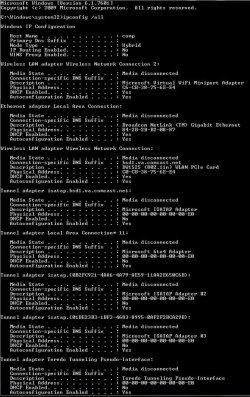
This looks like a BSOD caused by "athrx.sys" which is your Atheros Wireless 1525 WLAN Mini Card... and it also looks like the Drivers version of your Ethernet also look more newer.... than the one supported by Dell...

I am assuming this could have been installed via Windows update...

Anyways what i would suggest is you update your wireless drivers to the latest ie; version 8.0.0.376 and use also the ethernet drivers from Dell (probably need to rollback to the version mentioned at dell website.)

Here the direct link to your Drivers from DEll.. Update other as well..

Do these and restart your system and check and let me know
 

My Computer My Computer

At a glance

Windows 7 ultimate x64
Computer Manufacturer/Model Number
Nothing specific....what ever the clients provide for Repair
OS
Windows 7 ultimate x64
I agree, the driver is out of date because it doesn't show the Msoft virtual WiFi miniport driver which installs with all WHQL Windows 7 drivers.

This is also most likely the reason for the extra tunnel adaptors.
 

My Computer My Computer

At a glance

Windows 7 Ult, Windows 8.1 Pro,Q9650-4.275GHz, E8600 4.5GHz, E6750-3.8GHzG.Skill PC2 9600 1200Mhz 5 5 5 15 2TGTX480
Computer type
PC/Desktop
Computer Manufacturer/Model Number
Home built
OS
Windows 7 Ult, Windows 8.1 Pro,
CPU
Q9650-4.275GHz, E8600 4.5GHz, E6750-3.8GHz
Motherboard
Evga 780i FTW
Memory
G.Skill PC2 9600 1200Mhz 5 5 5 15 2T
Graphics Card(s)
GTX480
Sound Card
Asus Xonar D2
Monitor(s) Displays
HannsG
Screen Resolution
1680X1050
Hard Drives
GSkill Phoenix Pro 120GB SSD
PSU
ThermalTake Toughpower 1000Watt modular
Case
ThermalTake XaserV
Cooling
Xigmatek S1283
Keyboard
Logitech G15
Mouse
Logitech G9
Internet Speed
T1
I updated the WLAN card but was unable to find the specific ethernet driver. Is that an issue since I'm pretty much working on the wireless? I don't know how much they relate.

I ran the full battery of troubleshooting afterwards and still have the no valid IP config message. I really appreciate your help so far though, so thanks very much.

Not sure where to go from here.
 

My Computer My Computer

At a glance

Windows 7 64
Computer type
PC/Desktop
Computer Manufacturer/Model Number
Dell Studio XPS
OS
Windows 7 64
Not sure where to go from here.

What do you mean ?? Has it resolved the main thing abt getting internet ??
 

My Computer My Computer

At a glance

Windows 7 ultimate x64
Computer Manufacturer/Model Number
Nothing specific....what ever the clients provide for Repair
OS
Windows 7 ultimate x64
sorry if I wasn't clear. No, I am still getting the invalid ip config message and have no connectivity.
 

My Computer My Computer

At a glance

Windows 7 64
Computer type
PC/Desktop
Computer Manufacturer/Model Number
Dell Studio XPS
OS
Windows 7 64
Same Problem--WLAN adapter no ipconfig.

Aloha Chev65 & Centaur78,
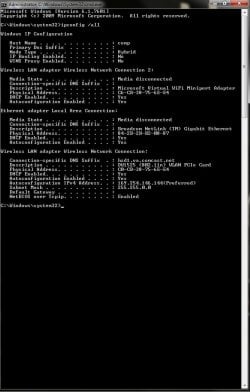
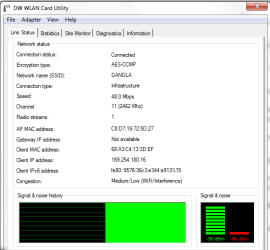
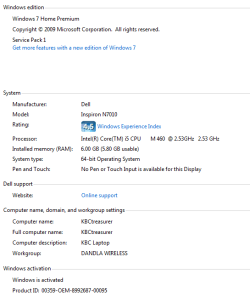
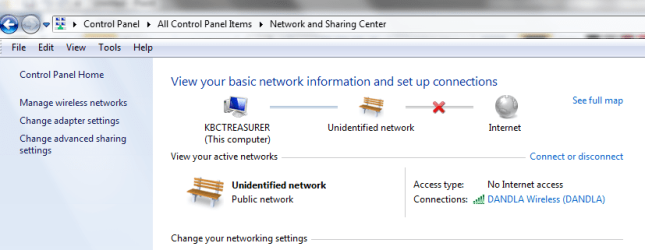
Many Mahalos for the assist you've been giving to KrazyJethro...I've got the same problem so your posts have helped me to at least get crucial info for your review via “SFDT”. I've also attached a screenshot of our Dell Laptop system info. This is the wireless client giving me problems.
I can play with the settings and finally get it connected then after a while of usage, for no reason it'll loose connectivity. If I reboot the machine, still no connectivity, I have to go into device manager and disable the LAN adapter for about 30sec. Many times even that doesn't work.

Our network consists of Cisco/Linksys: 1) Router, LINKSYS-E3200, 2) Switch, LINKSYS-EG005W ver3, 5 port Gigabit Workgroup Switch, 3) Range Expander, LINKSYS-RE1000-RM. Additional devices are, 4) NAS, Netgear ReadyNAS NV+V1 (RND4410-V1), 5) Printer, HP OFFICEJET PRO 8600 N911a, 6) 2 wired clients, 7) 6 wireless clients (Dell Laptop & HP 8600 included).
The newest addition to the network is the range expander. The problems with the laptop have been ongoing for several months but are now more frequent.

The HP8600 also receives a error message of not being able to reach the server. Our connectivity problems with the printer have also been ongoing for several months.
Mahalo & aloha for any assistance you can provide.
konadon
 

Attachments

  • 07-01-13_KBC_TREAS_SFDT_INFO.txt
    07-01-13_KBC_TREAS_SFDT_INFO.txt
    505.5 KB · Views: 0
  • 06-30-13_KBSTREASURER_WLAN-NO IP.png
    06-30-13_KBSTREASURER_WLAN-NO IP.png
    13.2 KB · Views: 5
  • 06-30-13_KBD_TREASURER SYSTEM SPECS.png
    06-30-13_KBD_TREASURER SYSTEM SPECS.png
    10.7 KB · Views: 6
  • 06-30-13_KBCTREASURER_WLAN-NO IP.png
    06-30-13_KBCTREASURER_WLAN-NO IP.png
    28.2 KB · Views: 5
  • 06-30-13_KBCTREASURER_CMD_IPCONFIG.png
    06-30-13_KBCTREASURER_CMD_IPCONFIG.png
    16.4 KB · Views: 10

My Computer My Computer

At a glance

Win7 Home Premium x64Intel CORE i5-6504GBONBOARD
Computer Manufacturer/Model Number
Custom
OS
Win7 Home Premium x64
CPU
Intel CORE i5-650
Motherboard
ASUS P7H55-M LX
Memory
4GB
Graphics Card(s)
ONBOARD
Sound Card
ONBOARD
Monitor(s) Displays
NEC AccuSync LCD92VX
Hard Drives
1 X MAXTOR 80GB O/S
2 X HITACHI 160GB DATA
PSU
500w
Cooling
1 X CPU, 3 X CASE FANS
sorry if I wasn't clear. No, I am still getting the invalid ip config message and have no connectivity.

Now the ipconfig/all looks better and the only problem I see is that you aren't getting anything from the router.

You should reset the router using the reset button then type in your wireless connection info like SSID, security password, type of encryption etc. into the routers settings.
 

My Computer My Computer

At a glance

Windows 7 Ult, Windows 8.1 Pro,Q9650-4.275GHz, E8600 4.5GHz, E6750-3.8GHzG.Skill PC2 9600 1200Mhz 5 5 5 15 2TGTX480
Computer type
PC/Desktop
Computer Manufacturer/Model Number
Home built
OS
Windows 7 Ult, Windows 8.1 Pro,
CPU
Q9650-4.275GHz, E8600 4.5GHz, E6750-3.8GHz
Motherboard
Evga 780i FTW
Memory
G.Skill PC2 9600 1200Mhz 5 5 5 15 2T
Graphics Card(s)
GTX480
Sound Card
Asus Xonar D2
Monitor(s) Displays
HannsG
Screen Resolution
1680X1050
Hard Drives
GSkill Phoenix Pro 120GB SSD
PSU
ThermalTake Toughpower 1000Watt modular
Case
ThermalTake XaserV
Cooling
Xigmatek S1283
Keyboard
Logitech G15
Mouse
Logitech G9
Internet Speed
T1
Now the ipconfig/all looks better and the only problem I see is that you aren't getting anything from the router.

You should reset the router using the reset button then type in your wireless connection info like SSID, security password, type of encryption etc. into the routers settings.

I have reset the route a few times. How would I go about entering the info into the routers settings.
 

My Computer My Computer

At a glance

Windows 7 64
Computer type
PC/Desktop
Computer Manufacturer/Model Number
Dell Studio XPS
OS
Windows 7 64
Now the ipconfig/all looks better and the only problem I see is that you aren't getting anything from the router.

You should reset the router using the reset button then type in your wireless connection info like SSID, security password, type of encryption etc. into the routers settings.

I have reset the route a few times. How would I go about entering the info into the routers settings.

You only need to type the Default Gateway of the router into the URL of your browser in order to access the routers wireless settings.

Since you haven't posted a valid IP showing a proper Default Gateway I can't tell you what the gateway IP is but depending on the router it's usually either 192.168.0.1 or 192.168.1.1, if you can give me the make and model number of your router I can look up the gateway info. :)
 

My Computer My Computer

At a glance

Windows 7 Ult, Windows 8.1 Pro,Q9650-4.275GHz, E8600 4.5GHz, E6750-3.8GHzG.Skill PC2 9600 1200Mhz 5 5 5 15 2TGTX480
Computer type
PC/Desktop
Computer Manufacturer/Model Number
Home built
OS
Windows 7 Ult, Windows 8.1 Pro,
CPU
Q9650-4.275GHz, E8600 4.5GHz, E6750-3.8GHz
Motherboard
Evga 780i FTW
Memory
G.Skill PC2 9600 1200Mhz 5 5 5 15 2T
Graphics Card(s)
GTX480
Sound Card
Asus Xonar D2
Monitor(s) Displays
HannsG
Screen Resolution
1680X1050
Hard Drives
GSkill Phoenix Pro 120GB SSD
PSU
ThermalTake Toughpower 1000Watt modular
Case
ThermalTake XaserV
Cooling
Xigmatek S1283
Keyboard
Logitech G15
Mouse
Logitech G9
Internet Speed
T1
It's an Arris TG862. I think it's 10.0.0.1 cause I get the Xfinity login screen from my netbook (but not from the problem pc) but can't seem to recall the username and pass. I've tried all manner of things, including the admin password default.

Sigh. Should reseting it reset that?
 

My Computer My Computer

At a glance

Windows 7 64
Computer type
PC/Desktop
Computer Manufacturer/Model Number
Dell Studio XPS
OS
Windows 7 64
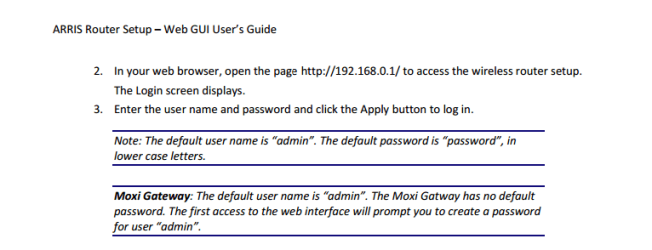
This is taken from your routers user guide. try these


arris.png
 

My Computer My Computer

At a glance

Windows 7 ultimate x64
Computer Manufacturer/Model Number
Nothing specific....what ever the clients provide for Repair
OS
Windows 7 ultimate x64
It's an Arris TG862. I think it's 10.0.0.1 cause I get the Xfinity login screen from my netbook (but not from the problem pc) but can't seem to recall the username and pass. I've tried all manner of things, including the admin password default.

Sigh. Should reseting it reset that?

This is one of things you need to be sure about. As you can see the gateway IP is supposed to be 192.168.0.1, I can only do so much from my end. :)

http://www.speedguide.net/routers/arris-touchstone-tg862-voip-wireless-cable-gateway-2488

This set up guide might be helpful.
http://www.arrisi.com/support/documentation/user_guides/_docs/TG862G-NA_User_Guide_Standard1-3.pdf
 

My Computer My Computer

At a glance

Windows 7 Ult, Windows 8.1 Pro,Q9650-4.275GHz, E8600 4.5GHz, E6750-3.8GHzG.Skill PC2 9600 1200Mhz 5 5 5 15 2TGTX480
Computer type
PC/Desktop
Computer Manufacturer/Model Number
Home built
OS
Windows 7 Ult, Windows 8.1 Pro,
CPU
Q9650-4.275GHz, E8600 4.5GHz, E6750-3.8GHz
Motherboard
Evga 780i FTW
Memory
G.Skill PC2 9600 1200Mhz 5 5 5 15 2T
Graphics Card(s)
GTX480
Sound Card
Asus Xonar D2
Monitor(s) Displays
HannsG
Screen Resolution
1680X1050
Hard Drives
GSkill Phoenix Pro 120GB SSD
PSU
ThermalTake Toughpower 1000Watt modular
Case
ThermalTake XaserV
Cooling
Xigmatek S1283
Keyboard
Logitech G15
Mouse
Logitech G9
Internet Speed
T1
Sorry for the delay in responding. We just got FIOS and I was hoping that would fix the issue, but it didn't. I did get into the router itself and am not even seeing my machine. My machine picks up the new router signal but will not connect, giving me the Problem with Wireless Adapter or Access Point error message.

I have set up the connection on my machine properly with no luck.

The ip of the new router is 192.168.1.1, which I can access from my netbook, but still not with the offending machine.
 

My Computer My Computer

At a glance

Windows 7 64
Computer type
PC/Desktop
Computer Manufacturer/Model Number
Dell Studio XPS
OS
Windows 7 64
Help! :(
 

My Computer My Computer

At a glance

Windows 7 64
Computer type
PC/Desktop
Computer Manufacturer/Model Number
Dell Studio XPS
OS
Windows 7 64
Sorry for the delay in responding. We just got FIOS and I was hoping that would fix the issue, but it didn't. I did get into the router itself and am not even seeing my machine. My machine picks up the new router signal but will not connect, giving me the Problem with Wireless Adapter or Access Point error message.

I have set up the connection on my machine properly with no luck.

The ip of the new router is 192.168.1.1, which I can access from my netbook, but still not with the offending machine.

Can I see the ipconfig/all again from this machine?

I'm also still a bit confused on the router set up, you mentioned the LinksysE3200 router but then you said it's the Arres TG862? Are there two routers?
 

My Computer My Computer

At a glance

Windows 7 Ult, Windows 8.1 Pro,Q9650-4.275GHz, E8600 4.5GHz, E6750-3.8GHzG.Skill PC2 9600 1200Mhz 5 5 5 15 2TGTX480
Computer type
PC/Desktop
Computer Manufacturer/Model Number
Home built
OS
Windows 7 Ult, Windows 8.1 Pro,
CPU
Q9650-4.275GHz, E8600 4.5GHz, E6750-3.8GHz
Motherboard
Evga 780i FTW
Memory
G.Skill PC2 9600 1200Mhz 5 5 5 15 2T
Graphics Card(s)
GTX480
Sound Card
Asus Xonar D2
Monitor(s) Displays
HannsG
Screen Resolution
1680X1050
Hard Drives
GSkill Phoenix Pro 120GB SSD
PSU
ThermalTake Toughpower 1000Watt modular
Case
ThermalTake XaserV
Cooling
Xigmatek S1283
Keyboard
Logitech G15
Mouse
Logitech G9
Internet Speed
T1
Back
Top