
WLAN awfully slow transferring files

barend

New member
Member
VIP
Local time
9:51 AM
Messages
126
Got a PC and a laptop, sharing everything as ANYONE over WLAN.
It has gotten awfully slow at transferring files vice versa.
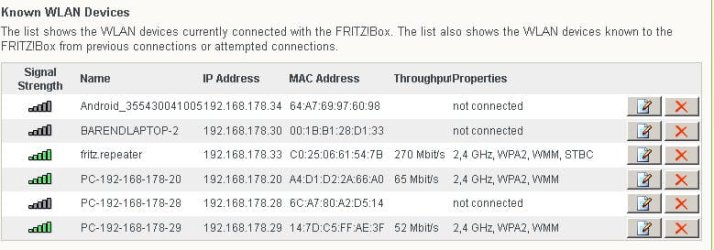
My WLAN uses a repeater as shown in the pic, but I wonder what the bottom entry 192-168-178-29 is?
Pinging OK, but entering in the browser does not go anywhere.
 

Attachments
  • wlan.jpg
    wlan.jpg
    38.3 KB · Views: 24

My Computer My Computer

OS
Windows 7
Hi Barend,

Although it's not too secured to lower the encrytion of the File sharing connections , but it might help to speed up the file transfers in your WLAN.
Go to: Control Panel\Network and Internet\Network and Sharing Center\Advanced sharing settings, then choose Enable file sharing for devices that use 40 to 56 bit encryption as shown in the image attached.

Please give us an update.
 

Attachments

  • 56 bit encryption.jpg
    56 bit encryption.jpg
    41.1 KB · Views: 33
Last edited:

My Computer My Computer

Computer Manufacturer/Model Number
Lenovo Desktop/Samsung Laptop
OS
Win7 & Win8 64bit
CPU
Intel i5
Internet Speed
Charter-20 Mbps
Antivirus
Avast
Browser
FF, IE9 and Chrome
Thanks! :D
It's already at 40/56, both the laptop and the PC.
Because I'm the only user, I have set EVERYONE in full control so I can exchange easily without having to deal with Trusted Installer.
Checked with InSSIDer, issue is the same even when I'm the only one in the neighborhood.
Tried with a 20MB file, it starts fast, then after some seconds it halts, then proceeds a little slower etc. etc., in the end the transfer creeps...
It used to work fine with a humble Netbook, but recently I bought a Samsung NP-700Z5A-S05UK with HDD replaced by a 256GB SSD. A superfast i7 machine so the slow transfer was unexpected...
Using AVAST.
A related question is:
Are Laptops limited to the 2.4GHz band, or should mine be able to do 5GHz as well?
Have tried my modem/router on 5GHz exclusively, and the repeater (also Fritz!) worked OK but not the Samsung laptop...
Strange!
 

My Computer My Computer

OS
Windows 7
Thanks! :D
It's already at 40/56, both the laptop and the PC.
Because I'm the only user, I have set EVERYONE in full control so I can exchange easily without having to deal with Trusted Installer.
Checked with InSSIDer, issue is the same even when I'm the only one in the neighborhood.
Tried with a 20MB file, it starts fast, then after some seconds it halts, then proceeds a little slower etc. etc., in the end the transfer creeps...
It used to work fine with a humble Netbook, but recently I bought a Samsung NP-700Z5A-S05UK with HDD replaced by a 256GB SSD. A superfast i7 machine so the slow transfer was unexpected...
Using AVAST.
A related question is:
Are Laptops limited to the 2.4GHz band, or should mine be able to do 5GHz as well?
Have tried my modem/router on 5GHz exclusively, and the repeater (also Fritz!) worked OK but not the Samsung laptop...
Strange!

Most laptops do not come with the 5.0Ghz frequency band. You would usually need to purchase a separate USB adaptor that can handle both bands.

To get the most out of wireless N you need to set your router to use wireless N only setting using WPA2 and AES encryption. You should have no problems moving files fast with those settings and a good connection.
 

My Computer My Computer

Computer type
PC/Desktop
Computer Manufacturer/Model Number
Home built
OS
Windows 7 Ult, Windows 8.1 Pro,
CPU
Q9650-4.275GHz, E8600 4.5GHz, E6750-3.8GHz
Motherboard
Evga 780i FTW
Memory
G.Skill PC2 9600 1200Mhz 5 5 5 15 2T
Graphics Card(s)
GTX480
Sound Card
Asus Xonar D2
Monitor(s) Displays
HannsG
Screen Resolution
1680X1050
Hard Drives
GSkill Phoenix Pro 120GB SSD
PSU
ThermalTake Toughpower 1000Watt modular
Case
ThermalTake XaserV
Cooling
Xigmatek S1283
Keyboard
Logitech G15
Mouse
Logitech G9
Internet Speed
T1
barend - True what chev65 has said, I second and it might help. :)
 
Last edited:

My Computer My Computer

Computer Manufacturer/Model Number
Lenovo Desktop/Samsung Laptop
OS
Win7 & Win8 64bit
CPU
Intel i5
Internet Speed
Charter-20 Mbps
Antivirus
Avast
Browser
FF, IE9 and Chrome
Back
Top