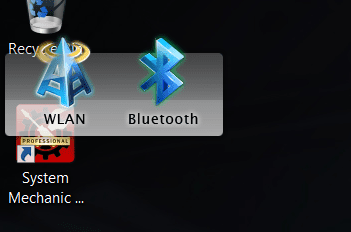
WLAN Bluetooth app/gadget

crispyclot

New member
Local time
3:24 PM
Messages
53
Not sure whats going on but brand new computer with fresh Win 7 seems fairly unstable , now that mini-window that pops up for choosing bluetooth or wlan has moved right into path of desktop icons and menu bars when explorer is open .

How do i move it , close it ? please help this is getting real annoying
 

My Computer My Computer

At a glance

Window 7 Home Premium 64Bit
OS
Window 7 Home Premium 64Bit
I do not really understand your post. However, if you have a window that's getting into the way of something you want to see and you can't close it any other way, try using the task manager. You do this by pressing Alt+Cntrl+Delete and choosing the bottom entry: Start Task Manager. Click on the Applications tab and see if it lists a program running the Window. If it does, right click on the program you want to close and then click on End Task in the resulting menu. If the Window getting in the way is not listed under the Applications tab, click on the Processes tab. Examine the processes and shut off the offending process. My experience is that Windows does not let me shut off truly essential processes. BUT I have very limited experiences in doing things this way.
 
Last edited:

My Computer My Computer

At a glance

Windows 7 Professional, 64-Bit2.8 GHz Intel Core 2 Duo E74006 GIG DDR2 800MSI Radeon 4550 (1Gig)
Computer Manufacturer/Model Number
Lenovo K230
OS
Windows 7 Professional, 64-Bit
CPU
2.8 GHz Intel Core 2 Duo E7400
Memory
6 GIG DDR2 800
Graphics Card(s)
MSI Radeon 4550 (1Gig)
Monitor(s) Displays
Samsung SyncMaster 213T
Screen Resolution
1600 x 1200
Thanks for your reply but im pretty resourceful when it comes to computers , been a pc gamer for years ( built my own last couple gaming rigs ) , just this is my 1st laptop and 1st time with Win 7 . I know all about task manager , just couldnt tell which program it was . Its basically a gadget ya cant close with the "x" . Its for choosing between Wlan and Bluetooth quickly . Im not sure if its an ASUS thing or Win7 but thought i would try here 1st .

Thanks

Chris
 

My Computer My Computer

At a glance

Window 7 Home Premium 64Bit
OS
Window 7 Home Premium 64Bit
Took a " snip " of it
 

Attachments

  • Wlan BT.PNG
    Wlan BT.PNG
    15.3 KB · Views: 165

My Computer My Computer

At a glance

Window 7 Home Premium 64Bit
OS
Window 7 Home Premium 64Bit
Well, you seem to be reasonably skillful. How did msconfig or registry editing work out?
 

My Computer My Computer

At a glance

Windows 7 Professional, 64-Bit2.8 GHz Intel Core 2 Duo E74006 GIG DDR2 800MSI Radeon 4550 (1Gig)
Computer Manufacturer/Model Number
Lenovo K230
OS
Windows 7 Professional, 64-Bit
CPU
2.8 GHz Intel Core 2 Duo E7400
Memory
6 GIG DDR2 800
Graphics Card(s)
MSI Radeon 4550 (1Gig)
Monitor(s) Displays
Samsung SyncMaster 213T
Screen Resolution
1600 x 1200
Well 1st off , sorry if i sounded like an ass , didnt mean to .

Looked in msconfig , but didnt know what it was called ( like task mang search ) so didnt help .

Seemed to be caused by failed backup , screwed a few things up actually , and is still showing in Action Center as in progress ....

After a couple reboots all is back to normal ( widget/gadget thing is called " Wireless Console " ) and is back in regular position , except action center notification still showing in backup in progress , but already finished on alternate drive. So i know thats alright

Thanks

Chris
 

My Computer My Computer

At a glance

Window 7 Home Premium 64Bit
OS
Window 7 Home Premium 64Bit
Back
Top