WLM 2011 to OneNote 2010

kristalsoldier

New member
Power User
Local time
10:45 PM
Messages
142
Hi...

Is it possible to send an email from WLMail 2011 to OneNote 2010? I believe this can be done in Outlook 2010.

Thanks in advance.
 

My Computer My Computer

OS
Win 7 Professional 64bit
Hi...

Is it possible to send an email from WLMail 2011 to OneNote 2010? I believe this can be done in Outlook 2010.

Thanks in advance.

According to technet this is not possible. You can of course copy and paste. Seems this very same question was asked by another user just yesterday at many other sites without an answer.
 

My Computer My Computer

Computer Manufacturer/Model Number
HP Pavillion dv-7 1005 Tx
OS
Win 8 Release candidate 8400
CPU
[email protected]
Memory
4 gigs
Graphics Card(s)
Nvidia 9600M
Sound Card
HD built-in
Monitor(s) Displays
17" Wxga
Screen Resolution
1440x900
Cooling
none
Internet Speed
45Mb down 5Mb up
As ZigZag mentioned, it's not possible to do it as it is in Outlook. Outlook allows you to send a mail message as an editable document to Onenote.

However, if you just want a copy of a Windows Live Mail message to Onenote, without need to edit it later, it's possible to send it as an image. Do like this:
  • Right click the message in WLM you want to send to Onenote
  • Select Print from context menu
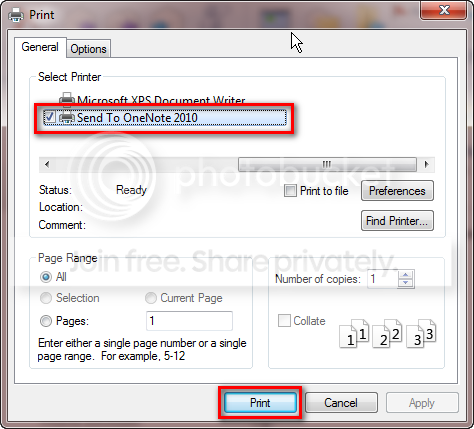
  • Select Send to Onenote as printer, click Print
    .
    WLM_to_Onenote_1.png

    .
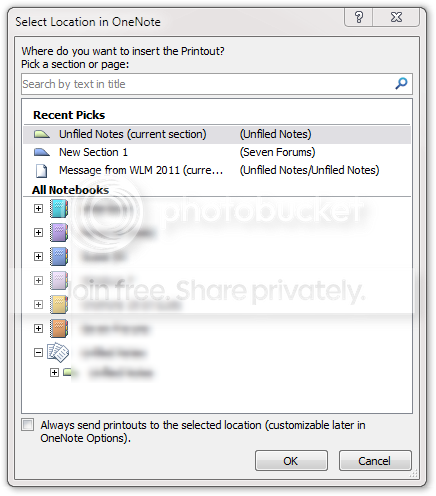
  • Select the notebook where you want the message to be saved
    .
    WLM_to_Onenote_3.png

    .
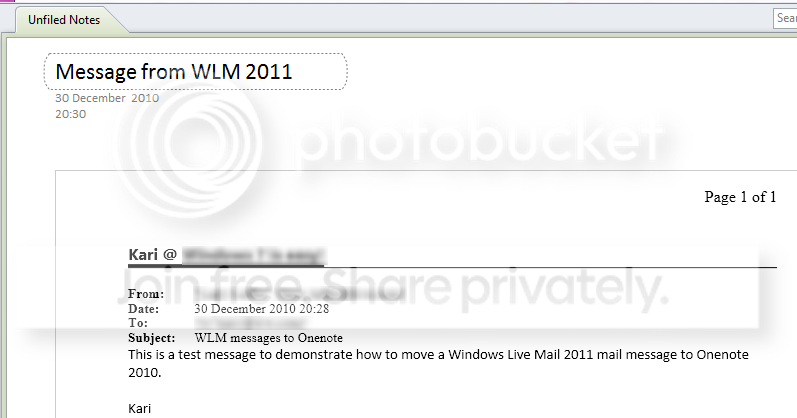
  • Done. The message is in Onenote as an image:
    .
    WLM_to_Onenote_2.png
This method can be used to send data from any application to Onenote. Simply print, choosing Send to Onenote as the printer.

Kari
 

My Computer My Computer

Computer type
Laptop
Computer Manufacturer/Model Number
HP ENVY 17-1150eg
OS
Windows 10 Pro x64 EN-GB
CPU
1.6 GHz Intel Core i7-720QM Processor
Memory
6 GB
Graphics Card(s)
ATI Mobility Radeon HD 5850 Graphics
Sound Card
Beats sound system with integrated subwoofer
Monitor(s) Displays
17" laptop display, 22" LED and 32" Full HD TV through HDMI
Screen Resolution
1600*900 (1), 1920*1080 (2&3)
Hard Drives
Internal: 2 x 500 GB SATA Hard Disk Drive 7200 rpm
External: 2TB for backups, 3TB USB3 network drive for media
Cooling
As Envy runs a bit warm, I have it on a Cooler Master pad
Keyboard
Logitech diNovo Media Desktop Laser (bluetooth)
Mouse
Logitech Performance Mouse MX
Internet Speed
50/10 Mbps VDSL
Antivirus
Windows Defender 4.3.9431.0
Browser
Maxthon 3.5.2., IE11
OK. Thanks. I would have liked an editable document in OneNote, which means that I need to have Outlook. Too bad. I guess one can't have everything.

I did not know this question was asked. But I did look through Google and did not find any solutions. Thanks for pointing it out.
 

My Computer My Computer

OS
Win 7 Professional 64bit
...I would have liked an editable document in OneNote...
If you want the entire email (including the To/From section) editable in any document format just push the forward button, click on the text area, "select all", and copy to the new document.
 

My Computer My Computer

Computer type
PC/Desktop
Computer Manufacturer/Model Number
OQO 2+
OS
Windows 8 Pro w/MC 32-bit
CPU
Intel Atom 1.86 GHz
Motherboard
OQO 2+
Memory
2 GB
Graphics Card(s)
Intel GMA 500
Sound Card
IDT
Monitor(s) Displays
LCD
Screen Resolution
800 x 480 (portable) 1280 x 1024 (docked)
Hard Drives
64 GB SSD
PSU
9 Ah Battery (portable) or OQO Brick (docked)
Case
Shirt Pocket Sized
Cooling
Tiny Fan
Keyboard
Slide out (portable) DiNovo Edge (docked)
Mouse
Eraser head (portable) Logitech Bluetooth (docked)
Internet Speed
WWAN or 802.11G (portable) T1 (docked)
Browser
IE 10
Other Info
DVD-RW OQO Docking Station
Back
Top