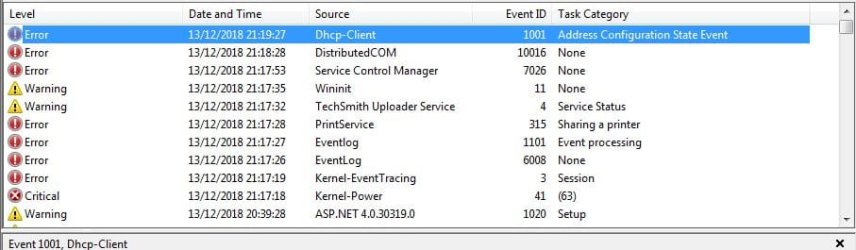
Windows has just started to freeze, maybe with going into sleep or hibernation? as it's frozen when i try to use the laptop after a while of inactivity
i've seen in event viewer this
can anyone read this error? thats from the 2 tabs
also seen this
i've seen in event viewer this
Code:
Log Name:      System
Source:        Microsoft-Windows-DistributedCOM
Date:          11/12/2018 20:35:50
Event ID:      10016
Task Category: None
Level:         Error
Keywords:      Classic
User:          SYSTEM
Computer:      Karen-PC
Description:
The application-specific permission settings do not grant Local Launch permission for the COM Server application with CLSID
{C97FCC79-E628-407D-AE68-A06AD6D8B4D1}
 and APPID
{344ED43D-D086-4961-86A6-1106F4ACAD9B}
 to the user NT AUTHORITY\SYSTEM SID (S-1-5-18) from address LocalHost (Using LRPC). This security permission can be modified using the Component Services administrative tool.
Event Xml:
<Event xmlns="http://schemas.microsoft.com/win/2004/08/events/event">
  <System>
    <Provider Name="Microsoft-Windows-DistributedCOM" Guid="{1B562E86-B7AA-4131-BADC-B6F3A001407E}" EventSourceName="DCOM" />
    <EventID Qualifiers="49152">10016</EventID>
    <Version>0</Version>
    <Level>2</Level>
    <Task>0</Task>
    <Opcode>0</Opcode>
    <Keywords>0x80000000000000</Keywords>
    <TimeCreated SystemTime="2018-12-11T20:35:50.000000000Z" />
    <EventRecordID>273167</EventRecordID>
    <Correlation />
    <Execution ProcessID="0" ThreadID="0" />
    <Channel>System</Channel>
    <Computer>Karen-PC</Computer>
    <Security UserID="S-1-5-18" />
  </System>
  <EventData>
    <Data Name="param1">application-specific</Data>
    <Data Name="param2">Local</Data>
    <Data Name="param3">Launch</Data>
    <Data Name="param4">{C97FCC79-E628-407D-AE68-A06AD6D8B4D1}</Data>
    <Data Name="param5">{344ED43D-D086-4961-86A6-1106F4ACAD9B}</Data>
    <Data Name="param6">NT AUTHORITY</Data>
    <Data Name="param7">SYSTEM</Data>
    <Data Name="param8">S-1-5-18</Data>
    <Data Name="param9">LocalHost (Using LRPC)</Data>
  </EventData>
</Event>
Code:
Log Name:      System
Source:        Microsoft-Windows-DistributedCOM
Date:          11/12/2018 20:35:50
Event ID:      10016
Task Category: None
Level:         Error
Keywords:      Classic
User:          SYSTEM
Computer:      Karen-PC
Description:
The application-specific permission settings do not grant Local Launch permission for the COM Server application with CLSID
{C97FCC79-E628-407D-AE68-A06AD6D8B4D1}
 and APPID
{344ED43D-D086-4961-86A6-1106F4ACAD9B}
 to the user NT AUTHORITY\SYSTEM SID (S-1-5-18) from address LocalHost (Using LRPC). This security permission can be modified using the Component Services administrative tool.
Event Xml:
<Event xmlns="http://schemas.microsoft.com/win/2004/08/events/event">
  <System>
    <Provider Name="Microsoft-Windows-DistributedCOM" Guid="{1B562E86-B7AA-4131-BADC-B6F3A001407E}" EventSourceName="DCOM" />
    <EventID Qualifiers="49152">10016</EventID>
    <Version>0</Version>
    <Level>2</Level>
    <Task>0</Task>
    <Opcode>0</Opcode>
    <Keywords>0x80000000000000</Keywords>
    <TimeCreated SystemTime="2018-12-11T20:35:50.000000000Z" />
    <EventRecordID>273167</EventRecordID>
    <Correlation />
    <Execution ProcessID="0" ThreadID="0" />
    <Channel>System</Channel>
    <Computer>Karen-PC</Computer>
    <Security UserID="S-1-5-18" />
  </System>
  <EventData>
    <Data Name="param1">application-specific</Data>
    <Data Name="param2">Local</Data>
    <Data Name="param3">Launch</Data>
    <Data Name="param4">{C97FCC79-E628-407D-AE68-A06AD6D8B4D1}</Data>
    <Data Name="param5">{344ED43D-D086-4961-86A6-1106F4ACAD9B}</Data>
    <Data Name="param6">NT AUTHORITY</Data>
    <Data Name="param7">SYSTEM</Data>
    <Data Name="param8">S-1-5-18</Data>
    <Data Name="param9">LocalHost (Using LRPC)</Data>
  </EventData>
</Event>
can anyone read this error? thats from the 2 tabs
also seen this
Code:
Log Name:      System
Source:        Microsoft-Windows-Kernel-PnP
Date:          11/12/2018 20:34:42
Event ID:      219
Task Category: (212)
Level:         Warning
Keywords:
User:          SYSTEM
Computer:      Karen-PC
Description:
The driver \Driver\WUDFRd failed to load for the device Root\PARAGONBLOCKDEVICE\0000.
Event Xml:
<Event xmlns="http://schemas.microsoft.com/win/2004/08/events/event">
  <System>
    <Provider Name="Microsoft-Windows-Kernel-PnP" Guid="{9C205A39-1250-487D-ABD7-E831C6290539}" />
    <EventID>219</EventID>
    <Version>0</Version>
    <Level>3</Level>
    <Task>212</Task>
    <Opcode>0</Opcode>
    <Keywords>0x8000000000000000</Keywords>
    <TimeCreated SystemTime="2018-12-11T20:34:42.089604600Z" />
    <EventRecordID>273051</EventRecordID>
    <Correlation />
    <Execution ProcessID="4" ThreadID="52" />
    <Channel>System</Channel>
    <Computer>Karen-PC</Computer>
    <Security UserID="S-1-5-18" />
  </System>
  <EventData>
    <Data Name="DriverNameLength">28</Data>
    <Data Name="DriverName">Root\PARAGONBLOCKDEVICE\0000</Data>
    <Data Name="Status">3221226341</Data>
    <Data Name="FailureNameLength">14</Data>
    <Data Name="FailureName">\Driver\WUDFRd</Data>
    <Data Name="Version">0</Data>
  </EventData>
</Event>
My Computer
At a glance
Win 7 Pro 32bitIntel Quad Core 66004 GBnVidia 8800GT
- Computer Manufacturer/Model Number
- Mesh Q4
- OS
- Win 7 Pro 32bit
- CPU
- Intel Quad Core 6600
- Motherboard
- Asus P5N-E SLI
- Memory
- 4 GB
- Graphics Card(s)
- nVidia 8800GT
- Sound Card
- Onboard
- Hard Drives
- 1TB Samsung Spinpoint,
1TB WD Eco Green