
WLM Cannot block images or html

michaelst

New member
Power User
VIP
Local time
12:45 PM
Messages
175
Location
Wisconsin
I used to have to click on 'show images' in a tool bar just above the preview window.

Now, that is gone, and all contents are showing.

I checked in "Safety Options", under 'Security' and in 'download images' both the 'Block images and other html content in e-mail' IS checked. as is 'show images from safe senders'. However, I have no entries in 'safe senders'.

I tried unchecking, rebooting, and rechecking that option, but nothing happened.

I ran a MSE scan - nothing, and a antimalwarebytes scan - nothing.

I tried restoring to a time before this started - this morning, and nothing happened.

Windows update shows no updates to wlm.

It was there at 4pm, but not at 9pm. Nothing downloaded, or mail opened inbetween

Any suggestions?
 

My Computer

Computer type
PC/Desktop
Computer Manufacturer/Model Number
Homebuilt
OS
windows 7 32
CPU
Intel i7 4770K
Motherboard
Asus Z97-A
Memory
Corsair Vengeance 8gb DDR3 2133(PC3 17000)
Graphics Card(s)
nVidia GTX 660 2gb
Sound Card
Asus Xonar D1
Monitor(s) Displays
Dell Ultrasharp UM2913WM
Screen Resolution
2560x1080 32
Hard Drives
PNY 240gb SSD
Seagate 500gb SSD
PSU
Corsair CXM 600
Case
Fractal Design Define R4
Cooling
Arctic Freezer Xtreme rev 2
Keyboard
Logitech K800 Wireless Illuminated
Mouse
MicroSoft 5000
Internet Speed
Cable
Antivirus
MSE
Browser
IE 11 and Chrome
Other Info
Samsung DVD-RW
Cambridge 4.1 speakers
Hauppauge HVR-950 USB Tuner
Asus Optimized Overclock to 4.4ghz

My Computer

Computer type
PC/Desktop
Computer Manufacturer/Model Number
OQO 2+
OS
Windows 8 Pro w/MC 32-bit
CPU
Intel Atom 1.86 GHz
Motherboard
OQO 2+
Memory
2 GB
Graphics Card(s)
Intel GMA 500
Sound Card
IDT
Monitor(s) Displays
LCD
Screen Resolution
800 x 480 (portable) 1280 x 1024 (docked)
Hard Drives
64 GB SSD
PSU
9 Ah Battery (portable) or OQO Brick (docked)
Case
Shirt Pocket Sized
Cooling
Tiny Fan
Keyboard
Slide out (portable) DiNovo Edge (docked)
Mouse
Eraser head (portable) Logitech Bluetooth (docked)
Internet Speed
WWAN or 802.11G (portable) T1 (docked)
Browser
IE 10
Other Info
DVD-RW OQO Docking Station
"IT" is the clickable text to 'show images'.

Here's something new.

I received some new e-mail that had images and links/html and the 'show images' was back.

Apparently, once I clicked to 'show images' it stays that way, even as it sits in my mailbox.

It was not that way before. I usually had to click 'show images' every time i went to a particular e-mail. Now, apparently, once I click to 'show images', that setting stays.

So, I guess this is not an issue.
 

My Computer

Computer type
PC/Desktop
Computer Manufacturer/Model Number
Homebuilt
OS
windows 7 32
CPU
Intel i7 4770K
Motherboard
Asus Z97-A
Memory
Corsair Vengeance 8gb DDR3 2133(PC3 17000)
Graphics Card(s)
nVidia GTX 660 2gb
Sound Card
Asus Xonar D1
Monitor(s) Displays
Dell Ultrasharp UM2913WM
Screen Resolution
2560x1080 32
Hard Drives
PNY 240gb SSD
Seagate 500gb SSD
PSU
Corsair CXM 600
Case
Fractal Design Define R4
Cooling
Arctic Freezer Xtreme rev 2
Keyboard
Logitech K800 Wireless Illuminated
Mouse
MicroSoft 5000
Internet Speed
Cable
Antivirus
MSE
Browser
IE 11 and Chrome
Other Info
Samsung DVD-RW
Cambridge 4.1 speakers
Hauppauge HVR-950 USB Tuner
Asus Optimized Overclock to 4.4ghz
roncerr said:
michaelst said:
Hi...

I stupidly upgraded to wlm 2011 - d'oh!

I know there's a way to return to wlm2009, but would restoring my drive from a back-up (from Last night) be an acceptable way to return?
Not sure what type of a backup. As long as you know where your messages and contacts are saved, you can try any of several methods and import any missing items. Personally, I'd try an uninstall of WLE via Prograns and Features, recognizing that I won't be able to use WLMessenger at all and that all the programs in the older suite are somewhat out of date. Then install the old version of WLE (I've posted the link before), see what's missing, and do the imports if needed. You may have to setup your accounts again, so I hope you remember your accounts and their settings.

I have a system image of my C: drive from a few days ago on an external drive, created using win7 system imaging.

Does the restore not just recreate what your system looked like previously?

btw... the only part of wle i have installed is live mail
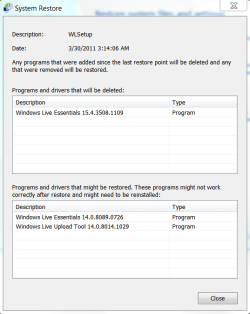
and here's what the system restore found:
 

Attachments

  • Restore.PNG
    Restore.PNG
    16 KB · Views: 8

My Computer

Computer type
PC/Desktop
Computer Manufacturer/Model Number
Homebuilt
OS
windows 7 32
CPU
Intel i7 4770K
Motherboard
Asus Z97-A
Memory
Corsair Vengeance 8gb DDR3 2133(PC3 17000)
Graphics Card(s)
nVidia GTX 660 2gb
Sound Card
Asus Xonar D1
Monitor(s) Displays
Dell Ultrasharp UM2913WM
Screen Resolution
2560x1080 32
Hard Drives
PNY 240gb SSD
Seagate 500gb SSD
PSU
Corsair CXM 600
Case
Fractal Design Define R4
Cooling
Arctic Freezer Xtreme rev 2
Keyboard
Logitech K800 Wireless Illuminated
Mouse
MicroSoft 5000
Internet Speed
Cable
Antivirus
MSE
Browser
IE 11 and Chrome
Other Info
Samsung DVD-RW
Cambridge 4.1 speakers
Hauppauge HVR-950 USB Tuner
Asus Optimized Overclock to 4.4ghz
Note the warning above the list of programs that will be restored. Using the restore point may work. It restores "system" files to the previous state. But documents, for example, are not "system" files. Also many programs, including Mail, have "app data" that may not be considered "system" files.

Also, a "system image" may not be the same thing as a restore point. A true "image" is usually thought to be a bit for bit clone of the hard drive. How did you make the backup you are talking about?
 

My Computer

Computer type
PC/Desktop
Computer Manufacturer/Model Number
OQO 2+
OS
Windows 8 Pro w/MC 32-bit
CPU
Intel Atom 1.86 GHz
Motherboard
OQO 2+
Memory
2 GB
Graphics Card(s)
Intel GMA 500
Sound Card
IDT
Monitor(s) Displays
LCD
Screen Resolution
800 x 480 (portable) 1280 x 1024 (docked)
Hard Drives
64 GB SSD
PSU
9 Ah Battery (portable) or OQO Brick (docked)
Case
Shirt Pocket Sized
Cooling
Tiny Fan
Keyboard
Slide out (portable) DiNovo Edge (docked)
Mouse
Eraser head (portable) Logitech Bluetooth (docked)
Internet Speed
WWAN or 802.11G (portable) T1 (docked)
Browser
IE 10
Other Info
DVD-RW OQO Docking Station
I think it would be a restore from back-up. A win 7 back up.
Like using a cloned image from the past.

But, as I've had a chance to work with wlm2011, other than the goofy large tool bar, everything else works just the same. So I think I'll keep it and avoid the headaches.

I still find it unacceptable that uninstalling an upgrade would cause so much crap. It's like when a Roxio media creator software upgrade made projects from the current version incompatable with the new version. That got me off that software around version 6.
 

My Computer

Computer type
PC/Desktop
Computer Manufacturer/Model Number
Homebuilt
OS
windows 7 32
CPU
Intel i7 4770K
Motherboard
Asus Z97-A
Memory
Corsair Vengeance 8gb DDR3 2133(PC3 17000)
Graphics Card(s)
nVidia GTX 660 2gb
Sound Card
Asus Xonar D1
Monitor(s) Displays
Dell Ultrasharp UM2913WM
Screen Resolution
2560x1080 32
Hard Drives
PNY 240gb SSD
Seagate 500gb SSD
PSU
Corsair CXM 600
Case
Fractal Design Define R4
Cooling
Arctic Freezer Xtreme rev 2
Keyboard
Logitech K800 Wireless Illuminated
Mouse
MicroSoft 5000
Internet Speed
Cable
Antivirus
MSE
Browser
IE 11 and Chrome
Other Info
Samsung DVD-RW
Cambridge 4.1 speakers
Hauppauge HVR-950 USB Tuner
Asus Optimized Overclock to 4.4ghz
Back
Top